
The old Google Business Profile chat button is gone. Google ended Business Profile chat and call history on July 31, 2024. Today, a claimed and verified profile in an eligible region can add a text message or WhatsApp contact option instead. A newer AI-powered messaging experience is also being tested with some US businesses. This guide covers what changed, how to set up what is left, what to do when the option does not show up, and how to run messaging so it brings you jobs instead of unanswered texts.
TL;DR
- Google’s built-in Business Profile chat ended on July 31, 2024. Customers can still reach you through Search and Maps by calling, visiting your website, and, where eligible, texting or WhatsApp.
- To add messaging, go to Edit profile, then Contact, then Chat. Choose Text message or WhatsApp, enter the number or link, and save.
- Google says the option is limited to select regions and may not show on every profile. Your profile must be claimed and verified.
- Messaging only pays off if someone answers fast. Decide who owns the inbox before you switch it on.
- Google appears to be rolling out an experimental AI messaging agent in the US, so expect this area to keep changing.
Table of Contents
- What happened to Google Business Profile messaging
- How customers can contact you now
- How to add text messaging or WhatsApp to your profile
- Why you can’t see the Chat option
- The AI messaging pilot: what we know
- Before you turn messaging on: build a response plan
- How to measure whether messaging works
- Our perspective
- Get help turning profile visits into booked jobs
- Keep your whole profile working
- FAQ
- Sources
What happened to Google Business Profile messaging
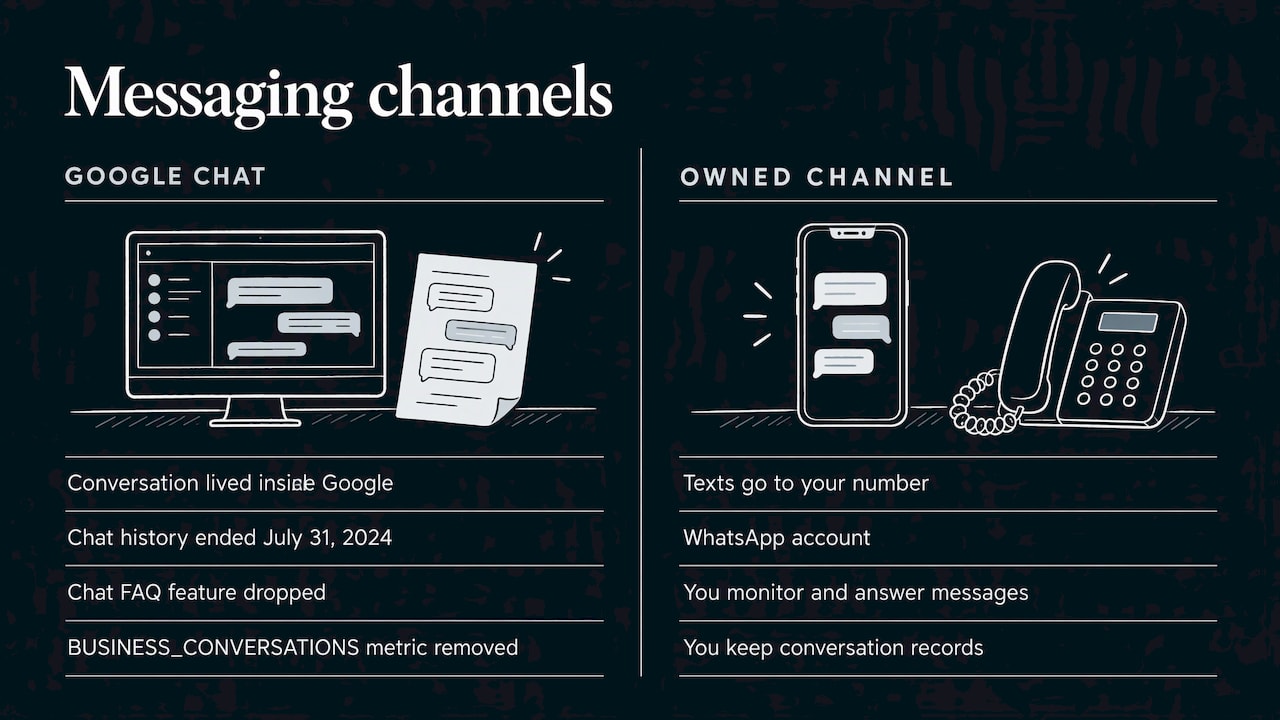
For years, businesses could turn on a Message button in their profile and answer customers in the Business Profile app or on Search and Maps. That was Google-hosted chat. Google discontinued chat and call history on July 31, 2024. The old chat FAQ feature was dropped too, and Google removed the BUSINESS_CONVERSATIONS metric from the Performance API, so any reporting tool that relied on it lost that number.
The practical change is bigger than the button. Before, the conversation lived inside Google. Now Google sends the customer to a channel you own: your phone number for texts, or your WhatsApp account. That means you are responsible for watching that channel, answering it, and keeping records of what was said.
The rest of your profile still works. Google says customers can still find and contact you through Search and Maps, and you still receive calls from your profile and can track engagement such as website traffic and direction requests.
How customers can contact you now
A customer who finds your business on Google today has several routes:
- Call: the Call button on your profile, which is still the highest-intent action for most home service and appointment businesses.
- Website: the link on your profile, which should lead to a page built for the next step, whether that is a booking form, a quote request, or a tour request.
- Directions: for anyone ready to walk or drive in.
- Text message or WhatsApp: the Chat option, where available.
Think of messaging as one door among several. It suits people who do not want to talk on the phone, who are searching during work hours, or who want to send a photo. A homeowner with a leaking water heater can text a picture. A couple comparing banquet halls can ask whether a date is open without sitting through a phone call.
How to add text messaging or WhatsApp to your profile
Google’s Chat with customers help page lays out the process. Here it is in order:
- Confirm your profile is claimed and verified. Unverified profiles cannot add chat options.
- Open your Business Profile, either from Search while signed in or from the Business Profile manager.
- Choose Edit profile.
- Open the Contact tab and find Chat.
- Select Text message or WhatsApp.
- For text, enter a phone number that can receive texts. For WhatsApp, enter your WhatsApp click-to-chat URL.
- Save your changes.
Two details matter. First, Google’s documentation says that if you add both options, only text messaging is shown. If WhatsApp is your main channel, add only WhatsApp. Second, the number must be able to receive texts. A landline or a call-tracking number that cannot accept SMS will not work for this.
Pick the right number
Use a number someone actually checks. Many small businesses give the owner’s personal cell, which works until the owner is on a roof, in a procedure room, or running an event. A dedicated business line that forwards texts to a shared inbox or to two staff members is safer. Whatever you choose, keep it consistent with the phone number on your website and other listings, so customers see the same business everywhere.
Why you can’t see the Chat option
This is the most common frustration, and Google’s own page explains it. Chat options are available only in select regions and might not be available for every profile. If you do not see the option, work through this list:
- Is the profile verified? Claimed is not enough. Check the verification status in your profile.
- Are you looking in the right place? The control sits under Edit profile, Contact. It is not in the old Messages area, which was removed in 2024.
- Is your region eligible? If Google has not turned the feature on for your area or profile, there is nothing to switch on from your side.
- Are you signed in with an owner or manager account? Some settings only appear for people with the right permissions.
If all of that checks out and the option is still missing, treat it as unavailable for now and build your response around the channels that do work: a strong call button, a fast website form, and clear hours. Check back occasionally, because Google has been changing this part of the profile.
The AI messaging pilot: what we know
There is a newer development. Search Engine Roundtable reported on October 29, 2026 that Google seems to be rolling out AI-powered messaging to more businesses. According to that report, an AI agent answers routine questions, hands off the ones it cannot answer to the business, and messages are available inside the Business Profile. The same report says the richer experience uses RCS-capable phones, while texts from non-RCS phones may go straight to the business and standard text rates may apply.
This is described as experimental and still rolling out, so it may not appear for your profile, and details may change. What to do now:
- Make sure your profile information is accurate: hours, services, service area, pricing language, and your website. An automated assistant can only be as good as what it can read.
- Be ready for handoffs. If a question gets passed to you, the customer has already waited for an answer once. A quick, human reply matters even more.
- Keep your core contact routes in order, so you are covered whether or not the pilot reaches you.
Before you turn messaging on: build a response plan
Messaging is a promise that someone will answer. A text that sits for a day looks worse than no text option at all, and it can push a ready buyer to the next listing in the map pack. Settle these points before you save the setting.
Decide who answers and when
Name one person as the owner of the inbox and a backup. Write down the hours you will reply and match them to the hours on your profile. If your profile says you are open until 6 p.m., a customer texting at 5:30 p.m. expects a reply.
Set a response-time target
Pick a target you can meet every day. Many service businesses aim for minutes during business hours, because the person texting is usually comparing two or three options at once. Pick a number you can hold, then hold it.
Write reply templates
A short set of templates saves time and keeps your tone steady. Edit each one before you send it, so it never reads like a robot. Examples by business type:
- HVAC and plumbing: “Thanks for reaching out. Is the system running at all right now? If you can send a photo of the unit or the leak, we can tell you how soon we can come out.”
- Dental office: “Thanks for texting. Are you a new patient, or have you been in before? We can offer a few appointment times. Please do not send personal health details by text. We will cover those when you call or come in.”
- Med spa: “We would love to help. Which treatment are you interested in? We can set up a consultation, and the provider will go over everything in person.”
- Banquet hall or venue: “Thanks for your interest. What date and guest count are you considering? We will check availability and send our packages.”
The dental example points to a real caution. Text messaging is not a secure channel for sensitive health information, so keep clinical details out of texts and move them to your normal, approved patient channels. If you handle patient information, ask your compliance advisor or attorney how texting fits your obligations under HIPAA before you promote it.
Plan the hand-off to a real conversation
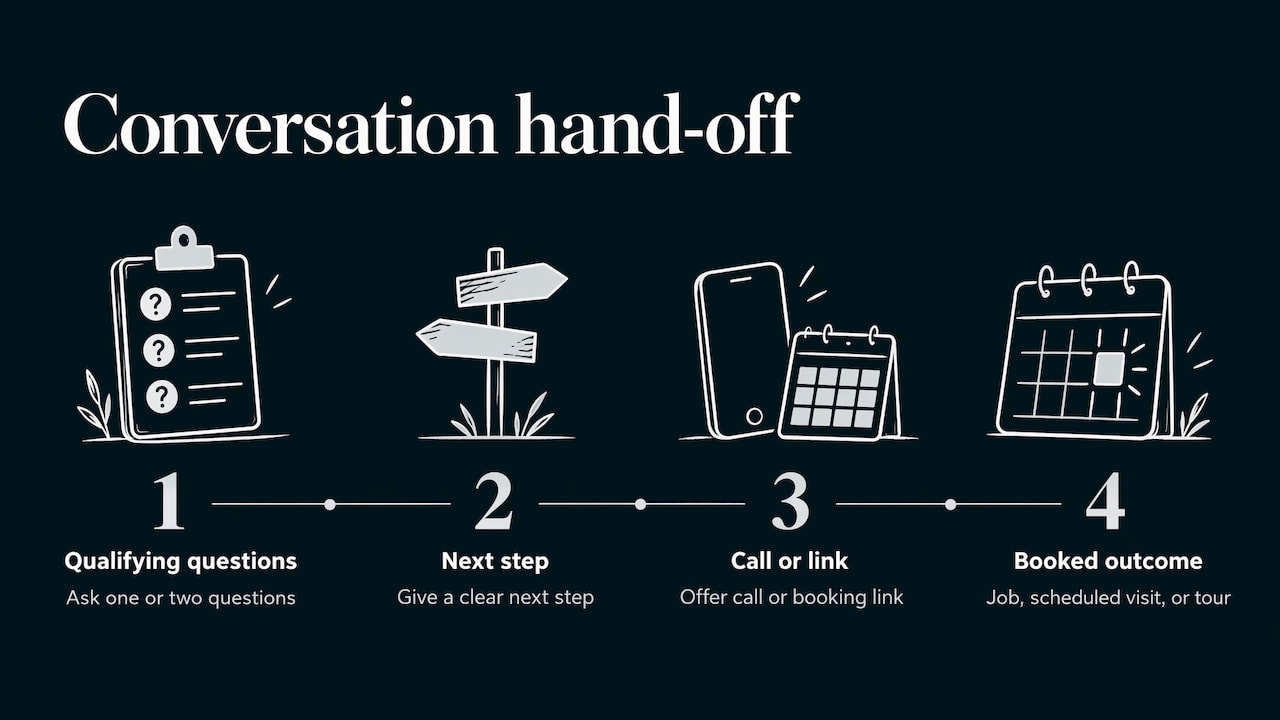
A text is a starting point. Your goal is to move toward a booked job, a scheduled visit, or a tour. Ask one or two qualifying questions, give a clear next step, and offer a call or a booking link. Do not run a whole sales process in a thread that is hard to track.
Keep records
Because the conversation no longer lives in a Google inbox, you need your own record. Use a shared business phone system or a CRM that logs texts, so a conversation is not lost when an employee leaves or changes phones.
Watch your reputation
A slow or careless reply can turn into a public complaint. If it does, respond quickly, calmly, and in public, and fix the problem offline. The first 48 hours review playbook covers how to act when a bad review lands, and the same speed applies to any customer who feels ignored. For more on how your profile builds trust, see our Google Business Profile guide.
How to measure whether messaging works
Since the Google-side message count is gone, measure from your own side and from the metrics Google still reports.
- Your own inbox: count the number of new text threads per week, how many got a reply within your target, and how many turned into booked work.
- Calls: Google says you still receive calls from your profile and can track other engagement, including website traffic and direction requests. Watch whether calls drop or rise after you add the Chat option.
- Website actions: track form submissions and clicks on your profile’s website link, ideally with tagged URLs so you can separate profile traffic from everything else.
- Job source: ask new customers how they reached you and log the answer. “Texted from Google” is a valuable data point.
Give it a few weeks of data before you judge. If texting adds conversations but your team cannot keep up, fix the staffing or the process before you remove the option.
Our perspective
After the 2024 change, messaging stopped being something Google handled for you and became a channel you have to run. We think that is good news for local businesses that treat it seriously, because the businesses that answer quickly and clearly stand out in a crowded map pack.
At IBrand Media, our approach to local marketing starts with the basics: an accurate, complete, verified profile, a website that backs up what the profile promises, and a clear plan for who answers every call, text, and form. Messaging fits that plan only when the follow-through is in place. We build a custom plan for each client rather than a one-size-fits-all checklist, because a plumber taking emergency calls and a banquet hall booking weddings need different response routines.
Our advice is simple. Set up the contact options that are available to you, write your templates, name your inbox owner, and track real results in real time. Then keep your profile fresh with posts, photos, and replies to reviews. Messaging works best as one part of a local presence that is easy to find and easy to trust.
TONY
Get help turning profile visits into booked jobs
If you would rather not manage this yourself, we can help. IBrand Media works with small and local businesses on local marketing, SEO, web design, and advertising, with a custom plan for each client and real-time performance tracking. We can review your Google Business Profile, tighten up your contact options, and make sure your website converts the visitors your profile sends.
See our services and request a custom plan on the IBrand Media site.
Keep your whole profile working
Messaging is one piece. A complete profile gives customers more reasons to contact you. For next steps, read our Google Business Profile tips for local visibility, our ideas for Google Business Profile posts, and our walkthrough on improving local search rankings. If you travel to customers instead of hosting them, our service area business SEO playbook explains how to set up your profile and pages.
FAQ
How do I enable messaging on my Google Business Profile?
Open your profile, choose Edit profile, then Contact, and edit Chat. Pick Text message or WhatsApp, enter a text-capable number or a WhatsApp click-to-chat URL, and save. Google says the profile must be claimed and verified, and availability is limited to select regions.
Why can’t I add chat on Google Business Profile?
The most likely reason is eligibility. Google says Chat options are only in select regions and may not appear on every profile. Also confirm that your profile is verified and that you are signed in with owner or manager access. If everything checks out, the option is probably not available for your profile yet.
Is the old Google Business Profile chat still available?
No. Google ended the original chat and call history on July 31, 2024. Customers can still call you, visit your website, and where eligible text you or use WhatsApp. An experimental AI messaging experience was reported in October 2026, but it is still rolling out.
Can I use both text and WhatsApp on my profile?
You can add both, but Google says only text messaging is shown when both are added. If WhatsApp is the channel you monitor most, add only WhatsApp so customers are not sent to a number you rarely check.
Sources
- Changes to Google Business Profile chat and call history
- Changes to Google Business Profile chat and call history (Performance API notice)
- Chat with customers from your Business Profile
- Google Business Profiles AI-Powered Messaging
Recent Comments