
Yes, you can advertise locally on Instagram, and for many small businesses it works. You set a geographic area around your shop, office or service territory in Meta Ads Manager, put a clear offer in front of nearby people, and measure leads and bookings rather than likes. This guide covers what you need before you start, how to choose your radius, which formats suit local offers, how to set a budget, and what to track.
TL;DR
- Local Instagram ads run through Meta Ads Manager, and you choose the area they show in, so you pay to reach people near you.
- Instagram mostly reaches people who are not searching yet, so a specific offer, a tight area and a fast reply to every inquiry decide the result.
- Start with a modest daily budget, keep it running long enough to learn, and judge it by cost per lead or booking, not clicks.
- Short video, real photos of your team and work, and one clear action beat generic stock images and long copy.
- Track what happens after the click with a Meta Pixel on your site or booking page.
Table of Contents
- Can you advertise locally on Instagram?
- What you need before you run your first ad
- Choosing your local audience and radius
- Ad formats and creative that work for local offers
- Boosting a post versus using Ads Manager
- How much to spend on Instagram ads
- Measuring whether your ads bring in business
- Common mistakes to avoid
- Instagram ads or Google ads first?
- Our perspective
- Get help running local ads
- FAQ
- Sources
Can you advertise locally on Instagram?
Yes. Instagram ads are paid placements that can appear in Feed, Stories, Reels and Explore, carry a Sponsored label and can include a link to your website, according to Buffer’s guide to Instagram ads. That link is what makes them useful for a local goal: calls, form fills, bookings, store visits or a direct message.
The local part comes from targeting. Inside Ads Manager you pick where your ad is allowed to show, plus audience controls such as age, gender and interests, as the same Buffer guide lists. A plumber can show an ad only to homeowners within a service area. A banquet hall can show wedding and event offers only to people within driving distance.
Do Instagram ads work for small businesses?
Often, yes, with a caveat about how. A 2022 Ipsos survey of more than 37,000 small and medium business decision-makers found that majorities of businesses using personalized Meta ads in several countries said the ads helped them reach business goals, including 68% in Canada and 91% in Mexico. The results are self-reported and cover Meta ads in general, so treat them as a signal, not a promise.
The practical caveat is intent. Someone searching for an emergency plumber is ready to buy. Someone scrolling Instagram is not. Nextiva’s October 2026 guidance on local advertising makes this point: social ads create demand rather than capture it, so success depends on a compelling offer, a narrow geography and a quick response to every inquiry. Build the campaign around those three things and the platform works in your favor.
What you need before you run your first ad
Setup takes an afternoon if you have the pieces ready. Shopify’s 2026 guide to Instagram ads lists the requirements:
- A professional (Business or Creator) Instagram account.
- A Facebook Page connected to it.
- A Meta business account with access to Ads Manager.
- An ad account in good standing with a payment method on file.
- Ads that follow Meta’s advertising policies.
- An advertiser aged 18 or older.
Two more things matter for a local business, though they are not on every checklist.
A page worth landing on. An ad can be perfect and still lose the customer if the link opens a slow page, a cluttered homepage or a form that does not work on a phone. Send people to a page built for one action: request a quote, book a table, schedule a tour. If your site needs work first, our guide to website design basics for local businesses covers what that page should include.
A way to measure results. The Meta Pixel is a snippet of code on your website that records what visitors do after they click. Install it before the campaign starts, not after, so the first dollar you spend teaches you something.
Choosing your local audience and radius
The most common local mistake is a target area that is too wide. Reaching a whole metro area when you only serve a 12-mile zone means paying for people you cannot or will not serve.
Meta lets you set a custom location by dropping a pin on your address and choosing a radius, or by selecting a city or postal code. A good starting point depends on how people reach you:
| Business type | How customers reach you | Radius approach |
|---|---|---|
| Restaurant, cafe, salon | Walk or short drive | Small radius around the address |
| Dentist, med spa, retailer | Drive from nearby neighborhoods | Medium radius covering your real patient or customer base |
| HVAC, plumbing, contractors | You travel to them | Match your actual service area |
| Venue, banquet hall | Customers travel for an event | Wider radius, since people drive further for a one-time booking |
Nextiva’s guidance recommends a tight radius of 10 to 15 miles for local offers. Use that as a ceiling to test downward from if you are in a dense city, where a few miles can contain far more people than you need.
Once the area is set, layer on audience filters sparingly. Age and interests can help a med spa or a wedding venue, but stacking many filters shrinks the audience and raises costs. Let the location and the creative do most of the work. For a deeper walkthrough of choosing areas, see our piece on Facebook radius targeting for local businesses, which applies to Instagram because both run through the same ad system, and our guide on how to target a local audience effectively.
Ad formats and creative that work for local offers
Format matters less than what the ad says and shows. Still, a few choices tend to fit local businesses well.
Short video in Stories and Reels
Vertical, full-screen video fits where people actually look. Nextiva’s guidance recommends short videos or before-and-after imagery paired with a specific offer. For a local business, that could be:
- A 10-second clip of a technician finishing a repair, with the neighborhood named in the caption.
- A before-and-after of a kitchen remodel or a smile makeover.
- A walkthrough of your venue set up for a wedding reception.
- A stylist or provider introducing themselves and the first-visit offer.
Single images and carousels
A strong photo of real work still earns its place in Feed. Use a carousel when you have several services or several finished projects to show. Practitioners often note that generic stock photography lowers trust for local brands, so use photos of your own team, your own location and your own results whenever you can.
One clear action
Give each ad a single job. A conversion-focused ad that asks nearby customers to take one step performs better than one that asks them to call, visit the website, follow the page and read the blog. Pick the action that fits the sales process: “Book a free estimate,” “Reserve your tour,” “Claim the new-patient offer.”
Write for neighbors
Name the town or neighborhood in the first line. “Austin homeowners: free AC tune-up estimate this month” tells the right people it is for them and signals to everyone else to keep scrolling, which saves your budget.
What a strong local offer looks like
The offer is the part owners underinvest in. A good one is specific, easy to understand in two seconds, and low-risk for someone who has never heard of you:
- A free quote or inspection with a stated time window.
- A first-visit price on a defined service.
- A limited number of tour or consultation slots per week.
- A seasonal tune-up, cleaning or package.
Avoid an offer you cannot honor at volume. If your ad is successful and you cannot respond quickly, the campaign has cost you money and goodwill.
Boosting a post versus using Ads Manager
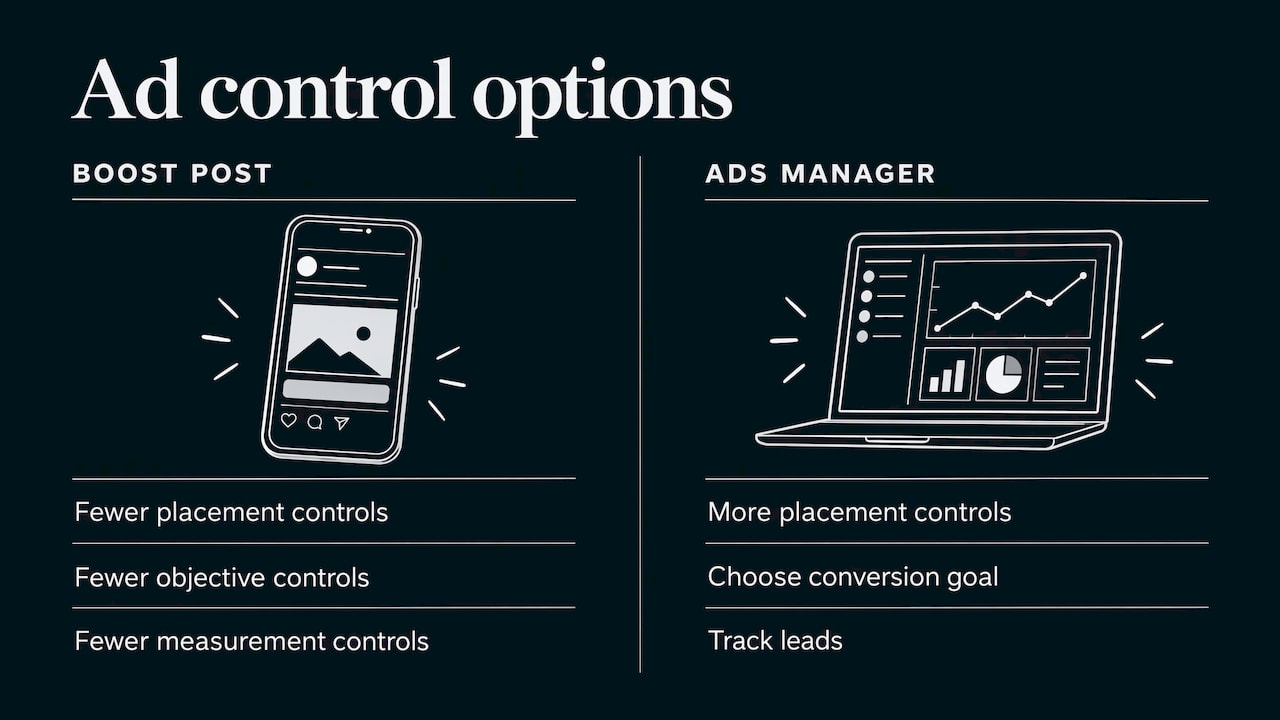
The Boost button inside Instagram is the fastest way to put money behind a post, and it is a fine first step. It offers fewer controls over placement, objective and measurement than Ads Manager. If you want to choose a conversion goal, set a precise radius and track leads, graduate to Ads Manager. We lay out a simple way to do this in our guide on running a 14-day Ads Manager test after a boost.
How much to spend on Instagram ads
There is no official minimum that guarantees results, and the right figure depends on your industry, your area and what a customer is worth. Think about it in terms of math you control:
- Start from customer value. If a new customer is worth $600 in first-year revenue and you close one in four leads, a lead is worth about $150 before costs. You can afford to pay less than that per lead.
- Pick a daily budget you can sustain. At $15 a day, a 30-day month costs $450. That is a figure you can commit to without stress, which matters because you need to leave the campaign running long enough to gather data.
- Give it time. Judging a campaign after three days is a common error. Plan on a few weeks of learning before you change much, then adjust based on cost per lead.
- Split by purpose when you can. Put most of the money behind the offer aimed at new local customers, and a smaller share behind retargeting people who visited your site or engaged with your page.
For how this fits into a wider marketing budget, Nextiva’s local advertising budget guide is a useful framework to compare with your own numbers. Our walkthrough on how to run local ads covers budget pacing in more detail.
Measuring whether your ads bring in business
Impressions and likes feel good and pay no bills. Measure what matches your goal:
- Cost per lead for forms and quote requests.
- Cost per call or message if customers contact you directly.
- Cost per booking for appointments, tours and reservations.
- Return on ad spend if you sell online and can tie revenue to the campaign.
To see these, the Meta Pixel needs to be recording actions on your site, and your offer page needs a clear conversion event such as a submitted form or a booking confirmation. Meta has said that advertisers who combined the Pixel with its Conversions API saw an average 13% lower cost per action than those using the Pixel alone, as reported by Social Media Today in 2023. The same report names account simplification, targeting, mobile-friendly video, testing and measurement as the main levers. In practice that means fewer campaigns, cleaner goals and one change at a time.
Then close the loop offline. Ask every new customer how they found you, and record which leads turned into paying work. Ad platforms report leads. Only you know which of them became revenue.
Respond fast
Because Instagram reaches people who were not looking, interest fades quickly. Answer form fills and messages within minutes, not hours. Nextiva’s guidance makes the same point about responding to leads within minutes. Set up notifications, assign one person to answer, and have a short script ready for common questions.
Common mistakes to avoid
- Too wide an area. Match the radius to the territory you really serve.
- Too many goals in one ad. One offer, one action.
- Stock imagery. Show your people, your work and your place.
- Sending traffic to a homepage. Use a page designed around the offer.
- Changing everything weekly. Change one variable at a time so you know what caused the difference.
- Ignoring policy. Ads for healthcare, cosmetic treatments and similar categories must follow Meta’s advertising policies. Check the current rules in Meta’s Business Help Center before you launch a med spa or dental campaign.
Instagram ads or Google ads first?
They do different jobs. Search ads capture people already looking for your service, and Instagram ads introduce your business to people who might need it soon. If you are deciding where the first dollar goes, our comparison of Google Ads and Facebook Ads walks through the choice, and our overview of how to run social ads for local small businesses shows how to sequence them.
Our perspective
Most local owners we talk to have already tried a boosted post, got a few likes and concluded that Instagram does not work. What usually went wrong is not the platform. It was a wide area, a vague message and no way to see what happened after the click.
Our approach is to build the plan around the customer you want, not the feature you can click. We start with the offer and the service area, then design the ad, the landing page and the tracking as one system. Real-time performance tracking matters because it shows you, week by week, which message brings calls and which one only brings scrolls.
We also believe small budgets deserve a custom plan. A dentist, an HVAC company and a banquet hall do not need the same campaign, and a template treats them as if they do. We work with you on the plan, keep the pricing transparent, and focus on results you can see in your inbox and calendar.
TONY
Get help running local ads
If you would rather spend your time on customers than on Ads Manager, we build and run local campaigns for small businesses, including advertising, social media management, web design and real-time performance tracking, with a custom plan for each client. Tell us your service area and your goal, and we will propose a plan that fits. See what we offer on the IBrand Media site.
If your website needs to convert before you pay for traffic, our team can also help with affordable web design for small businesses.
FAQ
Can you advertise locally on Instagram?
Yes. In Meta Ads Manager you choose where your ads can appear, using a city, a postal code or a radius around your address. Ads can run in Feed, Stories, Reels and Explore, and can link to your website, booking page or a message thread.
Do Instagram ads work for small businesses?
They can. Survey data from Ipsos shows many small businesses using personalized Meta ads said the ads helped them meet goals, though the answers are self-reported. Results depend most on your offer, a tight local area and how fast you answer inquiries.
How much should a local business spend on Instagram ads?
There is no fixed minimum. Choose a daily amount you can keep up for several weeks, such as $15 a day, which comes to $450 over 30 days, and compare cost per lead with what a new customer is worth. Adjust only after the campaign has gathered enough data.
What should I measure?
Track cost per lead, cost per call or message, and cost per booking, not likes or impressions. Install the Meta Pixel on your website or booking page so Ads Manager can report what visitors do after clicking.
Is boosting a post enough?
Boosting is a good way to start. Ads Manager gives you more control over objective, audience and tracking, which matters once you want leads and bookings rather than engagement.
Sources
- Instagram Ads 101: Step-by-Step Guide, Buffer
- Instagram Ads (2026): How They Work, Shopify
- Ipsos: small and medium sized businesses and online reach
- How to Budget Local Advertising for Small Businesses, Nextiva
- Meta Announces New Marketing Tips Webinar Series, Social Media Today
Recent Comments