
Set your primary category to “Plumber,” then add a secondary category only when it describes a separate kind of work you really do and could be hired for on its own, such as drain service or gas installation. Categories tell Google what kind of business you are. The list of services on your profile tells customers what jobs you take. Mixing those two up is the most common way plumbers weaken their listing.
This guide covers what to choose, how to decide on the extras, how categories differ from services, and what to do when you change them.
TL;DR
- Your primary category should be “Plumber.” It describes the whole business, not one job, and it is the label plumbing guides for contractors point to as the default.
- Add secondary categories only for real, separate service lines you can deliver, like drainage, gas installation or septic work.
- Individual jobs (faucet installs, toilet repairs, water heater swaps) belong in the Services section, not in extra categories.
- Stuffing categories to catch more searches breaks Google’s rules and can get your profile suspended.
- Google’s live category picker is the only complete list, so check it inside your profile instead of trusting a pasted list.
Table of Contents
- Why categories matter more than most plumbers think
- The primary category: just choose “Plumber”
- Secondary categories: which ones plumbers actually use
- Categories vs. services: where each job goes
- How to add or change categories
- Mistakes that cost plumbers calls
- A practical setup for three kinds of plumbing company
- Our perspective
- Getting more from a correct profile
- Need help setting it up?
- FAQ
- Sources
Why categories matter more than most plumbers think
When someone types “plumber near me” at 6 a.m. with water on the kitchen floor, Google has to decide which local businesses to show. Your category is one of the clearest signals it has about what you are. Review counts, photos and your website matter too, but a wrong or vague category can keep a good business out of the results it should win.
The category also shapes what customers see. It appears under your business name in the map results, so a reader scanning three listings sees “Plumber” and knows within a second that you fit.
Google itself says each business gets one primary category that describes the business as a whole, picked from a fixed list. You cannot invent your own wording. That is why the choice is less about creativity and more about matching your real operation to the closest label Google offers.
The primary category: just choose “Plumber”
For nearly every plumbing company, the primary category is “Plumber.” Plumbing guides written for contractors say the same: primary is “Plumber,” and extras are used only when they match what you actually offer today.
The reasoning follows Google’s own guidance. The primary category is meant to say what your business is overall, not list the individual services you provide. A company that does water heaters, repipes, drain cleaning and fixture installs is still a plumber. It is not a “water heater company” with a side of drains.
There are a few tempting alternatives to avoid:
- A narrow label as primary. If you are a full-service plumbing company, choosing a specialty such as an emergency or drainage label as primary narrows how Google understands you.
- A broader trade label. If you are a plumbing contractor, pick the plumbing-specific option rather than a general contractor label.
- A name that reads like a category. Your business name should be your real name, as it appears on your truck, invoices and signage. Google asks that businesses represent themselves as they are known in the real world, and adding keywords to the name is a fast route to a suspended profile.
When a different primary could make sense
If you only do one thing, the answer can change. A company that exclusively cleans drains and runs sewer cameras may decide a drainage-related label describes it better than “Plumber.” That is the exception, though. If customers call you for “a plumber” and your trucks say plumbing, stay with “Plumber.”
Secondary categories: which ones plumbers actually use
Secondary categories exist for genuine departments or distinct offerings. Google’s guidance is that they should clarify the business, and that the primary category already carries the main weight. It also discourages loading a profile with every label that sounds relevant.
The plumbing-related options commonly named by industry guides include:
| Secondary category | Add it when | Skip it when |
|---|---|---|
| Drainage service | Drain cleaning, hydro-jetting or sewer line work is a real, regular service line | You clear the odd clogged sink as part of regular plumbing calls |
| Gas installation service | You install or repair gas lines and hold the required licensing | You only reconnect an appliance now and then |
| Septic system service | You pump, inspect or repair septic systems | Your work stops at the house plumbing |
| Hot water system supplier | You sell and install water heaters as a core line | Water heater swaps are one job among many |
| Emergency plumber | You run a true after-hours or 24/7 dispatch | You take emergencies only when convenient |
A useful test comes from the industry guides: a secondary category should describe a real, independently hireable part of the business. If a customer could call you just for that, and your team could do it properly, it may deserve a category. If not, it is a service, not a category.
The “fewest categories” mindset
More is not better. Each extra label dilutes the message slightly and raises the odds that you look like you are claiming work you do not do. Start with “Plumber,” add one or two that match real revenue lines, and stop. You can always add another after you have actually launched that service.
Exact names can change
Google does not publish a single static list of every category. The definitive list is the picker inside the Business Profile editor, and labels can be renamed or retired without announcement. So treat any article’s list, including this one, as a starting point. Type “plumb” or “drain” into the picker and use what it offers today.
Categories vs. services: where each job goes
This is where many plumbing profiles go wrong. A category is the type of business. A service is a job a customer can hire you to do.
Google’s help pages say plumbing businesses can list individual jobs such as installing a faucet or repairing a toilet in the Services section, including custom services you name yourself. That is the right home for the long tail of what you do.
Here is how a typical plumbing company might split it:
| Where it goes | Examples |
|---|---|
| Primary category | Plumber |
| Secondary categories | Drainage service (if you run a drain division), Gas installation service (if licensed) |
| Services section | Water heater replacement, tankless installation, faucet repair, toilet repair, garbage disposal install, sewer line inspection, leak detection, repiping, sump pump installation |
Write each service with a short description in plain words, naming what is included and how the customer books it. Skip filler. A line such as “Same-day toilet repair, including flapper, fill valve and wax ring replacement” tells a reader and Google more than a vague promise of quality work.
How to add or change categories
- Sign in to Google with the account that manages your profile and search for your business name.
- Open Edit profile and go to Business information.
- Select your primary category, or use the add option for secondary ones.
- Search with a short term, such as “plumb” or “drain,” and pick from what the dropdown shows.
- Save, and check the profile a day or two later.
Be careful with timing. Google notes that adding or changing categories can trigger re-verification to confirm your information is accurate. For a plumber that depends on calls, avoid making several edits right before a busy season. Change one thing, confirm the profile is stable, then continue. If you are a service-area business, which most plumbers are, keep your address hidden if you do not serve customers at your location, and keep service areas realistic.
Mistakes that cost plumbers calls
Treating categories like keywords
Google states that categories should not be used solely as keywords, and it reserves the right to suspend profiles that break its guidelines. Adding a label because it sounds like something people search is the pattern to avoid.
Claiming work you do not do
If you add “Septic system service” but refer every septic call to another company, customers will notice, reviews will say so, and Google may too. Industry guidance warns against adding categories for services you do not run just to get more calls.
Letting categories go stale
Businesses change. If you dropped gas work two years ago, remove the category. If you launched a drain cleaning van this spring, add it. Review the profile twice a year, and whenever you add or drop a major service.
Inconsistent identity
Your profile, website, truck lettering and directory listings should all describe you the same way. When your site says “Plumbing and Drain Cleaning” and your profile says something else, it creates doubt. Match the name, address or service area, phone and the language you use about yourself.
Ignoring everything else on the profile
Categories get you considered. They do not close the call. After they are right, fill in the service list, upload photos of real jobs (clean finished work, your truck, your techs), keep hours accurate, and respond to every review. For the wider picture, see our guide to digital marketing for plumbers and the list of common plumbing marketing mistakes to fix.
A practical setup for three kinds of plumbing company
These are illustrations of how to apply the rules, not rules in themselves.
The general residential plumber. Primary: Plumber. Secondary: maybe one, such as a drainage label if drain work is a steady share of calls. Services: a full list of repairs, installs and inspections.
The plumber with a drain division. Primary: Plumber. Secondary: Drainage service. Services: drain cleaning, camera inspection, hydro-jetting, main line clearing, each with its own short description.
The plumber who also does gas and water heaters. Primary: Plumber. Secondary: Gas installation service, and a water heater label only if you sell and install as a distinct line. Services: gas line install, leak testing, tank and tankless replacement.
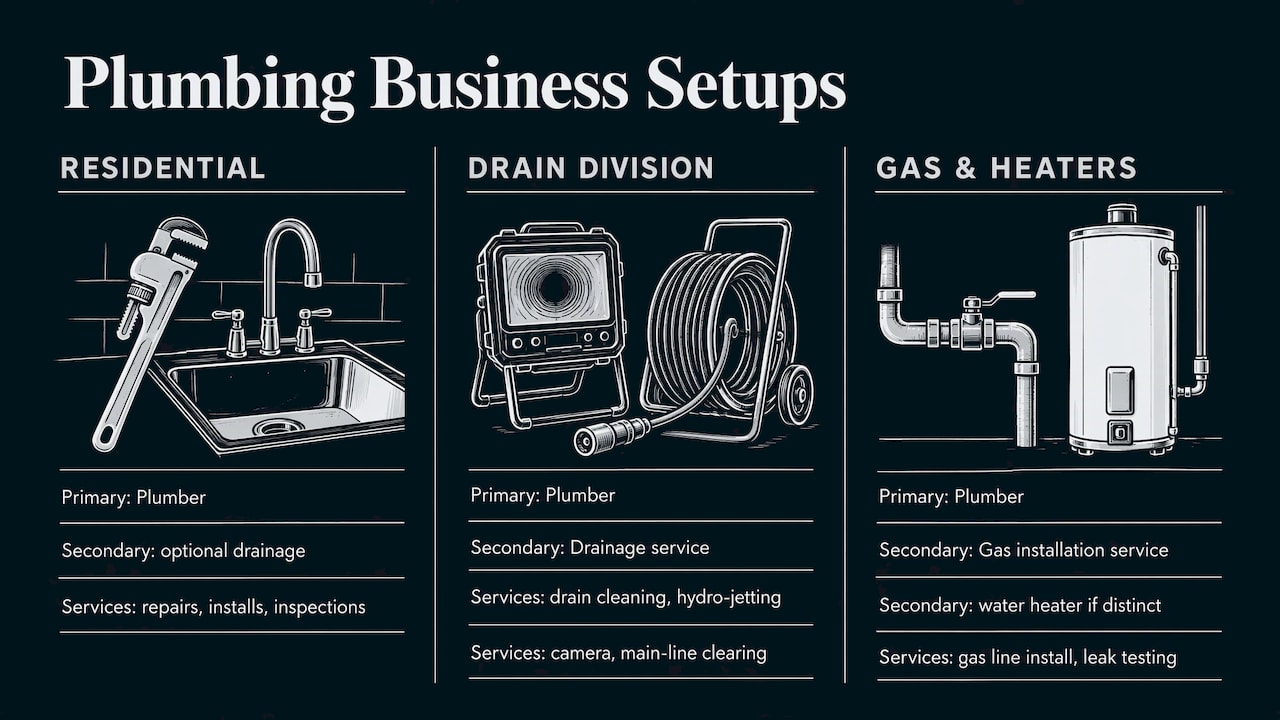
Notice that the primary never changes. The extras follow the business, and the services list carries the detail.
Our perspective
Most plumbers we talk to are not short on skill. They are short on time, and the Google profile is the thing that gets set up once and never touched again. We see the same pattern: a good company, a primary category that is fine, and five or six secondary categories added on a whim.
Our view is that a clean category setup is the cheapest improvement a plumbing business can make, and it only works as part of a plan. Categories tell Google who you are. Your service pages, reviews, photos and local content tell it that you deserve the call. That is why we build a custom plan for each client instead of a one-size package: a two-van shop in a suburb needs something different from a 15-truck outfit covering a metro area.
We also like to show owners what is happening. Real-time performance tracking means you can see which calls and visits came from your profile and which came from your site or ads, so you decide where to spend next based on results, not guesses.
TONY
Getting more from a correct profile
Once your categories are right, the next gains usually come from the pieces around them. A service page for each major job gives your website something to rank for outside the map results. Local content shows that you know your area. Steady review requests build the proof customers look for. If you want a broader view of where leads come from, our breakdown of the best marketing channels for plumbers and our piece on cost-effective plumber marketing are good next reads.
If you also run or manage an HVAC arm, the same logic applies, and we cover it in HVAC Google Business Profile categories.
Need help setting it up?
If you would rather hand this off, we manage local search for small and local service businesses, including plumbers. That covers Google Business Profile setup and upkeep, local SEO, web design, advertising and reporting, built around a plan for your market. You can see what we offer on our services page and ask for a custom plan.

We start by reviewing your current profile, categories, services and website, then tell you what to fix first.
FAQ
What is the best primary Google Business category for a plumber?
“Plumber” is the right primary category for almost every plumbing company. It describes the business as a whole, which is how Google defines the primary category. Use a narrower label as primary only if your company truly does just one kind of work.
Can I list services like water heater repair as categories?
Only if the work is a distinct, separate line of your business. Otherwise, add it in the Services section of your profile. Google’s help pages say plumbers can list individual jobs there, including custom ones you name yourself.
Will changing my categories hurt my rankings?
It can cause a temporary check. Google says adding or modifying categories may trigger re-verification of your business details. Make changes one at a time, confirm that the profile stays live, and avoid editing during your busiest weeks.
Where can I see every available category?
Inside the category picker in your own Business Profile editor. Google does not publish a full static list, and labels can be renamed or retired, so the picker is the source to trust. Search with short terms like “plumb,” “drain” or “gas.”
Should I add “Emergency plumber” if I take late calls sometimes?
Only if you really run an on-call service people can count on. Customers who call at night expect an answer. If you cannot deliver one, leave the category off and state your actual hours instead.
Sources
- How to choose a category for your Business Profile (Google Business Profile Help)
- Guidelines for representing your business on Google (Google Business Profile Help)
- Manage your services on your Business Profile (Google Business Profile Help)
- Plumbing Google Business Profile: Comprehensive Guide
- Best Google Business Profile Categories for Plumbers
Recent Comments