
For a general dental practice, set “Dentist” as your primary Google Business Profile category. Add a small number of secondary categories only for things your practice truly is, such as Cosmetic Dentist or Emergency Dental Service. Specialists should lead with their specialty. Google picks categories from a fixed list, so the work is choosing well from that list and checking it now and then.
This guide covers which categories exist for dentists, how to pick a primary one, when a secondary category helps, and how to audit what is live on your profile today.
TL;DR
- Categories come from a list Google controls. You cannot invent your own, according to Google’s category help page.
- General dentists should use “Dentist” as the primary category. Specialists should use their specialty.
- Add as few secondary categories as possible, and only ones that complete the sentence “This business IS a…”.
- Treatments like whitening or Invisalign belong in your services and description, not in extra categories.
- Open your profile, read your categories as a patient would, and fix anything vague or outdated.
Table of Contents
- Why categories matter for a dental practice
- The dental categories you can choose from
- How to choose your primary category
- When to add secondary categories
- Categories, services and descriptions are different jobs
- Practices with several dentists
- Perspective: what we see on dental profiles
- How to audit your categories in under an hour
- Common mistakes to avoid
- Where categories fit in your wider dental marketing
- Need a hand with your dental profile?
- FAQ
- Sources
Why categories matter for a dental practice
Google says categories connect your business with customers searching for relevant products or services, and that category is one of the factors affecting local ranking. Depending on the category, Google may also use it to assign a place label. All of that is in the Business Profile help page on choosing a category.
For a dentist, this has a practical meaning. A patient who types “dentist near me” or “emergency dentist” is asking Google to match a type of business to a need. Your category is the plainest signal you give about what type of business you are. Photos, reviews and website content help, but a mismatched category makes it harder for Google to understand your practice at all.
Categories are also not a magic lever. Distance, reviews, and how complete your profile is all play a part. Treat categories as the foundation: cheap to fix, easy to get wrong, and worth getting right before you spend on anything else. If you want the bigger picture, our Google Business Profile guide covers the rest of the profile.
The dental categories you can choose from
Google does not let you type a custom category. You choose from a dropdown, and the list changes over time. A university web services team that publishes an internal reference list of Google categories (last updated October 2024) includes these dental options:
| Category | Typical use |
|---|---|
| Dentist | General and family practices |
| Dental Clinic | Multi-provider facilities (see the caution below) |
| Cosmetic Dentist | Practices focused on smile design, veneers, whitening |
| Pediatric Dentist | Children’s dentistry |
| Orthodontist | Braces and aligners as a specialty |
| Endodontist | Root canal specialists |
| Periodontist | Gum disease and implant surgery specialists |
| Oral Surgeon | Extractions, wisdom teeth, jaw surgery |
| Oral and maxillofacial surgeon | Surgical specialty practices |
| Dental implants provider | Practices centered on implants |
| Emergency Dental Service | Practices that take urgent cases |
| Denture Care Center | Denture-focused offices |
The same reference labels some of these as “Location” and “Provider,” and others as “Location” only. That matters if you also set up profiles for individual dentists, which we cover below.
Because Google edits this list, always confirm what appears in your own dropdown when you search for a category. If a name above is missing or renamed, pick the closest current option rather than hunting for a workaround.
How to choose your primary category
Google’s guidance is that the primary category should describe the business as a whole and be as specific as possible. For most practices, that leads to a simple rule.
General and family dentists
Use “Dentist.” Dental Economics recommends “Dentist” as the primary category for a general-dentistry practice and advises against “Dental clinic” as primary, because it is searched far less often. Patients type “dentist,” not “dental clinic,” so match their words.
Specialists
If you are an orthodontist, periodontist, endodontist, pediatric dentist or oral surgeon, choose that specialty as primary. The same Dental Economics guide says specialists should choose their specialty. A practice that only places braces gains little from a “Dentist” label that sends it general-checkup searches it will not convert.
Cosmetic-focused practices
Here it is a judgment call. If your office genuinely markets itself around smile makeovers and most of your revenue comes from cosmetic work, “Cosmetic Dentist” can make sense. If you still do cleanings, fillings and crowns for the neighborhood, keep “Dentist” as primary and add “Cosmetic Dentist” as secondary.
A quick test
Ask three questions:
- If a patient called and asked “what kind of office are you?”, what would your front desk say in two words?
- Which search do you most want to win: “dentist near me” or a specialty term?
- Would the answer still be true if you removed your marketing language?
Whatever survives is your primary category.
When to add secondary categories
Google’s guidelines for representing your business say categories should complete the phrase “This business IS a,” not “This business HAS a.” They also say to use as few categories as possible, to avoid treating categories as keywords, and to choose ones that represent the main business.
So a practice with a dedicated emergency line and same-day slots can reasonably add “Emergency Dental Service.” A practice with a dentist who places implants daily might add “Dental implants provider.” But a practice that occasionally offers teeth whitening should not add a whitening-related category, and should list whitening as a service instead.
What the data says about extra categories
There is research, with limits. BrightLocal’s study of additional GBP categories found that the best-performing dentist profile used one additional category on average, with an average map rank of 7.3. It found no clear pattern linking the number of extra categories to dentists’ local rankings, and it stressed accuracy in regulated healthcare fields.
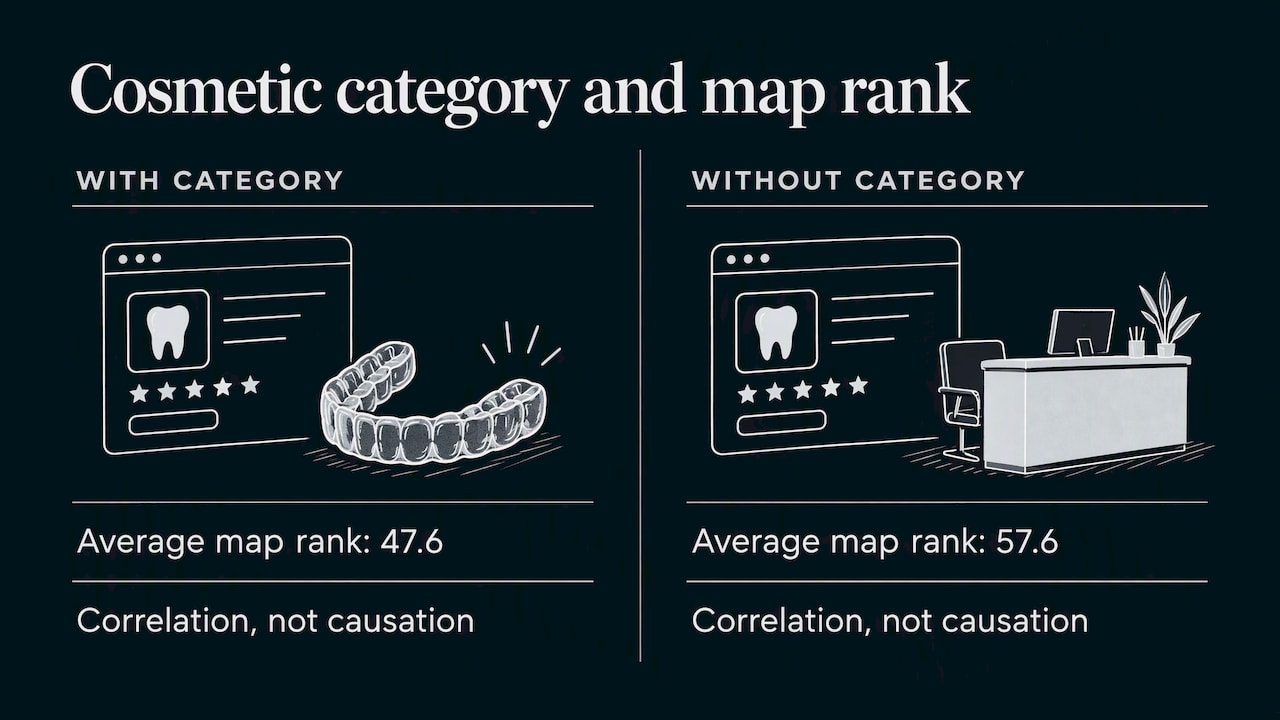
A more recent Search Engine Land analysis of 1.8 million Google Business Profiles (August 2026) found that Dentist profiles with Cosmetic Dentist as a well-chosen additional category averaged a rank of 47.6, versus 57.6 for those without it. The authors warn that this is correlation and does not prove causation. Practices that add cosmetic work on purpose may simply be better marketed overall.
Our reading: do not chase categories. One or two honest secondary categories are plenty for most offices. Five or six is a red flag that you are using the field as a keyword box, which Google’s guidelines tell you not to do.
Categories, services and descriptions are different jobs
A common mistake is cramming everything into categories. Each field does a different job:
- Category: what kind of business you are. Google wants a holistic description, not a list of every service, product or amenity.
- Services: the specific treatments you offer, such as implants, clear aligners, root canals or teeth whitening.
- Description: a short plain-language summary of your practice, who you serve and what makes the visit easy.
If you do Invisalign, you are still a “Dentist” who offers clear aligners. Put the treatment in services and on your website, and keep the category list clean.
Practices with several dentists
Google’s guidelines say public-facing practitioners, including dentists, may have their own profile if patients can contact them directly at the verified location during stated hours. That means an associate who sees patients under their own name can have a profile in addition to the practice listing.
If you go that route, keep the roles distinct. The practice profile describes the location. A practitioner profile describes the person. Google’s category help also notes that public departments independent from the main business should have their own profiles, and their category should not be added to the main one. The same logic applies to a distinct specialty office that shares your building: a separate entity with its own hours and staff is a separate profile, not a secondary category on yours.
Duplicate or overlapping profiles can cause confusion, so decide the structure before creating anything new.
Perspective: what we see on dental profiles
When we look at local practices, the category problem is rarely exotic. It is usually one of three things: a profile created years ago by a staff member and never touched, a “Dental Clinic” primary category chosen because it sounded professional, or a stack of secondary categories added in hope of ranking for treatments.
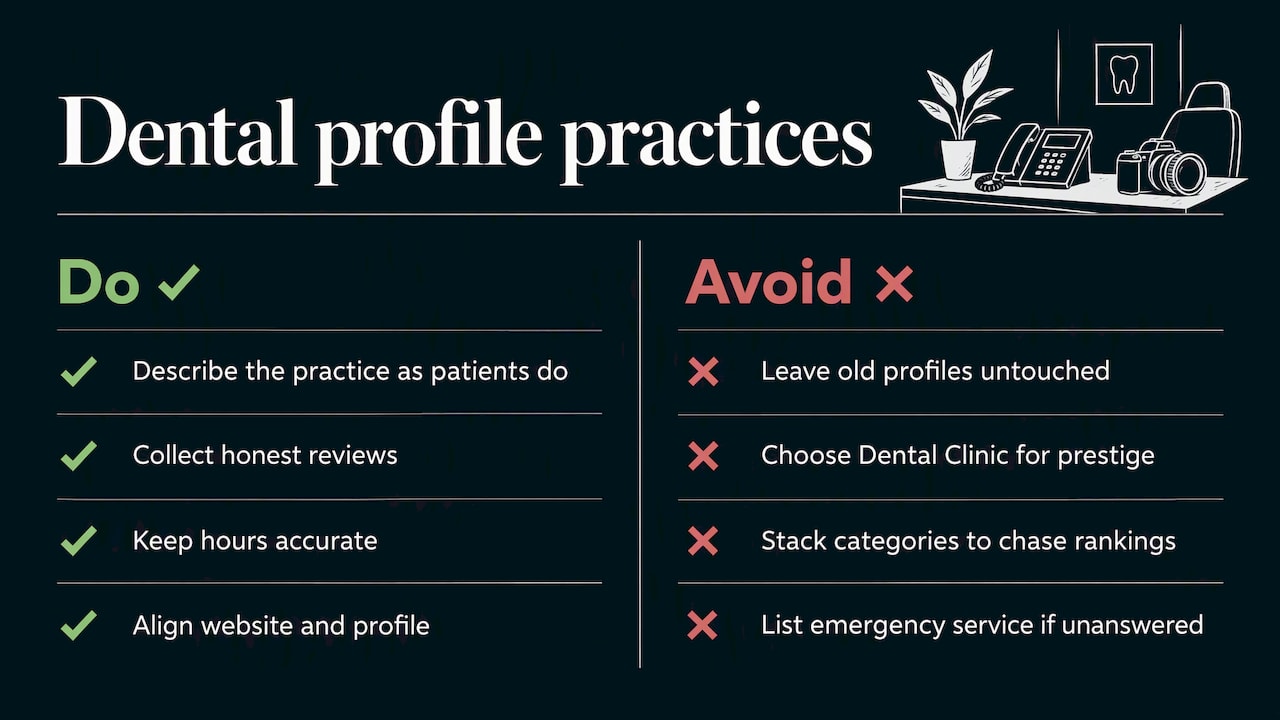
We think the fix is boring on purpose. Describe what you are, in the words patients use. Then spend your energy on the things categories cannot do: collecting honest reviews, keeping hours accurate, uploading real photos of the office, and making sure the website says the same thing as the profile.
The other point we hold firmly: dentistry is a regulated, trust-driven field. An accurate profile is not only a ranking tactic, it is a promise to a nervous patient. If your profile says Emergency Dental Service, someone with a broken tooth at 7 p.m. will believe it. Only add it if the phone gets answered.
— TONY
How to audit your categories in under an hour
Google describes where to view and edit them: in Search, select Edit profile, then About, then Business category. In Maps, select Edit profile, then Business information. The steps below build on that path.
- Open your profile while signed in as an owner or manager, using the route above.
- Write down your current primary and secondary categories. Note anything you do not recognize.
- Compare the primary to your real business. General practice with “Dental Clinic” or something broader? Change it to “Dentist.” Specialist stuck on “Dentist”? Consider your specialty.
- Test each secondary against “This business IS a…”. Remove any that describe a treatment or a one-off service.
- Move treatments into services. Add the ones you offer regularly.
- Check the website and other listings. Your site title, homepage and directory listings should describe the practice the same way.
- Revisit in a few weeks. Look at searches, calls and direction requests for changes, and keep a note of what you changed and when so you can judge the effect.
If you want a structured walkthrough, our 30 to 60 minute audit for Google Business Profile categories follows the same flow with a checklist.
Common mistakes to avoid
- Keyword stuffing through categories. Google’s guidelines tell you to avoid using categories as keywords.
- Picking “Dental Clinic” as primary for a practice that is really a dentist. Dental Economics advises against it because the term is rarely searched.
- Adding categories for competitors’ strengths. If you do not offer orthodontics in-house, do not list Orthodontist.
- Ignoring the list changing. Categories get renamed and added. Recheck once or twice a year.
- Treating categories as the whole strategy. They help Google understand you, but patients still choose based on reviews, proximity and how easy you are to reach.
Where categories fit in your wider dental marketing
Getting categories right is the first inexpensive step in local visibility. After that, the gains come from reviews, a fast mobile website with clear treatment pages, consistent name, address and phone details, and sometimes paid search. Our guides on SEO strategies for dentists and affordable marketing for dentists lay out what to do next and in which order for a budget-conscious practice.
Need a hand with your dental profile?
If you would rather not spend your lunch hour inside Google’s dashboard, we do this for small and local businesses. IBrand Media offers SEO optimization, local marketing, web design, advertising and real-time performance tracking, built as a custom plan for each client. For a dental practice, that can start with a category and profile review and extend to the website and ongoing local SEO. See our local SEO and marketing services and tell us about your practice.

FAQ
Can I create my own category for my dental practice?
No. Google requires you to choose from the categories it provides, and custom categories are not possible. If your exact specialty is missing, choose the closest accurate option and describe the rest in your services and description.
Should my primary category be Dentist or Dental Clinic?
For a general practice, choose “Dentist.” Dental Economics advises against “Dental clinic” as primary because very few patients search for it. Specialists should use their specialty instead.
How many secondary categories should a dentist add?
As few as possible. Google asks for the fewest categories that describe your core business. BrightLocal found that the best-performing dentist profile used one additional category on average, and saw no clear pattern linking more categories to better rankings.
Will adding Cosmetic Dentist improve my ranking?
It may help if cosmetic dentistry is a real part of your practice, but nobody can promise it. Search Engine Land’s 2026 analysis found a rank gap for profiles with that additional category, and said the link may not be causal. Add it only if it is true.
Where do I change my categories?
In Google Search, select Edit profile, then About, then Business category. In Maps, select Edit profile, then Business information. You need to be a verified owner or manager of the profile.
Sources
- How to choose a category for your Business Profile (Google Business Profile Help)
- Guidelines for representing your business on Google
- Google My Business Categories (UAMS Web Services)
- Dental SEO guide (Dental Economics)
- Study: Do Additional GBP Categories Boost Local Rankings? (BrightLocal)
- What 1.8 million Google Business Profiles tell us (Search Engine Land)
Recent Comments