
You get one primary category and up to nine secondary categories on your Google Business Profile, and the primary one carries far more weight than the rest combined. The winning move is choosing the narrowest, most accurate primary category available, then adding two to four secondaries that describe real services you offer. Get this wrong and your profile can rank for the wrong searches entirely, or miss out on features like booking buttons and menus that better-categorized competitors get for free.
TL;DR:
- Choosing the most specific primary category that accurately reflects your main service is crucial, as it has the strongest impact on search rankings and feature availability.
- Adding only two to four relevant secondary categories ensures your profile remains focused and prevents diluting your relevance signal.
- Regularly reviewing your categories by running local search queries and monitoring competitors’ categories helps identify optimal labels and avoid outdated choices.
- Changing your primary category may cause a temporary ranking drop and trigger re-verification, so plan such updates carefully and track results over four to six weeks.
- Using Google’s official category list via the dashboard or API ensures accurate selection, especially when your exact business type isn’t listed, since custom categories are not available.
Table of Contents
- What Are Google Business Profile Categories, and Why Do They Matter?
- How Do You Choose the Best Primary and Secondary Categories?
- How Do You Check What Categories Competitors Are Using?
- Where Can You Find Google’s Official Category List?
- Ibrand.media’s Quick Category Audit You Can Run Today
- How Ibrand.media Handles Google Business Profile Category Audits
- A Closing Note From Tony
- Sources
- FAQ
What Are Google Business Profile Categories, and Why Do They Matter?
A Google Business Profile category is a label pulled from a fixed list Google maintains, not something you type in yourself. Each entry has a stable categoryId behind the scenes and a displayName you see on your dashboard, like “Italian restaurant” or “Roofing contractor.” That structure matters because it means categories are a controlled taxonomy, not free text, according to Google’s own developer documentation for the categories resource.
Your primary category tells Google, in the clearest possible way, what your business actually is. Google treats it as the strongest relevance signal on your entire profile, more influential than your business description or even most of your reviews. Secondary categories add context, but they don’t carry the same ranking pull.
Categories also unlock features. A restaurant with the right primary category can display a menu link. A salon or clinic that’s categorized correctly gets a booking button baked right into the profile. Hotels get amenity tags. These aren’t cosmetic extras; they’re functional pieces of the listing that change whether someone calls you or scrolls past you, and Google’s own guidance confirms features vary by category.
A few structural facts worth knowing:
- You cannot create a custom category. If your exact business type isn’t listed, you pick the closest honest match.
- Google periodically adds, renames, and retires categories, so a label that fit two years ago might not exist anymore.
- Categories don’t need to match your business name. A shop called “Sarah’s” still needs an accurate category like “Florist” or “Bakery,” not a vague catch-all.
- The full taxonomy runs into the thousands. Some tracking sites put the count above 4,000 distinct categories, which is part of why so many businesses default to something broad when a precise match exists further down the list.
Getting this piece right is foundational to everything else in your local search strategy, and it connects directly to the ranking mechanics covered in Ibrand’s guide to boosting local visibility.
How Do You Choose the Best Primary and Secondary Categories?
Start narrow, not broad. That’s the single rule that fixes more category mistakes than anything else. A business owner who runs a nail salon and picks “Beauty salon” as the primary category is technically correct but leaving relevance on the table, because “Nail salon” exists as its own category and matches the exact intent behind most of the searches that would bring in customers.
Here’s a workable process for getting there:
- List what you actually do, in plain language. Not marketing copy, just a plain description: “We repair phone screens and sell used phones.”
- Search the category picker using your most specific term first. Google’s dashboard search matches from the beginning of the category name, so typing “phone repair” surfaces better matches than typing “repair phone.”
- Pick the primary category that matches your main revenue driver, not the service you’re proudest of or the one with the least competition.
- Add secondaries only for services the public can actually book or buy separately. If you sell used phones alongside repairs, “Cell phone store” is a legitimate secondary. If you occasionally fix a laptop for a regular customer, that’s not a secondary category, that’s a favor.
- Cap secondaries at two to four. Google allows up to nine, but stacking the profile with marginal categories doesn’t add reach, it dilutes the relevance signal your primary category is trying to send.
- Run three local search queries you’d expect a real customer to type, and check where you land relative to competitors before and after any change.
The most common mistake isn’t picking a bad primary category. It’s picking a technically accurate but overly broad one out of caution, or piling on secondary categories that have nothing to do with what customers actually walk in for. A auto shop that adds “Used car dealer,” “Towing service,” and “Car wash” as secondaries, when it does none of those things regularly, is muddying its own signal.
There’s a real risk on the other side too: changing your primary category, especially to something in a different general field, can trigger a re-verification request from Google. That’s a documented possibility, not a scare tactic, and it means category changes are worth planning rather than making on a whim, per Google’s own category management guidance.
Pro Tip: Before you change your primary category, screenshot your current profile and note your ranking position for your top three search terms. If visibility drops after the switch, you’ll have a clean before-and-after to diagnose the cause instead of guessing.
Once you’ve made a change, give it time before judging results. A short monitoring window, something like four to six weeks, gives Google’s index enough time to reflect the update and gives you enough data to see whether the new category actually moved the needle, rather than reacting to normal week-to-week fluctuation. This is also where service-area businesses need extra care, since category choices interact differently with ranking when there’s no storefront involved, a topic covered in more depth in Ibrand’s service area business SEO playbook.
How Do You Check What Categories Competitors Are Using?
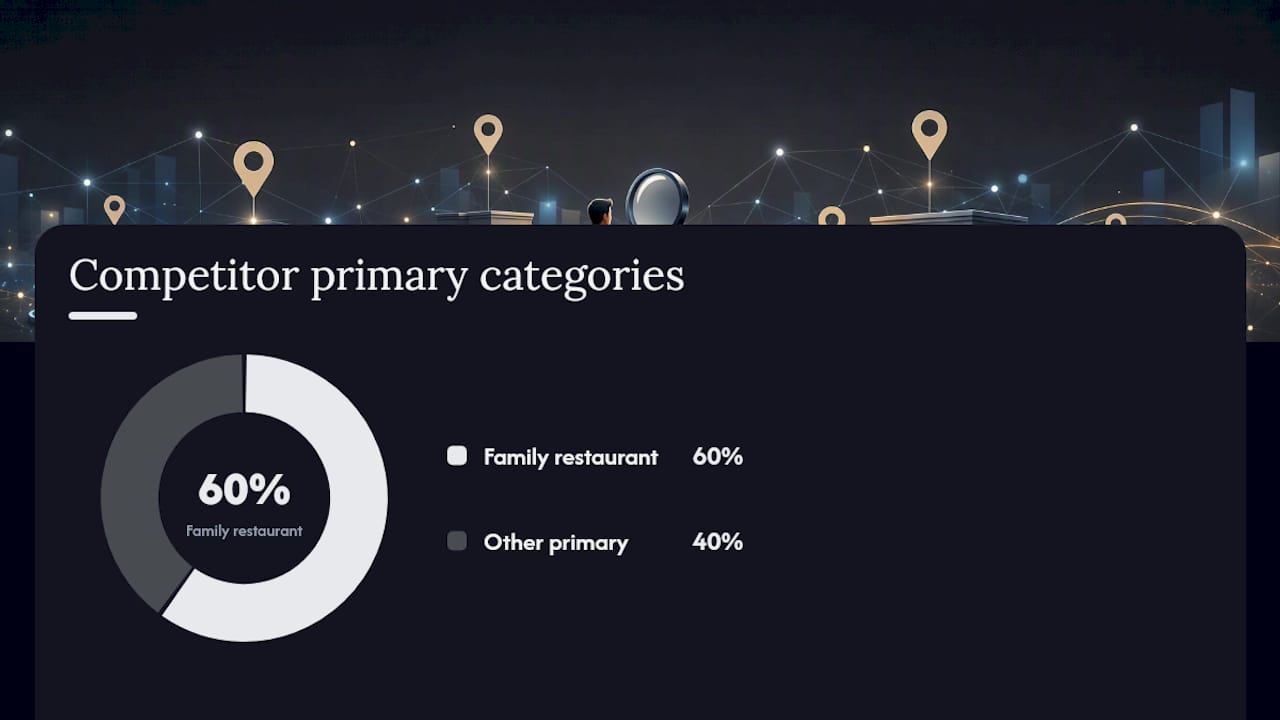
Competitor categories are public information, and checking them takes about two minutes per business. Open Google Maps, search for a competitor by name, and tap their listing. The category appears right under the business name, in smaller text, before the review count.
If you want more than a quick glance, a few approaches work well:
- Search your main keyword directly in Maps (“plumber near me,” “dog groomer downtown”) and note the categories of the top three to five results that show up in the map pack, not just the ones you’d assume are winning.
- Cross-check against your own Business Profile dashboard to confirm which category labels and features (booking buttons, menu links) are showing on your own listing versus theirs.
- Use a searchable third-party category list to browse the full taxonomy by keyword when you’re not sure what a competitor’s displayed label actually maps to internally, though these lists should always be treated as a starting point rather than gospel, since third-party compilations need periodic verification against Google’s own data.
- For developers or agencies managing multiple listings, the
categories.listmethod in Google’s API lets you pull the canonical list programmatically, filtered by region and language, which is far more reliable than scraping category names off Maps by hand.
Seeing that three of your five closest competitors use “Family restaurant” instead of “Restaurant” as their primary category is useful intelligence. It doesn’t mean you copy them blindly, but it does tell you what Google’s algorithm is already rewarding in your specific market.
Where Can You Find Google’s Official Category List?
The category picker inside your Business Profile dashboard is the fastest legitimate way to search Google’s live list, since it queries the same data Google uses to match your profile. Type a keyword and scroll through the matches rather than guessing at exact phrasing.
For anyone comfortable with a bit of technical work, Google’s own categories.list API endpoint returns the canonical, authoritative list directly, with support for filtering by regionCode and languageCode, plus pagination for scripting through the full set. This is the same data source agencies and developers use to build the category tools and browser plugins you’ll find scattered across the web.
A few practical notes on using either method well:
- Search matches from the start of the category name, not the middle. The API documentation confirms this behavior, which explains why searching “repair” turns up nothing useful while “phone repair” or “auto repair” works. Structure your search terms as a category would actually begin, not around a keyword buried mid-phrase.
- Third-party lists are genuinely convenient, especially for non-technical business owners who just want to browse without touching an API, but they’re compiled from snapshots and can lag behind Google’s actual updates. Treat any third-party list as a research tool, then confirm the final pick inside your own dashboard before saving.
- Categories carry metadata you don’t see directly, like
serviceTypeandmoreHoursTypeattributes, which is part of why some categories unlock richer profile features than others that sound almost identical. This is documented in Google’s REST resource reference for categories. - If your exact business doesn’t have a matching category, choose the next-closest honest description rather than forcing a stretch. Custom categories don’t exist, and a dishonest match tends to hurt more than a slightly broad but accurate one.
For businesses trying to connect category accuracy to broader ranking gains, Ibrand’s guide to improving local search rankings walks through how category choices interact with reviews, photos, and posts in the overall ranking picture.
Ibrand.media’s Quick Category Audit You Can Run Today
Agencies run category audits constantly, and the process doesn’t need to take more than an hour even for a business with a messy listing history. Here’s the version we walk local clients through:
- Confirm your current primary category matches your main revenue driver, not a legacy pick from years ago.
- List every secondary category currently active and ask honestly whether each one reflects a real, bookable service.
- Run three local search queries a real customer would type and note your map pack position for each.
- Check which profile features are currently live (menu, booking button, service list) and compare against what your category should unlock.
- Log the date and every change you make, so any ranking shift over the following weeks has a clear cause to point back to.
The most common issue we find in real audits isn’t a wrong primary category. It’s secondary category creep: businesses that added five or six loosely related categories over time, often at the suggestion of a well-meaning employee or a generic checklist, without checking whether those categories reflect anything customers actually search for. Practitioners generally agree that piling on unrelated or internal-facing categories dilutes the profile’s core relevance rather than expanding its reach.
Pro Tip: If your business has genuinely distinct service lines, like a hardware store that also runs a lumber delivery service, keep the secondary category, but only if a customer could search for that service specifically and land on your profile for it.
When an audit turns up a primary category that’s clearly wrong, or a profile that’s been suspended after a botched category change, that’s usually the point where professional help pays for itself faster than more trial and error.
How Ibrand.media Handles Google Business Profile Category Audits
Ibrand is the practical alternative to guessing your way through Google’s category list or paying a freelancer for a one-off fix that doesn’t get monitored afterward. A full Google Business Profile audit through Ibrand covers primary and secondary category review, competitor category benchmarking in your specific market, and ongoing tracking so you know whether a change actually moved your ranking, instead of hoping it did.

Local businesses that get their categories wrong often compound the problem with a website that isn’t structured to reinforce the right search terms either. Ibrand’s team pairs category optimization with the broader local SEO work covered in the small business SEO services offering, so the fixes on your profile and the fixes on your site are pointing at the same keywords instead of working against each other. Businesses focused specifically on brand consistency across categories and public-facing listings may also find value in positioning guidance from Baby Love Growth on aligning category choices with broader brand signals.
If your profile hasn’t been audited in the past six months, or you’ve never checked whether your primary category still matches Google’s current taxonomy, request a free consultation and get a category and local SEO review before your next slow month becomes a pattern instead of a blip.
A Closing Note From Tony
Run the audit checklist this week, not someday. Test three local search queries for your business right now, note where you land, and you’ll already know more about your category setup than most owners ever bother to find out.
If the results surprise you, or you want a second set of eyes before touching your primary category, that’s exactly the kind of conversation worth having before you make the change, not after.
— TONY
Sources
- Manage your business category – Google Business Profile Help
- REST Resource: categories | Google Business Profile APIs | Google for Developers
FAQ
How many categories can I add to my Google Business Profile?
You can select one primary category plus up to nine secondary categories, though Google’s own guidance recommends keeping the primary as specific as possible rather than filling every available slot.
Does changing my primary category hurt my ranking?
It can cause a temporary dip, especially if it triggers a re-verification request, so plan category changes rather than making them impulsively and monitor results for several weeks afterward.
Can I create a custom Google Business Profile category?
No. You must choose from Google’s existing taxonomy, and if your exact business type isn’t listed, the next-closest accurate category is the right choice.
How do I see what category a competitor is using?
Search for their business on Google Maps and tap their listing; the category appears in small text directly under the business name, right above the reviews.
Where can I find the full list of Google Business Profile categories?
Search directly inside your Business Profile dashboard’s category picker, or use Google’s categories.list API for the canonical, up-to-date list.
Recent Comments