
TL;DR:
- Automated email marketing is a cost-effective way for dental practices to reduce no-shows and increase patient retention.
- Structured sequences for new patients, reminders, follow-ups, recalls, and reactivation campaigns improve engagement and revenue.
Email marketing for dentists is the most direct, measurable way to reduce no-shows, recover lapsed patients, and build lasting loyalty without adding staff hours. Dental practices that run automated email sequences see 24.8% open rates on appointment emails, roughly 40% higher than generic healthcare emails. That gap exists because dental emails arrive at a moment patients already care about: their own health. The American Dental Association and the Journal of the American Dental Association both recognize patient communication systems as a core driver of practice retention. Done right, a structured email program pays for itself within the first month.
What are the essential email marketing sequences every dental practice needs?
Five core sequences form the backbone of any effective dental email program. Each one targets a specific moment in the patient relationship, and skipping even one leaves revenue on the table.
1. New patient welcome series
New patients are the most fragile segment in your list. New patients who receive at least three pre-appointment emails are 31% more likely to keep their first visit, cutting no-show rates by 8–10 percentage points. A three-email welcome series should cover: a warm introduction to your team, a clear explanation of what to bring and expect, and a final reminder 24 hours before the appointment. This sequence builds trust before the patient ever sits in the chair.
2. Appointment reminder sequence
Automated multi-channel reminders combining email and SMS reduce no-shows by up to 30%, saving $200–$450 per missed appointment in lost chair time. That is not a minor efficiency gain. A single recovered appointment per week adds up to tens of thousands of dollars annually. Send the first reminder seven days out, a second two days before, and a final one the morning of the visit.

3. Post-visit follow-up
Timing is everything for post-visit emails. BrightLocal’s 2025 survey finds that 76% of patients who are asked for a review within 48 hours leave one, versus only 22% if contacted after a week. Send a thank-you email within 90 minutes of appointment completion, then follow up with a review request the next morning. This two-email sequence generates Google reviews on autopilot without any front desk involvement.
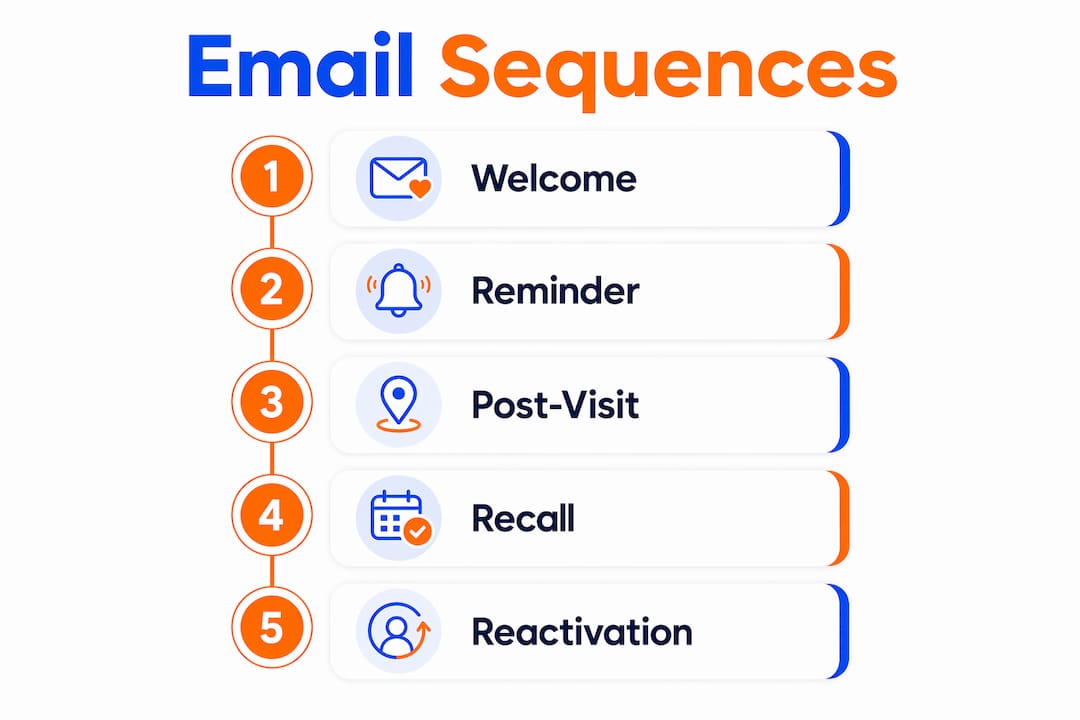
4. Recall emails
Recall emails bring patients back for their six-month cleanings and annual exams. The Journal of the American Dental Association reports that automated recall systems increase active-patient retention by 8–12% over manual recall processes. Manual recall relies on staff remembering to call. Automated recall fires the moment a patient’s next appointment window opens, every time, without exception.
5. Reactivation campaigns
Lapsed patients represent the fastest path to revenue recovery. Personalized reactivation campaigns recover 22–28% of lapsed patients within 90 days, compared to less than 8% recovery from generic mass emails. The difference is personalization: referencing the patient’s last visit date, their provider’s name, and a specific reason to return converts far better than a generic “We miss you” blast.
Pro Tip: Set your reactivation trigger at 13 months of inactivity. Patients who miss one recall cycle are still recoverable. Patients who miss two are significantly harder to win back.
How to integrate email marketing with your dental practice management system for automation
Automation only works when your email platform receives live patient data. The three most common integration patterns each carry real trade-offs.
| Integration method | How it works | Best for |
|---|---|---|
| Native integration | PMS and email platform connect directly via API | Practices using supported PMS platforms |
| Middleware connector | A third-party tool bridges PMS and email platform in real time | Most dental practices needing flexibility |
| CSV export and import | Staff manually exports patient data on a schedule | Very small practices with limited budget |
The most effective automation for reducing front desk labor is middleware that connects your practice management system directly to your email platform, triggering messages in real time without manual steps. Platforms like Dentrix, Eaglesoft, and Open Dental each support middleware connections through third-party tools. This means when a patient books, cancels, or completes a visit, the email sequence fires automatically within minutes.
The CSV approach is the most common starting point for smaller practices, but it creates a dangerous lag. If a patient cancels an appointment and the CSV hasn’t been updated, they still receive a reminder. That erodes trust fast. Middleware eliminates that problem entirely by pulling live appointment status on every trigger.
The most common integration challenge is data hygiene. Patient email addresses in older PMS databases are often outdated or formatted incorrectly. Before connecting any platform, run a data audit: remove duplicates, correct formatting errors, and flag patients with no email on file. A clean list of 800 active patients outperforms a messy list of 3,000 every time.
Pro Tip: Ask your PMS vendor for a list of certified middleware partners before purchasing any email automation tool. Certified partners have pre-built connectors that cut setup time from weeks to days.
How to segment your dental patient email list for targeted communications
Segmentation is the single biggest lever for improving email relevance. A patient in active orthodontic treatment has completely different needs than a patient who hasn’t visited in two years. Sending the same email to both wastes your budget and trains patients to ignore your messages.
The most productive segments for a dental practice are:
- Active treatment patients: Patients currently in orthodontics, implant therapy, or whitening programs. These patients respond well to treatment milestone emails and care instruction reminders.
- Lapsed patients (13+ months inactive): This group needs reactivation sequences, not recall emails. The messaging should acknowledge the gap and make rebooking frictionless.
- Families with children: Pediatric appointment reminders, back-to-school checkup campaigns, and sealant education emails perform well with this segment.
- Cosmetic interest patients: Patients who have inquired about veneers, whitening, or Invisalign but haven’t booked. A nurture sequence with before-and-after case studies moves these patients toward a consultation.
- Insurance-driven patients: Patients with benefits that reset in january or december respond strongly to “use your benefits before they expire” campaigns sent in november.
Segmentation also reduces unsubscribes. When patients receive emails that match their actual situation, they read them. When they receive irrelevant messages, they opt out. A well-segmented list maintains higher engagement over time and gives you cleaner data for refining future campaigns. For a deeper look at patient retention strategies, remarketing complements email segmentation effectively.
What are best practices and common mistakes in dental email campaigns?
The right cadence prevents the most common failure in dental email marketing: over-communication. Over-communicating beyond recommended email cadence is the top cause of patients unsubscribing from healthcare email campaigns. Once a patient unsubscribes, you lose that channel permanently.
The tested cadence that minimizes opt-outs:
- Recall sequences: 4 emails spread over 4 months
- Reactivation sequences: 3 emails over 2 weeks
- Post-visit follow-up: 2 emails within 72 hours
Subject lines drive open rates more than any other single variable. The highest-performing subject lines for dental practices are specific and personal. “Your cleaning is due, Sarah” outperforms “Time for your checkup” by a wide margin. Including the patient’s first name, their provider’s name, or a reference to their last visit date all lift open rates meaningfully.
Patient consent is non-negotiable. HIPAA does not prohibit email marketing, but it does require that you handle patient information carefully. Collect explicit opt-in consent at intake, document it in your PMS, and honor every unsubscribe request immediately. Practices that treat consent as a checkbox rather than a commitment face both legal and reputational risk.
Nurture sequences for unbooked treatment plans are the most underused tool in dental email marketing. When a patient accepts a treatment plan but doesn’t schedule, a three-email sequence sent over 10 days, referencing the specific treatment and its health implications, recovers a significant portion of those bookings without a single phone call.
Pro Tip: Test two subject lines on every major campaign by splitting your list 50/50. After 100 sends, the winner is clear. Apply that learning to your next campaign and your open rates will compound over time.
For a broader set of email campaign tactics that apply directly to small practices, Ibrand’s guide covers the fundamentals in plain language.
Key Takeaways
Automated, segmented email sequences are the most cost-effective system a dental practice can use to reduce no-shows, recover lapsed patients, and grow active retention without adding staff.
| Point | Details |
|---|---|
| Five core sequences | Welcome, reminder, post-visit, recall, and reactivation emails cover every stage of the patient relationship. |
| Automation requires clean data | Connect your PMS via middleware and audit patient emails before launching any sequence. |
| Segmentation lifts relevance | Divide your list by treatment status, visit history, and demographics to cut unsubscribes and improve engagement. |
| Cadence prevents opt-outs | Stick to tested frequencies: 4 recall emails over 4 months, 3 reactivation emails over 2 weeks. |
| Personalization drives recovery | Personalized reactivation emails recover up to 28% of lapsed patients versus under 8% for generic blasts. |
Why most dental practices are leaving email money on the table
Most dental practices I work with have some form of email communication in place. What they rarely have is a system. There is a meaningful difference between sending appointment reminders and running a structured email program that works while your front desk handles check-ins.
The practices that gain the most from email automation are not the ones with the biggest budgets. They are the ones that start with one sequence, measure it for 60 days, and then add the next. A welcome series alone, properly set up, can recover its setup cost in the first week by preventing even two no-shows.
The integration step is where most practices stall. Connecting Dentrix or Open Dental to an email platform feels technical, and it is, but only the first time. Once middleware is running, the system is nearly self-managing. The front desk stops making reminder calls. The practice owner stops worrying about recall. The emails just go.
The competitive advantage here is real and time-limited. Practices in most markets that adopt structured dental email campaigns now will have 12–24 months of list data, tested subject lines, and refined sequences before their competitors start. That head start compounds. Analytics tell you which emails patients open, which links they click, and which sequences convert. Every month of data makes the next campaign better.
Start with the welcome series and the appointment reminder. Get those right. Then build the recall sequence. Do not try to launch all five sequences at once. The practices that do usually end up with a half-built system that nobody maintains.
— TONY
How Ibrand can support your practice’s digital growth
Email marketing works best when it sits inside a broader digital presence that patients can find and trust. A well-run email sequence drives patients back to your website, your Google profile, and your social channels. If those assets are not working, the email effort carries more weight than it should.
Ibrand works with small and medium-sized practices to build the full digital foundation: SEO, local search visibility, web design, and performance tracking. If you want patients to find you before they even join your list, local SEO for small businesses is the logical next step. Ibrand’s team builds personalized plans that fit practice budgets and deliver measurable results. Getting started takes one conversation.
FAQ
What is the best email frequency for dental patient recall?
The tested sweet spot is 4 emails spread over 4 months. This cadence maintains visibility without triggering unsubscribes.
How much does a missed dental appointment actually cost?
Each missed appointment costs a practice between $200 and $450 in lost chair time. Automated reminders reduce no-shows by up to 30%.
Do I need special software to automate dental emails?
You need an email platform that connects to your practice management system, either natively or through a middleware tool. Dentrix, Eaglesoft, and Open Dental all support third-party middleware connections.
Is email marketing for dental offices HIPAA-compliant?
Email marketing is HIPAA-compliant when you collect explicit patient consent, avoid including protected health information in email bodies, and honor all unsubscribe requests immediately.
How quickly should I send a post-visit review request?
Send the first email within 90 minutes of appointment completion. Patients asked for a review within 48 hours leave one at a 76% rate, compared to 22% when contacted after a week.
Recent Comments