
Conversion tracking is the practice of recording specific, high-value actions users take after clicking your ad or visiting your site, such as a purchase, a form submission, or a phone call. It tells you which marketing dollars produced real business outcomes, not just traffic. Your first move: pick one primary conversion to measure before you touch another campaign setting.
The most common primary conversions for SMBs are:
- E-commerce purchase — a completed transaction with a dollar value
- Lead form submission — a quote request, contact form, or demo signup
- Phone call — a call from an ad or a click-to-call button on your site
Without that data, you are optimizing for clicks. Clicks pay nobody’s rent.
Table of Contents
- Why conversion tracking matters for your ad spend
- Which actions should you actually track?
- How conversion tracking actually captures an action
- The tools you’ll use: Google Ads, GA4, and GTM
- How to set up conversion tracking step by step
- Common problems and how to fix them
- Privacy, consent, and staying compliant in the U.S.
- Can you run ads without conversion tracking?
- What SMBs should prioritize and when to hire help
- Key Takeaways
- The part most SMBs get wrong about conversion tracking
- Ibrand’s conversion tracking setup service for SMBs
- Useful sources for implementation
- FAQ
Why conversion tracking matters for your ad spend
Conversion tracking connects marketing spend directly to business outcomes and unlocks automated bidding strategies like Target CPA and Target ROAS. Those bidding modes require conversion data to function. Without it, Google Ads has no signal to learn from, so it optimizes for clicks instead of customers.

The practical consequence is real money lost. Ad algorithms need conversion signals to allocate budget toward users most likely to buy. Feed them clicks, and they find you more clickers. Feed them purchases, and they find you more buyers. Google Analytics 4 (GA4) works the same way: conversion events you mark in GA4 feed into audience segments, attribution reports, and campaign performance views. Both platforms become dramatically more useful the moment you give them a meaningful conversion to chase.
Tracking also changes how you interpret results. A campaign with a 5% click-through rate and zero tracked conversions tells you nothing about whether it’s working. One with a $42 cost per lead tells you exactly whether to scale or cut it. That’s the shift conversion tracking creates, and it’s why measuring digital campaign ROI starts here.
Which actions should you actually track?
Conversion tracking monitors the specific interactions that represent meaningful business outcomes. Not every click or pageview qualifies. The distinction that matters most is between primary (macro) conversions and micro conversions.
Primary conversions are revenue-linked actions: a completed purchase, a submitted quote request, a booked appointment. These drive your bidding and budget decisions. Micro conversions are earlier-funnel signals: a newsletter signup, a video play, a product page scroll. They’re useful for understanding behavior but should never be the sole conversion you optimize toward.
Priorities differ by business type:
- E-commerce store: primary = purchase; micro = add-to-cart, product view
- Local service business: primary = phone call or contact form; micro = directions click, hours page view
- SaaS or software: primary = free trial signup or demo request; micro = pricing page visit, feature video play
For counting method, the rule is straightforward. E-commerce uses “Every” because each purchase represents separate revenue. Lead generation uses “One” per user because a contact form submitted three times is still one lead, and counting it three times inflates your numbers and misleads your bidding.
Pro Tip: Rank your conversions by revenue impact before you build anything. If you set up micro conversions first and accidentally mark them as primary, your automated bidding will optimize for newsletter signups instead of sales. Document the hierarchy in a simple spreadsheet before touching any platform.
How conversion tracking actually captures an action
The basic flow is three steps: a user clicks your ad, an event fires on your site, and that event gets attributed back to the marketing touchpoint that drove it.
The most common data sources are:
- Client-side tags/pixels — JavaScript that runs in the user’s browser when a page loads or a button is clicked
- GA4 event tracking — event-based measurement that records specific interactions like form submissions or button clicks, rather than just page loads
- Server-side events — your server sends the conversion data directly to the ad platform, bypassing the browser entirely
- Offline imports — CRM data or call-center records uploaded into Google Ads to credit campaigns for conversions that happened off-site
GA4’s event-based model is a meaningful upgrade from the old page-load goal system. Instead of firing only when a user lands on a thank-you URL, it fires on the action itself, which means you can track interactions that never change the URL at all.
Attribution windows define how far back a platform looks when deciding which ad gets credit for a conversion. Windows commonly range from 7 to 90 days; a 30-day window means any click within the past 30 days can receive credit. Shorter windows favor recent touchpoints; longer ones capture slower-moving purchase decisions.
Last-click attribution gives 100% of the credit to the final ad a user clicked before converting. Data-driven attribution distributes credit across all touchpoints based on their actual contribution to the conversion path. For most SMBs, data-driven is the better default once you have enough conversion volume to support it.
The tools you’ll use: Google Ads, GA4, and GTM
The three tools SMBs encounter most are Google Ads conversions, Google Analytics 4, and Google Tag Manager. Each plays a distinct role.

Google Ads conversions track actions that happen after an ad click. You define the conversion action inside Google Ads, implement the tag, and the platform uses that data for bidding and reporting.
GA4 tracks behavior across your entire site, not just paid traffic. You mark specific events as conversions inside GA4, and those can be imported into Google Ads. This is the recommended path for most SMBs because GA4 gives you a fuller picture of the customer journey.
Google Tag Manager (GTM) is the container that deploys your tags without requiring a developer for every change. You install GTM once, then manage all your tracking scripts through its interface. For SMBs without dedicated developers, GTM is the practical answer to “how do I add a tracking tag?”
Server-side tracking improves reliability when client-side JavaScript is blocked by browsers or ad blockers. It’s more complex to set up but worth it for purchase confirmations and high-value lead flows.
| Method | Pros | Cons | SMB Fit |
|---|---|---|---|
| Client-side (GTM/GTag) | Easy to set up, widely supported | Blocked by ad blockers, browser restrictions | Good starting point for most SMBs |
| Server-side | Reliable, privacy-resilient, accurate | Requires server infrastructure, more complex | Best for e-commerce or high-value leads |
| Hybrid (both) | Redundancy, better data capture | Higher maintenance | Ideal once client-side is proven |
| GA4 event import | Full-funnel view, free | Requires linking to Google Ads | Recommended for all SMBs |
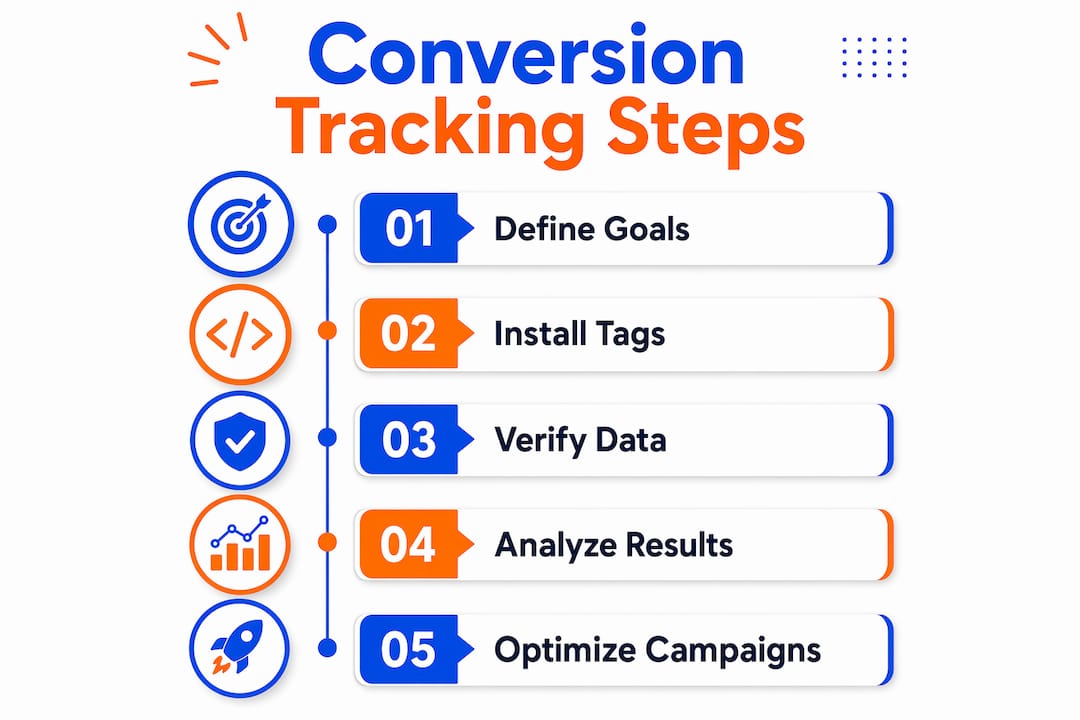
How to set up conversion tracking step by step
The goal is a measured conversion that’s visible in both your analytics account and your ad platform before you spend another dollar on campaigns.
- Pick and document your primary conversion. Write down the action, its value (exact dollar amount or estimated average), and the counting method (Every or One).
- Install Google Tag Manager on every page of your site if it isn’t already there. This is your deployment layer.
- Configure the conversion event in GA4. Use GTM to fire the event on the correct trigger (form submit, purchase confirmation, button click). Mark it as a conversion inside GA4.
- Link GA4 to Google Ads and import the conversion. This is done inside Google Ads under Tools > Conversions > Import.
- Set your counting method and attribution window inside the conversion settings. Match the window to your typical sales cycle.
- Assign a conversion value. Even an estimated average order value is better than zero; it lets you calculate ROAS.
- Test before going live. Submit a real test form, complete a test purchase, or use a test event. Verify the event fires once and appears in both GA4 DebugView and Google Ads.
Pro Tip: GA4 DebugView and Google’s Tag Assistant are your two fastest verification tools. DebugView shows events in real time as you browse your own site. Tag Assistant confirms your GTM container is loading and your tags are firing correctly. Use both before you declare the setup done.
A practical setup and verification checklist should always include manual testing on both desktop and mobile, since mobile browsers handle JavaScript differently and a tag that works on Chrome desktop can silently fail on Safari iOS.
Common problems and how to fix them
Trust your data before you make budget decisions. An unverified setup can show zero conversions when sales are happening, or double-count every lead and make a mediocre campaign look like a winner.
Common issues and their causes:
- No conversions recorded: tag not firing, wrong trigger condition, or the GA4-to-Google Ads import isn’t active
- Double-counting: the conversion tag fires on both the GTM trigger and a hardcoded GTag on the page simultaneously
- Delayed import: GA4 conversions can take 24–72 hours to appear in Google Ads after linking
- Cross-domain tracking breaks: users moving between your main site and a third-party checkout lose their session, and the conversion doesn’t get attributed
- UTM parameters stripped: redirects or URL shorteners remove UTM tags before the landing page loads, breaking campaign attribution
Before touching any campaign budget, confirm that a single user action triggers exactly one event, that the event appears in GA4 DebugView, and that it shows up in the Google Ads conversion report within the expected window.
For diagnosis, use GA4 DebugView for real-time event validation, Tag Assistant for container and tag firing confirmation, and your browser’s developer console (Network tab) to verify the GTag or GTM request is actually sending. Server-side setups add server logs as a fourth verification layer.
Privacy, consent, and staying compliant in the U.S.
Privacy changes make first-party, consented data the only reliable foundation for conversion measurement going forward. Client-side tracking that depends on third-party cookies is losing ground to browser restrictions and ad blockers.
Enhanced conversions and hashed first-party data let Google model conversions when consent is limited, improving accuracy without requiring you to send raw personal data. The platform hashes the data before it leaves your site.
Practical compliance steps for U.S.-based SMBs:
- Disclose tracking in your privacy policy, naming the platforms you use (Google Ads, GA4)
- Implement a cookie-consent banner if you serve California users (CCPA applies to businesses meeting certain thresholds)
- Use Google Consent Mode so tags adjust their behavior based on user consent status rather than firing unconditionally
- Store minimal personally identifiable information and hash email addresses before sending them as conversion signals
Pro Tip: Server-side conversion events are the most privacy-resilient setup available to SMBs right now. You control what data leaves your server, you can hash PII before it’s transmitted, and you’re not dependent on a browser allowing a third-party script to run. Document your consent flow alongside your tag setup so you have a clear record if questions arise.
| Approach | Privacy Resilience | Complexity | Recommended For |
|---|---|---|---|
| Client-side only | Lower (browser-dependent) | Low | Early-stage, low-risk setups |
| Consent Mode + client-side | Medium | Low-medium | Most U.S. SMBs as a baseline |
| Server-side + hashed data | High | Medium-high | E-commerce, high-value leads, CCPA-sensitive |
Can you run ads without conversion tracking?
Yes, but only if your goal is pure brand awareness with no expectation of measurable return. For anything else, running ads without conversion tracking means you cannot see which ads produce real results and cannot use automated bidding effectively.
The specific risks:
- Wasted spend: no way to identify which campaigns, ad groups, or keywords are generating customers vs. just traffic
- Broken automated bidding: Target CPA and Target ROAS require conversion data; without it, Smart Bidding defaults to maximizing clicks, which is rarely what you want
- Blind budget decisions: scaling a campaign that looks good on clicks but converts at zero is one of the fastest ways to burn through a monthly budget
The minimum viable setup is one primary conversion tracked and visible in your ad account. Even a single, well-configured conversion action gives the algorithm something real to optimize toward and gives you a number to evaluate against spend. That’s the floor, not the ceiling.
What SMBs should prioritize and when to hire help
The one-line prescription: track one revenue-linked conversion accurately before you track ten things loosely.
- Quick wins (do this week): Install GA4 and GTM, mark your primary conversion event, link GA4 to Google Ads, and verify with DebugView.
- Medium effort (do this month): Add server-side conversion tracking for purchases or high-value lead forms. Set conversion values. Configure Consent Mode.
- Longer term: Build cross-channel attribution by importing offline conversions (CRM data, phone calls) into Google Ads. Use automated bidding features once you have 30+ conversions per month to support the algorithm.
When to hire an agency: if your checkout flow spans multiple domains, if your privacy/consent requirements are complex, or if your internal team doesn’t have the bandwidth to test and maintain tags alongside running campaigns. Ibrand handles GA4 setup, GTM configuration, server-side conversion events, Google Ads linking, and campaign onboarding for SMBs. The deliverable is a tested, verified setup with documented conversion logic, not just a tag dropped on a page.
Pro Tip: Before hiring anyone, ask for a conversion audit first. A good agency should be able to tell you within an hour whether your current setup is double-counting, missing conversions, or attributing incorrectly. That audit alone is worth the conversation.
Once tracking is live and accurate, the next step is using that data to increase website conversions through optimization, not just measurement.
Key Takeaways
Conversion tracking works when you define one revenue-linked goal, implement it reliably, test it thoroughly, and feed that data into your ad platform’s bidding before scaling spend.
| Point | Details |
|---|---|
| Start with one primary conversion | Pick a purchase, lead form, or phone call and track it accurately before adding micro conversions. |
| Counting method changes your data | Use “Every” for purchases and “One” for leads to avoid inflated metrics that mislead bidding. |
| Test before trusting | Verify events fire once in GA4 DebugView and Tag Assistant on both desktop and mobile. |
| Privacy requires consent-aware setup | Implement Consent Mode and hashed first-party data to stay compliant and preserve accuracy. |
| Ibrand handles the full setup | Ibrand configures GA4, GTM, server-side events, and Google Ads linking for SMBs who need a verified, tested implementation. |
The part most SMBs get wrong about conversion tracking
Most small businesses set up conversion tracking once and never look at it again. They install a tag, see numbers appear in Google Ads, and assume the data is correct. It usually isn’t.
The most common gap I see: businesses tracking micro conversions as primary goals. A newsletter signup marked as a primary conversion in Google Ads will train Smart Bidding to find newsletter subscribers, not buyers. The campaign looks like it’s performing. Revenue doesn’t move. Nobody connects the two until months of budget are gone.
The second gap is testing. Tags break. Site updates overwrite GTM containers. A developer pushes a new checkout flow and the purchase event stops firing. Without a regular verification habit, you can run blind for weeks without knowing it.
Conversion tracking isn’t a one-time setup task. It’s an ongoing measurement system that needs the same attention as your ad creative or your landing pages. The businesses that get the most from their ad spend treat it that way.
Ibrand’s conversion tracking setup service for SMBs
Getting conversion tracking right from the start saves months of bad data and wasted budget. Ibrand sets up the full measurement stack for SMBs: GA4 configuration, GTM container build, server-side conversion events for purchases and leads, Google Ads linking and import, and Consent Mode for privacy compliance.

Every setup includes a pre-launch audit of your existing tracking, a documented conversion logic map, and a test report confirming events fire correctly across desktop and mobile. You get a working, verified system, not a tag dropped on a page and a handshake. For SMBs ready to stop guessing which campaigns are working, this is the starting point. See how Ibrand approaches small business growth and get in touch to request your conversion audit.
Useful sources for implementation
The sources below are worth bookmarking before you start building.
- Google Ads conversion tracking overview — Start here if your primary goal is feeding conversion data into Google Ads campaigns and enabling automated bidding. Covers setup, counting methods, and attribution windows.
- Google Ads conversion tracking definition — The official definition of what qualifies as a conversion and how the tracking mechanism works at the platform level.
- Google Ads measurement and enhanced conversions — Read this when you’re ready to implement enhanced conversions and hashed first-party data for privacy-resilient measurement.
- Trackingplan: how conversion tracking works — A technical but readable breakdown of event-based tracking, server-side methods, and when each approach is appropriate.
- Srcbeam: how to track conversions on your website — Practical setup and testing checklist; open this one when you’re ready to implement and verify.
If you’re auditing an existing setup, start with the Srcbeam checklist and the Google Ads overview. If you’re building from scratch, the Trackingplan piece gives you the conceptual foundation before you touch any platform.
FAQ
What is the purpose of conversion tracking?
Conversion tracking connects your ad spend to real business outcomes like purchases, leads, and phone calls. It also enables automated bidding strategies in Google Ads, such as Target CPA and Target ROAS, which require conversion data to function.
What is conversion tracking in SEO?
In an SEO context, conversion tracking measures which organic search visits result in meaningful actions, such as form submissions or purchases. GA4 tracks these as conversion events, letting you evaluate which pages and keywords drive actual business results, not just traffic.
Do I need conversion tracking?
Yes, for any campaign with a measurable business goal. Without it, you cannot identify which ads generate customers, and automated bidding has no signal to optimize toward, which leads to wasted spend.
Can I run Google Ads without conversion tracking?
You can, but your campaigns will optimize for clicks rather than customers, and Smart Bidding strategies like Target CPA will not work. The minimum recommended setup is one primary conversion tracked and visible in your Google Ads account before scaling spend.
Recent Comments