
TL;DR:
- Most home-service searches occur on mobile, making fast, mobile-friendly websites crucial for lead conversion. Quick fixes like image compression, click-to-call buttons, and shorter forms can significantly boost local visibility within days. Prioritizing these changes improves user experience, search rankings, and revenue opportunities for contractors.
Mobile optimization directly increases calls, quote requests, and local visibility for home contractors. 61% of home service searches happen on mobile devices, and for emergency queries, that figure is about 78%. If your site loads slowly, buries your phone number, or breaks on a small screen, you are handing those leads to a competitor who fixed those problems last month.
Three things to check right now:
- Pull up your site on your phone and time how long it takes to load. Anything over three seconds is costing you leads.
- Tap your phone number. If it does not dial automatically, it is not a click-to-call link.
- Try filling out your contact form with one thumb. If it takes more than 30 seconds, shorten it.
Table of Contents
- Why mobile optimization is crucial for home contractors
- What your contractor mobile site must actually include
- How to prioritize and implement mobile fixes
- The research numbers that make the business case
- How long does mobile optimization take, and what does it cost?
- How to measure whether your mobile changes are working
- Common mobile mistakes contractors make — and a quick audit checklist
- What to do next: a 30/90/180-day action plan
- The real reason mobile-first pays off faster for home services
- Ibrand can handle your mobile audit and fixes
- Useful sources and tools for testing and further reading
- Key Takeaways
- FAQ
Why mobile optimization is crucial for home contractors
Home services run on urgency. A homeowner with a burst pipe, a dead furnace, or a roof leak is not sitting at a desktop comparison-shopping. They grab their phone, type “emergency plumber near me,” and call the first result that loads fast and shows a phone number. That moment is where mobile-first design either wins or loses the job.
Mobile-first indexing means Google uses the mobile version of your site to determine your rankings, not the desktop version. So even if your desktop site looks polished, a slow or broken mobile experience directly suppresses where you appear in local search results. For contractors competing in the Local Pack (the map and three-listing block at the top of Google results), mobile performance is not a secondary concern.
The behavioral pattern reinforces this. A homeowner searching on mobile is often standing in the affected room, phone in hand, ready to make a decision. Mobile-first design surfaces your phone number, service area, and a tap-to-call button at exactly that moment. A desktop-first site that requires pinching, zooming, or scrolling to find a contact option loses that person in under ten seconds.

Pro Tip: Set your Google Business Profile phone number to match your website’s click-to-call number exactly. Inconsistency between the two is a local SEO signal that can hurt your Local Pack ranking.
What your contractor mobile site must actually include
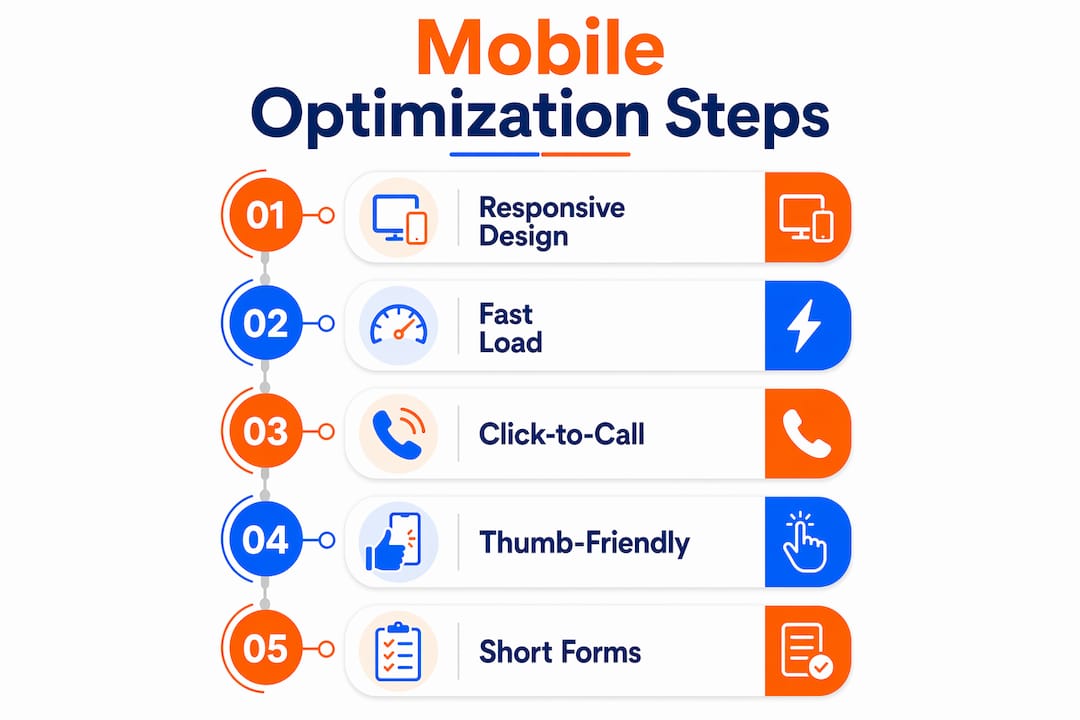
Responsive design is the starting point, not the finish line. A site that technically resizes for mobile can still fail if buttons are too small to tap, text is too small to read, or the contact form requires typing a paragraph on a glass keyboard. Here is what actually moves the needle.
Speed above everything
More than half of mobile users abandon sites that take longer than a few seconds to load. Many home-service sites load slowly on mobile, often taking significantly longer than the ideal few seconds. That gap is where most contractor leads disappear. Compress every image before uploading, remove plugins you are not actively using, and consider a content delivery network (CDN) if your hosting is slow. Aim to keep load times under around three seconds to avoid losing visitors.

Click-to-call as the primary CTA
Click-to-call buttons generate substantially more leads on mobile compared to contact forms. Your phone number should appear at the top of every page, styled as a large tappable button, not plain text. On mobile, plain text phone numbers do not dial automatically on all devices or browsers.
Thumb-friendly layout
The bottom third of a phone screen is where thumbs naturally rest. Place your primary call-to-action buttons there. Keep navigation to three or four items maximum. Buttons should be at least 44×44 pixels so they register a tap reliably without accidental misses.
Short, auto-fill-friendly forms
A quote request form with twelve fields kills conversions. Cut it to name, phone number, service type, and zip code. Enable browser auto-fill. Shortened, auto-fill-friendly forms are among the highest-ROI mobile changes for home services, and the difference between a five-field form and a twelve-field form can cut abandonment in half.
Visible service area and trust signals
A homeowner needs to confirm you serve their neighborhood before they call. Show your service area on the homepage, ideally with a small embedded map or a simple list of cities and zip codes. Pair it with three to five Google reviews displayed prominently. On mobile, a star rating and short quote load faster and convert better than a full testimonials page.
| Element | What to verify |
|---|---|
| Click-to-call | Phone number dials on tap from every page |
| Load time | Under 3 seconds on a 4G connection |
| Button size | At least 44×44 pixels, spaced apart |
| Form length | 4–5 fields maximum |
| Service area | Visible on homepage without scrolling |
| Reviews | At least 3 visible on mobile homepage |
How to prioritize and implement mobile fixes
Not every fix takes the same effort. Start with the changes that take under an hour and deliver the biggest lead impact, then work toward structural improvements.
-
Compress all images (30–60 minutes, DIY). Use a tool like Squoosh or ShortPixel to reduce image file sizes by 60–80% without visible quality loss. This single step often cuts load time by two to three seconds on contractor sites loaded with project photos.
-
Convert phone numbers to click-to-call links (15 minutes, DIY). Wrap every phone number in an
<a href="tel:+1XXXXXXXXXX">tag. In WordPress, a plugin like WP Call Button handles this without touching code. -
Remove unused plugins and scripts (30 minutes, DIY or developer). Each inactive plugin still loads code. Audit your WordPress plugins or ask your developer to audit third-party scripts. Removing five unused plugins can shave a full second off load time.
-
Shorten your contact form (20 minutes, DIY). Log into your form builder (Gravity Forms, WPForms, or similar) and delete every field that is not strictly necessary to qualify the lead.
-
Upgrade hosting or add a CDN (1–2 hours, developer recommended). Shared hosting plans common among small contractor sites often cap out at slow response times. Moving to a managed WordPress host or adding Cloudflare’s free CDN tier typically improves time-to-first-byte noticeably.
-
Run Google PageSpeed Insights (15 minutes, DIY). Go to pagespeed.web.dev, enter your URL, and run the mobile report. The tool flags specific issues with severity scores. Lighthouse (built into Chrome DevTools) gives the same data with more technical detail. GTmetrix adds waterfall charts that show which files are slowest.
-
Test on a real device (30 minutes, DIY). Real-device testing reveals tactile problems that browser emulators miss: buttons that are technically the right size but feel cramped, forms that trigger the wrong keyboard type, or maps that do not zoom correctly. Test on at least one Android and one iOS device.
Owner vs. developer split: Steps 1–4 are owner-level tasks in most website builders or WordPress setups. Steps 5–7 benefit from a developer or agency if you are not comfortable in a hosting dashboard. A lead generation website built with mobile conversion in mind from the start avoids most of these retrofits.
The research numbers that make the business case
The data on mobile behavior for home services is consistent across multiple studies. Here is what the numbers actually mean for your lead pipeline.
| Metric | Figure | What it means for you |
|---|---|---|
| Mobile share of home-service searches | 61% | Most of your potential customers are on phones right now |
| Emergency search mobile share | 78% | High-value urgent jobs come almost entirely from mobile |
| Abandonment at >3s load time | 53% | More than half your visitors leave before seeing your offer |
| Average home-service site load time | ~8+ seconds | Most contractor sites are already failing the 3-second test |
| Click-to-call vs. form lead lift | ~45% more leads | A single button change can lift monthly calls significantly |
| Target load time to avoid abandonment | 2.5–3 seconds | The performance bar you need to clear to stay competitive |
The 53% abandonment figure is the one most contractors find jarring. It means that if 100 people find your site through a Google search, 53 of them leave before your homepage finishes loading. At an average contractor job value of several hundred to several thousand dollars, that abandonment rate represents real, calculable revenue walking away.
Mobile responsiveness also affects how search engines evaluate your content and structure. A site that passes Google’s mobile usability checks gets a structural ranking advantage over one that does not, independent of content quality.
How long does mobile optimization take, and what does it cost?
Realistic timelines depend on how much work your site needs. Here is a practical breakdown.
| Task | Time to complete | Typical cost range |
|---|---|---|
| Image compression | 1–2 hours | — |
| Click-to-call setup | 30 minutes | — |
| Form shortening | 30–60 minutes | — |
| Plugin/script cleanup | 1–3 hours | — |
| Hosting upgrade or CDN | 1–2 days (migration) | $20–$80/month for better hosting |
| Full mobile-first redesign | 3–8 weeks | — |
Quick wins (image compression, click-to-call, form shortening) can go live in a single afternoon and often produce same-day engagement improvements. A full mobile-first redesign is a longer investment, but for contractors whose current site was built more than four years ago, it often pays back within two to three months through improved lead volume. Affordable marketing tips can help you sequence these investments without overcommitting budget upfront.
The DIY path works well for the quick fixes. For hosting changes, structured data markup, or a full redesign, an agency or developer saves time and avoids mistakes that can temporarily hurt rankings.
How to measure whether your mobile changes are working
Tracking the right numbers tells you whether your fixes are generating leads or just improving scores on a speed test. Set up these KPIs before you make changes so you have a baseline.
Primary KPIs to track:
- Mobile traffic share in Google Analytics 4 (GA4): segment by device type. You want to see mobile sessions growing as a percentage of total traffic.
- Mobile load time (LCP): Largest Contentful Paint, measured in Google Search Console under Core Web Vitals. Target under 2.5 seconds.
- Mobile bounce rate: in GA4, compare bounce rate for mobile vs. desktop. A mobile bounce rate more than 15 percentage points above desktop signals a UX problem.
- Click-to-call taps: set up a GA4 event on your click-to-call link or use a call-tracking platform like CallRail to count actual dials.
- Mobile form submissions: track as a GA4 conversion event. Compare weekly submission counts before and after each fix.
- Local Pack impressions and clicks: Google Search Console’s Performance report, filtered to “near me” and location-based queries, shows whether your local visibility is improving.
For tracking campaign performance, connect GA4 to Google Search Console via the property linking feature. This gives you a single dashboard showing organic clicks, impressions, and on-site behavior together. After quick fixes, expect to see bounce rate and load time improve within days. Local Pack visibility and lead volume typically respond over four to eight weeks as Google re-crawls and re-evaluates your mobile experience.
Common mobile mistakes contractors make — and a quick audit checklist
Most contractor sites fail mobile not because of complex technical problems but because of a handful of recurring, fixable issues.
-
Uncompressed project photos. A gallery of ten 4MB images adds 40MB to your page. Compress every image to under 200KB before uploading.
-
Phone number as plain text. Plain text numbers do not trigger the native dialer on all devices. Wrap every number in a tel: link.
-
Contact form with too many fields. Every additional field reduces completion rates. Keep it to four or five fields.
-
Navigation menu with eight or more items. On mobile, a crowded nav pushes content down and confuses visitors. Collapse to a hamburger menu with four items maximum.
-
Too many active plugins. Each plugin loads scripts. Audit quarterly and deactivate anything not actively used.
-
Slow shared hosting. If your server response time (TTFB) exceeds 600ms, no amount of image compression fully compensates. Consider upgrading.
-
Heavy third-party scripts. Live chat widgets, multiple analytics tags, and social media embeds each add load time. Load them asynchronously or remove the ones you do not monitor.
-
Obstructive popups. Google penalizes intrusive interstitials on mobile. A full-screen popup that appears immediately on a mobile visit can suppress rankings.
-
Non-functional embedded maps. Test your Google Maps embed on a real phone. Some embed codes break on mobile or load a blank frame.
-
No visible service area. If a visitor cannot tell within five seconds whether you serve their zip code, they leave. List your service cities in the footer and on the homepage.
Quick audit workflow: Run PageSpeed Insights on your homepage and your contact page. Check your Google Business Profile for a “mobile-friendly” signal. Pull up the site on an Android and an iOS device and try to call and submit a form. Check local lead generation best practices to confirm your Local Pack signals are aligned with your mobile experience.
What to do next: a 30/90/180-day action plan
A phased approach keeps the work manageable and lets you measure results at each stage before committing to larger investments.
30-day quick wins:
- Compress all images on your homepage and service pages
- Convert every phone number to a click-to-call link
- Shorten your main contact form to four or five fields
- Run PageSpeed Insights and fix the top three flagged issues
- Test the site on two real devices (Android and iOS)
90-day improvements:
- Upgrade hosting or add a CDN if TTFB exceeds 600ms
- Add structured data markup (LocalBusiness schema) to improve Local Pack eligibility
- Switch to a faster, mobile-optimized WordPress theme or template
- Set up GA4 conversion tracking for click-to-call and form submissions
- Review and deactivate unused plugins
180-day strategic moves:
- Commission a full mobile-first redesign if the site is more than four years old
- Run A/B tests on CTA button placement and form length
- Build a review-generation process to keep fresh ratings visible on mobile
- Set up monthly reporting on mobile traffic share, LCP, and lead volume
- Audit online visibility factors to ensure mobile improvements compound with broader local SEO gains
The real reason mobile-first pays off faster for home services
Most contractors who invest in mobile optimization expect the payoff to show up in rankings over several months. What actually happens is faster. Speed improvements and click-to-call additions often produce measurable engagement changes within days, because the fix is immediate: a visitor who previously bounced at a slow load now stays, and a phone number that previously required copy-pasting now dials in one tap.
The contractors who see the biggest gains are not the ones who did the most work. They are the ones who fixed the highest-friction points first: slow images, buried phone numbers, and long forms. Those three changes address the moments where leads were already arriving but converting at a fraction of their potential.
Mobile optimization for local businesses compounds over time because Google’s mobile-first indexing rewards consistent performance. A site that loads in 2.5 seconds, passes Core Web Vitals, and shows a clear service area earns better Local Pack placement, which drives more mobile traffic, which generates more calls. The cycle reinforces itself.
What most guides understate is how much of this is behavioral, not technical. A homeowner in a stressful moment does not think “this site has poor LCP.” They just feel friction and call someone else. Removing that friction is not a technical exercise. It is a sales decision.
Ibrand can handle your mobile audit and fixes
Contractors who want faster results without spending weeks in a hosting dashboard can hand the work to Ibrand. The agency runs a full mobile audit covering load time, click-to-call setup, form optimization, and Local Pack signals, then delivers a prioritized fix list with clear expected outcomes.

For contractors who want the work done rather than just diagnosed, Ibrand’s web and local SEO packages cover image compression, hosting recommendations, structured data markup, and mobile-first redesign when the site needs it. Pricing starts at accessible levels for small contractor businesses, and the agency’s local marketing guide gives a clear picture of what a full local visibility plan looks like alongside mobile work.
The next step is straightforward: request a mobile audit at ibrand.media and get a specific list of what to fix, in what order, with realistic cost and timeline estimates attached.
Useful sources and tools for testing and further reading
- Google PageSpeed Insights — Free tool that scores your mobile and desktop performance and lists specific issues to fix. Start here.
- GTmetrix — Adds waterfall charts to PageSpeed data, showing which files are slowest to load. Useful for diagnosing image and script problems.
- Google Search Console — Tracks Core Web Vitals (including LCP), mobile usability errors, and Local Pack impressions. Essential for ongoing monitoring.
- Squoosh — Google’s free browser-based image compression tool. No account needed; drag in an image and download a compressed version.
- Lighthouse — Built into Chrome DevTools; runs a full mobile performance, accessibility, and SEO audit directly in your browser.
- Mobile-First for Contractors: What It Really Means — The source for the key statistics cited in this article (61% mobile search share, 53% abandonment rate, click-to-call lift).
- How Mobile-First Websites Help Contractors Win More Local Clients — Practical guidance on local conversion signals and load time targets.
- Mobile Responsiveness and User Experience — Mailchimp’s overview of how mobile responsiveness affects search indexing and user behavior.
Key Takeaways
A mobile-optimized contractor site with fast load times, click-to-call buttons, and a visible service area converts more of the 61% of home-service searchers already on their phones.
| Point | Details |
|---|---|
| Mobile search dominates home services | 61% of home-service searches happen on mobile, and about 78% of emergency queries come from mobile devices. |
| Speed is the top conversion lever | 53% of mobile users abandon sites that load in over 3 seconds; target under 2.5–3 seconds. |
| Click-to-call outperforms forms | Click-to-call buttons generate roughly 45% more leads than contact forms on mobile. |
| Quick fixes deliver fast results | Image compression, click-to-call links, and shorter forms can go live in one afternoon. |
| Ibrand offers mobile audits and fixes | Ibrand runs mobile audits and delivers prioritized fix lists with cost and timeline estimates for contractors. |
FAQ
Why does mobile optimization matter for contractor SEO?
Google uses mobile-first indexing, meaning it ranks your site based on the mobile version. A slow or broken mobile experience directly suppresses your local search rankings, regardless of how good your desktop site looks.
How does a mobile-friendly site get contractors more leads?
Most home-service searches happen on phones, and click-to-call buttons generate roughly 45% more leads than contact forms on mobile. A site that loads fast and makes calling easy converts the same traffic into more actual calls.
What load time should a contractor site target on mobile?
Target under 2.5–3 seconds. 53% of mobile users abandon sites that exceed three seconds, and the average home-service site currently loads in over eight seconds.
What are the highest-ROI mobile fixes for a home contractor?
Image compression, converting phone numbers to click-to-call links, and shortening contact forms to four or five fields. These three changes address the most common friction points and can be completed in a single afternoon.
How does mobile optimization help with local SEO?
A mobile-optimized site with visible service area information, fast load times, and correct structured data markup improves your eligibility for the Google Local Pack. Local search behavior on mobile, particularly “near me” queries, rewards sites that load quickly and display location signals clearly.
Recent Comments