
A web form is HIPAA compliant when the whole path of the answers is protected: the form tool, your website host, the email or CRM that receives the data, and every script on the page. Each company that touches patient information must sign a business associate agreement (BAA), and the form must collect no more than it needs. A “HIPAA compliant” badge on a form builder covers one link in that chain. Your website build and your marketing tracking decide whether the rest holds. That is why we plan forms, site design and tracking together for the practices we work with.
This guide is for owners of dental practices, med spas and other health-related local businesses who want a contact or intake form on their site and want to know what is safe.
TL;DR
- HIPAA applies to your forms only if you are a covered entity (or a business associate) and the form collects protected health information (PHI). A form that asks for name, phone and “how can we help?” can still become PHI.
- Every vendor that creates, receives, stores or transmits PHI from the form needs a signed BAA: the form tool, host, email notifications, CRM and spam filtering.
- HTTPS alone is not compliance. You also need access controls, audit logs, encryption at rest and a risk analysis that covers the form.
- Ad pixels and analytics tags on pages with health forms are a major risk. Federal guidance says a privacy policy or cookie banner does not make those disclosures legal.
- Treat the form, the site and the tracking as one project, not a plugin you drop in.
Table of Contents
- Does your website form actually need to be HIPAA compliant?
- What makes a web form HIPAA compliant
- Where HIPAA forms go wrong in real small-business setups
- A common question: are Google Forms HIPAA compliant?
- How to add a compliant form to your site, step by step
- Rules that may change: the Security Rule update
- Perspective
- Work with a team that builds the whole site
- FAQ
- Sources
Does your website form actually need to be HIPAA compliant?
Not every business. HHS explains that the HIPAA Rules apply to covered entities and business associates. A health care provider counts as covered only if it transmits health information electronically in connection with certain standard transactions, such as billing insurance. An organization that is neither a covered entity nor a business associate does not have to comply.
In plain terms:
- A dental practice that bills insurance electronically is almost certainly covered. Its intake and appointment forms need protection.
- A med spa needs to check whether it conducts those standard electronic transactions. If it does, treat it as covered. If you are unsure, ask your healthcare attorney. That is the professional to see for this question.
- A plumber, HVAC company, contractor or banquet hall is not a health care provider. A normal contact form is not a HIPAA matter for you, though good security still protects your customers.
When you are covered, what matters next is what the form collects. HIPAA does not label a form compliant or not by itself. As HIPAAnswers explains, a contact form enters a regulated workflow when it collects identifiable health information or lets someone request care in a way that links them to your practice and reveals health context. A simple “name, email, preferred call time” form is lower risk. A free-text box that invites people to describe symptoms, a diagnosis or medications turns it into a PHI collector.
The Security Rule, the part of HIPAA that governs electronic data, applies to covered providers and their business associates. It requires administrative, physical and technical safeguards for electronic PHI, including access control, audit controls, integrity controls, authentication and transmission security.
What makes a web form HIPAA compliant
Think of the form as a pipe. Data enters on your page, travels, lands somewhere and often gets copied somewhere else. Compliance means every stage is covered.
1. A signed BAA with every vendor in the chain
A BAA is a written contract in which a vendor promises to protect PHI the way HIPAA requires. HHS states that a business associate must have a written agreement before it creates, receives, maintains or transmits electronic PHI. That agreement has to document satisfactory assurances, require Security Rule compliance, make subcontractors agree to the same, and require reporting of security incidents and breaches.
HHS cloud guidance applies the same logic to hosting and storage: a provider that handles electronic PHI for you may be used only if you have a HIPAA-compliant BAA with the cloud provider. HHS also expects you to understand the cloud setup well enough to run your own risk analysis.
A contact form usually involves more vendors than owners realize: the form platform, the website host, the email service that sends notifications, analytics tags, your CRM and a spam filter. HIPAAnswers notes that each one that handles PHI needs a BAA, and that if a provider will not sign one, you should not use that service to collect PHI.
2. Technical safeguards
The five technical safeguard standards in the HIPAA Security Rule are access control, audit controls, integrity, person or entity authentication and transmission security. In practice, a form setup should include:
- Encryption in transit: modern TLS on every page that loads the form.
- Encryption at rest: the stored submissions, and their backups, are encrypted.
- Role-based access: only staff who need submissions can open them.
- Audit logs: a record of who viewed, exported or deleted a submission.
- Minimum necessary collection: no field you do not need.
These controls are consistent with what compliance practitioners list for HIPAA forms, such as AccountableHQ’s overview of form requirements. Use the HHS pages above as the legal reference and treat vendor blogs as a checklist, not as the rulebook.
3. Everything on the page around the form
This is where many small-business websites fail, and it is a marketing problem as much as a legal one. Facebook pixels, Google tags and other trackers can send information about visitors to vendors who have not signed a BAA.
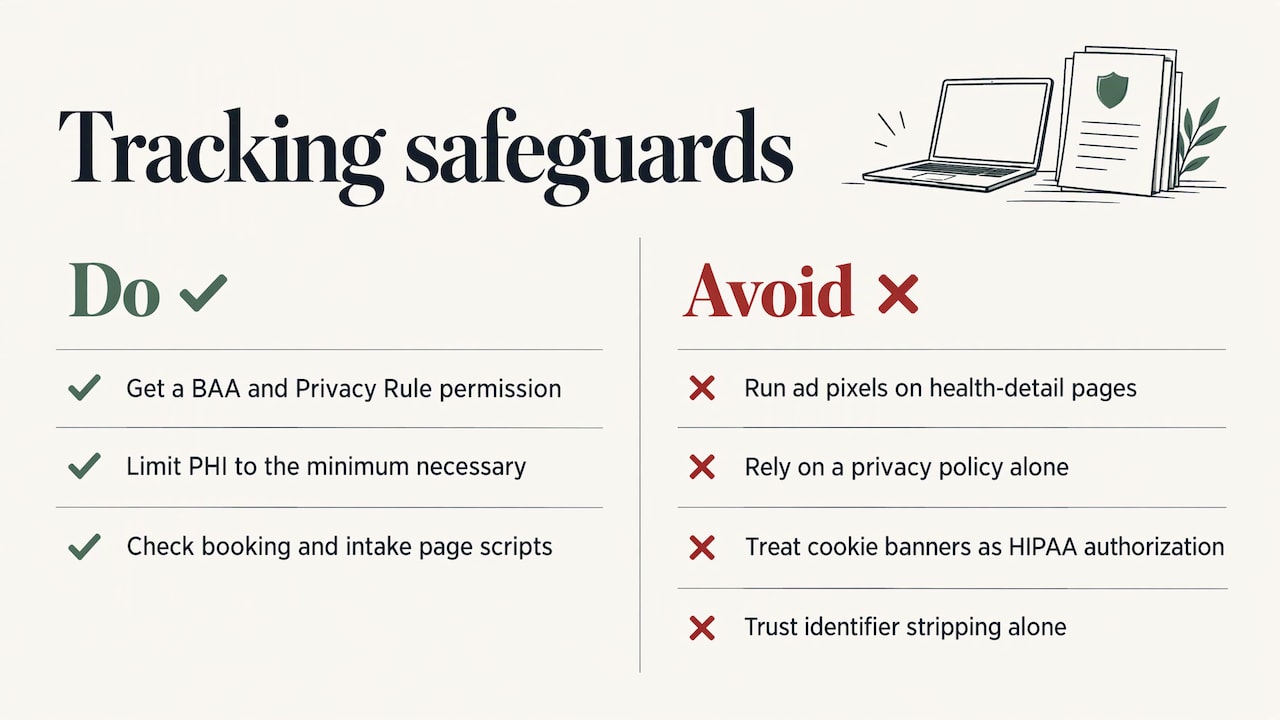
The HHS Office for Civil Rights (OCR) bulletin on online tracking technologies, updated March 18, 2024, is summarized in a law-firm comparison of its changes. Per that summary, regulated entities must make sure any PHI disclosed to tracking vendors is specifically permitted by the Privacy Rule and limited to the minimum necessary. A privacy policy alone does not permit the disclosure, and a cookie banner is not a valid HIPAA authorization. A vendor that merely strips identifiers before saving data is not enough either. Without patient authorization, you need a BAA and a Privacy Rule permission.
The practical rule: do not run advertising pixels on pages where patients enter health details, and know exactly which scripts load on your booking, intake and thank-you pages.
4. A risk analysis that includes the form
HIPAA expects a documented risk analysis. It should cover the form, its vendors and any tags on the page. Keep a simple inventory: which form, which host, where each submission is stored, who receives a notification and which scripts load. When something changes, such as a new plugin or a new email tool, update it.
Where HIPAA forms go wrong in real small-business setups
Most problems come from the connections, not the form itself.
- The notification email. A form stores data securely, then emails the full submission to an ordinary inbox. Caspio’s analysis points out that one non-compliant notification or automation path, such as a confirmation email or a workflow tool sending PHI to a service without a BAA, breaks the chain. A safer pattern is a notification that says a new submission is waiting, with no patient details, and a login to read it.
- Over-collecting. Asking for a date of birth, insurance details and symptoms on a first-contact form when a phone number would do. Collect the minimum necessary. Move detailed intake behind a secure link after the first contact.
- Forwarding to personal addresses or add-ons. Scripts and plugins that copy responses to a personal email or spreadsheet.
- Embedding on an insecure page. A form on an HTTP page, or on a page loaded with tracking scripts.
- Assuming HTTPS is enough. It protects data in transit only. It does not supply a BAA, control who views the data or log access.
A common question: are Google Forms HIPAA compliant?
Not by default. The HIPAA Journal explains that Google Forms can be used for PHI only if the organization has an appropriate Google Workspace or Cloud Identity package, signs Google’s business associate addendum, configures the service properly and trains its workforce. Personal accounts should not be used for PHI.
Google’s own HIPAA included functionality page states that, as of August 31, 2026, Google Drive, including Forms, is covered functionality under its addendum for covered customers. A signed agreement is only the start. You still have to control who can see responses, keep them out of open sharing links and manage where the answers flow next.
How to add a compliant form to your site, step by step
- Decide whether you are covered. If you are a dental practice or other provider billing electronically, assume yes and confirm with a healthcare attorney.
- Decide what the form is for. A general inquiry form, an appointment request and a full intake form carry different risk. Write down the fields each one needs, then cut anything else.
- Choose a form tool that signs a BAA. Get the signed document before launch. Do the same for the host, email provider and CRM that receive any submission.
- Map every copy of the data. Where does a submission land, who is notified, what is it synced to? Each copy needs a BAA and access controls.
- Clean the page. Remove ad pixels and analytics tags from pages where patients enter health information, or confirm each has a BAA and a legal basis. Use only the tracking you can defend.
- Use encryption and sensible access. TLS on the page, encrypted storage, unique logins and role-based access for staff.
- Write the form copy carefully. Tell people not to put medical details in free-text fields on a general contact form, and give them a phone number for urgent matters. Notices of privacy practices must also be posted on your website if you provide customer service or benefits information there. HHS says covered entities have had to add information about substance use disorder records to their notice since February 16, 2026.
- Document it and review it. Keep the BAAs, the data map and the risk analysis together. Review whenever you add a plugin, change vendors or redesign the site.
This is where the website and marketing team matters. Steps 5 and 7 live inside your site’s design and your analytics. If your marketer installs a tracker on a page that your compliance work assumed was clean, the form’s compliance does not matter. Our marketing compliance guide for dentists covers how to keep promotion and patient privacy from colliding, and our dental website must-haves show where forms fit in a patient-friendly site.
Rules that may change: the Security Rule update
In December 2024 OCR proposed changes to strengthen cybersecurity under the HIPAA Security Rule, as listed on HHS’s regulatory initiatives page. It is a proposal, not final law. Press coverage in July 2026 reported that the final action slipped toward July 2027, with proposed provisions such as mandatory encryption at rest and in transit and multi-factor authentication. The schedule can shift, so check HHS for the current status.
The practical takeaway: controls like encryption, multi-factor login and a clear inventory of your systems are good practice now. A form setup built that way will not need rebuilding if the rule becomes final.
Perspective
Practices usually ask us for “a HIPAA form,” as if it were one product. What they really need is a website where the form, the page it sits on and the marketing around it all agree with each other.
That is how we approach small and local business sites: a custom plan for each client, a mobile-friendly design patients can use on a phone, and tracking that is planned up front rather than bolted on later. For a practice that collects patient information, the plan starts with the question of which pages are allowed to carry which scripts.
Our real-time performance tracking exists to show you what brings in calls and bookings. For health-related pages, that same planning decides what is measured and where. A form that is secure but sits on a page full of ad trackers solves nothing, and a great campaign that sends patients to a risky form puts your practice in a bad position.
Build the form, the site and the measurement as one project, and compliance becomes part of how the site works instead of a patch.
TONY
Work with a team that builds the whole site
If you run a dental practice, med spa or another local practice and want a site where forms, design and tracking are planned together, IBrand Media builds websites and runs digital marketing for small and local businesses, including web design, SEO, local marketing and real-time stats, on a custom plan for each client.

Bring us your current form setup and the vendors behind it. We will plan the site and the tracking around them. Our guide to tracking digital marketing success shows how we think about measurement, and our analytics guide for med spas applies it to a health-related business.
FAQ
Which online forms can be HIPAA compliant?
Patient intake and registration forms, appointment requests, consent forms and billing or address updates can all be handled in a compliant way. What matters is the setup behind them: signed BAAs with every vendor that handles the data, encryption, access controls and audit logs. The form type itself is not what makes it compliant.
Does a contact form on my website need to be HIPAA compliant?
It does if you are a covered entity or business associate and the form collects or could receive PHI. A form that only gathers a name and phone number for a callback carries less risk, but a free-text box where people describe symptoms changes that. If your business is not a health care provider, such as a plumber or a banquet hall, HIPAA generally does not apply to your contact form.
Is HTTPS enough to make a form HIPAA compliant?
No. HTTPS encrypts data moving between the visitor and your site. It does not provide a business associate agreement, restrict who can read submissions or log who viewed them. You also need compliant storage, controlled notifications and a risk analysis that covers the form.
Can I use Google Forms for patient information?
Only on a paid Google Workspace or Cloud Identity account where you have accepted Google’s business associate addendum and configured the service for HIPAA. Personal Gmail accounts should not be used for PHI. Staff access and where responses are shared still need careful control.
Can I run Facebook or Google ad tracking on pages with health forms?
OCR’s tracking technology guidance says disclosures of PHI to tracking vendors must be permitted by the Privacy Rule, and a privacy policy or cookie banner does not make them permitted. The safest approach is to keep ad pixels off pages where patients enter health details, and to review every script on those pages.
Sources
- Covered Entities and Business Associates | HHS.gov
- Summary of the HIPAA Security Rule | HHS.gov
- Guidance on HIPAA & Cloud Computing | HHS.gov
- Model Notices of Privacy Practices | HHS.gov
- Regulatory Initiatives | HHS.gov
- OCR updated website tracking guidance comparison (March 18, 2024)
- Are Website Contact Forms HIPAA Compliant? | HIPAAnswers
- HIPAA-Compliant Web Forms: Requirements, Examples, and How to Build Them
- HIPAA-Compliant Online Forms for Healthcare Teams | Caspio
- Is Google Forms HIPAA Compliant? | HIPAA Journal
- HIPAA Included Functionality | Google Workspace
- HIPAA Security Rule Overhaul Slips to 2027 | HealthSystemCIO
Recent Comments