
Google Ads works for a dental practice when it is built around one thing: a nearby person searching for a dentist right now and finding a clear ad, a fast page and an easy way to book. Getting there takes tight local targeting, procedure-specific campaigns, a landing page that matches the ad, and a setup that respects Google’s healthcare rules and HIPAA. This guide walks through each step, shows where practices lose money, and explains where we take the work off your plate.
TL;DR
- Start with a small set of high-intent campaigns (emergency visits, implants, Invisalign, new patient exams) targeted tightly to the area your chairs can actually serve.
- You control spend with an average daily budget. Google can spend up to twice that on a busy day, but a month never exceeds the daily average times 30.4.
- Ads, keywords and landing page must say the same thing. Mismatch is the most common reason clicks never become appointment requests.
- Healthcare policy and HIPAA shape what you can say, show and collect. Build the compliance in before launch, not after a disapproval.
- Track calls and form submissions as conversions, then judge campaigns by booked patients, not clicks.
Table of Contents
- What Google Ads can do for a dental practice
- Set up the campaign: step by step
- Compliance: what dental ads can and cannot do
- Measure what matters
- Common mistakes that waste a dental ad budget
- Why a specialist makes sense
- How IBrand Media can help
- FAQ
- Sources
What Google Ads can do for a dental practice
Google Ads puts your practice in front of people at the moment they type something like “dentist near me” or “cracked tooth, same day.” That intent is the whole appeal. A patient who searches for an implant consultation is far closer to booking than someone who sees a social post.
Google offers formats that fit a brick-and-mortar practice. Its own industry guidance says Local campaigns are designed to bring business to physical healthcare locations, including dental specialty offices, and that Performance Max can run across YouTube, Display, Search, Discover, Gmail and Maps from one campaign. For most practices, though, the foundation is still Search: text ads that appear when a patient searches for a specific service in your area.
Every search triggers an auction. Google calculates Ad Rank to decide whether your ad is eligible and where it sits relative to other eligible ads. That ranking shifts with competition, the context of the search and the quality of your ad at that moment. In practice, a bigger bid does not guarantee the top spot. A relevant ad pointing to a relevant page often beats a lazy one with a higher bid.
Set up the campaign: step by step
Step 1: Pick the services worth paying for
A general dentist usually has a handful of services that justify paid clicks. Separate them by value and urgency:
- Urgent care: emergency dentist, toothache, broken or chipped tooth. Searchers book fast.
- High-value cases: dental implants, Invisalign, full-mouth restoration, veneers. Fewer searches, larger case value.
- Steady entry points: new patient exam, teeth whitening, family dentistry.
The mistake here is lumping everything into one campaign with one budget. Urgent searches eat the spend, and your implant ads never get a fair test. Give each group its own campaign so you can set budgets by what the service is worth to your practice.
This is also the step where a specialist earns the fee. At IBrand Media we build a custom plan for each client rather than a template, so the service mix reflects your chair capacity, your insurance mix and the procedures you want more of.
Step 2: Choose keywords that match how patients search
Google describes keywords as the way to match your ad to searches for terms related to your service. For a dental practice, that means thinking in three layers:
- Service plus place: “dental implants Tampa,” “emergency dentist near me.” These carry the clearest intent.
- Symptom searches: “wisdom tooth pain,” “lost filling.” These convert when the ad promises a prompt visit.
- Broad terms: “dentist” or “teeth cleaning.” These pull the most clicks and the most wasted spend.
Use phrase and exact match for the first two layers. Add negative keywords from day one: “jobs,” “school,” “free,” “cheap dentures DIY,” “salary,” “how to become a dentist.” Review the search terms report weekly during the first month, because it shows what people actually typed before clicking. Every irrelevant term you block is money returned to the terms that book patients.
Step 3: Target the area your practice can serve
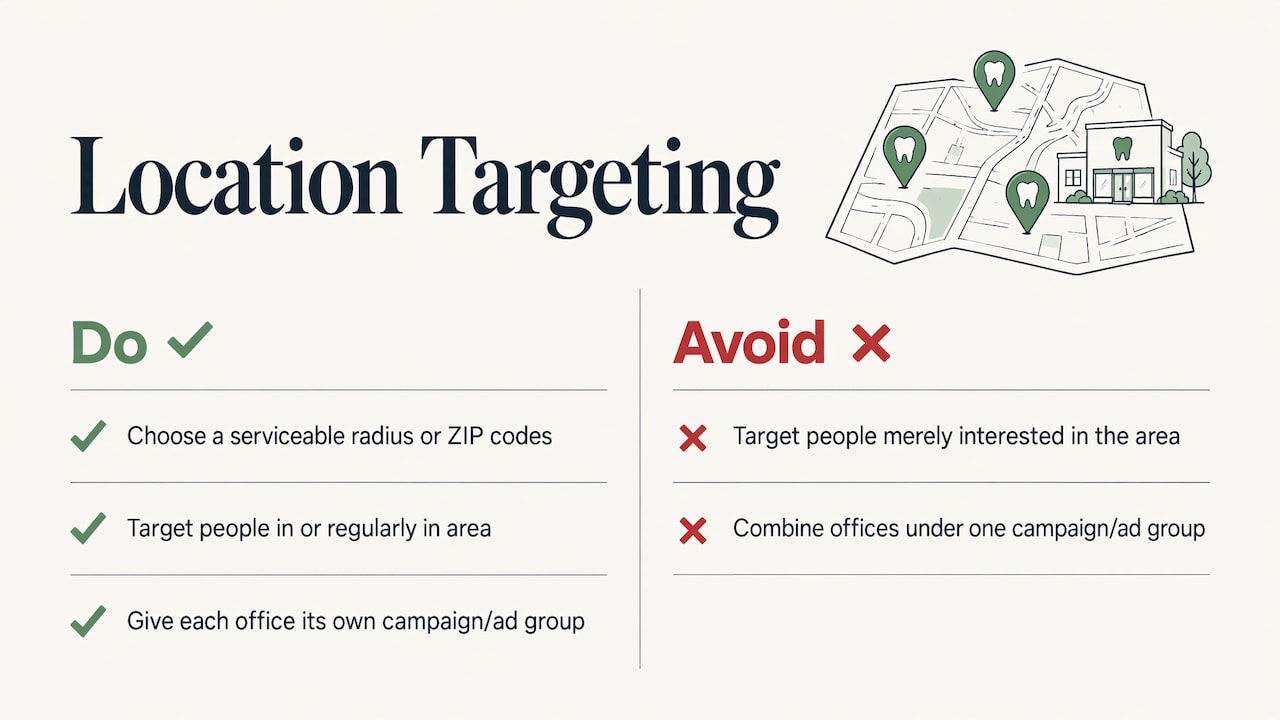
A dental ad shown 40 miles away is a wasted click. Set your location targeting to the radius or the ZIP codes your patients realistically travel from, and choose the option that targets people in or regularly in your area rather than people merely interested in it. If you have more than one office, give each its own campaign or ad group, with its own address and phone number.
Connect your Google Business Profile to the account so location details can show alongside the ad. Your Business Profile is also the free half of local visibility, which is why we pair paid campaigns with local marketing. If you want the organic side, our guide to SEO strategies for dentists covers it.
Step 4: Set a budget you can control
Google lets you set an average daily budget. On busy days it can spend up to twice that average, but over a month you will not be charged more than the daily average times 30.4. Two practical consequences:
- A $50 daily budget caps the month at $1,520, even when single days run higher.
- A budget too low for your market starves the campaign. If an implant click costs several dollars and you need a few dozen clicks to get one inquiry, a few dollars a day will not produce enough data to learn from.
Cost per click varies widely by city and procedure, and implants and cosmetic work tend to cost more than routine exams. Instead of copying a number from an industry roundup, work backward from your own economics: what is a new patient worth over a year, what share of inquiries book, and what can you pay to acquire one. That figure sets the budget.
A specialist helps here by starting narrow, spending where the search terms report shows real demand, and shifting budget weekly. When we run a campaign, our real-time performance tracking lets you see what the spend is doing without waiting for a monthly report.
Step 5: Write ads that say what the patient needs to hear
A responsive search ad takes up to 15 headlines and 4 descriptions, and Google mixes them. Give it strong material:
- Match the search. If the keyword is “emergency dentist,” a headline should say emergency dentist and, if true, same-day appointments.
- Name the location. A city or neighborhood in a headline signals relevance to the local searcher.
- Give one reason to call. New patient exam, accepting your insurance plans, evening hours, financing, or a free implant consultation, whichever is real.
- Add assets. Call, location and sitelink assets give the patient a way to reach you without hunting.
What to avoid is just as important, and it is where policy comes in.
Step 6: Build a landing page that matches the ad
The click is only half the job. Send ad traffic to a page built for that one service, not your homepage. A good dental landing page has:
- A headline that repeats the promise of the ad.
- A phone number you can tap on mobile, plus a short form (name, phone, preferred time).
- Dentist credentials, office address and a few real patient reviews.
- Insurance and financing information, which patients often search for before they book.
- Fast loading and a layout that works on a phone, since a large share of dental searches happen on mobile.
Our mobile-friendly dental website guidance covers the page basics in more detail. Web design is one of the services we offer, so the ad and the page can be built together rather than patched across vendors.
Step 7: Track the right conversions
Clicks are not patients. Before you spend a dollar, set up conversion tracking for:
- Calls from the ad and calls from the landing page.
- Form submissions.
- Online booking requests, if you offer them.
Then ask your front desk to log “how did you hear about us” on every new patient. Compare it with what the dashboard reports. The gap tells you whether calls are being counted, and whether the office is answering them. Unanswered calls are the quiet leak in many dental campaigns: the ad worked, the phone rang, nobody picked up.
Compliance: what dental ads can and cannot do
Dentistry is healthcare, so two sets of rules apply: Google’s advertising policies and, for patient information, HIPAA. This is not legal advice, and your compliance officer or healthcare attorney should review anything touching patient data.
Google’s healthcare ad rules
According to a compliance analysis of Google’s Healthcare and medicines policy (last updated March 2024), ads should avoid unrealistic treatment promises and guaranteed outcomes, before and after images are restricted in ads though allowed on landing pages, and ads should clearly identify the practice and licensed providers. In practice:
- Skip “guaranteed perfect smile” and “painless” style claims.
- Keep before and after galleries on the landing page, not in the ad.
- Show the practice name, location and provider credentials clearly.
If you also advertise dental insurance or discount plans, note that in the US, ads exclusively for dental, vision or travel health insurance are not restricted, while general health and medical insurance advertisers generally need Google certification.
HIPAA and your data
The same compliance analysis states that Google does not offer a business associate agreement for Google Ads, so protected health information should never reach the platform, and that remarketing built on health-related page visits creates exposure and should be severely limited or disabled. A separate guide on lead forms adds that Google’s standard lead form storage is not HIPAA-compliant, and recommends routing lead data straight to a HIPAA-compliant CRM, keeping it in Google’s systems for as short a time as possible.
Practical rules that follow:
- Keep forms to the minimum: name, phone, preferred time. Do not ask for symptoms, diagnoses or insurance details in a form tied to ad tracking.
- Do not pass form text or appointment details into analytics or ad platforms.
- Treat remarketing with care. Plain audiences built from general site visits are a different matter from lists built around specific treatment pages, and your compliance adviser should decide where the line sits for your practice.
- If you use automated callbacks or texting, consent and calling-hour rules under TCPA apply.
We have written a full walkthrough in our marketing compliance guide for dentists, and our piece on remarketing for dentists explains how to approach follow-up ads with those limits in mind.
Measure what matters
A monthly review should answer five questions:
| Question | Where to look | What a healthy answer looks like |
|---|---|---|
| Which searches triggered ads? | Search terms report | Mostly service and location terms, few irrelevant ones |
| How many calls and forms came in? | Conversion tracking | Steady count, tied to specific campaigns |
| How many became booked patients? | Front desk log or practice software | A clear share of inquiries booked |
| What does a new patient cost? | Spend divided by new patients | Below what a new patient is worth to you |
| Which procedures pay back? | Campaign-level cost and revenue | Budget moves toward the winners |
Judge a campaign on cost per booked patient, and over enough weeks to see a pattern. Judging on cost per click rewards cheap searches that never book.
Common mistakes that waste a dental ad budget
- One campaign for everything. Budget drifts to the cheapest, lowest-value clicks.
- No negative keywords. Job seekers and students use the same words as patients.
- Homepage as landing page. A visitor who clicked “emergency dentist” should not have to find the emergency page.
- Ignoring call handling. After-hours calls with no voicemail or callback lose the patient to the next ad.
- Set and forget. Ad Rank changes with competition, so campaigns need regular review.
- Collecting too much on forms. It slows conversion and creates a data-handling problem.
Why a specialist makes sense
Google Ads can be run in-house, but dental campaigns pack many moving parts into a small budget: keyword structure, location targeting, policy limits, a landing page, call tracking and weekly optimization. Each is manageable alone. Together they take hours a week that a practice owner rarely has between patients.
Our view
A dental practice does not need a bigger ad budget as much as a tighter plan. Most of the waste we want to prevent comes from three places: vague keywords, a landing page that does not match the ad, and no one checking the numbers. We build a custom plan for each client, price it transparently and show performance in real time, so the practice owner can see what the budget is doing.
Paid search works best next to the rest of your local presence: a solid Business Profile, a mobile-friendly site and reviews that back up the ad’s promise. That is why we treat Google Ads as one part of a local marketing plan, not a standalone gamble.
TONY
How IBrand Media can help
We offer advertising, local marketing, web design and real-time stats for small and local businesses, including dental practices. That means one team can set up the campaigns, build the landing page that matches them and show you the results as they come in. See how we approach PPC for dentists, or talk to us about a custom plan for your practice.
If you are weighing channels, our comparison of digital ads for dental practices and our list of affordable marketing strategies for dentists show how paid search fits with the rest.
FAQ
How much should a dentist spend on Google Ads?
Start from your own numbers: what a new patient is worth, what share of inquiries book, and what you can pay to acquire one. Then set an average daily budget. Google caps a month at your daily average times 30.4, so you always know the ceiling. Markets and procedures differ widely, so expect implants to need more than routine exams.
Are Google Ads worth it for a small dental practice?
They can be, because they reach people who are actively searching for a dentist in your area. The return depends on tight targeting, a matching landing page and a front desk that answers the phone. Track booked patients, not clicks, and adjust budget toward the services that pay back.
Can dentists use before and after photos in Google Ads?
According to a summary of Google’s healthcare policy, before and after images are restricted in ads but can appear on landing pages. Put your smile gallery on the landing page and keep the ad text focused on the service, the location and a clear next step.
Is Google Ads HIPAA compliant for dental practices?
Google does not provide a business associate agreement for Google Ads, so protected health information should stay out of the platform. Keep forms minimal, avoid sending appointment or symptom details into ad tracking, and limit health-based remarketing. Have your compliance adviser or healthcare attorney review your setup.
How long before Google Ads bring in patients?
Calls can start as soon as ads are approved and running. Meaningful conclusions take longer, since the search terms report and conversion data need weeks to show which keywords book patients. Plan for steady refinement in the first months rather than a one-time launch.
Sources
- Using Google Ads for online marketing, Google Ads Help
- Health insurance, Advertising Policies Help
- Dental implant Google Ads and healthcare policy compliance
- HIPAA and Google Ads lead forms compliance guide
Recent Comments