
To add testimonials to your website, collect specific quotes from real customers, get written permission to publish them, then place short ones next to the decisions visitors make (your phone number, quote form and prices) and give longer stories their own page. Do it with real customers only: since October 2024, a federal rule makes fake or misleading testimonials a legal problem, not just a trust problem. Below is the full routine, written for owners of local and service businesses, from asking for the quote to laying it out on a phone screen.
TL;DR
- Ask customers right after a clear win, and ask three or four specific questions instead of “Can you write us a testimonial?”
- Get written permission covering the name, photo, where the quote will appear and whether you may trim it.
- Put short quotes beside your contact form, booking button and pricing, plus a few on the homepage. Keep a dedicated page for longer stories and video.
- Never write, buy or reshape a testimonial, and never hide the bad ones in a way that misleads: the FTC consumer review rule covers all of it.
- Check the result on a phone first. Most local searches end there.
Table of Contents
- Why testimonials earn their space on the page
- Step 1: Collect testimonials that say something
- Step 2: Get permission before you publish
- Step 3: Know the federal rules before you publish
- Step 4: Choose and edit the quotes
- Step 5: Place testimonials where visitors decide
- Step 6: Pick a format that fits how much proof you have
- Showing Google reviews on your own site
- What good testimonial pages have in common
- Mistakes that cost you trust
- Let us build the proof into your site
- FAQ
- Sources
Why testimonials earn their space on the page
A stranger deciding whether to call a plumber, book a banquet hall or schedule a dental cleaning has your word and nothing else to go on. A testimonial replaces your claim with a customer’s. That is the whole job, and it is why it works best when it is specific: “Our AC was back on the same afternoon” does more than “Great service.”
If you want the wider case for social proof, we cover it in our guides on why small businesses use social proof and the role of testimonials in marketing. This article is the how-to: get them, clear them, place them.
Step 1: Collect testimonials that say something
Most owners stall here, not at the website. The routine that works is simple.
- Pick the moment. Ask when the customer has just seen the result: the repair is finished, the event went well, the treatment healed, the new patient left smiling. Waiting three months means asking someone who has forgotten the details.
- Ask everyone who had a good outcome, not only the customers you expect to gush. The quiet ones often write the most useful lines.
- Make it one tap. Send a short link by the channel the customer already uses with you, text or email. Every extra login or form field costs you replies.
- Ask specific questions. Three or four are enough:
- What was the problem before you called us?
- What happened when we worked together?
- What changed afterward (time saved, number of guests, a fixed problem)?
- Who would you recommend us to?
- Follow up once or twice. A polite reminder a few days later and another a week after that is plenty. Then stop.
For a venue owner, the best quote usually names the event type and the guest count. For an HVAC company, it names the season and how fast you showed up. For a med spa or dental office, it describes how the visit felt, since that is what a nervous first-time patient is worried about. Those details are what you are collecting.
If you do not have a way to ask at scale, that is a workflow problem we can help with. Our Review Gating Policy guide also explains how to ask for reviews without crossing Google and FTC lines.
Step 2: Get permission before you publish
A testimonial is a customer’s words and often their face. Get permission in writing (an email reply counts as a record) and make it cover:
- What you will publish: the quote, first name or full name, photo, job title or company.
- Where it may appear: your website, ads, social posts, email.
- Whether you can edit: trimming for length is fine, changing the meaning is not.
- A private option: some customers will say yes to an anonymous line such as “Homeowner in Tampa.” Offer it.
- How to withdraw: tell them to email you and you will take it down.
Send the customer the final formatted version before it goes live. It prevents surprises and often earns a better photo.
Keep the original submission stored next to the published version. If anyone ever asks where a quote came from, you can show them.
Step 3: Know the federal rules before you publish
The Federal Trade Commission’s rule on consumer reviews and testimonials, 16 CFR Part 465, took effect on October 21, 2024. In plain terms, for a small business:
- No fake testimonials. You may not create or buy reviews or testimonials that misrepresent whether the person exists, used your business or had the experience described. According to a law firm summary of the rule, that includes AI-generated ones.
- No paying for sentiment. You can thank customers for a testimonial, but under section 465.4 the reward cannot depend on the review being positive (or negative). Offer the same thank-you for any honest feedback, or none at all.
- No misleading curation. Under section 465.7, a review section cannot be presented as representing all the reviews you received if you withheld some because of a low rating or negative tone. The same summary notes you may still filter out content that is confidential, personal, discriminatory, or false and misleading, as long as you apply the criteria equally.
So choosing your best quotes for a “What customers say” strip is ordinary editing. Presenting a wall of five-star quotes as “all of our reviews” when you deleted the rest is the problem. Label curated sections as featured testimonials and you are on the right side of it.
This is general information, not legal advice. If you run ads that use testimonials in a regulated field such as healthcare, ask your attorney to review the wording.
Step 4: Choose and edit the quotes
You will usually have more material than space. Pick by these tests:
- Outcome beats adjective. Keep quotes that say what happened.
- Numbers beat vagueness. “Booked 40 more guests than last year” is stronger than “fantastic.”
- Match the objection. If prospects worry about price, feature the quote that says the price was fair. If they worry about mess, feature the one about a clean job site.
- Cover your customer types. A homeowner, a property manager and a commercial client each want to see someone like themselves.
Edit only for length and typos, and keep the meaning intact. Pull the strongest sentence as a headline, and keep the rest below it if you need context.
Step 5: Place testimonials where visitors decide
A testimonials page alone is rarely where a customer is convinced. Put proof at the point of hesitation:
| Where | What to show | Why there |
|---|---|---|
| Homepage, just below the top banner | A strip of three short quotes or a star rating with count | First doubt: “Are these people legit?” |
| Next to the contact or booking form | One quote about how easy or fast it was | Last hesitation before submitting |
| Service pages | A quote about that exact service | Visitors want proof for the job they need |
| Pricing or quote request page | A quote about fair price or no surprises | Cost is the main worry here |
| Dedicated testimonials page | Longer stories, photos, video | For people who want to dig in |
| Event or landing pages | Quotes from similar events or customers | Matches the visitor’s intent |
A quote beside your prices does the most good when the prices themselves are solid. If you are still working those out, this pricing strategy for service businesses is a useful companion.
For home service companies, the proof-on-every-service-page approach is covered in our guide to content for home service websites. For venues, see our notes on event landing pages. For the broader picture of turning visitors into inquiries, read our website conversion tips.
Step 6: Pick a format that fits how much proof you have
Match the layout to the amount of material:
- One strong quote: a large featured card with photo and name.
- Three to six quotes: a row of cards or a slider that visitors can control. Avoid auto-rotating sliders that move before anyone finishes reading.
- A dozen or more: a dedicated page with a grid layout, grouped by service or customer type.
- Video: useful for higher-ticket work like remodels, cosmetic treatments or weddings. A written quote can be skimmed in seconds, so mix a few video clips into a written-first page rather than relying only on video.
Each card should keep four things together: the quote, a real name (and photo if permitted), the context (service, city or business) and, where relevant, a star rating or the platform it came from. A quote with no name looks invented, even when it is real.
Make it work on a phone
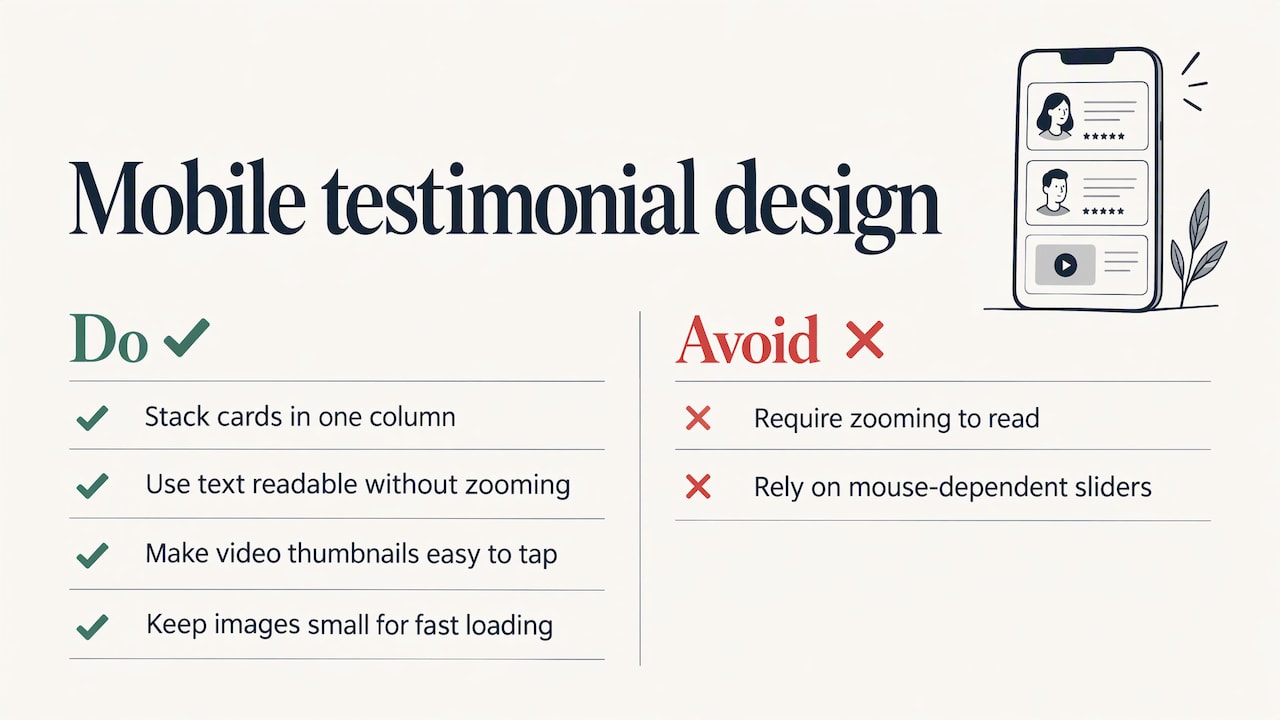
Most people searching for a plumber or a dentist are on mobile. Stack cards in a single column, keep text large enough to read without zooming, make video thumbnails easy to tap, and keep images small so the page loads fast. A slider that works with a mouse often misfires with a thumb. Our website design basics for local businesses and best website design practices go further on mobile layout.
Showing Google reviews on your own site
Many owners would rather display the reviews they already have on Google than collect new quotes. That is a legitimate approach, with a few ground rules:
- Show reviews from a Google Business Profile you own or manage.
- Keep each review intact: the author’s name, the star rating and the date.
- Do not edit the words, and do not quietly leave out the unflattering ones in a section that claims to show your reviews. That is the same curation line the FTC rule draws.
The technical route depends on your site. Website builders and WordPress usually offer a review widget or plugin, and Google provides interfaces for pulling in reviews. Some tools only display a handful of reviews, so check how many your setup will actually show. A single embedded block of Google reviews near the top of your homepage, plus one relevant quote on each service page, is a strong combination.
To get more reviews to show, make sure your profile is complete and active. Our local marketing guide for reaching customers online walks through that. If you list on Yelp too, read our Yelp review policy guide first, since asking for reviews there has its own rules.
What good testimonial pages have in common
When you study strong examples, the same features repeat:
- A headline that states the result, not “Testimonials.” Something like “What 300 Tampa homeowners say about our service.” Only use a number you can back up.
- Real photos, ideally of the customer or the finished job.
- Short cards in a two-column or grid layout, easy to scan.
- Mixed formats: several written quotes, two or three videos, one or two short case studies.
- A next step under the proof: a button to call, book or request a quote.
- Filters or groupings (by service, location or event type) once the page grows.
A before-and-after for a contractor, a gallery for a venue with a guest quote under each photo, a smile photo with a first-name quote for a dental office: each is just the same pattern in the language of that trade.
Mistakes that cost you trust
- Stock photos next to quotes. Visitors notice.
- Initials only, with no city or context.
- Quotes so polished they sound written by marketing.
- A testimonials page nobody links to. Link it from the main menu or footer, and surface the best lines elsewhere.
- Never updating. A page whose newest quote is three years old suggests the work stopped. Add a new one every month or two.
- Offering a discount only to customers who leave a glowing review. That is the practice the FTC rule bars.
We believe that a testimonial section is part of the sales conversation your site is already having, so it should be planned like one.
Local businesses often do the hard part, serving customers well, and then leave the proof buried on a page nobody visits. Our approach is to build a plan around each client’s business, so the proof sits near the call button, on the service page that matters, and loads cleanly on a phone.
It starts with asking at the right time and ends with a layout that is mobile-friendly. We think that is how a small business gets more from the customers it has already earned.
TONY
Let us build the proof into your site
If you would rather spend your time on customers than on page layouts, we can help. IBrand Media works with small and local businesses on web design, local marketing, content creation and reputation-focused work, with a custom plan for each client and mobile-friendly design.

Tell us what you sell and who you serve, and we will plan where the testimonials, reviews and calls to action belong. Start at ibrand.media.
FAQ
Where should testimonials go on a website?
Put short quotes at the moments of decision: below the homepage banner, next to your contact or booking form, on the matching service page and near your prices. Give longer stories and videos their own page and link to it from the menu.
Can you put fake testimonials on your website?
No. The FTC’s rule that took effect on October 21, 2024 prohibits fake reviews and testimonials, including ones from people who never used the business or had the experience described. Use only real customers and keep the original submissions on file.
Can I remove negative reviews and show only the good ones?
You can feature your best testimonials, if you label them as featured. What you cannot do is present a review section as showing all your reviews when you withheld some for being negative. Filtering content that is false, confidential or discriminatory is allowed if you apply the same criteria to everyone.
Do I need permission to use a customer’s name and photo?
Yes, get it in writing, and spell out the name, photo, title, where it will appear and whether you may trim it. Offering an anonymous option such as “Homeowner in Austin” keeps customers who prefer privacy on board.
Can I give customers a discount for leaving a testimonial?
Only if the reward does not depend on the content being positive. Under the FTC rule, an incentive tied to a particular sentiment is prohibited. Thank every honest responder the same way, or skip incentives.
Sources
- eCFR: 16 CFR Part 465, Rule on the Use of Consumer Reviews and Testimonials
- eCFR: 16 CFR Part 465, section 465.4 and table of contents
- Federal Register, final rule published August 22, 2024
- Summary of the FTC final rule on fake consumer reviews and testimonials
Recent Comments