
Small businesses are not flying under the radar when it comes to cybercrime. 43% of attacks target SMBs, yet most owners still assume hackers are only interested in large corporations. That assumption is exactly what makes smaller businesses such attractive targets. A single breach can cost you customer data, revenue, and the trust you have spent years building. This guide cuts through the noise and gives you clear, prioritized website security basics you can act on right now, even without a dedicated IT team.
Table of Contents
- Why website security matters for small businesses
- The essential building blocks: Core website security measures
- Frameworks and checklists: Applying structure to your security
- Real-world threats: Common website vulnerabilities facing small businesses
- A practical perspective: What really works for SMB website security
- Next steps: Strengthening your website’s foundation
- Frequently asked questions
Key Takeaways
| Point | Details |
|---|---|
| SMBs face real risks | Small businesses are prime targets for cyberattacks, making basic website security non-negotiable. |
| Security basics first | Focus on quick wins like HTTPS, strong passwords, MFA, updates, and regular backups to reduce most risks. |
| Frameworks simplify action | Using checklists like NIST CSF or OWASP helps make website security manageable, not overwhelming. |
| Consistency beats complexity | Simple and consistent security habits are more effective than complex but incomplete measures. |
Why website security matters for small businesses
Let’s get one myth out of the way immediately: being small does not make you invisible to attackers. In fact, 46% of breaches occur at organizations with fewer than 1,000 employees. Hackers actively seek out businesses with lighter defenses because they are faster and easier to compromise. Your website is often the first door they try.
Many business owners believe that because they do not store credit card numbers or medical records, they have nothing worth stealing. That is not how attackers think. Your customer email list, your login credentials, your payment processor access, and even your website’s server resources are all valuable. Attackers can use a compromised small business site to launch attacks on other targets, host malware, or steal customer data quietly over months.
The consequences go well beyond a technical headache. Consider what a breach actually costs:
- Downtime: Every hour your site is down, you lose sales and leads.
- Recovery costs: Cleaning up a hacked site can cost thousands in developer fees.
- Reputation damage: Customers who receive phishing emails from your domain will not come back.
- Regulatory risk: Depending on your industry, a data breach can trigger fines.
“Security is not a product, but a process.” The same applies to your website. It is not something you set up once and forget.
The good news is that website security importance is increasingly recognized, and the basic controls that block the majority of attacks are not expensive or complicated. The NIST CSF for SMBs confirms that businesses implementing structured security practices reduce their incident rates significantly. Reviewing your website security essentials is the single highest-return action you can take this quarter.
The cost of prevention is almost always lower than the cost of recovery. A few hours invested in the basics now can save you weeks of painful, expensive cleanup later.
The essential building blocks: Core website security measures
So what do “website security basics” actually mean in practice? They are not complicated tools or enterprise software. They are a set of consistent habits and configurations that close the doors attackers most commonly walk through.
Start with these non-negotiable controls:
- HTTPS: Your site must use an SSL/TLS certificate. 98.8% of web requests now use HTTPS, but many sites still skip advanced headers like HSTS (HTTP Strict Transport Security) and CSP (Content Security Policy), which add another layer of protection.
- Strong, unique passwords: Every account connected to your website, your hosting panel, your CMS, your plugins, needs a password that is long, random, and not reused anywhere else.
- Multi-factor authentication (MFA): MFA means requiring a second form of verification beyond a password. Even if a password is stolen, MFA stops the attacker cold.
- Software and plugin updates: Outdated software is the number one entry point for attackers. Every unpatched plugin is an open window.
- Regular backups: Follow the 3-2-1 rule: three copies of your data, on two different media types, with one stored offsite or in the cloud.
The SMB cybersecurity checklist recommends MFA everywhere, automatic updates and patching, 3-2-1 backups, quarterly phishing training, a risk assessment, and an incident response plan as the core framework for small business protection.
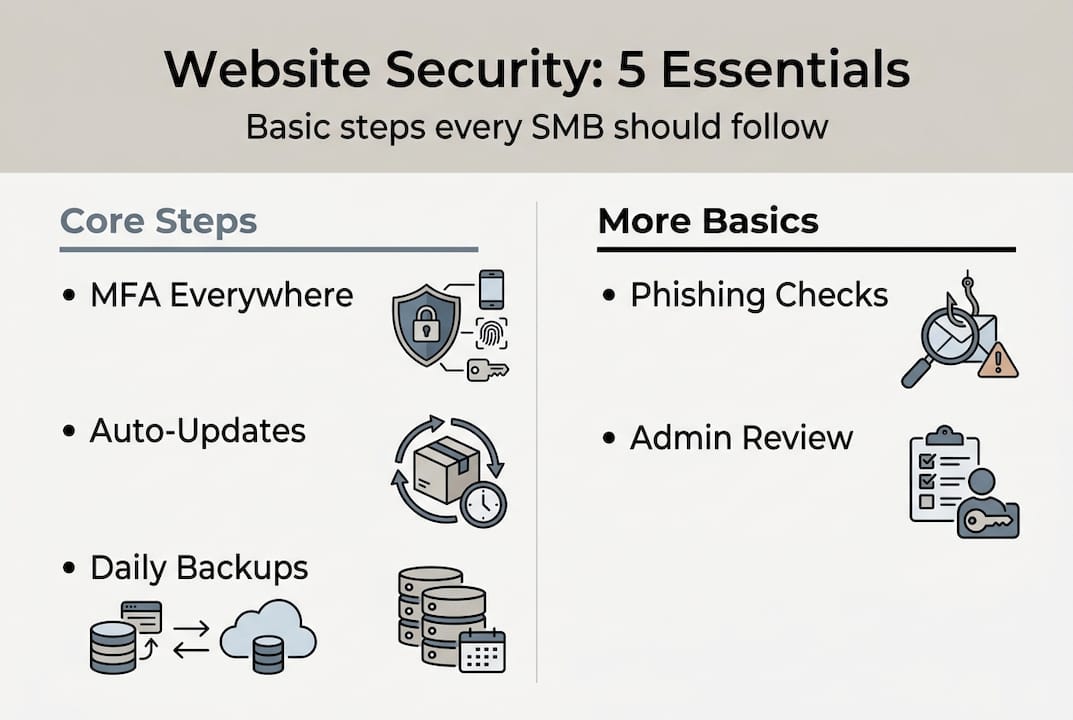
Automation is your best friend here. Set your CMS and plugins to auto-update. Schedule automated backups daily. Use a password manager so strong credentials become the default, not the exception. These are cybersecurity basics that require almost no ongoing effort once configured.

Pro Tip: Do not confuse compliance with real security. Passing a checkbox audit does not mean your site is protected. Real security means your controls are actually working and tested regularly. Review your website updates schedule and confirm it is actually running, not just planned.
The OWASP Top 10 is a globally recognized list of the most critical web application security risks. Familiarizing yourself with it helps you understand what your developers or hosting provider should be protecting against.
Frameworks and checklists: Applying structure to your security
Having a list of tasks is useful. Having a framework that organizes those tasks into a repeatable system is far more powerful. Two frameworks stand out for SMBs: the NIST Cybersecurity Framework (CSF) and the OWASP Top 10.
NIST CSF implementers reduce incidents measurably, and the framework is designed to scale from solo operators to large enterprises. It organizes security into six functions:
| NIST CSF function | What it means for your SMB |
|---|---|
| Govern | Define who is responsible for security decisions |
| Identify | Know what assets, data, and systems you have |
| Protect | Put controls in place: passwords, MFA, updates |
| Detect | Monitor for unusual activity or alerts |
| Respond | Have a plan for when something goes wrong |
| Recover | Restore operations quickly after an incident |
The OWASP Top 10 focuses specifically on web application risks. The top OWASP risks in 2025 include A01 Broken Access Control (users accessing data they should not), A02 Security Misconfiguration (default settings left unchanged), and A10 Mishandling Exceptional Conditions (errors that expose system details). These are not abstract threats. They show up in WordPress sites, e-commerce platforms, and custom web apps every day.
Here is a simple way to apply both frameworks without getting overwhelmed:
- Start with Identify: List every account, plugin, and system connected to your website.
- Move to Protect: Apply MFA, update everything, and enable HTTPS with security headers.
- Set up Detect: Enable login attempt alerts and uptime monitoring.
- Write a basic Respond plan: Even a one-page document covering who to call and what to do is enough.
- Test your Recover process: Restore a backup in a test environment at least once a year.
You do not need to do everything at once. Use the website security checklist as your starting point and add layers over time.
Real-world threats: Common website vulnerabilities facing small businesses
Frameworks tell you what to do. But what are you actually protecting against? Understanding the specific vulnerabilities that affect small business websites makes the abstract feel concrete and urgent.
Web applications cause 80% of security incidents and account for 60% of breaches. That means your website itself, not just your network, is a primary attack surface. Here are the vulnerabilities SMBs encounter most often:
- Broken access control: Users or attackers can reach pages, files, or admin panels they should not have access to. This is the number one issue on the OWASP list.
- Insecure software updates: Plugins and themes that are not updated become known vulnerabilities. Attackers scan for outdated versions automatically.
- Poor backup practices: Without tested backups, ransomware or accidental deletion becomes catastrophic.
- Weak authentication: Reused passwords and no MFA mean one leaked credential unlocks everything.
- Server-side request forgery (SSRF): An attacker tricks your server into making requests to internal systems. This sounds technical, but it exploits misconfigured cloud or hosting setups common in SMB environments.
| Vulnerability | How it shows up | SMB impact |
|---|---|---|
| Broken access control | Admin panel exposed to public | Full site takeover |
| Outdated plugins | Known exploit used automatically | Malware injection |
| No MFA | Stolen password = full access | Data theft, lockout |
| Missing backups | Ransomware or deletion | Permanent data loss |
| SSRF | Cloud misconfiguration exploited | Internal data exposed |
Most of these are not sophisticated attacks. They are the result of skipped basics. Review your website protection measures and cross-reference them against the SMB cyber checklist to find your gaps.
Pro Tip: Schedule a monthly 30-minute security review. Check for pending updates, review user access levels, and confirm your backups ran successfully. Treat it like a utility bill: boring, but non-negotiable.
A practical perspective: What really works for SMB website security
Here is something most security guides will not tell you: perfection is the enemy of protection. We have seen business owners spend months researching enterprise-grade security tools while their WordPress admin panel sits open with a password like “admin123.” That is not a hypothetical. It happens constantly.
The uncomfortable truth is that the vast majority of SMB breaches are caused by skipped fundamentals, not sophisticated nation-state attacks. MFA alone blocks over 99% of automated credential attacks. Regular updates eliminate the vulnerabilities attackers scan for daily. Good passwords stop the brute-force attempts that run around the clock.
Consistency in the basics outperforms advanced but patchy efforts every single time. You do not need a security operations center. You need a checklist you actually follow. Think of real-world website security the same way you think about bookkeeping: it is maintenance, not a one-time project. Outsource what you cannot repeat reliably in-house. A managed hosting provider or a digital partner who handles updates and monitoring is worth far more than a one-time security audit you never act on.
Review your security checklist with the same discipline you bring to your business finances. Monthly. Without exception.
Next steps: Strengthening your website’s foundation
Your website is both your storefront and your most vulnerable asset. Getting the security basics right protects everything built on top of it: your SEO rankings, your customer relationships, and your revenue. Now that you understand the risks and the controls, the next step is putting them into practice consistently.

At ibrand.media, we work with small and medium-sized businesses to build websites that are not only visible and fast but also secure from the ground up. Explore our website security essentials resources, learn how to optimize your website for search and performance, and review our cybersecurity basics guide to keep your business protected. Security and growth go hand in hand. Let us help you build both.
Frequently asked questions
What are the top three website security basics for SMBs?
Enable HTTPS, use multi-factor authentication, and keep all systems updated. These three controls, highlighted in the SMB security checklist, deliver the highest protection with the least complexity.
How often should I update my website and plugins?
Apply updates as soon as they are released, or at minimum monthly. The auto-update recommendation from security experts exists because delayed patches are the most common entry point for attackers.
Is my small business really a target for hackers?
Absolutely. 43% of cyberattacks target small and medium-sized businesses specifically because their defenses tend to be weaker and easier to exploit.
What frameworks should I use for website security?
Start with the NIST Cybersecurity Framework for overall structure and the OWASP Top 10 for web-specific risks. Together they give you a practical, prioritized roadmap without requiring deep technical expertise.
Recommended
- Website Security Essentials: Protecting Small Businesses | Ibrandmedia
- Complete Guide to Cybersecurity Basics for Small Business | Ibrandmedia
- Why Website Security Matters for Small Businesses | Ibrandmedia
- Protecting Online Business Reputation Easily for SMBs | Ibrandmedia
- Warum professionelle Webseiten für KMU Wachstum sichern
Recent Comments