
Most missing Google reviews are either delayed in moderation, filtered by Google’s automated systems, or posted to the wrong or duplicate listing. Before assuming the worst, confirm the review actually exists by checking the reviewer’s “Your contributions” page or the direct notification link, then screenshot everything you find.
TL;DR:
- Most missing reviews are delayed in moderation or filtered automatically before appearing publicly, often taking several days to process.
- Checks should include confirming the review exists in the contributor’s account, testing notification links, and verifying the correct business listing to rule out duplicates or suspensions.
- Bulk or repeated review removals usually indicate platform-wide incidents or systemic filtering, not individual deletion, especially if review counts are mismatched across interfaces.
- Waiting 72 hours before escalating is advisable, and supporting cases must include timestamps, review details, and screenshots to increase the chances of resolution.
- Preventative habits include spreading review requests over time, avoiding incentives, regularly auditing duplicate listings, and maintaining consistent business profile information.
Table of Contents
- What Does It Mean When Google Reviews Are Not Showing?
- Quick Checklist: 7 Things to Try Now
- Why Are Google Reviews Hidden or Removed?
- How Do You Fix Missing Google Reviews?
- When Should You Escalate to Google Support?
- How to Prevent Review Visibility Problems Going Forward
- A Publisher’s Perspective on Missing Reviews
- How Ibrand Can Help Protect Your Review Visibility
- Sources
- FAQ
What Does It Mean When Google Reviews Are Not Showing?
New reviews sit in a queue while Google checks them against its policies, and that process alone can take several days. A review that never clears that check simply won’t appear on the public listing, even though the person who wrote it can still see it under their own account.
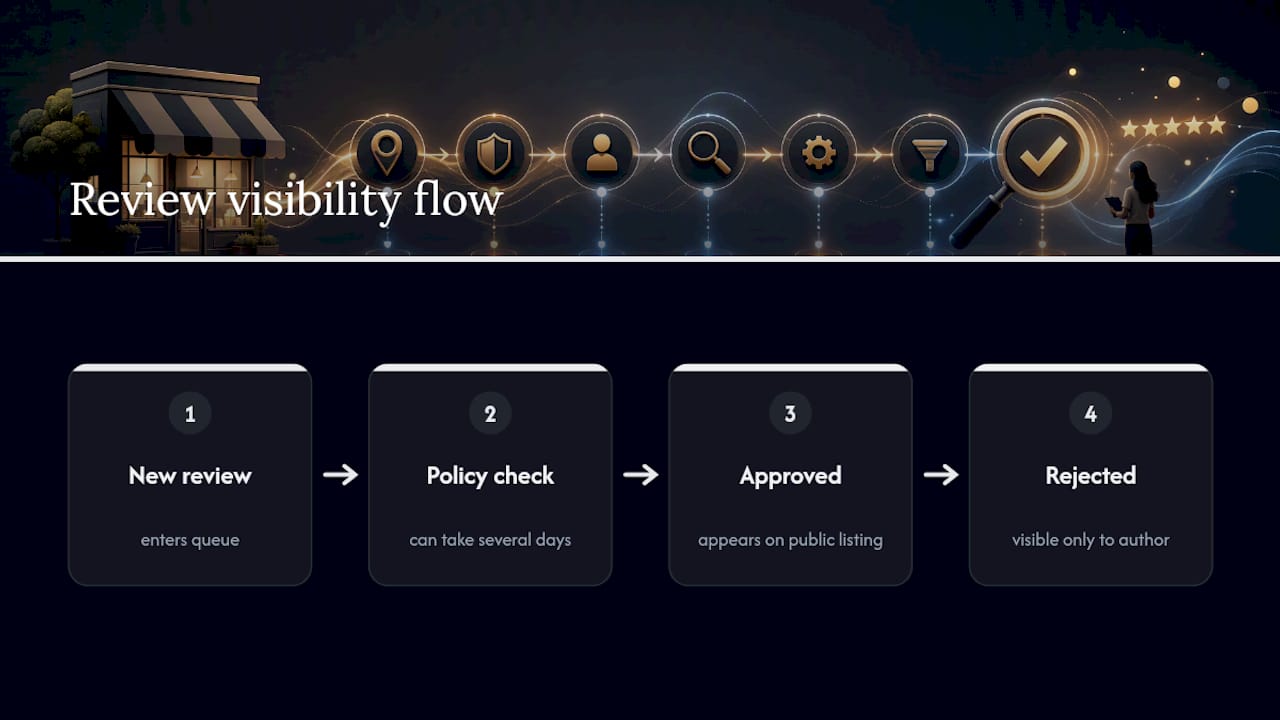
That distinction matters more than most owners realize. A review “not showing” and a review “removed” are two different problems with two different fixes. One usually resolves itself. The other might be permanent. Sorting out which one you’re dealing with is the entire point of the diagnostic work below, and it starts with a fast round of checks before you touch anything on your listing.
Quick Checklist: 7 Things to Try Now
Run through these in order. Most missing-review cases get solved somewhere in the first four steps.
- Ask the reviewer to open “Your contributions” in their Google account and confirm the review still exists there.
- Have them send you a screenshot, plus the exact wording and star rating, so you have a record.
- Open any notification link they received while signed into their own Google account, and check whether it loads.
- Confirm you’re looking at the correct, primary business listing. Duplicate profiles get created and merged more often than owners expect.
- Check your Business Profile Manager for verification prompts or suspension notices, which can affect what displays publicly.
- Have the reviewer update the Google Maps app, clear its cache, or try a different device entirely.
- View your listing in an incognito browser window to rule out your own cached, logged-in view of the page.
If none of that surfaces the review, give it up to 72 hours before escalating. Start collecting evidence now regardless.
Why Are Google Reviews Hidden or Removed?
Several distinct problems produce the same symptom, and each one needs a different response.
- Automated spam filtering. Google’s systems flag reviews that arrive in unusual patterns, such as a sudden spike after a slow month, or clusters coming from the same network. A filter can also apply retroactively, pulling a review that was visible days ago after the system reassesses activity around your profile.
- Policy-based removal. Reviews tied to incentives, offensive content, conflicts of interest, or fake engagement get removed outright. Google’s own guidance is direct on this: reviews taken down for policy violations do not come back, no matter how you appeal or reformat the request.
- Duplicate or merged listings. If a second profile exists for your business, reviews can attach to the wrong version. When Google merges duplicates, some reviews get absorbed cleanly and others simply vanish from the surviving profile.
- Reviewer-side account problems. A reviewer who isn’t signed in, whose account was deleted, or whose account already has a reputation flag on it can have a review blocked before it ever reaches public view. Google has started sending “review not posted” emails in some of these cases, explaining that an automated system removed the content and pointing the reviewer to an appeals process.
- Platform bugs and caching issues. Sometimes nothing is wrong with the review at all. Review counts can desync between Google Maps, Search, and Business Profile Manager, especially during a known display incident.
Pro Tip: If the reviewer can see their review but you can’t, don’t ask them to delete and repost it right away. Reposting during an active filter event often gets caught by the same system twice.
The FTC’s 2024 rule banning fake reviews and testimonials is worth knowing about here too. It’s a reminder that Google’s filters aren’t arbitrary. They’re built to catch exactly the kind of incentivized or coordinated review activity that regulators now treat as a legal problem, not just a platform violation.
How Do You Fix Missing Google Reviews?
Work through this in order, and resist the urge to jump straight to a support ticket.
- Build a timestamped evidence file first. Screenshot your total review count, the review list page, and any direct notification links, all with visible dates. This single habit does more to speed up a resolution than anything else you can do, since a documented case is far easier for support or the community to act on than a vague complaint.
- Decide whether this is a bug or a filter. If multiple business owners in your network are reporting the same thing at the same time, and review counts look mismatched between Maps and Business Profile Manager, that pattern points toward a platform-wide incident rather than something specific to your listing. Isolated removals, by contrast, usually mean filtering.
- Fix listing problems if you find them. Search for duplicate profiles under slightly different names or addresses, and merge or claim the correct primary listing.
- Hold off on new review requests if filtering is suspected. Pausing campaigns for a week or two, and never pushing requests from the same shared network or QR code all at once, reduces the odds of tripping the same filter again.
- Prepare your support case with specifics. Have your profile ID, the listing URL, the reviewer’s name if they’ll share it, dates, and screenshots ready before you open a ticket.
Google acknowledged and investigated a wave of missing-review reports affecting many business profiles at once, which tells you these incidents are real, not just individual bad luck.
When Should You Escalate to Google Support?
Escalate once you’ve waited 72 hours with no change, or if you’re seeing mass drops and mismatched review counts that suggest a broader incident rather than a single filtered review.
- Include your Business Profile ID, the exact listing URL, and screenshots with visible dates in your support case.
- Note the full timeline: when the review appeared, when it disappeared, and every check you already ran.
- Mention whether other locations you manage are affected, since that detail helps support distinguish a bug from an isolated filter.
- Post in the Google Maps Help Community if you want added visibility, and link your support ticket number once you have one.
- Set realistic expectations. Policy-based removals are usually final. Platform bugs get fixed, but the timeline isn’t predictable.
How to Prevent Review Visibility Problems Going Forward
Most future headaches are avoidable with a few habits baked into how you ask for reviews.
- Spread out review requests over time instead of pushing them all at once from the same shared QR code, receipt link, or staff device.
- Never offer discounts, incentives, or gated review requests. Ask neutrally and send a direct, personalized link instead.
- Run a duplicate-listing audit every few months, since new duplicate profiles can appear without any action on your part.
- Keep your profile’s core details consistent across your website, social pages, and directories.
- Train any staff who ask customers for reviews to avoid posting from a shared device or requesting reviews in bulk during a single shift.
Pro Tip: A steady trickle of five or six reviews a month reads as normal to Google’s systems. A sudden burst of twenty in one day, even from real customers, looks exactly like the pattern automated filters are built to catch.
A Publisher’s Perspective on Missing Reviews
Most missing-review scares resolve within a few days, and treating the situation calmly, with documentation instead of panic, is almost always the right first move. The checklist above solves the majority of cases without any outside help.
Where it stops being a solo job is when the problem repeats across multiple locations, or a removal keeps happening even after you’ve fixed a duplicate listing or slowed your request cadence. At that point, the pattern usually points to something structural in how reviews are being requested or how the listing itself is set up, not to a single unlucky filter event. That’s a governance problem, not a one-time fix, and it’s worth treating it that way before it costs you more reviews than the one you’re currently chasing.
— TONY
How Ibrand Can Help Protect Your Review Visibility
If you’re managing this across two, five, or twenty locations, the manual checklist stops scaling fast. Our team can run listing audits to catch duplicate profiles before they split your reviews, stabilize review request cadence to reduce triggering spam filters, and handle support escalations with the required documentation.

Hiring outside help makes sense once you’re seeing repeated removals, multi-location inconsistencies, or you simply don’t have the bandwidth to chase down every notification link and screenshot yourself. A typical engagement starts with a documented audit of your current listing and review history, moves into prioritized fixes for anything broken, and settles into ongoing monitoring so the same issue doesn’t resurface next quarter. If your review visibility problems are tangled up with a broader local search issue, Ibrand’s local marketing services for small businesses cover both at once. Reach out for a review of your current profile and a plan built around what’s actually going wrong.
Sources
- About missing or delayed reviews – Google Business Profile Help
- Google Business Profile Reviews Go Missing For Many
- Google reviews disappeared: What you need to know | Birdeye
- Google Review Not Posted – Content Not Posted Email Notice
FAQ
Why isn’t my Google review showing up publicly?
It’s most likely still in moderation, caught by an automated spam filter, or attached to a duplicate listing that hasn’t merged with your primary profile. Google’s own guidance lists all three as common causes.
How do I retrieve a missing Google review?
Start by confirming with the reviewer that it still exists under their “Your contributions” page, then wait up to 72 hours. If it’s still gone, gather screenshots and timestamps and open a support case, since documented evidence speeds up resolution significantly.
What happened to Google reviews during recent incidents?
Google has acknowledged and investigated waves of missing-review reports affecting many business profiles at once, restoring reviews where they’d been removed incorrectly.
Why can I see my Google review but others can’t?
This usually means the review is visible only to the person who wrote it, either because it’s still in moderation or because it was flagged by an automated filter before going fully public. It doesn’t mean the review was deleted, just that it hasn’t cleared for public display yet.
Recent Comments