
Offline conversion tracking connects a sale, closed deal, or phone call that happens away from your website back to the ad click that started it. The recommended path for most small and medium businesses combines enhanced conversions for leads with server-side or API-based uploads, run in parallel for redundancy. The workflow follows a simple sequence: capture a click ID or first-party contact data, persist it in your CRM, trigger the upload when the deal closes, then push it to the ad platform.
TL;DR:
- Offline conversion tracking is essential for accurately measuring sales and contacts that occur outside your website, such as phone calls or in-person purchases.
- Combining GCLID imports, enhanced conversions for leads, and server-side API uploads provides a resilient, comprehensive tracking setup for small and medium businesses.
- Most SMBs should prioritize capturing and storing the contact or click ID in their CRM at the moment of contact to ensure reliable offline conversion reporting.
- Regular reconciliation of CRM data with reported offline conversions is crucial, as mismatches or missed identifiers can significantly reduce tracking accuracy.
- Using offline conversion data allows ad platforms to optimize toward actual revenue, especially for businesses with longer sales cycles and high-value transactions.
Table of Contents
- What Counts as an Offline Conversion?
- Why Offline Conversion Tracking Changes Your Ad Performance
- How Do You Actually Track Offline Conversions?
- How to Set Up Offline Conversion Tracking Step by Step
- Common Offline Conversion Tracking Mistakes and Fixes
- How Ibrand Approaches Offline Conversion Tracking for Local Clients
- Where to Find the Official Docs and Implementation Guides
- The Part Most Guides Skip
- Get Offline Conversion Tracking Set Up Without Hiring a Data Team
- Sources
- FAQ
What Counts as an Offline Conversion?
An offline conversion is any valuable customer action that happens outside your website’s tracking pixel: a phone call that turns into a sale, a walk-in purchase at a retail counter, or a B2B deal that closes three weeks after the initial form fill. The ad click happened online. The result didn’t.
That distinction separates offline conversions from delayed online conversions, which is a common point of confusion. A delayed online conversion still completes on your site, like an abandoned cart checkout finished two days later. An offline conversion completes somewhere your analytics tools can’t see: a sales call, a showroom, a handshake at a trade show.
To reconnect that offline event to the original ad click, platforms rely on identifiers captured at the moment of the click:
- GCLID (Google Click Identifier) — a unique string attached to each Google Ads click, useful when you can capture and store it immediately on a form submission.
- fbclid — the Meta equivalent, used for uploading offline events tied to Facebook or Instagram ad clicks.
- Hashed email or phone number — used by enhanced conversions when no click ID exists or when it has expired, matching against a logged-in Google or Meta account instead of a specific click.
A car dealership tracking a lead that calls three weeks after clicking a search ad needs the hashed-contact method, since GCLIDs have upload windows that don’t stretch that far. A local HVAC company capturing a same-day quote request can often rely on the click ID alone. Most businesses end up needing both, which is exactly why conversion tracking fundamentals matter before you build anything more advanced on top.
Why Offline Conversion Tracking Changes Your Ad Performance
Ad platforms optimize toward whatever signal you feed them. If you only report the form fill and never report whether that lead turned into revenue, Smart Bidding chases form fills, not customers. Feed it offline conversion data, and the algorithm starts optimizing toward the clicks that actually produce paying customers, not just curious clickers.
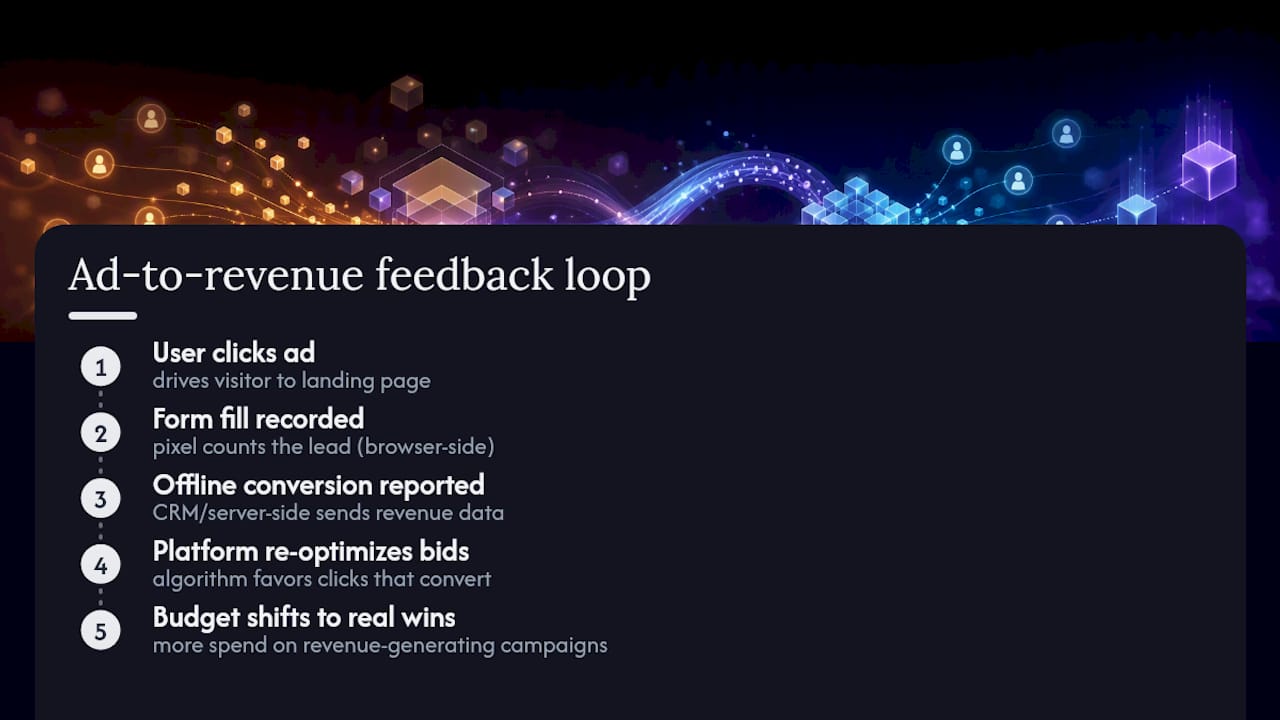
This matters most for businesses where the real value happens after the click: call-driven service businesses, high-ticket B2B sales, and anything with a sales cycle longer than a single browser session. A roofing contractor whose average deal takes two weeks of estimates and follow-up calls is optimizing blind without offline data. The platform sees a form submission and assumes that’s the finish line.
Server-side tracking and Conversions API integrations can increase reported conversions by capturing events that browser pixels miss, particularly on iOS devices and in browsers running ad blockers or aggressive privacy settings. That gap between what a pixel sees and what actually happened is often the difference between a campaign that looks unprofitable and one that’s quietly your best performer, once the offline data catches up.
The practical upshot: businesses that close the loop between ad spend and actual revenue tend to spot which campaigns deserve more budget and which ones just generate cheap, low-value leads. Without that loop, you’re allocating spend based on a metric that only tells half the story.
How Do You Actually Track Offline Conversions?
Three methods dominate offline conversion tracking today, and they’re not mutually exclusive. Most durable setups run more than one.
- GCLID-based offline imports. Capture the click identifier the moment a visitor lands on your site, store it against the lead record, then upload it back to Google Ads once the deal closes, either through a CSV import or the API. This method is precise but fragile: GCLIDs eventually expire, and if your CRM doesn’t save the identifier at first contact, you lose the link permanently.
- Enhanced conversions for leads. Google recommends enhanced conversions for leads as an upgraded, easier-to-set-up method that uses hashed first-party data (email, phone) rather than a click ID. It fills the gap when a GCLID has expired or was never captured, and it holds up better across devices, since it matches against a signed-in account rather than a single browser session.
- Server-side API uploads. Whether through Google’s UploadClickConversions or Meta’s Conversions API, pushing data directly from your server or CRM avoids the fragility of browser-based pixels entirely.
For the technical build, a few rules apply no matter which platform you’re targeting:
- All user-provided data (email, phone) must be normalized and hashed with SHA-256 before upload, per Google’s developer guidance.
- Include as many user identifiers as you have, up to five, since each additional identifier increases the odds of a match.
- Batch conversions with a shared job ID, which makes diagnosing upload failures far easier than troubleshooting one record at a time.
- Run client-side and server-side tracking in parallel. Platforms deduplicate events arriving from both sources, so you get resilience without double-counting.
If you’re weighing which method to start with, don’t overthink it: enhanced conversions for leads is the lower-lift option, and most businesses layer GCLID imports or server-side uploads on top once the basics are working.
How to Set Up Offline Conversion Tracking Step by Step
The four-stage framework here (capture, persist, trigger, push) mirrors the pipeline recommended by conversion tracking practitioners, adapted for a smaller operation without a dedicated data team.
- Capture the identifier at the point of contact. Add a hidden form field that grabs the GCLID from the URL parameter automatically, or store it in a cookie the moment someone lands from an ad. If phone calls are your main conversion type, use dynamic number insertion so the identifier attaches to the call record, not just the web session.
- Persist it in your CRM. The click ID or hashed contact data needs to live on the contact and opportunity record, not in a spreadsheet someone forgets to update. This is the step most SMBs skip, and it’s the one that breaks everything downstream.
- Define your trigger. Decide exactly what qualifies as a conversion: a call over 90 seconds, a deal marked Closed Won, a POS transaction above a minimum threshold. Record the timestamp when that trigger fires, since upload windows are time-sensitive.
- Hash, format, and push. Normalize the PII, build the conversion payload with the required fields, and upload it either through the Data Manager API or a scheduled CSV import. Google migrated offline conversion imports and enhanced conversions for leads uploads to the Data Manager API starting June 15, 2026, and legacy upload methods are now blocked, so confirm your developer token has been active since before that cutoff.
Pro Tip: Set a recurring calendar reminder to reconcile your CRM’s closed-won count against the platform’s reported offline conversions every two weeks. Catching a broken upload after two weeks costs you far less optimization data than catching it after two months.
A few operational details separate a setup that works from one that silently fails:
- Use a consistent job ID for each batch upload so failures are traceable to a specific run, not a mystery.
- Include a deduplication ID on every conversion record to prevent the same event from being counted twice across pixel and server-side channels.
- Respect the platform’s upload window. Conversions submitted too late get rejected outright, which is often the real reason a campaign’s numbers look off.
- A healthy setup typically has platform-reported offline conversions matching CRM closed-won counts within about 10 percent for the same period. Bigger gaps point to a capture or upload problem, not a fluke.
Common Offline Conversion Tracking Mistakes and Fixes
Most failures trace back to a handful of repeat offenders, and they’re almost always fixable once you know where to look.
- Missing or expired GCLIDs. If your form doesn’t capture the click ID at first contact, there’s nothing to upload later. Enhanced conversions for leads exists partly to solve this.
- Inconsistent hashing. Uppercase letters, extra whitespace, or unnormalized phone formats before hashing will produce a hash that never matches. Normalize first, hash second, every time.
- Uploading outside the accepted window. Conversions submitted past the platform’s allowed window, historically around 90 days for GCLID-based imports, get rejected. Long B2B sales cycles are exactly why hybrid enhanced conversions matter.
- Ignoring diagnostic warnings. Google Ads surfaces issues like CLICK_NOT_FOUND or deduplication conflicts in its offline data diagnostics report. These aren’t noise. They tell you precisely which records failed and why.
| Issue | Likely cause | Fix |
|---|---|---|
| CLICK_NOT_FOUND | GCLID expired or never captured | Add enhanced conversions for leads as a fallback |
| Low match rate | Inconsistent hashing/formatting | Normalize data before SHA-256 hashing |
| Dedup warnings | Pixel and server-side both firing | Confirm dedup ID logic is correctly implemented |
| Delayed reporting | Normal processing lag | Wait for the standard processing window before troubleshooting |
Pro Tip: Never upload unhashed personal data as a workaround “to see if it fixes the match rate.” It won’t, and it violates platform policy outright.
How Ibrand Approaches Offline Conversion Tracking for Local Clients
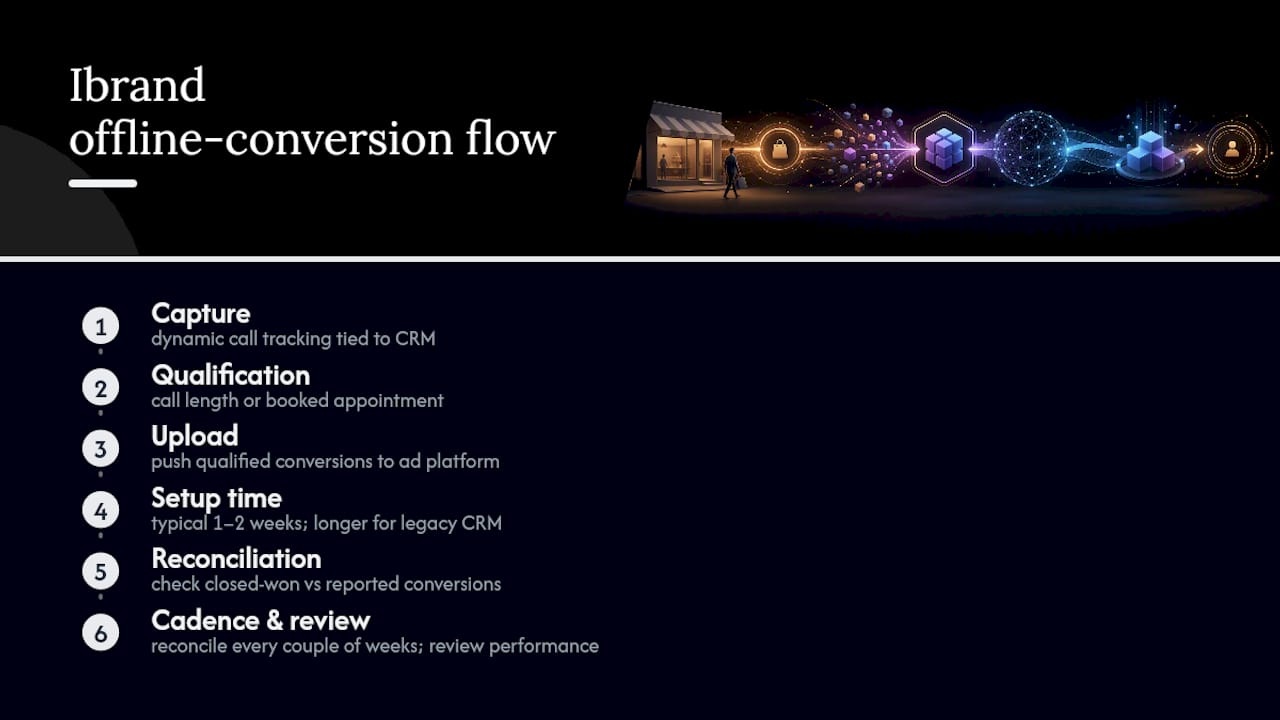
The workflow Ibrand sets up for small business clients follows the same capture-to-upload logic described above, scaled to what a local business can realistically maintain without a full data team. For a service business, that usually means dynamic call tracking tied to CRM records, with a qualification threshold (a call length, a booked appointment) defining what counts as a real conversion before anything gets pushed to the ad platform.
Setup typically takes one to two weeks for a straightforward CRM integration, longer if call tracking or a legacy CRM system is involved. After launch, the priority shifts to reconciliation: checking closed-won records against reported platform conversions on a regular cadence so Smart Bidding is optimizing against real outcomes, not proxy metrics.
The businesses that get the most out of offline conversion tracking aren’t the ones with the fanciest setup. They’re the ones who actually check the reconciliation numbers every couple of weeks instead of setting it up once and walking away.
Reviewing campaign performance tracking alongside offline data closes the loop between ad spend and revenue that actually shows up in a bank account.
Where to Find the Official Docs and Implementation Guides
The platform documentation changes often enough that bookmarking the primary sources beats relying on secondhand summaries, including this one.
- Google Ads Help: offline conversion imports covers enhanced conversions for leads and the Data Manager API migration.
- Google’s developer docs for UploadClickConversions detail hashing requirements and payload structure.
- Meta’s Conversions API deduplication guide explains how pixel and server events reconcile.
- Babylovegrowth’s conversion rate optimization guide offers useful adjacent tactics once your tracking data is reliable.
- Ibrand’s guide on GBP call tracking integration walks through the CRM side of the phone-call use case.
The Part Most Guides Skip
Most offline conversion tracking advice reads like it was written for enterprise marketing teams with dedicated data engineers. It isn’t. The businesses that actually benefit from this are the ones without that luxury: the local contractor, the regional B2B shop, the retailer whose real conversion happens at a cash register three states from any web server.
The conventional advice oversells GCLID imports as the primary method and treats enhanced conversions for leads as an afterthought. That’s backwards for most SMBs. Click IDs expire, sales cycles stretch past upload windows, and CRMs get rebuilt by whoever’s available, not a data architect. Hashed first-party data survives all of that better.
If there’s one thing to prioritize first, it’s not the API integration. It’s making sure your CRM actually stores the identifier at the moment of contact. Every downstream step depends on that single habit, and it’s the one most businesses skip because it feels too basic to matter.
— TONY
Get Offline Conversion Tracking Set Up Without Hiring a Data Team
This workflow can be built directly into ad campaigns for small and local businesses, so conversion data reflects closed deals and completed calls, not just form fills. That means Smart Bidding optimizes toward real revenue from week one instead of waiting months while a business owner figures out CRM integrations alone.

For businesses running paid ads without a dedicated marketing hire, that gap between ad spend and reported results is usually the single biggest reason budgets get wasted on campaigns that look fine on paper but produce nothing. Ibrand’s approach to campaign performance tracking folds offline conversion setup into the broader account management, so reconciliation happens on a schedule instead of once a year during a panic. Reach out for a custom plan and get your offline conversions connected to your ad accounts within the first setup cycle.
Sources
- About offline conversion imports – Google Ads Help
- Developers
- Deduplicate pixel and server events – Facebook Developers
- How to Track Offline Conversions from Online Ads (HYROS)
FAQ
Can I Run Google Ads Without Conversion Tracking?
Yes, but Smart Bidding has nothing to optimize toward, so the algorithm defaults to generic signals like clicks rather than actual sales or leads, which usually means wasted spend on low-value traffic.
How Do I Set Up Offline Conversion Tracking in Google Ads?
Start with enhanced conversions for leads using hashed first-party data, then capture and persist GCLIDs in your CRM for a second matching method, and upload both through the Data Manager API following Google’s current guidelines.
How Do You Track Conversions That Happen Offline?
Capture a click identifier or contact detail at the point of ad contact, store it in your CRM tied to that lead, trigger an upload when the offline event (call, sale, closed deal) happens, and push it to the ad platform via API or CSV.
When Should I Use Offline Conversions Instead of Standard Website Tracking?
Use offline conversion tracking whenever the real value of a lead is determined after it leaves your website, such as phone sales, in-store purchases, or B2B deals that close weeks after the initial click.
What’s the Difference Between GCLID Imports and Enhanced Conversions for Leads?
GCLID imports match a specific ad click using a stored identifier, while enhanced conversions for leads match against hashed first-party data like email or phone, which holds up better when click IDs expire or were never captured.
Recent Comments