
Yes, most suspended Google Business Profiles can be reinstated. Your first move is to confirm your account is still in good standing, then file an appeal through Google’s official appeals tool. Don’t create a new listing while you wait. A duplicate profile can complicate or delay your reinstatement, and Google’s guidance is explicit on that point.
TL;DR:
- Most suspended Google Business Profiles can be reinstated if the underlying issues are corrected and an appeal is filed through Google’s official appeals tool.
- Common triggers include address violations like P.O. boxes or virtual offices, and name violations such as keyword stuffing or mismatched signage.
- Submitting a thorough appeal with matching official documents within 60 minutes is crucial, as incomplete evidence can delay or prevent reinstatement.
- An account restriction affecting one profile can suspend all profiles managed under that account, especially for multi-location businesses.
- Verifying the profile and related information after reinstatement helps prevent immediate re-suspension and supports ongoing visibility.
Table of Contents
- What Triggers a Google Business Profile Suspension?
- How to Submit an Appeal Using the Google Business Profile Appeals Tool
- What Evidence Actually Strengthens a Suspension Appeal
- Why One Restricted Account Can Take Down Every Profile You Manage
- Confirming Your Profile Is Actually Fixed After Reinstatement
- If Your Appeal Gets Denied: What to Do Next
- What a Suspended Profile Actually Costs Your Business
- Temporary Suspension vs. Permanent Suspension: How to Tell the Difference
- Manual Review vs. Automated Detection: Why It Matters for Your Appeal
- Common Mistakes That Slow Down or Sink an Appeal
- Should You Fix This Yourself or Bring in an Agency?
- Get Help Recovering Your Suspended Listing
- Sources
- FAQ
What Triggers a Google Business Profile Suspension?
Google suspends profiles for two broad reasons: something on the listing itself violates policy, or the account managing it does. On the listing side, the most common culprits are address problems (P.O. boxes, virtual offices, or addresses that don’t match a real, staffed location) and name violations, like stuffing keywords or city names into your business name. Google’s representation guidelines are blunt about this: your listed name must match your real-world signage and paperwork, with no extra marketing text tacked on.
Content problems come next. Photos that don’t show the actual business, reviews that look manipulated, or descriptions loaded with promotional language can all trigger a review.
Then there’s the account itself. If the Google Account managing your profile isn’t in good standing, that alone can take your listing down regardless of how clean the profile content is.
To find out which of these applies to you:
- Check your email for a notification from Google explaining the suspension reason
- Log into the Business Profile Manager and look for a status banner on the listing
- Review your business name, address, and photos against the representation guidelines line by line
Google’s own appeals documentation lists P.O. box addresses and keyword-stuffed names as specific, named triggers, which tells you these aren’t edge cases; they’re the two most predictable ways owners lose their listings.
How to Submit an Appeal Using the Google Business Profile Appeals Tool
Once you’ve diagnosed the likely cause, fix what you can before you appeal. Google’s reinstatement guidance walks through the appeals workflow, and it’s more straightforward than most owners expect if you follow it in order.
- Sign in with the correct Google Account. Use the exact account linked to the suspended profile, not a personal or secondary account.
- Open the appeals tool from the notification email or directly through Business Profile Manager.
- Select the suspended profile and choose the specific decision you’re appealing (some accounts show more than one flagged issue).
- Attach your evidence when prompted, then submit.
- Track the status inside the appeals tool rather than guessing. Google typically responds within a few working days, though complex cases can take longer.
One rule matters more than the rest: never file a second appeal for the same issue while the first is still pending. Google explicitly discourages this, and duplicate appeals tend to confuse the review queue rather than speed it up. If a week passes with no update, check the status page again before resubmitting anything.
Pro Tip: Screenshot the confirmation screen after you submit. If you ever need to contact support about a delayed appeal, having a timestamp and case reference saves real time.
What Evidence Actually Strengthens a Suspension Appeal
Google accepts a specific set of documents to verify a legitimate business, and vague paperwork gets you nowhere. According to Google’s reinstatement guidance, the strongest evidence includes:
- Official business registration or incorporation documents
- A current business license
- Tax certificates or filings showing the business name
- A recent utility bill showing the business name and address
Every document needs to match your profile’s listed name and address exactly. A utility bill under an old business name or a slightly different suite number is a common reason evidence gets rejected on the first pass.
Here’s the part that trips up even careful owners: once you open the evidence form, you have exactly 60 minutes to attach your files. Miss that window and you have to start the evidence submission over.

Before you touch the appeals tool, scan every document into one folder, name each file clearly (business_license.pdf, not scan0043.jpg), and confirm file sizes aren’t too large to upload quickly. That prep work turns a stressful 60-minute scramble into a five-minute task.
Why One Restricted Account Can Take Down Every Profile You Manage
If you manage multiple locations under a single Google Account, a restriction on that account can suspend every profile tied to it at once. This is the cascade effect, and it’s one of the least understood parts of the suspension process. Google’s policy overview confirms that account-level restrictions apply broadly, not just to the one listing that triggered the review.
Even trickier: a restriction on a separate, non-Business Google product account linked to the same login can block content from reaching your profile until that other account is reinstated too.
If you run several locations, take these steps now rather than after the next suspension:
- Identify exactly which account manages each location before an issue occurs
- Use separate manager accounts for high-risk or high-volume locations instead of one shared login
- Keep compliance consistent across every location, since one violation can jeopardize the whole group
Confirming Your Profile Is Actually Fixed After Reinstatement
Reinstatement isn’t the finish line. Once your profile is back online, verify that your name, address, and phone number match exactly what’s on your website and other directories. Confirm your business category and services list are accurate, and remove any leftover content that triggered the original review.
Check user-contributed photos and Q&A sections too. Suppress anything that violates policy before it draws another look from Google’s automated systems.
| Post-reinstatement check | Why it matters |
|---|---|
| NAP consistency across profile and website | Mismatches are a recurring suspension trigger |
| Category and services accuracy | Wrong categories can flag reviews unnecessarily |
| User-generated content audit | Old flagged photos/reviews can resurface issues |
| Change log of fixes made | Useful if Google follows up or a new flag appears |
Documenting what you changed is worth the ten minutes it takes. If a future issue pops up, having a record of prior corrective action makes a second appeal faster to write.
If Your Appeal Gets Denied: What to Do Next
A denial isn’t necessarily final. You can request an additional review and attach new evidence, ideally something you didn’t include the first time.
Patience matters here more than persistence. Appeal reviews commonly take several working days, and resubmitting too quickly with the same documents rarely changes the outcome.
- Request an additional review through the same appeals tool, not a new appeal
- Add evidence you haven’t already submitted, such as a second proof-of-address document
- Use official Google Business Profile support channels rather than third-party forums for status questions
- For broader recovery strategy on related Google penalties, a step-by-step recovery guide can help frame your escalation approach
What a Suspended Profile Actually Costs Your Business
The visibility hit is immediate. A suspended profile disappears from Google Maps and local search results entirely, which means your business stops showing up for “near me” searches the moment it goes down. For a local service business, that’s often the single biggest source of new customer inquiries, gone overnight.
Existing reviews, photos, and your accumulated star rating don’t get deleted during a standard suspension. They’re just invisible to searchers until reinstatement, which is some relief, but it doesn’t help the customers who couldn’t find you last Tuesday.
Phone calls and direction requests that normally route through your Business Profile stop generating entirely. If you rely on Google as a primary lead source rather than a supplementary one, a suspension lasting even a few days can mean a real dip in foot traffic or bookings that’s hard to fully recover, even after your listing comes back.
There’s a secondary cost too: competitors fill the gap. Local search results rarely leave a slot empty, so a suspended competitor’s loss becomes another nearby business’s temporary gain in visibility, clicks, and calls. That’s exactly why speed matters more here than in most SEO problems. The address and content accuracy that keeps a listing compliant is worth checking before a suspension ever happens, not after.
Temporary Suspension vs. Permanent Suspension: How to Tell the Difference
Most suspensions are temporary and resolve through a straightforward appeal once the underlying issue is fixed. These are typically triggered by a single fixable problem: a name violation, a content issue, or a documentation mismatch.
Permanent suspensions are rarer and usually follow a pattern of repeated violations, fraudulent information, or a serious breach of Google’s policies, like fake reviews or a business that doesn’t operate at the listed address at all.
The practical difference shows up in how you respond. A temporary suspension calls for correcting the specific issue, gathering matching documentation, and appealing once. A pattern of repeated suspensions on the same profile, or a suspension tied to fraud allegations, calls for a much more thorough evidence package and often benefits from professional help preparing the appeal, since Google’s review teams weigh prior history when deciding whether reinstatement is even on the table.
If you’re not sure which category you’re in, the suspension notice itself is the best clue. Language referencing “permanently removed” or “policy violation pattern” signals a tougher path than a routine “content review” notice.
Manual Review vs. Automated Detection: Why It Matters for Your Appeal
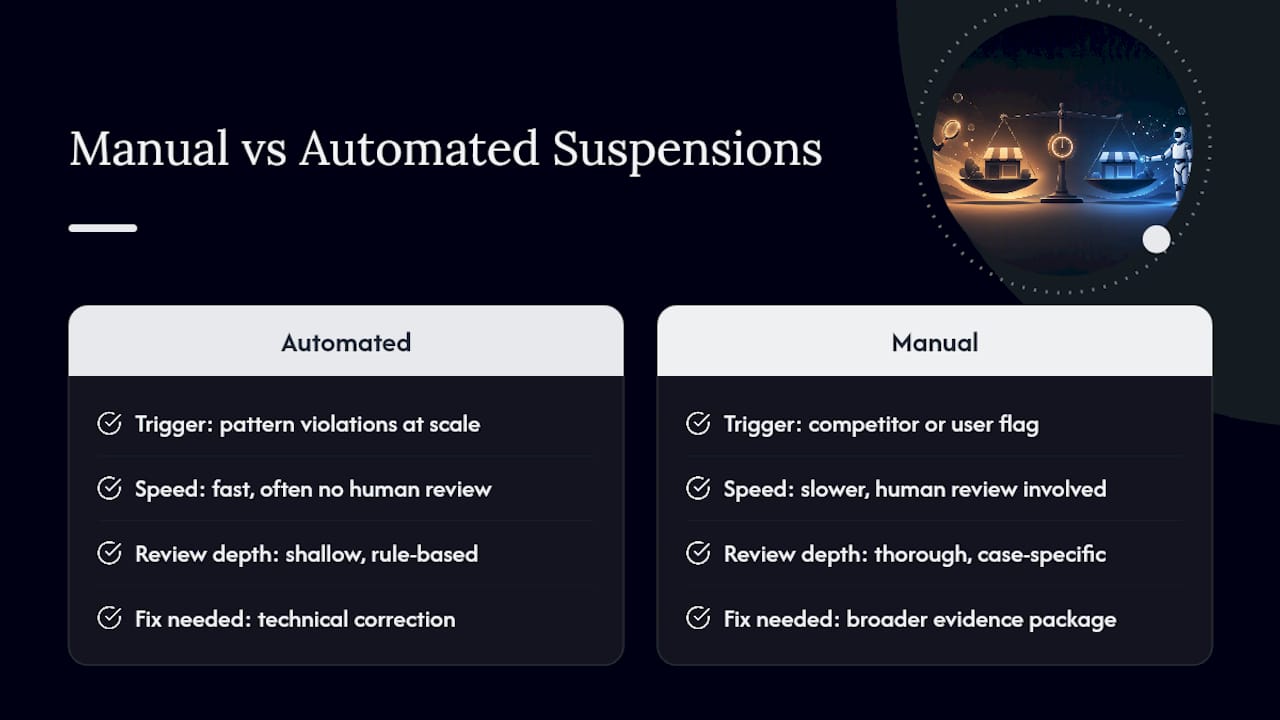
Google’s suspension systems operate on two tracks. Automated systems scan for pattern violations at scale, things like keyword-stuffed names, mismatched addresses, or suspicious review activity, and can suspend a profile without any human ever looking at it first.
Manual reviews happen when a competitor or user flags a listing, or when a business gets pulled for closer inspection after an automated flag. These reviews tend to be more thorough and can take longer to resolve because an actual person is evaluating the evidence.
Knowing which track suspended you changes how you appeal. An automated suspension responds well to a clean, well-documented correction: fix the flagged issue, attach clear evidence, and the reversal often happens quickly. A manual suspension, especially one triggered by a competitor complaint or user flag, may need a more complete evidence package addressing not just the technical fix but the specific concern that prompted a human reviewer to look twice.
Either way, the appeals insight from Google’s own documentation suggests these actions often follow detectable patterns, which is exactly why cleaning up obvious policy gaps before they’re flagged beats reacting after the fact.
Common Mistakes That Slow Down or Sink an Appeal
The single biggest mistake is creating a new listing instead of appealing the suspended one. Google’s guidance is direct: duplicate profiles complicate reinstatement and can create additional policy problems on top of the original suspension.
Submitting incomplete or mismatched evidence is the second most common error. A business license with an old address, or a name that doesn’t exactly match your profile, gets flagged as inconsistent rather than accepted as proof.
Filing multiple appeals for the same issue before getting a decision is another frequent misstep. It doesn’t speed up review, and it can make your case harder to track internally.
Rushing the 60-minute evidence window without preparing files in advance causes avoidable failures. So does giving up after one denial instead of requesting an additional review with new documentation. Each of these mistakes is easy to avoid once you know they’re common, which is exactly why a quick pre-appeal checklist saves more time than it costs.
Should You Fix This Yourself or Bring in an Agency?
A single-location suspension with a clear cause, a wrong address, a name tweak needed, is usually a DIY job. Gather your documents, follow the appeals steps, and you’re likely done within a week.
Complexity changes the math. Account-level restrictions, multiple flagged locations, or a denial that needs a second, stronger evidence package are where an outside team earns its keep, packaging evidence correctly, untangling which account triggered a cascade, and setting up ongoing monitoring so it doesn’t happen again. Our Google Business Profile guide covers the DIY fundamentals in more depth for readers handling a straightforward case.
— TONY
Get Help Recovering Your Suspended Listing
If your suspension involves more than one location, an account restriction, or a denial you’re not sure how to respond to, that’s exactly where doing it alone starts costing more time than it saves. Ibrand handles the parts owners find hardest: pulling together evidence that matches Google’s exact requirements, untangling account-level restrictions before they cascade further, and setting up ongoing monitoring so the same issue doesn’t resurface in three months.

The service scope covers a full audit of what caused the suspension, evidence preparation and submission, account remediation for cascade issues, and post-reinstatement monitoring so your listing stays visible. This fits best for multi-location businesses, anyone facing a second suspension on the same profile, or owners who simply don’t have the hours to chase a 60-minute evidence window mid-workday. If that sounds like your situation, request a local SEO consultation and get a clear read on what your specific case needs before you file another appeal.
FAQ
Can a suspended Google Business Profile be reinstated?
Yes, most suspensions are reversible through Google’s official appeals tool once you correct the underlying issue and submit matching evidence.
How long does a Google Business Profile suspension appeal take?
Appeal reviews commonly take several working days, though account-level or complex cases can take longer.
What documents does Google accept for a reinstatement appeal?
Business registration papers, a current business license, tax certificates, and a recent utility bill showing your business name and address all qualify.
Should I create a new listing if my profile is suspended?
No. Creating a duplicate profile while an appeal is pending can complicate reinstatement and is explicitly discouraged in Google’s guidance.
What’s the difference between a temporary and permanent suspension?
Temporary suspensions usually stem from a single fixable issue and resolve through a standard appeal, while permanent suspensions typically follow repeated violations or serious policy breaches like fraud.
Why would one account restriction suspend multiple business locations?
If a single Google Account manages several profiles, a restriction on that account can suspend every linked listing until the account itself is reinstated.
Recent Comments