
You can remove a Google review only when it breaks Google’s content policies, not because it’s unfair or hurts your ratings. If you wrote the review yourself, delete it now through Maps or Search. If someone else posted it and it violates policy, flag it immediately and start collecting evidence before you escalate.
TL;DR:
- Most review removals require clear evidence of policy violations, such as fake, spam, or harmful content, not merely negative opinions or unfair reviews.
- Flagging reviews without specific policy citations often results in delays or denials, making detailed, policy-based appeals more effective.
- Escalation to Business Profile Support and the Business Redressal Form is necessary when initial flagging is denied or when reviews expose personal information or involve coordinated attacks.
- Legal action is limited to demonstrably false, damaging statements and is often slow, costly, and reserved for serious defamation cases rather than typical negative feedback.
- Small businesses should focus on responding publicly to honest complaints and maintaining profile quality to protect reputation, rather than relying solely on removal attempts.
Table of Contents
- How Do You Report or Delete a Google Review?
- What Happens When Your First Report Gets Denied?
- Should You Just Respond Instead of Fighting for Removal?
- When Does Legal Action Actually Make Sense?
- What Small-Business Owners Get Wrong About Review Removal
- Get Review Disputes Handled Without the Guesswork
- Where to Verify the Rules Yourself
- Sources
- FAQ
How Do You Report or Delete a Google Review?
Two different problems require two different fixes. If the review is yours, you delete it. If it belongs to someone else, you flag it and hope Google’s moderation team agrees it crosses a line.
Deleting your own review:
- Open Google Maps and tap your profile icon, then go to “Your contributions.”
- Select “Reviews” to see everything you’ve posted.
- Tap the three-dot menu next to the review and choose “Delete” or “Edit.”
This works instantly because you own that content outright — no waiting period, no appeal process needed.
Flagging a third-party review on your Business Profile:
- Open your Business Profile, Maps, or Search and find the review under “Read reviews.”
- Click the three-dot menu next to the specific review.
- Select “Flag as inappropriate.”
- Choose the policy category that matches the violation: spam, offensive language, conflict of interest, illegal content, or off-topic content.
- For verified profiles, submit and track the report through the Reviews Management Tool, which shows statuses like “Processing report,” “Content removed,” or “Content not removed.”
Before you flag anything, screenshot the review and copy its exact URL. If Google later restores the content or denies your report, you’ll want a timestamped record showing what the review said on the day you filed.
Pro Tip: Write your flag justification as one sentence that names the exact policy violated and quotes the offending line. Something like: “This review violates Google’s conflict-of-interest policy because the reviewer is a competitor, evidenced by their business listing at [URL].” Specific appeals that map text to policy language get resolved faster than vague complaints.

Google’s reporting system exists to catch fake reviews, harassment, and spam, not to referee whether a customer’s complaint was fair.
What Happens When Your First Report Gets Denied?
Most flagged reviews get resolved within days. Some don’t, and that’s when you need a real escalation strategy instead of just re-flagging the same review and hoping for a different outcome.
Escalate when you see any of these situations:
- Google denied your initial flag despite a clear policy violation
- Multiple suspicious reviews landed within a short window (a coordinated attack)
- The review exposes personal information, like an employee’s home address or phone number
- The reviewer is clearly impersonating a customer or is a disgruntled former employee posing as one
Business Profile Support is your next stop. Go to Help, then “Contact us,” then select “Reviews and photos.” Request a chat or callback, cite the specific policy your original flag referenced, and attach your screenshots and the review URL.
The Business Redressal Form is for cases where support didn’t resolve things. Include the review URL, dated screenshots, and any records showing no transaction occurred, like a receipt log or appointment calendar with no matching entry.
Legal removal requests through Google’s Legal Help form apply to defamation or exposed personal data, not ordinary complaints. This route commonly takes 2 to 6 weeks or longer, and it requires an actual legal basis rather than a business owner’s frustration.
If you’re dealing with a coordinated attack, the Reviews Management Tool lets you batch up to 10 reviews into a single appeal, and Google sometimes temporarily freezes new reviews on a profile while investigating a suspected attack.
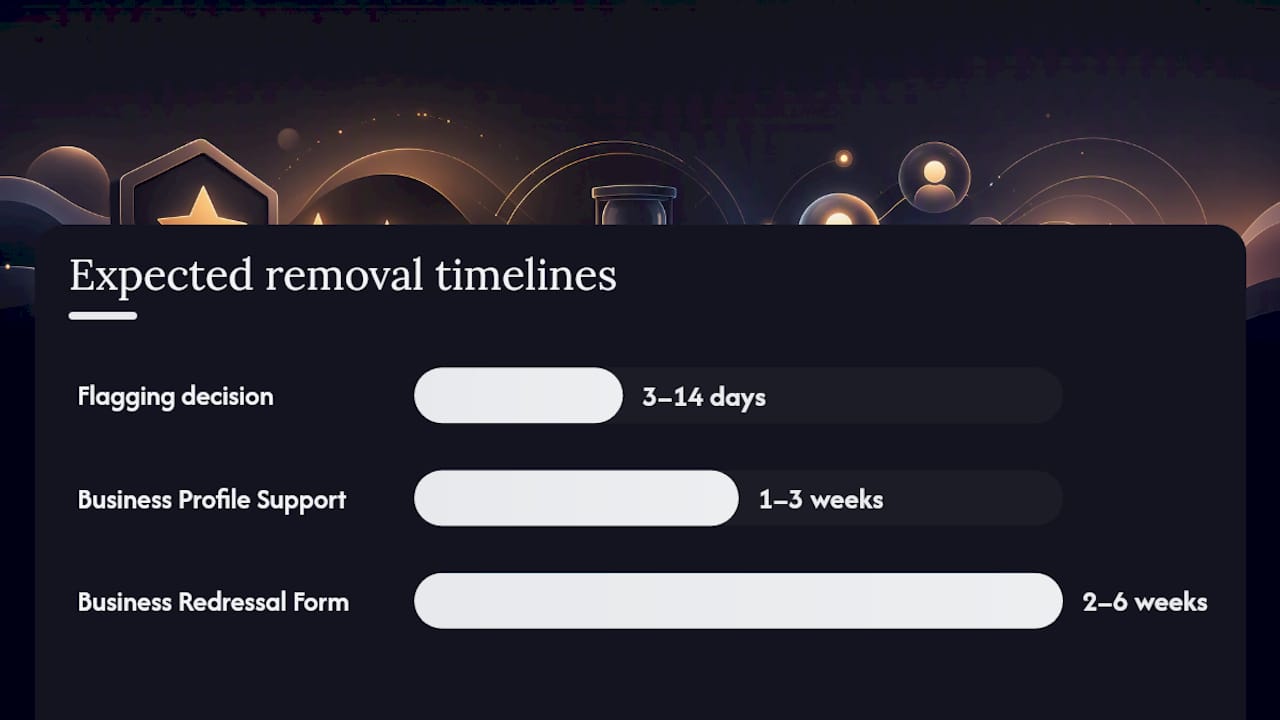
Rough timelines to expect: flagging decisions typically land in 3 to 14 days, Business Profile Support cases usually take about one to three weeks., and Business Redressal Form submissions generally take two to six weeks… Success rates climb noticeably when your report includes documented evidence rather than just a written complaint.
Should You Just Respond Instead of Fighting for Removal?
Google will not remove a review just because it’s negative, harsh, or based on a customer’s honest but unflattering experience. An angry one-star review that accurately describes slow service isn’t a policy violation. It’s an opinion, and opinions are protected even when they sting.
Google’s own guidance makes this distinction clear: moderation targets policy violations, not customer satisfaction disputes. If a customer says your staff was rude and your staff really was rude that day, no appeal will change that.
When removal isn’t realistic, shift your energy toward response and reputation repair:
- Reply publicly within 24 to 48 hours, acknowledge the specific complaint, and offer to resolve it offline
- Never argue in the reply thread. Move the conversation to a phone call or email
- Ask satisfied customers to leave reviews consistently so a handful of bad ones don’t dominate your average
- Optimize your Google Business Profile with current photos, accurate hours, and a full services list to keep newer positive activity visible
Ibrand’s guide to responding to negative reviews walks through exact reply wording and timing that tends to defuse rather than escalate a public complaint.
Pro Tip: A thoughtful public reply often does more for your reputation than a successful takedown. Prospective customers read the response as closely as the review itself, and a calm, solution-oriented reply signals professionalism that a deleted review never would have shown them.

Steer clear of paid “guaranteed removal” services and abusive legal threats. Google’s Maps contribution policy explicitly warns that fraudulent takedown claims can get content reinstated, or worse, trigger account-level penalties against your own profile.
When Does Legal Action Actually Make Sense?
Legal action is the slowest, costliest path, and it only works for a narrow category of harm: statements presented as fact that are demonstrably false, not opinions you simply disagree with. Calling your restaurant “the worst meal I’ve had in years” is protected opinion. Falsely claiming you served customers spoiled food that made them sick, when no such incident occurred, edges toward defamation.
If Google won’t remove a review that’s genuinely false and damaging, the realistic legal path is a defamation claim against the reviewer, potentially paired with a subpoena compelling Google to identify an anonymous poster. This is expensive and slow, reserved for cases with real financial harm.
Before you call a lawyer, gather:
- The exact review text with a timestamp
- Screenshots showing the review live on your profile
- Transaction or appointment records proving no service occurred, if that’s the dispute
- Any prior correspondence with the reviewer
What Small-Business Owners Get Wrong About Review Removal
The biggest misconception is that removal is a coin flip you can win with persistence. It isn’t. Google’s moderation runs on pattern matching against specific policy text, and the businesses that succeed are the ones who write appeals like a policy lawyer, not like a wronged customer venting into a form.
The conventional advice, “just flag it and wait,” undersells how much the quality of your justification matters. A generic flag sits in a queue behind thousands of others. An appeal that quotes the exact review line, names the exact policy clause, and attaches a receipt showing no transaction ever happened gets resolved faster because there’s less ambiguity for a reviewer or an algorithm to weigh.
Where most owners waste time is treating every negative review as a removal candidate. Most aren’t. If a customer had a bad experience and said so accurately, no policy path exists, and chasing one only delays the response that would actually help. Prioritize this way: real threats and impersonation, escalate hard. Fake reviews from non-customers, flag and follow up. Honest complaints, reply and move on. Getting that triage right matters more than mastering any single form.
— TONY
Get Review Disputes Handled Without the Guesswork
Chasing down policy citations, screenshotting reviews, and refreshing the Reviews Management Tool every few days eats hours you don’t have when you’re also running the business. Ibrand handles review escalations, appeal wording, and Business Profile optimization as an ongoing service, so disputes get filed correctly the first time instead of bouncing back from Google unresolved.

Managed escalation matters most when you’re facing a coordinated attack or a review tied to exposed personal information, situations where a single missed policy citation can sink an otherwise valid appeal. Ibrand pairs that dispute work with the local marketing support that keeps your profile’s overall review average climbing while individual disputes play out. If a review attack has already hit your listing, request a consultation and get a specific plan for your profile instead of guessing your way through Google’s forms alone.
Where to Verify the Rules Yourself
Before you file anything, read Google’s own reporting guidelines and the Maps contribution policy directly. For a deeper look at escalation tactics and evidence formatting, BrightLocal’s removal guide and Ibrand’s own review management overview cover the process in more detail than any single article can.
Sources
- Manage your Google Business reviews – Google Business Profile Help
- Deleting Google Reviews: How to Report, Appeal, or Dispute a Google review (BrightLocal)
- Can You Delete a Google Review? – 2026 Removal Playbook
FAQ
How do you actually get a Google review removed?
Flag it through your Business Profile with a specific policy citation and evidence, then escalate through Business Profile Support and the Business Redressal Form if the first report is denied.
How much does it cost to have a Google review removed?
Flagging and escalating through Google’s own tools costs nothing; paying a third party to “guarantee” removal is risky and can trigger account penalties if the claim turns out to be fraudulent.
Why are so many Google reviews being removed lately?
Google’s moderation is largely automated and policy-driven, so spikes in removals usually track spikes in spam, fake review networks, or coordinated attacks rather than any change in how businesses are treated.
Is it illegal for a company to delete bad reviews?
A business cannot delete another person’s review at all, and legal removal only applies to reviews that are demonstrably false and defamatory, not reviews that are simply negative or unflattering.
Recent Comments