
The Google Ads learning phase is the short period after a major structural change when Smart Bidding, Google’s automated bidding, is still calibrating. Google now caps the visible “Learning” status at 7 days, your ads keep running normally during it, and the number that matters more for a local business is how many conversions the campaign collects, not how many days have passed. If you are an HVAC company, a dentist, a med spa or a venue owner paying for every click, this guide shows what triggers the phase, what to leave alone, and how to judge results fairly.
At IBrand Media we build custom Google Ads plans for small and local businesses and track results in real time, so this is the routine we would hand a friend who owns a business.
TL;DR
- “Learning” is a status label that appears after major structural changes, such as a new or reactivated bid strategy or a significant change to conversion goals. Google’s help page says it never lasts more than 7 days.
- Your ads still enter auctions and serve normally while the label shows. Performance can wobble, but the campaign is not paused or penalized.
- Budget, target, creative and targeting edits no longer trigger the status, according to Search Engine Land’s November 2026 report. They can still move your results, so keep watching.
- Calibration can take around 50 conversion events or three conversion cycles, so low-volume local campaigns often need longer than a week to settle.
- Judge a campaign after two conversion cycles or two weeks, whichever is longer, and fix tracking before you touch bids.
Table of Contents
- What the learning phase actually is
- What triggers the learning status
- How long it lasts in 2026
- What it does to your costs and reporting
- What to do while a campaign is learning
- How to tell the campaign has settled
- Common mistakes that waste a learning period
- Our point of view
- Let us run the learning period for you
- FAQ
- Sources
What the learning phase actually is
Smart Bidding sets your bid for every single auction using signals such as device, location, time of day and the search itself. To do that well, it needs a pattern: which clicks turn into calls, form fills or bookings. When the campaign is new, or its structure changes enough that old patterns no longer apply, the system has less to go on and its bids are less precise.
Google shows this with a “Learning” status. In its Smart Bidding learning help page, Google describes the status as an indicator that a campaign or bid strategy has recently had structural changes. It is a signal to you. It is not an on/off switch for your ads.
Two plain-language terms help here:
- Conversion: an action you count as a win, such as a phone call, a quote request, a booked appointment or a reservation inquiry.
- Conversion cycle: the time between a click and the resulting conversion. Google’s bidding algorithm page defines it this way, and includes reporting lag for conversions you import from another system. For a plumber with an emergency call, the cycle may be minutes. For a banquet hall, where a couple tours a venue and decides a week later, it can be much longer.
Meta’s ad platform has its own learning phase with different rules. Everything below is about Google Ads.
What triggers the learning status
Google’s documentation lists the structural changes that cause the label to appear. According to the official help page, these are:
- a new or reactivated bid strategy;
- campaigns, ad groups or keywords added to or removed from the strategy, which changes its composition;
- a significant change to the conversion goals or actions being optimized.
That means launching a campaign, switching from manual bidding to a Smart Bidding strategy, pausing a campaign for a while and turning it back on, or swapping which conversion action you optimize for will all start the clock.
What no longer triggers it
This is the change many older guides miss. Google’s updated documentation says budget, target, creative and targeting changes do not trigger the status and do not remove your historical data. Search Engine Land reports that the earlier “Setting change” trigger was removed, and that budget and target adjustments take effect immediately.
So if an article tells you that a 20% budget bump or a new ad headline will reset learning, check its date. Guides written before the update describe rules that no longer apply.
How long it lasts in 2026
There are two clocks, and mixing them up causes most of the confusion.
The label. The visible “Learning” status never lasts more than 7 days, per Google. Search Engine Land (November 11, 2026) reports this is down from the previous guidance of 7 to 14 days.
The calibration. Performance typically converges within one to two conversion cycles, according to Google’s help page, and the length depends on conversion volume, cycle length and campaign settings. In September 2026, Search Engine Land reported that Google framed this around volume: a bid strategy can take up to around 50 conversion events or three conversion cycles to calibrate after a change, and campaigns with enough history may learn faster.
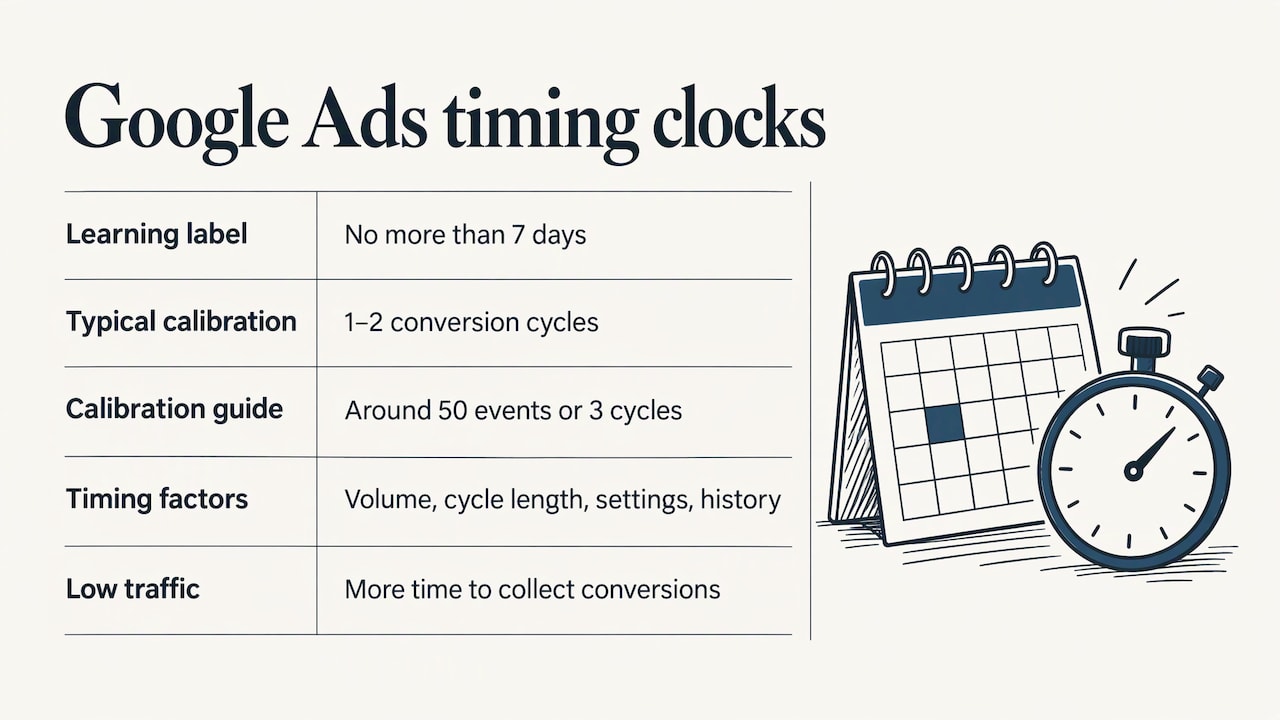
The same report points out what this means for smaller advertisers. Collecting enough conversions simply takes more calendar time when traffic is low. That is a matter of volume, not a sign that the campaign is broken.
A worked example for a local business
This is an illustration, not a benchmark. Say an HVAC company’s new search campaign produces about 20 tracked calls and form fills a month. Fifty conversion events would take roughly two and a half months at that pace. The “Learning” label may be gone after a week, but the system is still sharpening for longer than that.
Now take a dentist’s office whose campaign produces 8 booked-appointment conversions a month. Waiting for 50 would take over six months. For an account like that, the practical move is to give the system more conversion signals to work with. Fewer, broader campaigns concentrate your data. A conversion action that happens more often, such as a phone call from the ad, feeds the system faster than one that happens rarely.
Performance Max follows a similar pattern. Google’s Performance Max documentation says automated bidding campaigns typically need 1 to 2 weeks to optimize, sometimes up to 6 weeks, with fluctuations in performance or spend considered normal. It allows 24 to 48 hours for data to appear in new campaigns. Search Engine Land also reports that Google extended the initial ad-serving ramp-up guidance for new Performance Max and Demand Gen campaigns from up to 5 days to up to 7.
What it does to your costs and reporting
Google states that campaigns run normally during “Learning,” entering auctions and serving without interruption. New campaigns or bid strategies with no history may see temporary swings as Smart Bidding ramps up, and results steady as conversion data matures across the conversion cycle.
For a business owner, that translates into three practical expectations:
- Cost per lead can be uneven early on. One week may look expensive and the next cheap. Neither is the real number yet.
- Conversions arrive late. A click on Monday may become a booking on Friday. Early reports undercount results, and the numbers fill in afterward.
- Daily checking misleads. A single bad day on a campaign that sees five conversions a week says very little.
One more point from Search Engine Land’s November report: a campaign without the “Learning” label is not guaranteed to be stable. Budget, target and creative updates can still affect delivery, spending and conversions, so keep monitoring after any significant change.
What to do while a campaign is learning
Google’s best practices for this period are short and practical. Here they are, with what each looks like for a local business.
Use one consistent primary conversion goal
If you count page views, calls, form fills and button clicks all as primary goals, the system gets mixed messages about what a good click is. Pick the action that actually makes you money, such as a booked estimate or a tour request, and make that the primary goal. If you are not sure your tracking counts that action correctly, start with our guide to conversion tracking for small businesses and the 4-step Google Tag Manager checklist.
Send conversion data frequently and consistently
Smart Bidding can only learn from what it sees. If your form confirmation page fires the tag one day and not the next, or your phone call tracking drops out, the system loses its signal. Check that tags fire after any website change. Redesigns and new booking widgets are common culprits.
Keep the daily budget sufficient
A budget too small to get meaningful clicks starves the system of data. Google lists adequate daily budgets as part of good practice. If you sell high-value jobs, such as a roof replacement or a wedding hall booking, a single click can cost a meaningful share of a tiny daily budget, so consider how many clicks per day your budget actually buys.
Consolidate where you can
Splitting a small budget across many campaigns and ad groups spreads conversions thin, and each piece then learns slowly. Google recommends consolidating campaigns and ad groups where possible. A plumber running separate campaigns for every suburb often does better with one campaign and location targeting inside it.
Avoid stacking target changes
Google advises against multiple target changes within one conversion cycle unless there is a clear business need. Since budget and target edits take effect immediately now, repeated tweaking muddies the picture: you cannot tell which change produced which result.
How to tell the campaign has settled
The “Learning” label disappearing is not the finish line. Google’s guidance is to evaluate performance after the convergence period, over two conversion cycles or a two-week window, whichever is longer, accounting for conversion delay. Conversions often take several days to come in, and Smart Bidding aims to hit its target over a week or longer.
A simple routine:
- Write down your start date and the change you made. Note the date of the launch, the strategy switch or the goal change.
- Wait out the conversion cycle. If your customers usually call within a day, one cycle is short. If they book a consultation over a week or two, wait longer.
- Look at the bid strategy report. Google points to this report for monitoring results after changes.
- Compare cost per conversion across the full evaluation window, not day by day.
- If results look wrong, check tracking first. A sudden fall in conversions can be a tag that stopped firing rather than a bidding problem. Smart Bidding responds to the data it receives. If it is wrong, the results will be too.
If your ads are not appearing at all, that is a different problem from learning. Our five quick checks for Google Ads not showing cover the usual causes such as billing, approvals and budget limits.
Common mistakes that waste a learning period
- Pausing and restarting. A reactivated bid strategy triggers the status again. If you must pause, expect a fresh calibration on return.
- Swapping conversion goals mid-flight. A significant change to the optimized conversion action is one of the listed triggers.
- Judging at day three. Early numbers are partial, because conversions lag clicks.
- Optimizing for a rare action. If only two people a month request a full consultation, the system has little to learn from.
- Making time-of-day cuts too early. Dayparting before you have enough conversions removes data the system needs. Our piece on dayparting with small budgets explains why waiting for 30 to 50 conversions first makes sense.
- Sending traffic to a weak page. Smart Bidding can find the right clicks, but it cannot make a slow or confusing page convert. See how to build a Google Ads landing page that converts.
Our point of view
Most small business owners we talk to are not worried about an algorithm. They are worried about a bill. When a campaign shows “Learning” and the first week looks expensive, the instinct is to change something. That instinct is usually what costs the most.
Our approach starts before launch. We build a custom plan for each client, and we start with what counts as a lead for that business: a call, a booked estimate, a tour request. Then we make sure that action is tracked cleanly, because the system can only learn from the signal we give it.
We also think about volume honestly. A venue or a med spa with a long decision cycle will not collect 50 conversions in a week, and the plan should say so up front instead of promising overnight results. Real-time performance tracking lets us watch the conversions arrive and read them over the right window, not react to a single day.
The learning phase is not an obstacle. It is a few weeks where patience, clean tracking and a steady hand do more than constant edits.
TONY
Let us run the learning period for you
If you would rather spend those first weeks serving customers than watching a dashboard, we can take the campaign off your hands. IBrand Media offers advertising, SEO optimization, local marketing and real-time stats for small and local businesses, with a custom plan for each client.
Tell us what a good lead looks like for your business, and we will build the plan around it. You can start from the IBrand Media homepage and request your custom plan there.
FAQ
Does the learning phase hurt my ad performance?
Your ads keep running and entering auctions normally during the “Learning” status. New campaigns or strategies with no history can see temporary fluctuations while Smart Bidding ramps up, according to Google. Results usually steady as conversion data builds up.
How long does the Google Ads learning phase last?
The visible “Learning” status lasts at most 7 days. Full calibration can take longer: Search Engine Land reports up to around 50 conversion events or three conversion cycles. Low-volume local campaigns often need more calendar time to reach that count.
Does changing my budget restart learning?
No. Under Google’s updated documentation, budget, target, creative and targeting changes do not trigger the status or remove historical data. They can still affect delivery and spend, so watch results after any change, as Search Engine Land notes.
When should I judge whether a campaign is working?
Google suggests evaluating after two conversion cycles or a two-week window, whichever is longer, allowing for conversion delay. If your customers take a week to book, plan for a longer window before making decisions.
Sources
- About Smart Bidding learning, Google Ads Help
- How our bidding algorithms learn, Google Ads Help
- Create a Performance Max campaign, Google Ads Help
- Google Ads shortens Smart Bidding learning status to 7 days, Search Engine Land
- Google Ads reframes Smart Bidding learning around 50 conversions, Search Engine Land
Recent Comments