
Ask at the peak moment of satisfaction, send a direct link to your review form, and follow up once. That’s the whole system. Everything else in this guide is about making those three steps faster, more consistent, and harder to skip.
Start here — three things to do in the next 24 hours:
- Pick one primary review platform (Google Business Profile for most local businesses, Yelp or an industry site if your buyers check those first).
- Generate a direct review link or QR code for that platform and save it somewhere you’ll actually use it (your phone, your email signature, your POS screen).
- Write a two-sentence follow-up message and save it as a template in your email or SMS tool.
The tech you need is minimal:
- A direct-to-review link (not just your profile URL — the link that opens the review dialog).
- An email or SMS template with that link embedded.
- A place to paste it: email signature, receipt footer, post-service page, or a QR code on a card.
That’s it. You don’t need a sophisticated CRM on day one. You need a habit and a link.
Key Takeaways
The most effective way to collect client reviews is to ask at the peak moment of satisfaction, send a direct link to the review form, and follow up once within 3–7 days.
| Point | Details |
|---|---|
| Timing is everything | Ask within 24–48 hours of service delivery, when satisfaction is highest. |
| Direct links remove friction | Generate a dialog-direct review link from Google Business Profile; never send users to a profile page. |
| One follow-up recovers responses | A single reminder sent 3–7 days after the initial ask recovers a meaningful share of lost responses. |
| Never incentivize positive reviews | Offering rewards for positive reviews violates Google’s policies and can result in review removal or profile suspension. |
| Ibrand handles the full setup | Ibrand builds review automations, Google Business Profile optimization, and monitoring for small businesses. |
Table of Contents
- How to get client reviews: proven tactics that actually move the needle
- Which review platforms should you prioritize?
- Exactly how to ask for reviews: scripts, cadence, and timing
- How to create direct links, QR codes, and simple automations
- How to respond to reviews: templates for positive and negative feedback
- What you should never do when collecting reviews
- How to display and reuse reviews across your marketing
- How to monitor reviews and track what’s actually working
- What the data says about timing and wording
- Why most businesses are doing this backwards
- Ibrand can set up your review system from scratch
- Sources
- FAQ
How to get client reviews: proven tactics that actually move the needle
The single biggest reason small businesses don’t collect enough reviews is timing. Most ask too late, when the client has moved on mentally. Ask when satisfaction is at its peak — right after a project wraps, a service is delivered, or a support issue gets resolved, usually within a few days. Miss it and response rates drop sharply.
Prooflet’s research on review timing confirms what most experienced operators already sense: asking at the peak moment of satisfaction, including a direct link to the review form, and sending one polite reminder a few days later materially increases response rates. The follow-up alone recovers a meaningful share of responses that would otherwise never come.
A few tactics that consistently work:
- Ask directly and personally. “Would you mind leaving us a quick Google review?” said in person or in a personal email converts better than any automated blast. Referencing the specific project or product signals the request is genuine, not a mass send.
- Use multiple channels, but pick the right one per customer. Email works well for post-project service businesses. SMS is faster for same-day local services (plumbers, salons, food delivery). In-app prompts work for software. Match the channel to where your customer already is.
- Automate post-purchase or post-service follow-ups. Mailchimp’s research on post-purchase emails shows that automated follow-ups drive a large share of total reviews collected. The key is keeping the message conversational and specific to the transaction, not generic.
- Keep the ask short. One sentence asking for the review, one sentence explaining why it matters, and the link. That’s the formula. Long messages get skimmed and ignored.
Shopify’s guide on getting more reviews emphasizes building a repeatable process: generate direct links, embed review requests in post-purchase flows, and train staff to ask using simple scripts. Consistency beats any single clever tactic.
Which review platforms should you prioritize?
The right platform depends on who your buyers are and how they find you. For most local businesses, Google Business Profile is the clear first choice. Chamber of Commerce data citing Statista](https://www.uschamber.com/co/grow/marketing/tips-for-encouraging-positive-customer-reviews), about 87% of consumers use Google to find local business information. A strong Google review count directly feeds your local search rankings and shows up in Maps, Search, and the local pack.
Beyond Google, the calculus shifts by industry:
- Yelp still matters for restaurants, salons, and home services in markets where Yelp has strong local penetration.
- Facebook Reviews are worth maintaining if your audience is active on Facebook and you run ads there — social proof on the same platform where you advertise is a real conversion lever.
- Industry-specific sites often matter more than general platforms for B2B buyers. Capterra and G2 are where software buyers do their research; TripAdvisor dominates travel and hospitality; Amazon reviews are non-negotiable for marketplace sellers.
- Your own website gives you full control and zero platform risk, but it carries less third-party credibility than a verified review platform.
For most small businesses, the practical answer is: start with Google, add one secondary platform that matches your industry, and collect testimonials on your own site as a long-term asset. See the importance of online reviews by business type for a deeper breakdown by category.
Exactly how to ask for reviews: scripts, cadence, and timing
The ask itself is where most businesses fumble. They either make it too formal (“We would greatly appreciate your feedback on our services”) or too vague (“Let us know what you think”). Neither converts.
According to Prooflet, the highest-converting asks are short, personal, and include a direct link. Here are three copy-ready templates:
Email template (post-purchase or post-project):
Hi [First Name], thanks for trusting us with [project/product]. If you have two minutes, a quick Google review would mean a lot — here’s the direct link: [REVIEW LINK]. Even a sentence or two about what you found helpful is perfect.
SMS template (same-day local service):
Hi [First Name], great having you in today! If you’re happy with [service], would you mind leaving us a quick Google review? [REVIEW LINK] — takes about 60 seconds. Thanks!
In-person script (with instant link delivery):
“We really appreciate your business. Would you be open to leaving us a quick Google review? I can text you the link right now so it’s easy.” [Send the link on the spot.]
Training frontline staff to offer the link immediately, rather than asking customers to find the profile themselves, is one of the highest-converting moves available to local service businesses. LivePlan’s guidance on collecting reviews confirms that in-person asks with instant link delivery produce among the best response rates of any channel.
Recommended cadence:
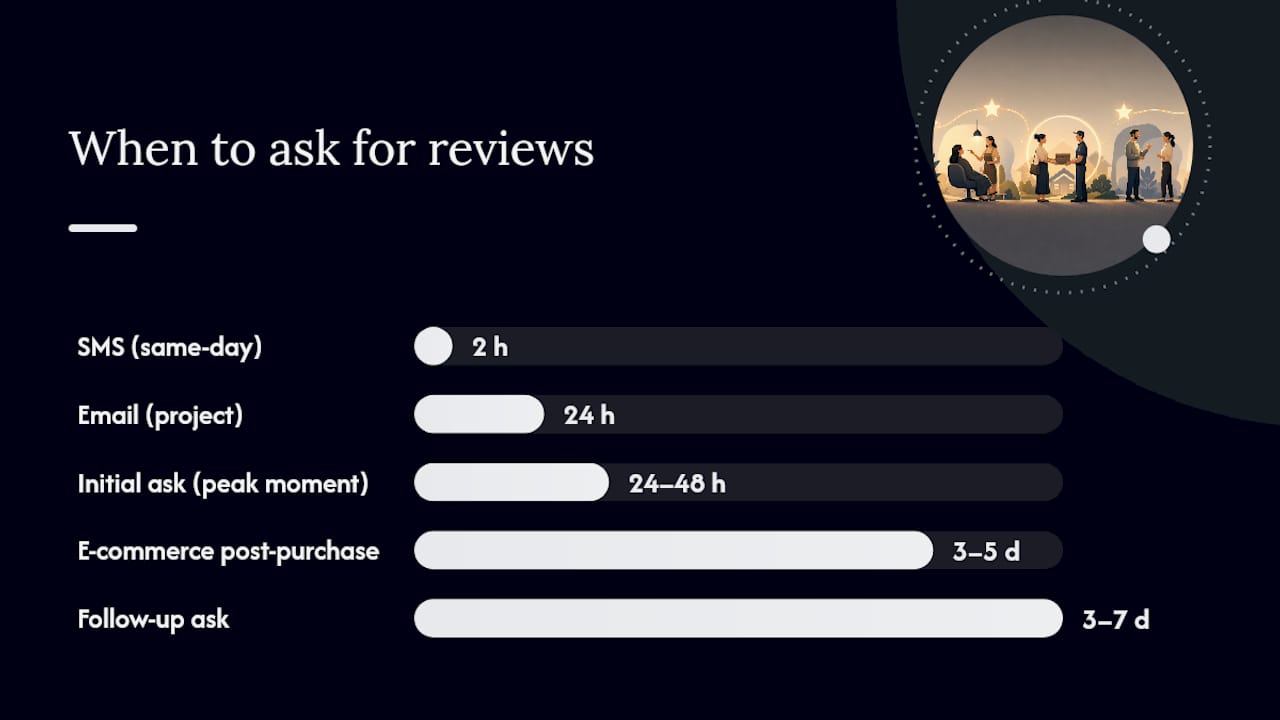
- Send the initial ask within 24–48 hours of the peak moment (delivery, project completion, resolved issue).
- Send one gentle follow-up 3–7 days later if no review has appeared. Keep it brief: “Just a quick follow-up on my earlier note — the link is still here if you have a moment: [REVIEW LINK].”
- Stop there. Two touches is the limit. A third ask reads as pressure and can damage the relationship.
Checklist for choosing your channel and timing:
- Same-day service (salon, repair, food): SMS within 2 hours.
- Project-based work (contractor, consultant, designer): Email within 24 hours of delivery.
- E-commerce: Automated post-purchase email 3–5 days after confirmed delivery.
- B2B software/SaaS: In-app prompt after a key milestone or positive support interaction.
How to create direct links, QR codes, and simple automations
Friction kills review conversion. Sending someone to your Google Business Profile homepage and hoping they find the “Write a review” button loses a significant portion of people who would have left a review if the path were clearer.
To generate a direct Google review link:
- Go to your Google Business Profile dashboard.
- Click “Ask for reviews” in the left menu or the home panel.
- Copy the short link Google generates. This link opens the review dialog directly on mobile and desktop.
- Shorten it with Bitly or a similar tool if you’re using it in SMS (shorter links look cleaner).
- Convert it to a QR code using any free QR generator (QR Code Generator, Canva, or Adobe Express all work).
Where to place your link or QR code:
- Email signature (every outgoing email becomes a passive ask).
- Printed receipts and invoices.
- Post-service follow-up pages or confirmation emails.
- Packaging inserts for physical products.
- A small card at your checkout counter or front desk.
Automation basics:
For e-commerce, connect your order management system (Shopify, WooCommerce) to an email tool like Mailchimp or Klaviyo and trigger a review request 3–5 days after delivery confirmation. For service businesses, most CRMs (HubSpot, Zoho, Keap) support SMS or email triggers based on job status. If you want a full overview of what automated outreach looks like in practice, this guide to automated customer outreach covers the setup logic well.

Pro Tip: Link directly to the review submission dialog, not just your profile page. Users who land on a profile page often browse, get distracted, and leave without reviewing. The dialog-direct link removes that decision point entirely.
How to respond to reviews: templates for positive and negative feedback
Responding to reviews is not optional. Google’s own guidance recommends replying to show customers their feedback matters, and the replies themselves become indexed content that signals engagement to search algorithms. Aim to respond within 48–72 hours.
Positive review reply template:
Thank you so much, [First Name]! We’re really glad [specific thing they mentioned] worked out well for you. We’d love to have you back, and if you ever need anything, don’t hesitate to reach out.
Keep it specific to what they wrote. A generic “Thanks for the review!” feels automated and wastes the SEO value of a keyword-rich, personalized reply.
Negative review reply template:
Hi [First Name], thank you for sharing this. We’re sorry your experience with [specific issue] didn’t meet expectations. We’d like to make it right — please reach out to us directly at [email/phone] so we can address this properly.
A few rules for negative replies:
- Never argue or get defensive in public.
- Acknowledge the experience without necessarily admitting fault for things outside your control.
- Move the resolution offline. The public reply is for optics; the fix happens in private.
- If the review violates platform policies (fake, spam, conflict of interest), flag it through the platform’s reporting tool rather than engaging with it.
When to escalate:
- Offer a refund or replacement privately when the complaint is legitimate and the customer is genuinely upset.
- Flag reviews that appear to be from someone who was never a customer.
- For repeated negative patterns about the same issue, treat the reviews as a product or operations signal, not just a PR problem.
What you should never do when collecting reviews
Some tactics that seem harmless can get reviews removed, trigger platform penalties, or damage your reputation more than a bad review ever would.
Google’s review policies are explicit: reviews that violate content guidelines, come from conflict-of-interest accounts, or are incentivized can be removed, and repeated violations can result in profile suspension. The same principle applies across Yelp, TripAdvisor, and most major platforms.
The practical rule: ask everyone, not just the customers you think will say something nice. Send the same request to your full post-purchase list. If someone had a bad experience, you want to know before they tell everyone else.
How to display and reuse reviews across your marketing
A review collected and left sitting on Google is half the value of a review collected, displayed on your site, and repurposed across your marketing. Shopify’s guidance on Google reviews recommends asking permission before republishing a customer’s review content, particularly when the platform’s terms require it.
Where to embed reviews:
- Homepage (a rotating testimonial block near the hero section).
- Product or service pages (next to the CTA, where purchase intent is highest).
- Landing pages for paid ads (social proof at the conversion point).
- Email newsletters (a featured review in a monthly send).
Ideas for repurposing:
- Pull a strong quote and turn it into a social post with the customer’s first name and photo (with permission).
- Use a short testimonial as ad creative in Facebook or Google Ads — real customer language often outperforms polished copy.
- Build a case study from a detailed review: add context, results, and a before/after narrative.
- Tag reviews internally by theme (speed, quality, customer service) so you can pull relevant quotes for specific campaigns.
The role of testimonials in marketing goes well beyond social proof. A well-placed review on a conversion page can do more for your close rate than a price reduction.
How to monitor reviews and track what’s actually working
Collecting reviews without tracking them is like running ads without checking conversions. You need a short list of metrics and a simple alert system.
Key metrics to watch:
- New reviews per week (volume trend).
- Average star rating (and whether it’s moving).
- Review response time (are you hitting the 48–72 hour window?).
- Sentiment trend (are the themes in reviews shifting?).
- Platform distribution (are you over-indexed on one platform?).
Setting up alerts:
- In Google Business Profile, turn on email notifications for new reviews under Settings > Notifications.
- Set a Google Alert for your business name to catch reviews on sites outside your primary platforms.
- If you use a CRM, configure it to flag new review activity or integrate a tool like Podium, Birdeye, or ReviewTrackers for aggregated monitoring.
For a broader view of how to connect review tracking to your overall marketing performance tracking, treat review volume and average rating as leading indicators of customer satisfaction, not just vanity metrics.
Interpreting what you see:
A sudden spike in negative reviews over 48 hours usually points to a specific operational issue, not a general trend. A slow decline in average rating over three months is a product or service signal. Treat them differently. Short-term spikes call for immediate investigation; sustained changes call for process changes.
The customer communication tools checklist is a practical starting point for choosing SMS, email, and CRM tools that support both outreach and monitoring in one stack.
What the data says about timing and wording
About 87% of consumers use Google to find local business information, which means your Google review count is often the first credibility signal a potential customer sees. Getting that number up isn’t just a reputation play — it’s a visibility play.
Research also suggests consumers read around seven reviews before trusting a business. If you have three reviews, you’re not yet in the trust zone for most buyers.
On timing and wording, industry research points to a few consistent patterns:
| Variable | Lower-performing approach | Higher-performing approach |
|---|---|---|
| Send timing | End of month batch send | Within 24–48 hours of service |
| Message tone | Formal, corporate (“We value your feedback”) | Conversational, personal (“Quick favor — would you mind?”) |
| Link placement | Buried at the bottom of a long email | First or second line, immediately visible |
| Follow-up | No follow-up | One reminder 3–7 days later |
| Ask specificity | Generic (“Leave a review”) | Specific (“Tell us about [product/project]”) |
If you want to test what works for your audience, run a simple A/B test: send half your list a short, direct ask and the other half a slightly longer conversational version. Measure which generates more reviews over two weeks. Then test timing: same-day send vs. next-day send. Small experiments with clear measurement windows tell you more than any general benchmark.
The goal isn’t to find the perfect template. It’s to find the one that works for your specific customers and then run it consistently.
Why most businesses are doing this backwards
The conventional advice on collecting reviews focuses almost entirely on volume: get more reviews, get them fast, get them everywhere. That’s not wrong, but it misses the more important question — which reviews, from whom, and placed where?
A single detailed review on Google from a customer who describes a specific problem you solved is worth more than ten generic five-star ratings with no text. Search algorithms weight review content, not just count. Buyers read the words, not just the stars. And a review that describes a real outcome gives you marketing copy you didn’t have to write.
The businesses that get the most value from their reviews treat the ask as the beginning of a content pipeline, not the end of a transaction. They ask for specifics (“What problem were you trying to solve? What did you find most useful?”), they respond to every review in a way that adds context, and they repurpose the best ones across every channel. That’s a fundamentally different posture than “please leave us a five-star review.”
The other thing most guides understate: negative reviews, handled well, often convert better than a perfect rating. A business with 4.3 stars and thoughtful responses to every complaint reads as more trustworthy than one with 4.9 stars and no engagement. Buyers know perfection is fake. They’re looking for evidence that you care when things go wrong.
Ibrand can set up your review system from scratch
Most small businesses know they need more reviews. The gap is usually execution: no direct link set up, no follow-up template written, no automation running. Ibrand builds the full review collection and reputation monitoring setup for you, including Google Business Profile optimization, post-purchase automation flows, and a monitoring dashboard so you never miss a new review.

If you want your review volume and local visibility working together, Ibrand’s local SEO and reputation services are built specifically for small businesses that need results without a long agency ramp-up. Schedule a quick audit and walk away with a clear picture of where your review profile stands and exactly what to fix first.
Sources
- Tips to get more reviews – Google Business Profile Help
- How To Ask for a Review (Templates + Best Timing) | Prooflet
- Why You Need Customer Reviews (and the Best Ways to Get Them) | Mailchimp
- How To Get More Reviews: 5 Small Business Strategies – Shopify
FAQ
How do I get a client to leave a review?
Ask directly within 24–48 hours of a positive interaction and send a link that opens the review form immediately. A personal, specific message (“Thanks for the project — would you mind sharing a quick Google review?”) with a one-tap link converts far better than a generic request.
How do I gather customer reviews at scale?
Automate post-purchase or post-service email and SMS requests using your CRM or email platform, and embed your direct review link in every message. Mailchimp’s research shows automated follow-ups drive a large share of total reviews collected.
How do I get people to actually write reviews?
Reduce the effort required: use a dialog-direct link, suggest what to write (“Tell us what problem we helped you solve”), and keep the ask to two sentences. One follow-up reminder 3–7 days later recovers responses from people who intended to review but forgot.
Can I offer a discount in exchange for a review?
No. Offering any reward in exchange for a positive review violates Google’s review policies and similar rules on most major platforms, and can result in review removal or account penalties. Ask everyone on your list and let honest feedback come in naturally.
What’s the best platform to collect reviews on first?
For most local businesses, Google Business Profile is the priority because about 87% of consumers use Google to find local business information. Add a second platform (Yelp, Facebook, or an industry site) once your Google review count is solid.
Recent Comments