
A Nextdoor business page is free. You claim it (or create it if none exists), verify that you represent the business, fill in your details, and start collecting recommendations from neighbors. Most owners can finish the setup in an afternoon. The part that pays off is what comes after: asking happy customers for recommendations, answering messages quickly and posting to the neighborhoods you serve.
This guide walks through each step, explains what verification asks for, and shows how local service businesses, venues and practices can get real leads from the platform.
TL;DR
- Creating or claiming a Nextdoor business page costs nothing, and you must be an owner, employee or authorized representative.
- Search for your business by name and location first. Many pages already exist from public data or neighbor recommendations, so claim before you create.
- Verify by phone call or text if a number is on file, or by uploading a business document such as a license or an IRS EIN letter.
- Add a logo, a cover photo and up to 10 categories, then share your unique page link to collect recommendations.
- Post regularly and reply fast. Verified businesses get unlimited free Business Posts that appear in the neighborhood news feed.
Table of Contents
- What a Nextdoor business page does for you
- Claim or create your Nextdoor business page
- Verify your business
- Fill out your page so it converts
- Get Nextdoor recommendations from real customers
- Post to your neighborhood
- What does it cost?
- Our perspective
- Make Nextdoor part of your local marketing
- Let us handle the local marketing for you
- FAQ
- Sources
What a Nextdoor business page does for you
Nextdoor is a neighborhood network where members register with a real address. Through a business page, neighbors can recommend you, message you and find your phone number, address and website. That makes it a word-of-mouth channel more than an ad channel.
The numbers Nextdoor itself publishes explain why owners bother. According to its own playbook, around one third of conversations on the platform are neighbors asking for or sharing recommendations, and pages with five or more recommendations see 30% higher engagement. Nextdoor also reports that 72% of neighbors have been influenced by a business recommendation.
These are Nextdoor’s figures about its own platform, so treat them as directional. They still point to the same lesson: a page with a logo, complete details and a handful of recommendations looks like a business neighbors can trust.
The businesses that tend to fit best are those that serve a defined service area: plumbers, HVAC companies, home contractors, dentists, med spas, restaurants, banquet halls and other venues. If your customers live within a few miles of you, this is a channel worth a few hours.
Claim or create your Nextdoor business page
Start by checking whether your business already has a page. Nextdoor explains that business information comes from third-party public data or from members who recommended a business and could not find an existing page. Claiming an existing page keeps any recommendations already attached to it. Creating a duplicate splits them.
Step by step
- Go to the business sign-up page at business.nextdoor.com/local and choose the free sign-up or claim option.
- Create an account or log in. Nextdoor says you manage the page with the same email and password.
- Search using both your business name and your location. Select your page if it appears.
- If you do not see it, scroll to the bottom and click the blue link to create your business page instead.
- Confirm that you are an owner, employee or authorized representative. That is a requirement, not a formality.
- Complete verification (covered below).
If you are a one-person service provider rather than a registered storefront, Nextdoor’s guide for casual providers describes a Neighbor for Hire option: pick the categories that describe your service, then add current contact details, a profile photo and a friendly greeting that explains what you do. That guide dates from 2019, so menus may look different today. If the option is missing from your account, the standard business page is the route to use.
Name it the way customers search
Use the name customers actually see on your truck, sign or invoice. If your legal name differs from your public name, keep that in mind for verification, since a different name requires an extra document (see below).
Verify your business
Verification is what unlocks the full feature set, including free Business Posts. The route depends on how you got to the page.
- Claimed an existing page with a phone number on file: Nextdoor says you can verify by phone call or text message.
- Created a new page, or no phone option appears: you submit documents from your account settings.
Per Nextdoor’s FAQ, acceptable documents for U.S. businesses include:
| Document | Notes |
|---|---|
| Business license or permits | Issued by local, state or federal government |
| Business tax registration certificate | Tax or VAT registration |
| EIN confirmation letter or IRS tax notice | U.S. only |
| Business bank statement | Account number redacted |
| Business credit report | |
| Fictitious Business Name Statement | Needed in addition to one of the above if you operate under a different name |
Have one of these ready as a clean scan or photo before you start. Mismatched names are the most common snag: the name on the document should line up with the name on the page, or you should add the fictitious name statement.
Fill out your page so it converts
Once the page is yours, open the Page tab and click Edit. Nextdoor’s claiming guide says this is where you add a logo and cover photo, update your name, location and contact information, and choose up to 10 categories.
The details that matter most
- Logo: Nextdoor states that pages with a logo get 7X as many views as pages without one. Use a square, readable version of your mark.
- Cover photo: show real work, your storefront, your team or your room. Neighbors are choosing someone who lives nearby, so authentic beats stock.
- Categories: use all the ones that honestly apply, up to 10. A plumber might add drain cleaning, water heater installation and emergency repair rather than only “plumbing.”
- Address: there is a checkbox to show your address publicly. Leave it unchecked if you work from home or travel to customers. Check it if you have a storefront or venue people visit.
- Description: write in plain words about what you do, which neighborhoods you serve and how to book. Skip slogans.
- Contact details: phone, website and hours should match your Google Business Profile exactly. Consistent details across directories help customers trust you and are a basic local SEO habit. Our guide on using local listings to boost visibility covers how to keep them aligned.
If you take gift card purchases or takeout orders, Nextdoor says there is no fee to add a gift card link or takeout and delivery options. The transaction happens outside Nextdoor, so the checkout you link to is yours to set up.
Get Nextdoor recommendations from real customers
Recommendations are the core of the page. Nextdoor says they come from neighbors who registered and confirmed they live where they say they do. That is why they carry weight with other neighbors.
A neighbor can also tap “Fave” on your page. Nextdoor describes Fave as the primary action on a business page, and says your Fave count helps you rank higher in search results.
How customers leave one
Under the Page tab (labeled “Your reputation” in some guides) you will find your unique page link. When a customer opens it, they are prompted to sign in or create a free Nextdoor account, after which they can click Recommend. Customers who are not yet on Nextdoor can join for free, so the link works for everyone.
Ways to ask without being pushy
- Put the link in your post-job email or invoice. Our email marketing best practices show how to build that follow-up into a routine.
- Add it to a text message right after a finished job, when satisfaction is highest.
- Share it on your own social profiles and on your website’s contact page. Nextdoor encourages sharing the link anywhere, including your own marketing.
- Ask in person: “If you’re on Nextdoor, a recommendation helps your neighbors find us.”
Ask for honest feedback and nothing more. Do not offer payment or discounts in exchange for a particular rating, and never write recommendations for yourself. Platform rules and consumer protection rules both take fake reviews seriously.
Respond to every one
Nextdoor advises responding from the Page tab and thanking people for their kind words, and doing so for both the good and the bad. A calm, specific reply to a critical comment often convinces the next neighbor more than the five-star ones do. Keep it short, take the details offline if needed and never argue.
When a recommendation is glowing, Nextdoor’s editorial team suggests posting that feedback so it speaks for you. Get the customer’s okay first if you quote their name.
Post to your neighborhood
Verified businesses get unlimited free posts. Nextdoor says Business Posts appear in the neighborhood newsfeed, the most visible section of the app. According to the playbook, a post from your page can reach all neighbors within two miles of your business. Reactions and replies push a post higher in the feed, so engagement compounds.
To post, log in to your claimed page and choose Post from the left menu on desktop or the bottom menu on mobile.
What to post
Nextdoor’s playbook lists several formats that work for local businesses: updates such as new service options, questions that gather customer feedback, advice in your area of expertise, photos of new products or finished work, and job openings.
Here is how that translates by trade:
| Business | Post idea |
|---|---|
| HVAC | A short seasonal tip on changing filters before summer, with your booking link |
| Plumber | Photo of a before-and-after water heater swap in a nearby street (with permission) |
| Dentist | Announce new appointment openings or a family-friendly hours change |
| Med spa | Educational post answering a common question about a treatment |
| Banquet hall or venue | Photos of a recent event setup and a note on upcoming open dates |
| Home contractor | A project walkthrough and how you handle permits |
Do not copy the same promotional post every week. Treat the feed like a conversation: Nextdoor’s own tips say to respond as soon as neighbors comment, connect with other local businesses and organizations, and think about seasonality.
Frequency matters
Nextdoor notes that customers need to hear from a business around seven times before buying, which is why it recommends posting early and often. A realistic schedule for a busy owner is one or two posts a week: one useful, one promotional.
Answer messages quickly
Neighbors can message you privately through the page to ask about availability and pricing. Nextdoor’s guide says to respond promptly. For a plumber with a leaking pipe on the line, the first business to reply usually gets the job. Turn on notifications and set a rule for yourself: reply within the hour during business hours.
What does it cost?
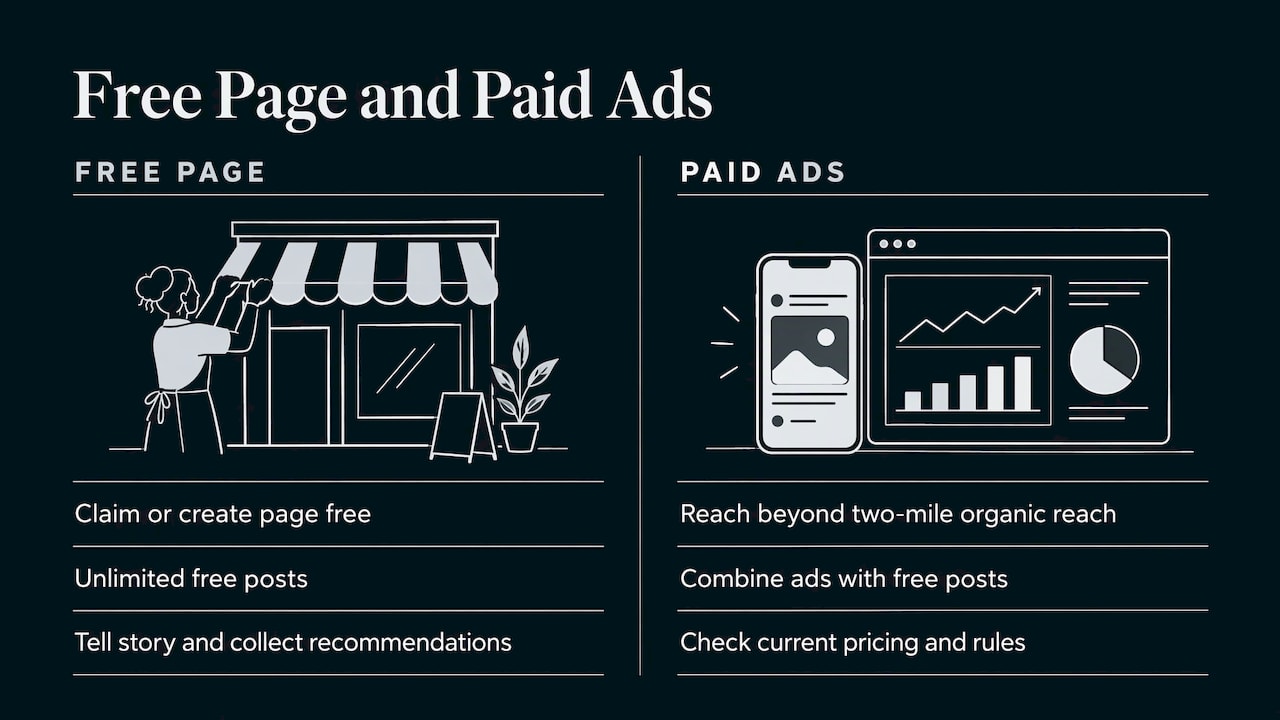
Claiming or creating the page is free, and Nextdoor says the free page lets you tell your business story, collect recommendations and publish unlimited free posts. Paid advertising is a separate layer. If you want to go beyond your two-mile organic reach, Nextdoor offers an ads platform, and its own advice is to combine free posts with ads to reach that repeated exposure. Check Nextdoor’s current ad pricing and rules directly before you commit a budget, since they change.
If you see an unexpected charge on a card, it is almost certainly tied to an advertising or promotion setting inside your account. Review your billing settings and contact Nextdoor support through your account’s help center.
Our perspective
Most small business owners we talk to treat Nextdoor as an afterthought. They claim the page, upload a logo and never touch it again. That wastes one of the few channels where a customer’s neighbor is the one doing the selling.
Our view is simple: the Nextdoor page should be one piece of a local presence, not a separate project. The same business name, address, phone number and services should appear on your website, your Google Business Profile, your listings and your Nextdoor page. The same happy customer who leaves a Google review can be asked for a Nextdoor recommendation in the same follow-up message. The same photo from a finished job can become a Google post, a social post and a Nextdoor post.
That is how we plan local marketing for the businesses we work with: a custom plan for each client, built around the places their customers actually look, with real-time tracking so you can see what is generating calls. For home service companies, practices and venues, a well-kept Nextdoor page is a low-cost way to start building the local trust everything else depends on.
TONY
Make Nextdoor part of your local marketing
A Nextdoor page works best next to the rest of your local presence. Three connections are worth setting up early.
Google Business Profile. For most local searches this is still where customers start. Our Google Business Profile tips and post ideas pair well with a Nextdoor posting routine, since one piece of content can serve both.
Your website. Link to your Nextdoor page from your contact page and add your recommendation link to your confirmation emails. A site that loads fast on a phone and makes it easy to call or book turns the attention you earn on Nextdoor into actual appointments.
Community engagement. Nextdoor rewards businesses that behave like neighbors. Sponsor a local team, answer questions about your trade, and thank other businesses publicly. Our piece on engaging your local community online goes deeper on that approach.
A simple 30-day plan
- Week 1: Claim and verify the page. Add the logo, cover photo, categories and description.
- Week 2: Send your recommendation link to your ten most recent happy customers.
- Week 3: Publish two posts: a helpful tip and a recent project photo. Reply to every comment within a day.
- Week 4: Review which posts got reactions, answer any pending messages and decide whether paid reach makes sense for you.
Keep a note of how many calls or booking requests mention Nextdoor. Asking “how did you hear about us?” on the phone or intake form is enough to see whether the channel earns its time.
Let us handle the local marketing for you
If you would rather spend your time running the business, we can help. IBrand Media works with small and local businesses on local marketing, SEO, web design, social media management, content creation, email marketing and more, with a custom plan for each client and real-time performance stats so you can see what is working.
Tell us about your business and your service area, and we will map out where a Nextdoor page, your Google Business Profile and your website fit together. Start at IBrand Media to request a plan.
FAQ
How can I post my business on Nextdoor?
Claim or create your business page, then complete verification. Once verified, log in, choose Post from the menu and write your update. Nextdoor says verified businesses get unlimited free posts to their immediate neighborhood and connections.
Do I need to verify my Nextdoor business page?
Yes, verification confirms you represent the business and unlocks Business Posts. You can use a phone call or text if a number is on file for an existing page. Otherwise you upload a document such as a business license or IRS EIN letter.
Can customers recommend my business if they are not on Nextdoor?
They need a free Nextdoor account to leave a recommendation. When they open your unique page link, they are prompted to sign in or sign up, then they can recommend you. Send the link in an email or text right after the job.
Can I hide my address on my business page?
Yes. In the page editor there is a checkbox to show your address in your contact information. Leave it unchecked and your address stays hidden, which suits home-based and mobile service businesses.
Should I create a new page if mine already exists?
No. Search by business name and location and claim the existing page. This keeps any recommendations already attached to it and avoids a duplicate listing that confuses customers.
Sources
- Create a Free Business Page on Nextdoor
- Managing Your Nextdoor Business Page: Answers to Your Most Asked Questions
- Guide to claiming your Nextdoor Business Page
- Small business guide to getting Nextdoor Faves and recommendations
- Neighbors for Hire: How to Use Nextdoor to Grow Your Business
- Nextdoor Local Business Playbook
- How to engage neighbors with free and unlimited holiday Business Posts
- Guide to posting on Nextdoor as a business
- 8 Ways to use Nextdoor Business Posts to drive engagement
- New Product Features for Small Businesses
Recent Comments