
TL;DR:
- Responding promptly to negative reviews using the L.A.S.T. framework effectively addresses complaints while reassuring prospects. Keeping public replies concise and moving detailed resolution offline helps preserve reputation and build trust. Assigning ownership and using templated responses streamline management, ensuring quick, personalized engagement.
Respond publicly promptly using a brief 3–5 sentence L.A.S.T. reply, then move the resolution offline. That’s the whole playbook in one sentence. Here’s what it looks like in practice.

Public reply template (copy and customize):
Private follow-up template (email or DM):
Keep public replies to 50–100 words. Anything longer reads as defensive, even when every word is accurate. If the issue involves billing, a refund, or personal details, say nothing specific publicly — move it offline immediately.

Table of Contents
- Why responding to negative reviews protects your business
- What is the L.A.S.T. framework and how do you use it?
- Core best practices for crafting a public reply
- How to tailor replies by scenario, with ready-to-use templates
- Platform-specific guidance: Google, Yelp, Facebook, TripAdvisor, and BBB
- When not to reply publicly and how to escalate
- How to follow up after resolution and turn it into a positive
- Industry-specific example replies: restaurant, hotel, and healthcare
- Quick-reference checklist and 10 copy-ready replies
- Key Takeaways
- The part most guides skip: who should actually own your review responses
- Useful sources and further reading
- FAQ
Why responding to negative reviews protects your business
Every reply you post has two audiences: the unhappy reviewer and every prospective customer who reads the thread afterward. The SBA makes this point directly — your response is a public signal of how you handle conflict, and future customers weigh it heavily before deciding whether to call you.
The business case for responding is concrete. Businesses that reply to negative reviews see an average rating increase of about 0.12 stars and a 12% boost in positive reviews afterward. Those numbers sound modest, but on a platform where a 3.9 and a 4.1 can mean the difference between a click and a scroll-past, they matter. Silence, by contrast, signals indifference.
Here’s what consistent, well-timed responses actually deliver:
- Reduced conversion loss. Prospective customers who see a thoughtful reply are far less likely to walk away based on one bad review.
- Recovered ratings. Resolved complaints sometimes prompt reviewers to update their star rating voluntarily.
- Fewer escalations. A fast, calm public reply often stops a frustrated customer from posting on additional platforms.
- Operational intelligence. Patterns in negative feedback reveal real service gaps before they become systemic.
Timing is where most small businesses fall short. Responding within 24–48 hours signals active engagement. Waiting a week signals the opposite, and by then the prospective customer who read the review has already chosen someone else.
What is the L.A.S.T. framework and how do you use it?
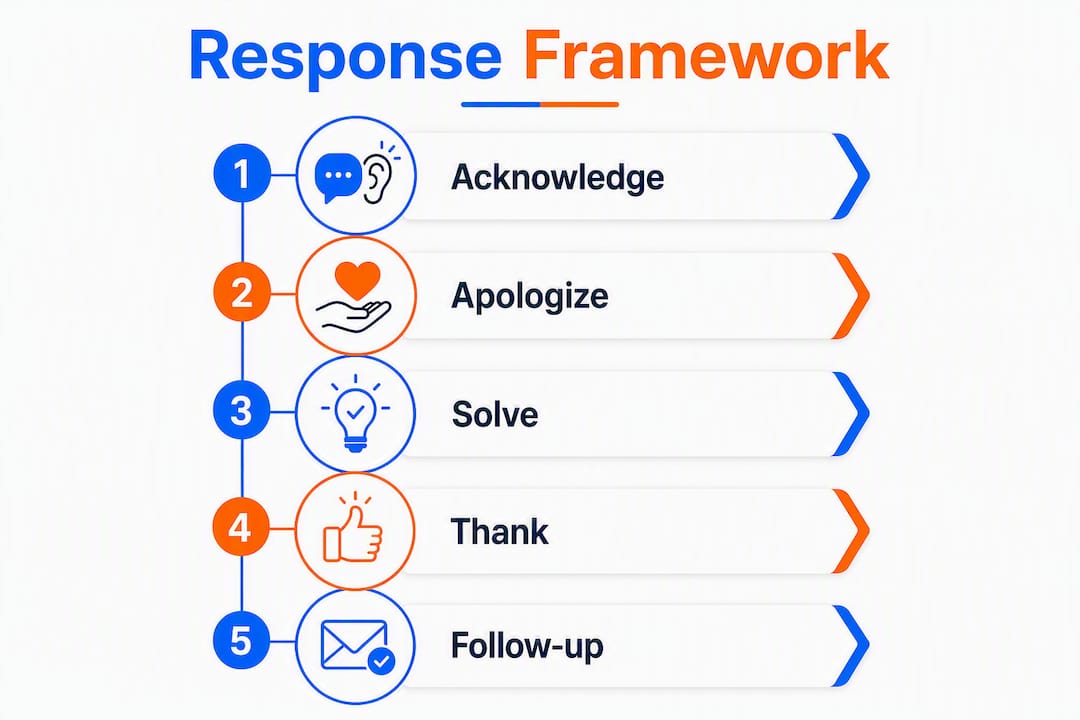
L.A.S.T. stands for Listen, Apologize, Solve, and Thank. It’s the most widely used framework for structuring review responses, and it works because it forces you to address the actual complaint rather than defend your business.
- Listen: Read the review twice. Strip out the emotional tone and identify the specific factual claim — a wait time, a billing error, a damaged item. That’s what you’re responding to.
- Apologize: Apologize for the situation, not for your existence. “I’m sorry the item arrived damaged” is specific and shows you read the review. “I’m sorry you feel that way” is a passive non-apology that signals you didn’t take the complaint seriously.
- Solve: Offer a path to resolution. Keep it brief and public-facing (“please contact us at [email]”), with the actual remedy handled privately.
- Thank: Thank the reviewer. It sounds counterintuitive, but it de-escalates tone and signals professional maturity. It also shows future readers that you welcome feedback rather than fear it.
Aim for 3–5 sentences in your public reply, which typically keeps responses within the recommended 50–100 word range. Practitioners consistently flag that longer responses are perceived as defensive regardless of their accuracy. For a service business, that means one sentence per L.A.S.T. step. For a SaaS product, you might compress Solve and Thank into one sentence since the resolution path is usually a support ticket or account review.
Pro Tip: Build a one-page response SOP for your team: who owns replies (owner vs. manager), what the 24-hour deadline looks like in practice, and which star ratings require founder-level sign-off. Assign one person per platform and review it monthly.
Core best practices for crafting a public reply
The SBA advises business owners to remain polite, avoid getting personal, customize responses, and show the actions taken to resolve issues. That’s the floor. Here’s what actually separates a good reply from a great one.
- Read the review twice before typing. Identify the specific complaint. Don’t respond to the emotional tone — respond to the factual claim.
- Use the reviewer’s name. “Hi Sarah” is more disarming than “Dear Customer.” It signals you read the review as a person, not a ticket.
- Apologize for the situation, not in the abstract. Name the issue: “I’m sorry the appointment ran 30 minutes late.” Vague apologies read as scripted.
- Avoid passive-apology phrases. “I’m sorry you feel that way” and “We’re sorry if you were inconvenienced” both imply the customer is wrong. Drop them entirely.
- Move resolution offline. Post your contact info once, clearly. Don’t negotiate refunds, replacements, or discounts in a public thread.
- Sign with a real name. “— Maria, Owner” or “— The [Business Name] Team” both work. Anonymous corporate-voice replies feel hollow.
- Never offer compensation publicly in exchange for removing a review. This can violate platform terms and FTC guidance and tends to backfire badly when screenshotted.
| Do this | Avoid this |
|---|---|
| “I’m sorry the item arrived damaged.” | “I’m sorry you feel that way.” |
| “Please contact us at [email] so we can make this right.” | “We take all feedback seriously.” (no action) |
| “Hi [Name], thank you for your feedback.” | “Dear Valued Customer,” |
| “We’re reviewing our scheduling process.” | “This has never happened before.” |
| “— [Real Name], [Title]” | Unsigned or “The Team” with no name |
For contact info placement, put it at the end of the reply, not the beginning. Opening with “Call us at 555-0100” before acknowledging the complaint reads as dismissive.
Pro Tip: For one-star reviews or complaints involving money, the founder or owner should sign the reply personally. For three-star feedback or minor service notes, a team member signature is fine. The severity of the complaint should match the seniority of the responder.
How to tailor replies by scenario, with ready-to-use templates
Matching tone to the situation
Not every negative review deserves the same response. A billing dispute needs a factual, calm tone. A service failure needs empathy first. A fake review needs no public argument at all.
| Tone | Example opening | When to move offline |
|---|---|---|
| Empathetic | “Hi [Name], we’re truly sorry your experience fell short.” | Service failures, staff complaints, emotional reviews |
| Factual | “Hi [Name], thank you for flagging this billing concern.” | Billing disputes, policy questions, factual errors |
| Urgent | “Hi [Name], we want to address this right away.” | Safety concerns, health-related complaints, legal risk |
One-sentence factual clarifications work well when a review contains a verifiable error (wrong date, wrong location). Keep it brief: “Just to clarify, our return window is 30 days from delivery.” Avoid extended public rebuttals — they rarely persuade the reviewer and often look combative to future readers.
Public reply templates
Service failure:
“Hi [Name], we’re sorry your experience didn’t reflect the service we aim to deliver. That’s on us. Please reach out to us at [email/phone] so we can make this right for you. Thank you for letting us know.”
Billing dispute:
“Hi [Name], thank you for flagging this. We’d like to review your account and sort this out. Please contact us at [email] with your order number and we’ll get back to you within one business day.”
Late delivery:
“Hi [Name], we apologize for the delay — we know how frustrating that is. We’re looking into what happened on our end. Please contact us at [email] and we’ll follow up with a resolution.”
Product defect:
“Hi [Name], we’re sorry the product didn’t arrive in the condition it should have. Please reach out at [email] with a photo and your order number. We’ll replace it or issue a refund right away.”
Polite negative feedback:
“Hi [Name], thank you for the honest feedback. We’re glad you shared this — it helps us improve. We’d love to hear more at [email] if you’re open to it.”
Unfair or suspected fake review:
“Hi [Name], we take all feedback seriously and want to make sure every concern is addressed. We weren’t able to find a matching record for this visit. Please contact us at [email] so we can look into this further.”
Rude staff complaint:
“Hi [Name], this is not the experience we want anyone to have. We’re addressing this internally. Please reach out at [email/phone] so we can follow up with you directly.”
Minor complaint:
“Hi [Name], thank you for the note. We’re sorry about [specific issue] and will use this feedback to do better. Feel free to reach out if there’s anything else we can help with.”
Private follow-up templates
General resolution follow-up:
“Hi [Name], I’m [Your Name] from [Business Name]. I wanted to follow up on your recent review. I’m sorry about [issue]. I’d like to offer [remedy]. Can we connect this week? You can reach me at [contact info].”
Billing resolution:
“Hi [Name], I’ve reviewed your account and found [specific issue]. I’m processing [refund/credit] now and you should see it within [timeframe]. Please let me know if you have any questions.”
Replacement or refund:
“Hi [Name], I’ve arranged a replacement for [item] and it will ship within [timeframe]. I’ve also waived the shipping fee. Please confirm your address and I’ll get this moving.”
Appointment or scheduling issue:
“Hi [Name], I’d like to offer you a complimentary [service/appointment] to make up for the inconvenience. Please reply here or call [phone] to schedule at your convenience.”
Post-resolution check-in:
“Hi [Name], I wanted to check in and make sure everything was resolved to your satisfaction. If there’s anything else I can do, please don’t hesitate to reach out.”
Pro Tip: Save your private templates in a shared doc your whole team can access. Label each one by scenario. When a review comes in, the responder picks the closest template, customizes the bracketed fields, and sends it within the hour. This cuts response time dramatically without sacrificing personalization.
Platform-specific guidance: Google, Yelp, Facebook, TripAdvisor, and BBB
Each platform has its own rules, tools, and culture. A reply that works on Google can feel off on TripAdvisor.
Google Reviews
- Reply directly through your Google Business Profile. Responses are public and indexed by Google.
- Keep replies to 3–5 sentences. Google’s own guidance emphasizes useful, readable, and courteous responses.
- To flag a review for removal, click the three-dot menu next to the review and select “Flag as inappropriate.” Google removes reviews that violate its policies (spam, fake, off-topic, conflict of interest).
- Never include keywords or promotional language in a review reply — Google can penalize this.
Yelp
- Respond through Yelp for Business. You can post a public comment or send a private message (requires a real business photo on your profile).
- Yelp’s culture skews conversational. A slightly warmer tone works here.
- Yelp does not remove reviews simply because you disagree with them. Flag only for clear policy violations: fake accounts, inappropriate content, or conflicts of interest.
- Yelp explicitly warns that offering compensation for review removal violates its terms.
Facebook (Page Reviews / Recommendations)
- Reply through your Facebook Business Page. Responses appear publicly under the recommendation.
- Facebook allows you to turn off the Recommendations feature entirely, but doing so removes all reviews — positive and negative.
- To report a review, click the three dots on the post and select “Find support or report.” Facebook removes content that violates its Community Standards.
- Private messaging a reviewer is allowed and often effective for moving resolution offline.
TripAdvisor
- Respond through the Management Center. TripAdvisor displays your response directly below the review.
- Sign replies with your name and title (e.g., “Maria, General Manager”). TripAdvisor’s hospitality audience expects this.
- TripAdvisor allows one response per review — make it count. You cannot edit it after posting.
- Flag reviews through the Management Center for policy violations. TripAdvisor investigates reports of fake or incentivized reviews.
Better Business Bureau (BBB)
- The BBB operates differently from review platforms. Complaints go through a formal mediation process, not a public comment thread.
- Respond to BBB complaints within the timeframe the BBB specifies (typically 14 days). Your response becomes part of your public BBB file.
- Keep BBB responses factual and professional. Avoid emotional language — this is closer to a formal business record than a review reply.
- Resolving BBB complaints improves your BBB rating and signals trustworthiness to customers who check accreditation status.
Never offer to remove a review in exchange for compensation on any platform. This violates FTC guidance and most platform terms of service, and it tends to surface publicly in the worst possible way.
When not to reply publicly and how to escalate
Some reviews require a different response entirely — or no public response at all.
Don’t reply publicly when:
- The review contains threats, harassment, or personal attacks against staff.
- The review includes what appears to be defamatory content (false statements of fact presented as true).
- You’re in a regulated industry and the review contains patient or client information (HIPAA applies to healthcare providers — any public reply that confirms a patient relationship can trigger a violation).
- The review is part of a coordinated fake-review attack with no matching transactions in your records.
- A legal dispute is already underway involving the reviewer.
Escalation steps:
- Screenshot the review with a timestamp before doing anything else.
- Check your transaction records. If no matching customer exists, verify internally before responding or flagging.
- Flag the review using the platform’s reporting tool. Document the flag with a screenshot.
- If the review contains defamatory content, consult an attorney before posting any public reply. A public rebuttal can complicate a defamation claim.
- For healthcare providers, route the review to your compliance officer before any response is drafted.
Legal triggers to watch for:
- False statements of fact (not just negative opinions) presented as true.
- Doxxing or personal identifying information about staff.
- False identity claims (reviewer claims to be a customer but no record exists and the account is new or anonymous).
- Coordinated review attacks from competitor accounts.
Pro Tip: Keep a dedicated folder in Google Drive or Dropbox for escalated reviews: screenshot, date, platform, action taken, and outcome. If you ever need to pursue a platform appeal or legal action, that documentation is your evidence.
How to follow up after resolution and turn it into a positive
Resolving a complaint privately is only half the job. The public thread still shows the original one-star review unless you close the loop.
Public follow-up (post after resolution):
This post serves future readers as much as the original reviewer. It shows you follow through.
Private request to update the review (use carefully):
Never tie a compensation offer to a review update or deletion. That’s an FTC violation and a platform terms breach. The ask should be genuine and optional.
Internal action items after every resolved complaint:
- Log the complaint type, root cause, and resolution in your CRM or a shared spreadsheet.
- Flag recurring issues for a team debrief (three complaints about the same thing in 30 days is a process problem, not a customer problem).
- Update your FAQ, onboarding materials, or service policy if the complaint reveals a gap.
- Check whether the product, service, or staff involved needs retraining or adjustment.
For a deeper look at reputation repair strategies, Ibrand has a practical guide for small businesses covering recovery workflows and monitoring tools.
Industry-specific example replies: restaurant, hotel, and healthcare
Restaurant
Public reply:
“Hi [Name], thank you for the honest feedback. We’re sorry the wait time and [specific dish] fell short — that’s not the experience we want for anyone. Please reach out to us at [email] and we’d like to invite you back on us. We appreciate you giving us the chance to do better.”
Private follow-up:
“Hi [Name], this is [Owner Name] from [Restaurant Name]. I wanted to personally apologize for your experience on [date]. I’d like to offer you a complimentary meal for two on your next visit. Please reply here or call [phone] to arrange it.”
Hotel / Hospitality
Public reply:
“Hi [Name], thank you for staying with us and for taking the time to share this. We’re sorry the [room/service issue] didn’t meet your expectations. Our general manager has been notified and we’re addressing this directly. Please contact us at [email] — we’d like to make your next stay right.”
Private follow-up:
“Hi [Name], I’m [Name], General Manager at [Hotel Name]. I’ve reviewed your stay and I want to personally apologize for [specific issue]. I’d like to offer [remedy: points/discount/complimentary night]. Please reply here or call [direct line] at your convenience.”
Pro Tip: In hospitality, always sign with your name and title. TripAdvisor readers specifically look for management responses, and a named GM reply carries more weight than a generic “hotel team” signature.
Healthcare
Public reply (HIPAA-safe):
“Thank you for your feedback. We take all patient concerns seriously and want every experience at our practice to be positive. Please contact our patient care coordinator at [phone/email] so we can address your concerns privately and appropriately.”
Never confirm or deny that the reviewer is a patient. Never reference appointment dates, treatments, or any clinical detail publicly. For dental practices specifically, Ibrand’s guide on dental reputation management covers HIPAA-compliant reply frameworks in more detail.
Private follow-up (after patient confirms contact):
“Hi [Name], thank you for reaching out. I’d like to schedule a brief call with our practice manager to discuss your experience. Please let us know a convenient time and we’ll arrange it. We appreciate your patience.”
Quick-reference checklist and 10 copy-ready replies
Response workflow checklist
- See the review (set up Google Alerts or a review monitoring tool to catch it fast).
- Read it twice. Identify the factual complaint, not the emotional tone.
- Apply L.A.S.T.: Listen, Apologize, Solve, Thank.
- Keep the public reply to 50–100 words (3–5 sentences).
- Move detailed resolution offline. Post contact info once.
- Log the complaint type and resolution in your records.
- Follow up privately after resolution. Ask for a review update only if appropriate and never tied to compensation.
10 short copy-ready replies
Use these as-is for quick responses on busy days. Replace all bracketed fields before posting.
-
Late delivery: “Hi [Name], we’re sorry for the delay. Please contact us at [email] with your order number and we’ll resolve this right away. Thank you for your patience.”
-
Wrong item: “Hi [Name], we apologize for sending the wrong item. Please reach out at [email] with a photo and your order number — we’ll ship the correct one immediately.”
-
Rude staff: “Hi [Name], this is not how we treat our customers and we’re sorry. We’re addressing this with our team. Please contact us at [phone/email] so we can follow up with you directly.”
-
Billing issue: “Hi [Name], thank you for flagging this. Please contact us at [email] with your invoice number and we’ll review and correct it within one business day.”
-
Missed appointment: “Hi [Name], we sincerely apologize for the scheduling error. Please reach out at [phone/email] and we’ll prioritize rescheduling you at no charge.”
-
Suspected fake review: “Hi [Name], we take all feedback seriously. We weren’t able to locate a matching record for this visit. Please contact us at [email] so we can look into this further.”
-
Product defect: “Hi [Name], we’re sorry the product arrived in that condition. Please email us at [email] with a photo and we’ll send a replacement or issue a full refund.”
-
Minor complaint: “Hi [Name], thank you for the note. We’re sorry about [specific issue] and will use this to improve. Feel free to reach out if there’s anything else we can help with.”
-
Praise with a note: “Hi [Name], thank you for the kind words and for the honest feedback on [specific issue]. We’re working on it. We hope to see you again soon.”
-
Low-effort 1-star (no text): “Thank you for your rating. We’d love to learn more about your experience so we can address any concerns. Please reach out to us at [email/phone].”
When to use these short replies vs. a full L.A.S.T. response: Short replies work for 3-star and above reviews, minor complaints, and situations where the issue is clear and the fix is simple. For 1-star reviews, billing disputes, or any complaint with legal or safety implications, write a full L.A.S.T. reply and escalate internally.
Avoid copy-pasting without customizing. A reply that uses the reviewer’s name and references their specific complaint will always outperform a generic one, even if both are the same length.
Key Takeaways
Responding to negative reviews promptly using the L.A.S.T. framework, keeping public replies concise, and moving resolution offline is the most effective approach for small businesses to protect their reputation and recover ratings.
| Point | Details |
|---|---|
| Respond promptly | Fast replies signal active engagement and reduce conversion loss from prospective customers reading the thread. |
| Use the L.A.S.T. framework | Listen, Apologize, Solve, Thank — keeps replies structured, specific, and under 100 words. |
| Keep public replies short | 50–100 words (3–5 sentences) is the recommended length; longer replies read as defensive. |
| Move resolution offline | Post contact info once publicly; handle refunds, replacements, and details in private. |
| Document everything | Log complaint type, platform, action taken, and outcome for every escalated review. |
The part most guides skip: who should actually own your review responses
Most advice on handling negative reviews focuses on what to write. The harder question for a small business is who writes it and when.
Here’s the honest reality: if you’re a solo operator or a team of five, you probably can’t monitor five platforms daily and respond within 24 hours without a system. The businesses that handle this well aren’t necessarily faster writers — they’ve assigned ownership. One person owns Google, one owns Yelp, and the founder gets flagged only when a review hits one star or involves a legal risk. That’s it. No committee, no approval chain for routine replies.
The shortcut that actually saves time is a shared template doc with ten pre-written replies, organized by scenario. When a review comes in, the responder opens the doc, picks the closest match, swaps in the reviewer’s name and the specific complaint, and posts it. The whole thing takes three minutes. Without that doc, the same person stares at the screen for fifteen minutes trying to find the right tone and ends up posting something either too stiff or too apologetic.
The other thing worth saying plainly: the founder should not respond to every review personally. It signals that the business has no process, and it doesn’t scale. But the founder absolutely should respond to any one-star review that involves a refund, a safety issue, or a threat. Those carry reputational weight that a team member’s signature can’t match.
Building a review management workflow doesn’t require expensive software. A shared Google Doc for templates, Google Alerts for your business name, and a clear ownership rule per platform is enough to handle 90% of what comes in. The remaining 10% — fake reviews, legal threats, coordinated attacks — needs escalation, not a template.
Useful sources and further reading
- U.S. Small Business Administration: Essential Steps to Handle Negative Reviews
- Google Business Profile Community: How to Effectively Respond to Google Reviews
- Reviewz: How to Respond to Negative Reviews — L.A.S.T. Framework + Examples
- Search Engine Land: How to Handle Negative Google Reviews
- FeedbackRobot: How to Respond to Negative Reviews
- Ibrand: Protecting Your Online Business Reputation
- Ibrand: Complete Guide to Managing Online Business Reputation
- Ibrand: Why Reviews Matter for Business Success Online
FAQ
How do you professionally respond to a negative review?
Acknowledge the reviewer by name, apologize for the specific situation, offer a path to resolution, and thank them for the feedback. Keep the reply to 3–5 sentences and move detailed resolution offline.
Should you respond to every negative review?
Yes. Responding to every negative review shows prospective customers that you’re attentive and accountable. The SBA recommends responding to all reviews, positive and negative, as part of active reputation management.
How do you handle a fake or spam review?
Check your transaction records first. If no matching customer exists, flag the review using the platform’s reporting tool rather than arguing publicly — a public rebuttal rarely removes the review and can look defensive to future readers.
What should you never say in a negative review response?
Avoid “I’m sorry you feel that way,” any offer to remove a review in exchange for compensation, and any public disclosure of billing or personal details. These either signal you didn’t take the complaint seriously or can violate FTC guidelines and platform terms.
How long should a public review response be?
50–100 words, or 3–5 sentences. Longer replies are consistently perceived as defensive, even when factually accurate.
This article is general information for educational purposes. For legal, HIPAA compliance, or platform-specific policy questions, consult the relevant platform’s official guidelines or a qualified professional for your specific situation.
Recent Comments