
Reply quickly, acknowledge the issue, offer a concrete next step, and sign your name. That’s the rule. Everything else is execution.
Here are three templates you can post right now:
- Positive (15–40 words): “Thank you, [Name]! We’re so glad [specific detail they mentioned] hit the mark. We look forward to seeing you again soon. [Your name], [Role]”
- Neutral/mixed (40–60 words): “Hi [Name], thank you for the honest feedback. We’re glad [positive point] worked for you, and we hear you on [issue]. We’d love to make it right — please reach out to us at [email/phone]. [Your name], [Role]”
- Negative (50–100 words): “Hi [Name], we’re sorry this happened and we take it seriously. We’ve looked into [issue] and [brief corrective action or next step]. Please contact [Name/email] directly so we can resolve this for you. We appreciate you letting us know. [Your name], [Role]”
Aim for 50–100 words on a negative reply, 15–40 words on a positive one. Acknowledge within 24–48 hours — the longer you wait, the more damage compounds.
Pro Tip: On one-star replies, always use the reviewer’s first name and sign with your actual role (“Sarah, Operations Manager”). It signals a real person read the review, not a bot.
Key Takeaways
Responding to every review — positive, neutral, and negative — within 24–48 hours using the L.A.S.T. framework is the single most reliable way to protect your rating and convert skeptical prospects.
| Point | Details |
|---|---|
| Reply within 24–48 hours | Negative reviews get same-day priority; delayed replies compound reputational damage. |
| Use the L.A.S.T. framework | Listen, Apologize, Solve, Thank — apply it in order for every negative reply. |
| Match length to review type | Keep positive replies to 15–40 words; negative replies to 50–100 words in the public thread. |
| Assign one review owner | One person per week owns the queue; inconsistent coverage is the most common failure mode. |
| Ibrand handles it end-to-end | Ibrand monitors, drafts, escalates, and reports across all four major platforms for small-budget teams. |
Table of Contents
- Why responding to reviews matters for your business
- How to respond to reviews using the L.A.S.T. framework
- Copyable templates for every review type
- Platform-specific steps for Google, Yelp, Facebook, and TripAdvisor
- How to handle fake, abusive, or fraudulent reviews
- One-page SOP you can implement today
- What actually works in reputation management
- Reputation management without the overhead
- Sources
- FAQ
Why responding to reviews matters for your business
Replying to reviews isn’t a courtesy — it’s a conversion lever. Responding to all reviews signals to prospective customers that you’re accountable, and consumers notice when businesses don’t reply just as much as when they do.
The business case is straightforward. A public reply to a negative review is read by every future customer who finds that thread. A calm, professional response tells them: this business handles problems like an adult. That’s often more persuasive than the original five-star review sitting next to it.
Three specific areas where replies move the needle:
- Local SEO and visibility. Google’s algorithm factors in review activity, including responses, when ranking local listings. Consistent engagement keeps your profile active.
- Conversion protection. A negative review with no reply looks like an admission. A thoughtful reply reframes the story.
- Customer retention. Acknowledging a complaint publicly, then resolving it privately, often turns a dissatisfied customer into a repeat buyer.
According to Reviewz, businesses that respond to negative reviews see their average rating rise by approximately 0.12 stars and receive about 12% more positive reviews afterward.
Timing matters as much as tone. A reply posted three weeks after a complaint reads as an afterthought. The Shopify blog on negative reviews recommends responding within 24–48 hours and moving complex resolutions offline for a faster outcome.
How to respond to reviews using the L.A.S.T. framework
The most consistent method for writing review replies is the L.A.S.T. framework: Listen, Apologize, Solve, Thank. Apply it in that order every time, and your team’s responses will stay professional even under pressure.
Listen (Acknowledge). Start by naming the specific issue the reviewer raised. Don’t paraphrase vaguely. “We hear you had a long wait on Tuesday evening” lands better than “We’re sorry you had a bad experience.” Specificity tells the reader you actually read the review, and it tells future customers you pay attention.
Apologize. Apologize for the experience, not for the reviewer’s feelings. “We’re sorry this happened” is clean and de-escalating. Avoid “I’m sorry you feel that way” — it reads as dismissive and tends to make things worse. The Search Engine Land guide on negative Google reviews emphasizes that your reply is written for prospective customers as much as for the original reviewer, so tone carries real weight.
Solve. Offer a concrete next step. A direct email address, a manager’s name, a phone number. Don’t promise a vague “we’ll look into it.” If you’ve already fixed the problem, say so briefly and publicly.
Thank. Close by thanking the reviewer for taking the time. It costs nothing and signals maturity.
Dos and don’ts:
- Do keep negative replies under 100 words in the public thread.
- Do move detailed resolutions to a private channel (email, phone, DM).
- Don’t argue facts publicly, even when you’re right.
- Don’t offer refunds or compensation in a public reply — that conversation belongs offline.
- Don’t copy-paste the same reply to every review; Google can detect it, and customers definitely can.
Pro Tip: Before you type a single word, pull the internal record: date, order number, which staff member was on duty. A reply grounded in specifics is far harder to dispute and far more credible to future readers.
Copyable templates for every review type
Positive reviews
Short (15–25 words):
“Thank you, [Name]! Hearing that [specific detail] made your visit is exactly what keeps us going. See you soon!”
Longer (30–40 words):
“[Name], this genuinely made our day. We’ll pass your kind words along to [team/person mentioned]. We’d love to have you back — and if there’s ever anything we can do better, just let us know.”
Neutral and mixed reviews
Mixed reviews are the most underused opportunity in reputation management. The reviewer is still engaged enough to leave feedback. That’s a warm lead.
“Hi [Name], thank you for the honest take. We’re glad [positive element] worked for you. The [issue they raised] is something we’re actively working on — we’d love a chance to show you the improvement. Feel free to reach out at [contact].”
Negative reviews
Legitimate complaint:
“Hi [Name], we’re sorry the [specific issue] happened. We’ve [corrective action taken or underway]. Please contact [Name] at [email/phone] so we can make this right. Thank you for letting us know.”
Misunderstanding or policy issue:
“Hi [Name], thank you for reaching out. We understand the confusion around [policy/situation]. [Brief, factual clarification — one sentence]. We’d be glad to walk you through it — please contact us at [contact].”
No-text star rating (1–3 stars, no comment):
“Hi there, we noticed your rating and want to make sure we address any concerns. Please reach out to [contact] — we’d love to understand what happened.”
Follow-up after resolution
Once you’ve resolved a complaint privately, a brief public update shows future customers the loop closed:
The SBA’s guide on handling negative reviews recommends publicly noting corrective actions after a complaint is resolved — it signals accountability to every future reader. When the platform allows it, attaching a photo of the fix (a repaired item, a restocked shelf, a new process sign) adds credibility that words alone can’t match. Visual proof of remediation consistently increases customer trust after a complaint.

For detailed timing guidance and additional templates, the Ibrand resource covers reply cadence by review type.
Platform-specific steps for Google, Yelp, Facebook, and TripAdvisor
Google Business Profile
To reply, your business must be verified. Go to your Business Profile, select “Reviews,” find the review, and click “Reply.” Google posts replies publicly under the review and may review them before they appear — allow up to 30 days in rare cases, though most go live within minutes.
To flag a review for removal: click the three-dot menu next to the review, select “Flag as inappropriate,” and choose the violation type. Google’s threshold for removal is narrow (spam, fake, off-topic, prohibited content), so document your case before submitting.
Yelp for Business
Log in to your Yelp for Business account, navigate to “Reviews,” and click “Respond.” Yelp distinguishes between a public comment (visible to everyone) and a direct message (private). Use the public comment for brief acknowledgment and the direct message for resolution details.
Yelp’s content guidelines prohibit responses that are promotional, threatening, or that include personal information about the reviewer. Violations can result in your response being removed or your account flagged.
Yelp also allows you to flag reviews that violate their guidelines. Use the flag icon on the review and select the appropriate reason. Yelp’s review recommendation algorithm is separate from flagging — a “not recommended” review isn’t the same as a policy violation.
Facebook/Meta
On your Facebook Page, go to the “Reviews” or “Recommendations” tab. Click “Respond” under the review. Note that Facebook uses a Recommendations system (thumbs up/down with optional comment) rather than a star rating. You can report a recommendation that violates Facebook’s Community Standards by clicking the three dots and selecting “Find support or report.”
You cannot turn off individual reviews without disabling the entire Reviews tab, which removes all reviews — positive and negative. That’s rarely worth it.
TripAdvisor
Log in to the Management Center, go to “Reviews,” and click “Respond to Review.” TripAdvisor limits one management response per review. For hospitality businesses, response rate and recency are factored into your Popularity Ranking.
To flag a review, use the “Report a problem” link beneath the review and select the violation category. TripAdvisor’s Content Integrity team reviews flagged submissions, and turnaround can take several weeks.
Responding strategically to negative reviews — pausing, gathering facts, then inviting private follow-up — applies on every platform, not just Google.
How to handle fake, abusive, or fraudulent reviews
Not every negative review deserves a response. Some deserve a flag. Here’s how to tell the difference and what to do about it.
Checklist: signs a review may be fake or abusive
- No purchase history or booking record matches the reviewer’s name or date
- Generic language with no specific details about your business
- Reviewer profile is brand new with no other review history
- Multiple negative reviews posted in a short window (coordinated attack pattern)
- Review mentions a competitor by name or uses language that mirrors a competitor’s marketing
- Review contains personal attacks, slurs, or threats
Step-by-step flagging process:
- Screenshot the review immediately with the date, reviewer name, and star rating visible.
- Check your internal records for any transaction matching the reviewer’s name, date, or details mentioned.
- Note any discrepancies (wrong location, wrong product, impossible timeline).
- Go to the platform’s flagging tool (three-dot menu on Google, flag icon on Yelp, “Report” on Facebook, “Report a problem” on TripAdvisor).
- Select the most accurate violation category and write a brief, factual explanation.
- Save confirmation of your flag submission.
- If the platform denies removal, document the denial and the original review for your records.
If you can’t get the review removed, post a brief, factual public rebuttal:
“Hi [Name], we’ve searched our records and are unable to find a visit or transaction matching your description. We take every concern seriously — please contact [email/phone] with your order details so we can investigate. We’re committed to resolving any genuine issue.”
Escalation criteria: Involve your attorney when a review contains false statements of fact (not just opinion), when a coordinated attack appears to be from a competitor, or when the review creates legal exposure (defamation, trade libel). Document every instance in a running log with dates, screenshots, and platform responses.
One-page SOP you can implement today
Most small businesses have templates. Few have a process. The gap between the two is where reviews go unanswered for two weeks and a manager finds out about a crisis from a friend.
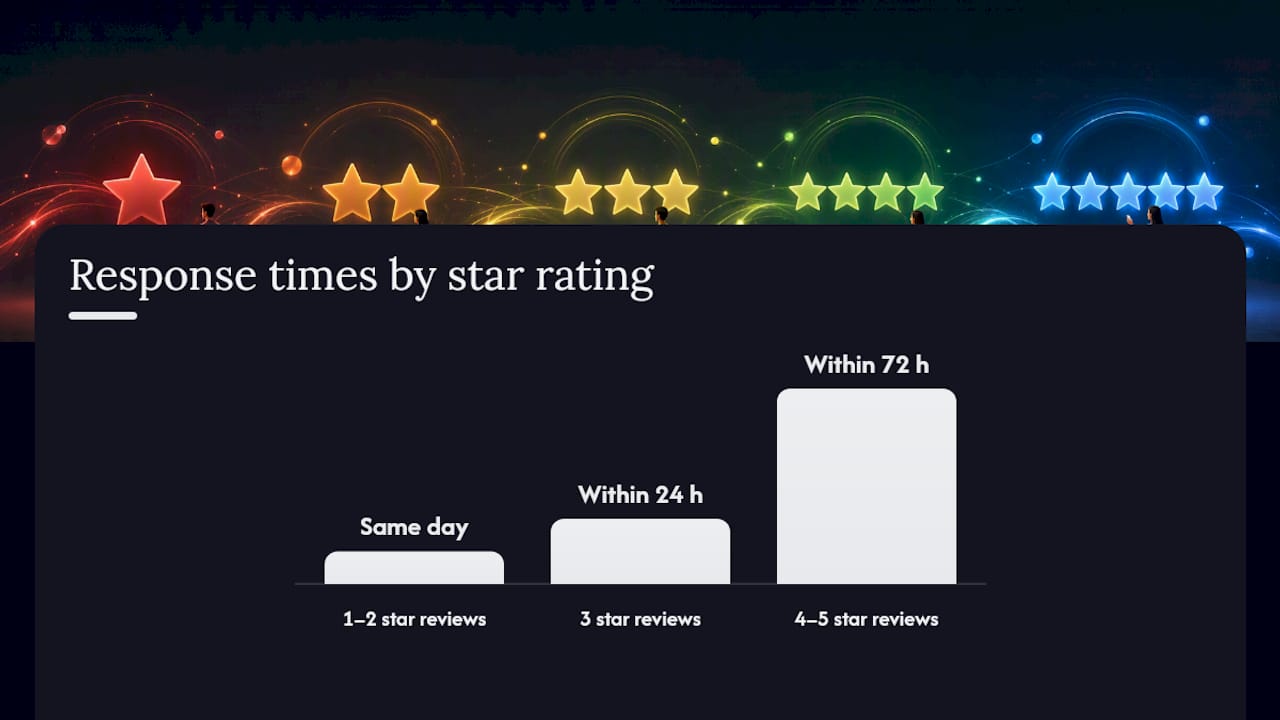
Here’s a compact SOP your team can run without proprietary software.
Weekly monitoring and triage checklist:
- Check Google, Yelp, Facebook, and TripAdvisor at least twice per week (daily for high-volume businesses)
- Assign a single “review owner” per shift or per week — one person, not everyone
- Triage by star rating: 1–2 stars get same-day attention, 3 stars within 24 hours, 4–5 stars within 72 hours
- Flag anything that looks fake or abusive before responding
Tracking fields (paste into a spreadsheet or your CRM):
| Field | What to record |
|---|---|
| Platform | Google / Yelp / Facebook / TripAdvisor |
| Reviewer name | As shown on the review |
| Date of review | Exact date posted |
| Star rating | 1–5 |
| Response owner | Staff member assigned |
| Date replied | When public reply was posted |
| Private follow-up sent | Yes / No / Date |
| Resolution status | Open / In progress / Resolved |
| Outcome | Reviewer updated rating / No update / Escalated |
Escalation matrix:
- Staff handles: 3–5 star reviews with no complaint, standard negative replies using approved templates
- Manager steps in: 1–2 star reviews with a specific complaint, any review mentioning a staff member by name, any review with potential legal language
- Founder/owner steps in: coordinated attacks, press mentions, reviews with legal exposure
- Legal counsel: defamatory content, competitor-originated attacks, repeated false claims
The Search Engine Land guide recommends checking internal logs — date, order, staff on duty — before posting any public reply. That one step prevents defensive reactions and lets you offer accurate context instead of excuses.
For a broader look at online review management for small businesses, including monitoring tools and automation options, the Ibrand guide covers the full workflow.
What actually works in reputation management
The most common failure mode I see with small businesses isn’t ignoring reviews entirely. It’s replying inconsistently — a burst of responses after a bad week, then silence for two months. That pattern is worse than no replies at all, because it tells future customers that accountability is situational.
The SOP above fixes that. When one person owns the review queue each week, responses go out on time, in the right tone, every time. The templates aren’t a shortcut — they’re a floor. They prevent the 11 PM emotional reply that turns a three-star review into a PR problem.
The anonymized case that sticks with me: a restaurant owner who received a one-star review alleging a food safety issue. Instead of replying defensively, she posted a calm, specific response within four hours: named the corrective action taken, invited the reviewer to call her directly, and updated the post 48 hours later with confirmation that the issue had been addressed. The original reviewer updated to three stars. Three other customers left five-star reviews in the following week, two of them explicitly mentioning that they’d read her response and felt reassured.
That’s the playbook. Reply fast, stay specific, close the loop publicly. Test it for 30 days and watch what happens to your rating trend.
Reputation management without the overhead
Running a consistent review response program takes time most small business owners don’t have. Ibrand handles the monitoring, drafts platform-appropriate replies, escalates anything that needs a manager’s eye, and tracks resolution outcomes — so nothing slips through on a busy Tuesday.

The service covers Google, Yelp, Facebook, and TripAdvisor, with custom plans built for small budgets. You get weekly reporting, a dedicated reply workflow, and a team that knows the difference between a legitimate complaint and a coordinated attack. For businesses that also want their review activity to feed into stronger local search rankings, Ibrand’s local SEO program for small businesses connects reputation signals directly to visibility.
To get started, visit Ibrand and request a custom plan. The intake process takes about ten minutes, and you’ll have a proposal within one business day.
Sources
The following resources cover platform rules, response frameworks, and legal considerations in depth:
- How to handle negative Google reviews (Search Engine Land)
- Essential steps to handle negative reviews (SBA)
- Read and reply to reviews (Google Business Profile Help)
- Negative reviews (Shopify blog)
- How to respond to negative reviews: the L.A.S.T. framework + 7 real examples (Reviewz)
- Business
For review disputes involving false statements of fact, coordinated competitor attacks, or repeated defamatory content, consult a business attorney before posting any public reply. A lawyer can advise on cease-and-desist options and platform escalation paths that go beyond standard flagging.
FAQ
How do you respond to a good review?
Thank the reviewer by name, reference one specific detail they mentioned, and keep it to 15–40 words. A personalized reply takes 30 seconds and signals to future customers that real people run the business.
How do you politely respond to critical feedback?
Use the L.A.S.T. framework: acknowledge the specific issue, apologize for the experience (not the feeling), offer a concrete next step, and thank the reviewer. Keep the public reply under 100 words and move the resolution offline.
How quickly should you reply to a negative review?
Within 24 hours. The Shopify blog recommends responding within 24–48 hours; for one- and two-star reviews, same-day is the standard worth targeting.
Can you ask a reviewer to update their rating after you resolve the issue?
Yes, and you should. Once a complaint is resolved privately, send a brief follow-up message thanking the customer and letting them know they’re welcome to update their review if their experience has changed. Never pressure or incentivize the update.
What should you never do when responding to a review?
Don’t argue publicly, don’t share the customer’s private information, don’t offer refunds or compensation in the public thread, and don’t use the phrase “I’m sorry you feel that way.” Each of these escalates rather than de-escalates the situation.
Recent Comments