
Google Ads works for plumbers because people search at the moment they need you: a burst pipe, a dead water heater, a backed-up drain. The best setup for most plumbing companies pairs two things. Search campaigns give you control over keywords and ad copy. Local Services Ads put your verified business at the top of the results and charge per lead. This guide shows how to choose between them, set them up, budget for them and judge whether they are paying off.
TL;DR
- Search ads give you control over keywords and copy. Local Services Ads charge per lead and need Google verification. Many plumbing companies run both.
- Build campaigns around the jobs you want most, with negative keywords and a tight service area, so you stop paying for clicks from people you will never serve.
- Send emergency clicks to a page built around tap-to-call. Send routine jobs to a short quote form.
- Track phone calls, forms and booked jobs, not just clicks. Cost per booked job is the number that matters.
- Review search terms and lead records every week in the first two months, then every month.
Table of Contents
- Search ads vs. Local Services Ads: which to use
- Getting verified for Local Services Ads
- Planning a Search campaign around real jobs
- Writing ads that get the call
- Landing pages: match the page to the urgency
- What to budget and how you are charged
- Tracking calls, booked jobs and cost per lead
- Improving campaigns from search terms and lead quality
- Our perspective
- Get help running your plumbing ads
- FAQ
- Sources
Search ads vs. Local Services Ads: which to use
Google describes standard Google Ads as customizable pay-per-click text ads that any business can run. Local Services Ads are pay-per-lead listings for verified local providers. They appear at the top of Search and let a prospect call, message or book directly.
The practical difference is control. Google’s own small-business guidance says Search campaigns run on keywords and give you more control over ad copy and formats. Local Services Ads decide relevant searches automatically, so you have less say over keywords and wording.
| Search ads | Local Services Ads | |
|---|---|---|
| How you pay | Per click | Per lead |
| Keyword control | High | Limited |
| Ad copy control | Full | Limited |
| What the customer sees | Your headline, description, extensions | Your business profile, badge, reviews, call and message buttons |
| Verification | Standard account setup | Screening and verification by Google |
| Best for | Targeting specific services, such as water heater replacement or sewer line repair | Fast, high-intent calls for core plumbing work |
If you can only start one, think about your goal. If you want phone calls quickly with the least setup work, start with Local Services Ads. If you want to push specific high-margin jobs, such as repiping, tankless installs or commercial work, Search gives you the steering wheel. Our breakdown of what Local Services Ads cost per lead goes deeper on that side.
Where Performance Max fits in
Google has said that Local Services Ads are transitioning for selected advertisers into specialized Performance Max campaigns with pay-per-lead goals. The migration keeps the pay-per-lead model and your presence in Search and Maps. If your account is moved, you will manage it inside Google Ads rather than the separate Local Services dashboard. Our guide to Performance Max for local campaigns explains how that campaign type works.
Getting verified for Local Services Ads
Local Services Ads are not open to everyone the moment they sign up. For U.S. advertisers, Google says requirements vary by category and location. They may include Business Profile ownership, business registration, applicable licenses, insurance, and background and identity checks.
Google may also re-evaluate advertisers later. If you do not complete a requested review, the badge can be removed, ads paused or the account suspended. So keep these in order before you apply:
- Your state or local plumbing license, with the number and expiration date handy.
- Proof of general liability insurance that is current.
- Your legal business name and registration details, matching your Business Profile.
- A Google Business Profile you own, with the right address or service area and a phone number that you answer.
- Owner and employee details for the background checks, where required.
One reassurance for regular Search campaigns: Google’s U.S. restricted-business policy singles out locksmith and garage-door repair as requiring Advanced Verification. It does not list ordinary plumbing in that restriction. Check your own state’s licensing rules, since those apply regardless.
Planning a Search campaign around real jobs
Most wasted plumbing ad spend comes from one mistake: one campaign, a pile of broad keywords, and every click going to the home page. Start from the jobs instead.
Choose services and keywords
List your work and rank it by profit and by how much you want it. A typical plumbing company might sort it like this:
- Emergency: burst pipe, leak repair, no hot water, sewer backup, clogged main line.
- Scheduled, higher ticket: water heater replacement, tankless installation, repiping, sewer line replacement.
- Routine: drain cleaning, faucet and toilet repair, garbage disposal installs, fixture replacement.
Give each group its own campaign or ad group, with keywords that match what people type, such as “emergency plumber,” “water heater replacement” or “drain cleaning near me.” Put the city or neighborhood into some of them. Keeping groups tight lets your ad say exactly what the searcher typed, and it keeps your reports readable.
Add negative keywords on day one
Negative keywords tell Google which searches should not trigger your ad. Plumbers usually need to exclude searches like these:
- Job seekers: “plumber jobs,” “plumbing apprenticeship,” “plumber salary.”
- Do-it-yourselfers: “how to fix,” “diy,” “tutorial,” “video.”
- Parts shoppers: “pvc pipe price,” “faucet cartridge,” “buy.”
- Work you do not take: services outside your trade, or commercial jobs if you only do residential.
The ServiceTitan guide to plumbing ads makes the same case for negative keywords and separate landing pages for each service. Expand your negative list every time you review search terms.
Set your service area honestly
Target the cities and ZIP codes you actually serve, and be willing to leave out the fringe areas where drive time eats the margin. Choose location settings that target people in your area, not people who are merely interested in it. A plumber in one suburb does not need clicks from someone researching a move from another state.
Ad scheduling matters too. If you do not staff after-hours calls, an emergency ad running at 2 a.m. sends callers to voicemail. Either route those calls to an answering service or limit the hours. Our guide to targeting a local audience covers the geographic side in more detail.
Writing ads that get the call
Plumbing ads win on clarity. A homeowner with water on the floor does not want cleverness. The advice from Housecall Pro’s plumbing ads guide lines up with what we see work: name the actual service, name the local area, state availability or urgency, show a trust signal and ask for the call.
Here is a pattern you can adapt:
- Headline 1: Emergency Plumber in [City]
- Headline 2: Licensed and Insured Plumbers
- Headline 3: Call Now, Same-Day Service
- Description: Burst pipes, leaks, clogged drains and water heater repair. Upfront quotes before work starts. Call for fast help in [City].
Only claim what is true for your company. If you do not offer 24/7 service, do not say it. Add call extensions, location information and sitelinks to your most-wanted services. For more angles, see our plumbing ad ideas that book local jobs.
Landing pages: match the page to the urgency
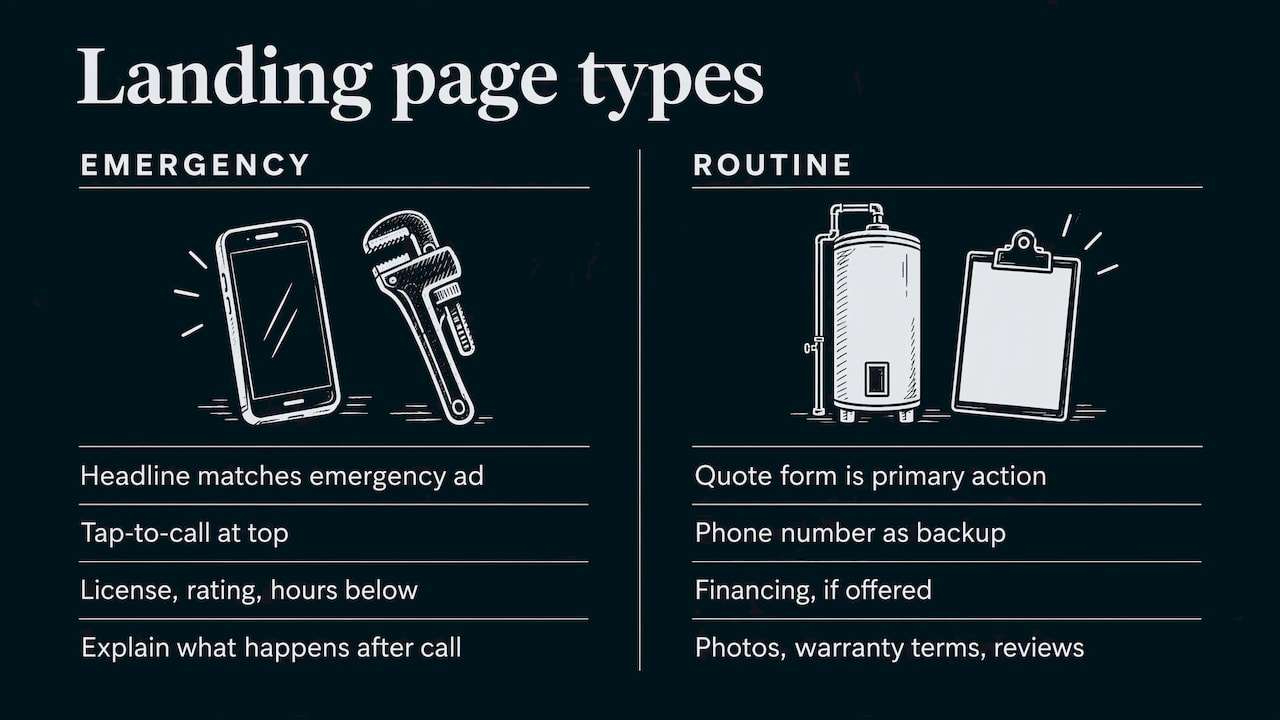
Clicks are expensive, so the page they land on has to finish the job. SearchPod’s landing page guidance recommends matching the headline to the ad promise, putting proof near the top and using one primary call to action. For emergency mobile traffic it favors tap-to-call over form-heavy pages.
That suggests two page types:
Emergency page. The headline repeats the ad (“Burst Pipe? Plumbers Available Now in [City]”). A large tap-to-call button sits at the top. Right beneath it go your license number, review rating, service hours and a line or two on what happens after the call.
Routine or planned job page. For a water heater replacement or a repipe, people compare. A short quote form works as the primary action, with a phone number as a backup. Add financing options if you offer them, photos of finished work, warranty terms and a few specific reviews.
On both, keep the menu minimal, load fast on mobile and avoid sending ad traffic to a general page with ten competing links. If your site needs work first, our guides on website design basics for local businesses and affordable web design are a good start.
What to budget and how you are charged
Search ads use auctions: you set a bid or a bidding strategy, and you pay when someone clicks. Local Services Ads work differently. Google says budgets can be based on the number of new leads you want each week, can be adjusted monthly and charge when potential customers get in touch.
Costs vary a lot by city, season and job type. Emergency and sewer work in a big metro costs more per click than drain cleaning in a small town. So instead of copying someone else’s number, build your budget backward from your own economics:
- Work out your average profit on a booked job, by service type.
- Decide the most you are willing to pay for one booked job (not one lead).
- Estimate the share of leads that become booked jobs. If you book about one in three, the most you can pay per lead is roughly a third of your cap per job.
- Multiply the number of jobs you want each month by that cost per job.
Example with made-up numbers: if you want 15 booked jobs a month and are willing to pay up to $150 per booked job, your working budget is $2,250 a month. If your phones only convert one lead in four, expect to need around 60 leads, which means a cost per lead near $37. If the market costs more than that, you either raise the budget, narrow to higher-ticket work or improve call handling.
Start with a budget you can sustain for at least two to three months. Pausing and restarting resets learning and hides real results. For channel context, see our overview of the best marketing channels for plumbers and the cost effective plumber marketing guide.
Tracking calls, booked jobs and cost per lead
Clicks tell you very little. Housecall Pro recommends tracking ad calls, website calls, forms and bookings, and that is the right scope. Set up:
- Call tracking for calls from ads, with a minimum call length counted as a conversion.
- Form conversion tracking on your quote forms.
- A booked-job record in your scheduling software or even a spreadsheet, so you can tie revenue back to the campaign.
For Local Services Ads that have moved into Google Ads, Google says conversions, cost, cost per conversion, budgets, bidding targets, service areas, schedules, categories and downloadable lead records are visible in the account. Use the lead records to listen to calls and mark which ones were real jobs.
Then calculate three numbers each month:
- Cost per lead = ad spend divided by leads.
- Cost per booked job = ad spend divided by jobs booked from ads.
- Return on ad spend = revenue from those jobs divided by ad spend.
If cost per lead looks fine but cost per booked job is high, the problem is usually not the ads. It is missed calls, slow callbacks or leads outside your service area.
Improving campaigns from search terms and lead quality
Once data arrives, the work becomes a routine.
Weekly in the first two months:
- Open the search terms report. Add irrelevant queries as negatives.
- Note which terms produced real calls and give them more budget or tighter match types.
- Listen to a sample of call recordings. Mark spam, wrong-service and out-of-area calls.
- Check the hours and locations where calls come in, and trim dead zones.
Monthly after that:
- Compare cost per booked job by service. Move budget toward the services with the best margins.
- Test one new ad headline or landing page headline at a time.
- Refresh reviews, photos and your Business Profile, since those support both Local Services Ads and your regular listing.
- Review your bidding strategy only once you have enough conversions to support it.
For Local Services Ads, dispute leads that are clearly invalid, such as wrong service or spam, using the process Google provides in your account.
Our perspective
We talk to plumbing owners who tried Google Ads once, saw clicks without calls and wrote it off. In most cases, the ads were not the problem. The account was missing a tight service list, negative keywords, a landing page that matches the urgency of the search and real call tracking.
Our approach for local service businesses is to build a custom plan around the jobs you want most, keep pricing transparent, and show you performance in real time so you can see calls and costs as they happen. We treat Search ads and Local Services Ads as partners rather than rivals, and we line them up with your Google Business Profile, reviews and website so every channel supports the others.
If you take one thing from this guide, make it this: judge your ads by booked jobs, not clicks. When the numbers are in front of you every week, good decisions get easy and budget goes where it earns.
TONY
Get help running your plumbing ads
IBrand Media builds marketing plans for local service businesses, including advertising, local marketing, web design and real-time stats. Each plan is tailored to the client, from the ad account to the landing page to the way results are reported.
If you would rather have a team set this up and watch it for you, tell us about your plumbing company and request a custom plan. You can also read our plumber advertising strategies and guide to getting plumbing leads first.
FAQ
Are Local Services Ads better than regular Google Ads for plumbers?
Neither is better in every case. Local Services Ads are pay-per-lead and put a verified badge at the top of the results, which suits high-intent calls. Search ads give you more control over keywords and copy, which suits targeting specific jobs. Many plumbing companies use both.
How much should a plumber spend on Google Ads?
It depends on your market, your job mix and how many booked jobs you want. Work backward from the profit on an average job and the most you can pay for one booked job, then set a monthly budget you can keep up for at least a few months. Google lets Local Services Ads budgets follow the number of leads you want and be adjusted monthly.
What do I need to run Local Services Ads as a plumber?
Google says requirements vary by category and location. They may include Business Profile ownership, business registration, licenses, insurance and background and identity checks. Have your license, insurance papers and business details ready before you apply.
How do I know if my plumbing ads are working?
Track calls, form submissions and booked jobs, then calculate cost per lead, cost per booked job and return on ad spend. If leads come in but few become jobs, review call handling, service area and search terms before changing the ads.
Sources
- Reach Local Customers with Local Service Ads, Google
- Google Ads vs Local Services Ads for small business, Google
- Local Services Ads transition to Performance Max campaigns, Google Ads Help
- Understand the screening and verification process, Local Services Ads Help
- Other restricted businesses: Local services, Google Advertising Policies
- Google Ads for Plumbers: How to Maximize Lead Generation, ServiceTitan
- Google Ads for Plumbers: Costs, Setup & Tips, Housecall Pro
- Google Ads Landing Page Optimization, SearchPod
Recent Comments