
Yes, you can still track calls from your Google Business Profile, but you need a system outside the profile itself. Set up a trackable phone number or lean on Google Ads call reporting, then push every call outcome into your CRM. Google pulled call and chat history out of GBP in mid-2024, so anything you don’t capture externally is simply gone. Pick a method below and test it with a real call today.
TL;DR:
- Using a local tracking number that matches your area code is key to maintaining customer trust and avoiding confusion, with no impact on GBP ranking if correctly implemented.
- Since Google removed call and chat history in mid-2024, businesses must rely on external call tracking systems and manual logs to monitor call volume and outcomes.
- Importing call outcomes into Google Ads’ conversion tracking provides the highest accuracy for measuring which calls lead to sales, but requires proper CRM integration and timestamp data.
- Regularly verify forwarding numbers and log setup details to avoid issues from number reassignments or mismatched area codes, especially if handling multiple locations.
- For comprehensive call tracking, combining CRM outcomes, website click-to-call data, and Google Ads reports offers the clearest picture of actual revenue-generating calls.
Table of Contents
- How to Add a Tracking Number to Your GBP Listing
- What Changed When Google Removed Call History in July 2026
- Turning Tracked Calls Into Real Conversion Data
- Picking the Right Tracking Method Without Overcomplicating It
- How Agencies Build Call Tracking Into Local Reporting
- Why Most Businesses Get Call Tracking Backwards
- Sources
- FAQ
How to Add a Tracking Number to Your GBP Listing
Adding a tracking number to your Business Profile is the single most reliable way to know how many calls your listing actually drives. Done carelessly, it can create name, address, and phone (NAP) mismatches that confuse both customers and Google’s local algorithm. Done correctly, it costs you nothing in ranking.
- Decide your setup. Most businesses either swap the primary GBP number for a tracking number (with the real business line placed in the secondary phone field) or run a static tracking number only in specific campaigns. Call tracking platforms like CallRail’s Google Business Profile integration use the swap method: tracking number in the primary slot, real number secondary, so nothing about customer experience changes.
- Get a local number. Choose a tracking number with the same area code as your business whenever a provider offers it. A number that doesn’t match your city looks off to sharp-eyed customers, even though it won’t hurt your ranking.
- Update the phone field. Open your Business Profile, edit the phone number, save, and confirm any verification prompts Google sends.
- Test the routing. Call the listed number from a personal phone, confirm caller ID displays correctly, and check that forwarding and voicemail behave the way you expect.
- Log the change. Note the date you swapped numbers somewhere you’ll actually check it, in case call volume shifts and you need to rule out the swap as the cause.
Pro Tip: Keep your original business number active as a backup line for at least 60 days after any swap. Some directories and old citations take weeks to catch up, and you don’t want a dead number stranding a customer.
Swapping numbers does not hurt NAP accuracy or your listing’s ranking as long as the tracking number forwards instantly and reliably to your real line. Google cares about consistency and responsiveness, not which specific digits sit in the field.
What Changed When Google Removed Call History in July 2026
Google quietly removed the chat and call history features from Business Profile in July 2024, cutting off the built-in log business owners used to check who called and when. If you wanted your old records, Google offered a Takeout export window that closed August 30, 2024. If you missed it, that history is unrecoverable.
Some data still exists, just not where most owners look. The Business Calls API returns aggregate insights like missed and answered call counts broken down by hour, but pulling that data requires developer access and business.manage authorization tied to an Owner, Co-Owner, or Manager role on the listing.
For everyday operators, the practical takeaway is simple: stop counting on GBP’s dashboard to remember anything for you. Route calls through a tracking number, keep your own log, and treat any conversion data you want to act on later as something you capture the moment the phone rings, not something you’ll retrieve after the fact.
Turning Tracked Calls Into Real Conversion Data
A call log by itself tells you volume. It doesn’t tell you which calls turned into paying customers, and that gap is where most GBP call tracking efforts stall out.
Google Ads call reporting is the most common starting point. It assigns a forwarding number to your ads, then reports call duration, the caller’s area code, and whether the call connected. That’s useful, but it has real limits: forwarding numbers belong to Google and can be reassigned, and caller ID doesn’t behave consistently in every country, though it’s reliable for U.S. callers in most cases.
Three tactics fill in the gaps:
- Duration thresholds. Set a minimum call length (say, 60 seconds) to count as a conversion, filtering out accidental dials and wrong numbers.
- Website call conversions. Track calls placed by clicking a number on your site separately from calls placed off your GBP listing, so you know which channel actually drove the contact.
- Imported call conversions. Upload outcomes from your CRM back into Google Ads, marking which calls became sales.
Imported conversions give you the sharpest signal of the three. Google Ads documentation is explicit that labeling which calls resulted in a sale, rather than just counting connected calls, is the highest-precision input you can feed into automated bidding. To use it, your call records need a timestamp, the caller’s number, and an outcome tag your CRM can match back to the original call. Once that’s mapped, you can finally see which keywords and channels produce calls that close, not just calls that ring.
Picking the Right Tracking Method Without Overcomplicating It
There’s no single correct way to track GBP calls. The right choice depends on how many locations you run and how much time you have to babysit the setup.
- Static tracking number in GBP. Simplest option. Good for a single location with modest call volume.
- Forwarding-based tracking through Ads. Works well if most of your call volume already comes from paid search rather than organic Maps and Search listings.
- CRM-integrated tracking. Best for businesses that want call outcomes tied to actual sales records, not just call counts.
- Server-side conversion import. The most technical option, but the most accurate for feeding automated bidding.
Watch for three recurring problems. Google can reassign forwarding numbers without much warning, so check your listing periodically to confirm the number hasn’t quietly changed. Area code mismatches make a tracking number look suspicious to local callers even when it’s technically legitimate. And if you’re recording calls for quality review, make sure your consent language covers it. Two-party consent states have real requirements here.
Pro Tip: Set a recurring 90-day calendar reminder to place a test call to your own listed number. It takes two minutes and catches broken forwarding before a customer does.
Log the setup date, the provider, and the number itself somewhere outside the tracking platform. If a provider changes hands or a number gets reassigned, you’ll want a record of what “normal” looked like before troubleshooting a sudden drop in reported calls.
How Agencies Build Call Tracking Into Local Reporting
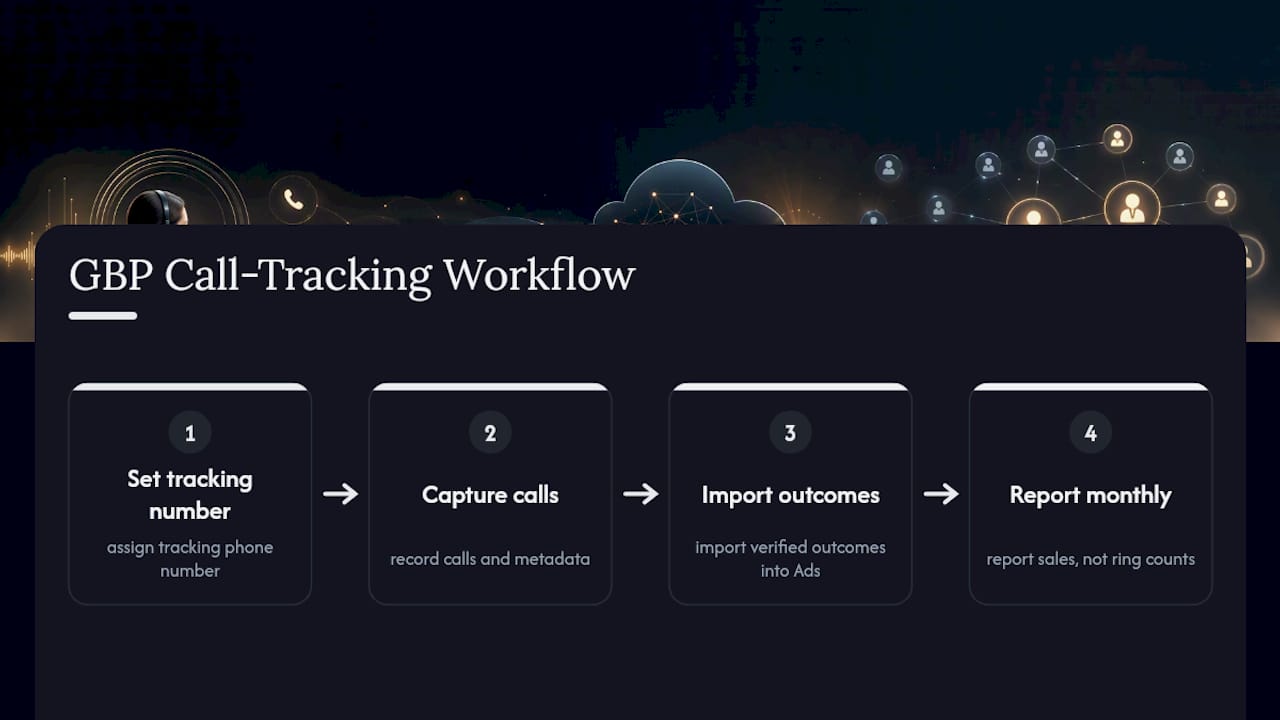
A basic agency engagement for GBP call tracking typically runs four stages: set up the tracking number, capture calls with metadata, import verified outcomes into Ads, and report monthly against actual sales, not just ring counts. Ibrand handles this exact workflow for local businesses, tying Business Profile management directly into broader campaign performance tracking. DIY setup works fine for a single-location business with light call volume. Once you’re juggling multiple locations or trying to import conversions cleanly into a CRM, the setup time adds up fast, and that’s usually where hiring help pays for itself.
Why Most Businesses Get Call Tracking Backwards
Most owners treat call tracking as a box to check once, not a system to maintain. Ibrand sets up GBP call tracking, connects the data to a working dashboard, and imports verified call conversions so the numbers actually mean something by the time you see them.

A typical engagement covers three things: the tracking number setup and NAP-safe swap, a CRM sync so outcomes attach to real calls, and a monthly report that shows which calls turned into revenue instead of just how many times the phone rang. That last part is where most self-managed setups quietly break down. Nobody has time to manually tag call outcomes every week on top of running the business.
If you’re weighing whether to build this yourself or hand it off, start by looking at what conversion tracking actually requires to work end to end. Then request a consult and we’ll map out what your specific call volume and location count actually need.
— TONY
Sources
- Changes to Google Business Profile chat and call history – Google Business Profile Help
- Google Business Profile | CallRail integration
FAQ
How Long Does GBP Verification Take?
Verification usually completes within a few days for a phone or email code, though postcard verification can take one to two weeks and video verification is typically resolved same day.
How Do I Check My Call Tracking Setup Is Working?
Call your listed number from an outside phone, confirm it forwards correctly, then check your tracking platform or Google Ads call reports to see the call logged with the right duration and area code.
How Much Does Call Tracking Cost?
Costs vary by provider and call volume, but most small businesses pay a monthly fee per tracking number plus a per-minute rate; Google Ads’ own forwarding-number reporting is included at no extra cost within an active ad account.
Can Google Track a Phone Number’s Location?
Google Ads forwarding numbers report the caller’s area code as part of call reporting, but they don’t provide precise geographic location beyond that, and Google doesn’t expose caller location data through GBP itself.
Does Adding a Tracking Number Hurt My GBP Ranking?
No. Swapping in a tracking number doesn’t damage your ranking as long as the number forwards reliably and your listing stays consistent, since Google evaluates responsiveness and accuracy, not which specific digits appear.
Recent Comments