
Core Web Vitals are three field metrics, Largest Contentful Paint, Interaction to Next Paint, and Cumulative Layout Shift, and Google counts a site as “good” when LCP is at or under 2.5 seconds, INP is at or under 200 milliseconds, and CLS is at or under 0.1. Fixing them improves the experience on your site and can support SEO and conversion rates, though it is one factor among many. This guide gives you a prioritized checklist built for small-business sites.
TL;DR:
- Google’s good thresholds are LCP 2.5 seconds or less, INP 200 milliseconds or less, and CLS 0.1 or less across 75% of visits.
- Use Search Console and PageSpeed Insights to find affected URLs, but judge ranking performance by CrUX or real user monitoring, not Lighthouse simulations.
- Prioritize revenue pages such as product listings and booking forms; compress hero images, defer nonessential scripts, and reserve space for late loading ads.
- Review Search Console weekly and retest after plugin or theme updates; field data can reveal regressions that a single lab test misses.
- Check mobile results separately, because phones and weaker connections often expose oversized images, heavy scripts, and layout shifts that desktop testing misses.
Table of Contents
- What Core Web Vitals Are and How Google Uses Them
- The Three Metrics Explained: LCP, INP, and CLS
- Where to Measure Core Web Vitals: Tools and a Workflow
- A Prioritized Checklist to Improve Core Web Vitals This Week
- Monitoring and Regression Prevention
- The Role of Mobile-Friendly Design in Core Web Vitals Performance
- Integration With Overall Digital Marketing Strategy
- Common Pitfalls Unique to Small Business Websites
- Why Core Web Vitals Deserve a Place on Every Small Business Owner’s Checklist
- How We Help You Fix and Maintain Core Web Vitals
- FAQ
- Sources
What Core Web Vitals Are and How Google Uses Them
Core Web Vitals measure three things real visitors experience on your site: how fast the main content loads (LCP), how quickly the page responds when someone taps or clicks (INP), and whether elements jump around while loading (CLS). These are field metrics, meaning they come from actual visits, not a lab simulation.
Google folds these metrics into its page experience signals, but Core Web Vitals are one of many ranking factors, not a guaranteed path to page one. A site with excellent content and weak vitals can still outrank a faster competitor with thin content.
There is also a difference between field data and lab data. The Chrome User Experience Report (CrUX) and real-user monitoring (RUM) reflect what real visitors on real devices and networks experience, and that is what matters for ranking. Lighthouse, by contrast, runs a single simulated test and is best used for debugging, not for judging your ranking standing.
For a small-business owner, this means:
- Your real visitors’ phones and connections matter more than a perfect lab score.
- A slow mobile experience can quietly cost you visibility and sales, even with strong content.
- You should check field data regularly, not just run one Lighthouse test and move on.
The Three Metrics Explained: LCP, INP, and CLS
Each metric targets a different frustration point, and the official thresholds were defined using the 75th percentile of page loads, meaning three out of four visits need to hit “good” for your site to pass.
Largest Contentful Paint (LCP) measures how long it takes for the biggest visible element, usually a hero image, heading, or banner, to render. A good LCP is 2.5 seconds or faster. Common culprits on small-business sites include oversized hero images, slow hosting response times, and render-blocking CSS or JavaScript that delays the main content from appearing. Check your homepage and your top landing pages first, since those usually carry the heaviest images.
Interaction to Next Paint (INP) measures how quickly your page responds after someone clicks a button, taps a menu, or fills a form, from the moment of interaction to the moment the screen visibly updates. INP replaced First Input Delay (FID) as the official responsiveness metric in March 2024, and it captures the entire interaction rather than just the initial delay. A good INP is 200 milliseconds or under. Long JavaScript tasks, heavy third-party scripts, and bloated plugins are the usual offenders, and many sites that passed FID struggle with INP because the new metric is more thorough.
Cumulative Layout Shift (CLS) measures visual stability, how much content unexpectedly moves while a page loads. A good CLS score is 0.1 or lower. The most common causes on small-business sites are images or ads loaded without a defined size, web fonts that swap in late, and cookie banners or chat widgets that pop in and push content down.
| Metric | Measures | Good threshold | Typical small-business cause |
|---|---|---|---|
| LCP | Load speed of main content | 2.5 seconds or less | Oversized hero images, slow hosting |
| INP | Responsiveness to interaction | 200 milliseconds or less | Heavy plugins, long JavaScript tasks |
| CLS | Visual stability | 0.1 or less | Unsized images, late-loading ads or banners |
- Test your busiest pages, not just the homepage, since behavior often differs by template.
- Re-test after any theme, plugin, or page builder update, since these are common regression points.
Where to Measure Core Web Vitals: Tools and a Workflow
You do not need a developer to start measuring. A simple, repeatable workflow works well for most small sites.
- Start with Search Console. The Core Web Vitals report groups your URLs by status and flags site-wide patterns, which is the fastest way to spot a template-level problem affecting many pages at once.
- Run PageSpeed Insights on specific URLs. This tool combines real CrUX field data with a Lighthouse lab test and lists specific, actionable opportunities, like “reduce unused JavaScript” or “serve images in next-gen formats.”
- Add field monitoring for deeper context. CrUX is the dataset Google actually uses for ranking signals, while pairing it with real-user monitoring or the open-source web-vitals library gives you a clearer view of how performance connects to business outcomes like form submissions or checkout completions.
- Reach for Lighthouse or WebPageTest when debugging. These lab tools are ideal for testing a fix before it goes live or for running checks in a staging environment, but treat their scores as diagnostic, not as your ranking source of truth.
When lab and field numbers disagree, trust the field data. A lab test reflects one device and one network condition, while field data reflects the mix of phones, connections, and locations your actual customers use.
A Prioritized Checklist to Improve Core Web Vitals This Week
Small sites rarely need a full rebuild. Most gains come from a short list of targeted fixes, the same ones web.dev highlights as the most effective ways to improve Core Web Vitals: prioritizing the LCP resource, trimming unnecessary JavaScript, and preventing layout shifts.
- Compress and resize your hero image. Serve it in a modern format like WebP or AVIF, and set explicit width and height or an aspect ratio so the browser reserves space before it loads.
- Preload your LCP resource. A simple preload tag tells the browser to fetch your hero image or main font earlier in the load sequence.
- Lazy-load everything below the fold. Images and embeds the visitor has not scrolled to yet do not need to load immediately.
- Defer nonessential scripts. Chat widgets, tag managers, and analytics snippets can often wait until after the page becomes interactive without hurting their function.
- Break up long JavaScript tasks. If a single script blocks the page for too long, splitting it into smaller chunks keeps the page responsive to taps and clicks.
- Preload critical fonts and use
font-display: swap. This prevents text from vanishing or jumping while custom fonts load. - Inline critical CSS where feasible. This lets the page render visible content before the full stylesheet finishes downloading.
- Reserve fixed space for ads and embeds. A banner or widget that loads late should drop into a pre-sized box, not shove the rest of the page downward.
- Turn on a CDN and confirm caching is active. A content delivery network and browser caching cut load times for repeat visitors and visitors farther from your server; check your Time to First Byte (TTFB) with your host if pages still load slowly.
- Use CMS-friendly tools. An image-optimization plugin, a page-caching plugin, and a lightweight theme or template that avoids heavy client-side rendering handle much of this automatically on WordPress and similar platforms.
Pro Tip: Start with the pages that drive revenue, your homepage, product pages, and booking or contact forms, and measure actual conversions before and after each change so you know which fixes are worth repeating elsewhere.
For a deeper walkthrough of these tactics, our guide on boosting business website speed for more sales breaks down implementation by platform.
Monitoring and Regression Prevention
A fix that works today can quietly break after your next plugin update, theme change, or new ad script. Set a simple performance budget, a maximum acceptable LCP, INP, and CLS for your key templates, and check new code against it before it goes live, ideally in a staging environment or an automated check tied to your deployment process.
- Review Search Console’s Core Web Vitals report weekly, not just after a redesign.
- Set an alert or calendar reminder to retest after any major content or plugin update.
- Keep a simple rollback plan: know which recent change to undo if a metric regresses.
Case studies like Swappie’s show a 42% increase in mobile revenue after a focused push on Core Web Vitals, a reminder that these numbers tie directly to business results, not just technical scorecards. Our piece on website performance metrics and visibility explains how to translate a speed report into numbers your team or stakeholders actually care about.
The Role of Mobile-Friendly Design in Core Web Vitals Performance
Most Core Web Vitals problems show up first, and worst, on mobile. Phones run on slower processors, often connect over weaker networks, and display smaller viewports where a single oversized image or unsized ad can dominate the entire screen. A hero image that loads acceptably on a desktop connection can push LCP well past 2.5 seconds on a mid-range phone over a spotty connection.
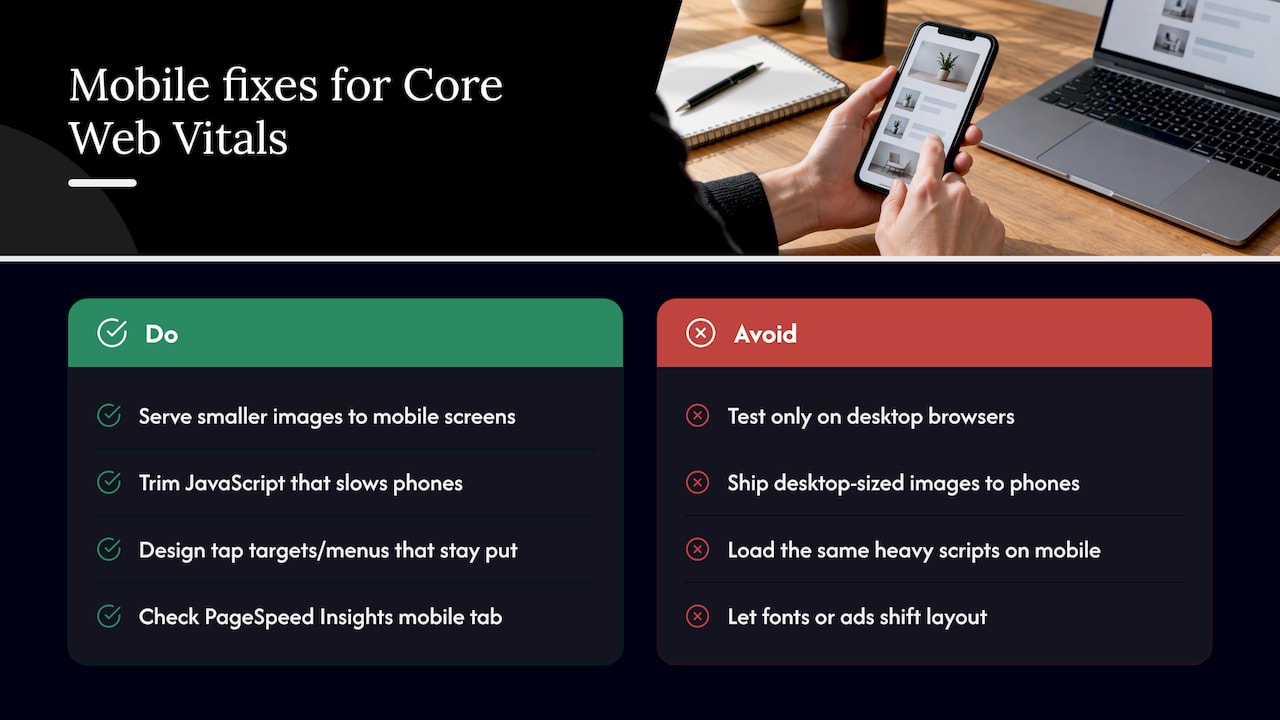
Responsive design alone does not guarantee good vitals. A mobile-friendly layout that still ships desktop-sized images, loads the same heavy scripts, and reflows content as fonts and ads arrive will still fail CLS and INP on a phone. True mobile optimization means serving smaller image files to smaller screens, trimming JavaScript that mobile processors struggle to execute quickly, and designing tap targets and menus that do not shift layout when they open.
Since CrUX field data is weighted heavily toward mobile traffic for most small-business categories, your mobile scores often carry more influence over your overall Core Web Vitals status than your desktop scores do. Testing exclusively on a desktop browser and assuming mobile performs the same is one of the most common blind spots for small sites. Checking PageSpeed Insights results for the mobile tab specifically, not just the default view, catches this early.
Integration With Overall Digital Marketing Strategy
Core Web Vitals work best when it is not treated as a separate technical project sitting apart from your marketing plan. A paid ad campaign that drives traffic to a slow landing page wastes budget before a visitor ever sees your offer, and an email promotion linking to a page with a shifting layout can cost you clicks right at the moment of intent. Treating site speed as part of the same plan as your SEO, advertising, and content work keeps every channel pointed at a page that can actually convert.
This also means prioritizing vitals work on the pages your other campaigns depend on most: the landing page behind your ad spend, the booking form linked from your email list, the product page your social posts drive traffic to. A site-wide fix matters, but a targeted fix on your highest-traffic conversion page often shows a return faster.
Our guide to optimizing websites for search covers how performance fits alongside keyword targeting, content structure, and local SEO signals as part of one connected plan rather than a list of separate to-do items.
Common Pitfalls Unique to Small Business Websites
Small-business sites tend to hit the same handful of traps repeatedly. Recognizing them early saves time and avoids chasing symptoms instead of causes.
- Stacking too many plugins or widgets. Booking tools, chat boxes, review widgets, and marketing pixels each add their own script, and together they can push INP well past 200 milliseconds even when each one seems lightweight alone.
- Uploading full-resolution photos straight from a phone or camera. A multi-megabyte image displayed in a 600-pixel wide space is one of the most common causes of a poor LCP score on small sites.
- Treating a template fix as a one-time task. A theme update, a new page builder block, or a freshly added ad slot can silently reintroduce a layout shift that was already solved months earlier.
- Chasing a perfect Lighthouse score instead of field results. Optimizing for CrUX and RUM data rather than a lab score avoids wasted effort on changes that look good in a report but do not change what real visitors experience.
- Skipping mobile-specific testing. Reviewing only a desktop view misses the conditions most customers actually browse under.
Why Core Web Vitals Deserve a Place on Every Small Business Owner’s Checklist
Most advice about Core Web Vitals is aimed at engineering teams with dedicated performance budgets and a backlog of sprints to spend on it. Small businesses do not have that luxury, and the honest take is that chasing a perfect score across every metric is the wrong goal. The better goal is picking the two or three fixes that touch your highest-traffic, highest-intent pages and leaving the rest alone until they actually cause a problem.
What gets underestimated is how often a single oversized image or one poorly placed script accounts for almost all of a small site’s vitals trouble. Owners often assume they need a full redesign when the real fix takes an afternoon. A realistic starting project looks like a short audit followed by two to four targeted fixes, then two to three weeks of monitoring to see whether conversions or bounce rate actually moved. That cycle, done once or twice a year, does more for a small site than any one-time technical overhaul.
— TONY
How We Help You Fix and Maintain Core Web Vitals

We build our audits around exactly the gaps covered above: hero image weight, slow-loading scripts, and layout shifts that cost you conversions before a visitor even finishes reading your offer, with custom web design and website development tailored to your business needs. We offer a combination of technical audits with prioritized fixes and real-time performance tracking, so you see what changed and what it did for your traffic, not just a score. Every plan is built around your site rather than a generic template.
If you want a straightforward next step, request a site audit through our services page and we will walk you through what is slowing your pages down and what fixing it is likely worth.
FAQ
What are the Core Web Vitals metrics?
The three Core Web Vitals metrics are Largest Contentful Paint (LCP), which measures loading speed, Interaction to Next Paint (INP), which measures responsiveness, and Cumulative Layout Shift (CLS), which measures visual stability. Good scores are LCP at 2.5 seconds or less, INP at 200 milliseconds or less, and CLS at 0.1 or less.
What is the meaning of CLS in SEO?
Cumulative Layout Shift measures how much visible content unexpectedly moves around while a page loads, such as a button shifting down after an image or ad appears. It is one of the three Core Web Vitals Google factors into page experience signals, though it is one of many ranking inputs rather than a standalone ranking guarantee.
What are site metrics?
Site metrics are measurements that describe how a website performs for visitors and search engines, covering areas like load speed, responsiveness, visual stability, traffic, and engagement. Core Web Vitals are a specific, standardized subset of site metrics focused on real-user loading experience.
What are the top three website performance metrics to monitor?
For most small-business sites, the top three to track are the Core Web Vitals themselves: LCP for load speed, INP for responsiveness, and CLS for visual stability. These three carry defined ‘good’ thresholds that make them easy to monitor consistently over time, unlike many other performance metrics that lack a clear pass or fail line.
How do Core Web Vitals affect local search visibility?
Core Web Vitals are part of the page experience signals Google’s ranking systems take into account, which can factor into visibility for local searches alongside other local SEO elements like your Google Business Profile and reviews. A slow or unstable page is not disqualifying on its own, but it can work against an otherwise strong local listing.
Recent Comments