
Boosted posts work best for quick visibility and engagement on content you’ve already published. Ads Manager campaigns work best when you need measurable leads, sales, or scalable conversions. If you have a website and any way to track what happens after the click, using Ads Manager is the better choice. Save boosting for social-native businesses or fast, low-stakes creative tests.
TL;DR:
- Boosted posts are ideal for quick visibility on existing content but offer limited targeting and placement options compared to Ads Manager campaigns.
- Ads Manager campaigns focus on conversion objectives, using advanced targeting, multiple placements, and detailed reporting, which can significantly improve return on ad spend.
- A small budget under $5 per day may suffice for awareness goals with boosting, but effective lead or sales campaigns usually require $10 to $25 daily over at least a week for meaningful results.
- Linking tracking tools like the Meta Pixel is essential for measuring actual conversions and optimizing campaigns beyond surface engagement metrics.
- Running head-to-head tests with equal budgets for boosted posts and Ads Manager campaigns is the most reliable way to understand which approach performs better for specific business goals.
Table of Contents
- Boosted Post vs Ads Manager: What Each One Actually Is
- What Really Changes Between Boosted Posts and Ads Manager
- Budget and ROI: What Your Spend Actually Buys
- How to Decide: A Quick Checklist and Two Starter Workflows
- Real Scenarios: Which Tool Fits Your Business
- How Ibrand.media Approaches Paid Social for Clients
- An Editorial Take on Boosted Posts vs Ads
- Get Paid Social Set Up the Right Way
- Sources
- FAQ
Boosted Post vs Ads Manager: What Each One Actually Is
A boosted post starts from something you already published: a photo, a video, an update sitting on your timeline. You click “Boost Post,” pick a goal like more engagement or profile visits, set a budget and duration, and Meta turns that existing content into a paid promotion. It’s fast, usually done in under two minutes, and it’s why so many business owners never learn the alternative exists — but tools like the Facebook Ad Generator for Primary Text & Headlines can help create compelling ad copy quickly when moving beyond boosting.
Ads Manager works differently from the ground up. Instead of one post, you build a campaign with three layers: the campaign level (your objective), the ad set (audience, budget, placement), and the ad itself (creative and copy). Meta’s own documentation confirms boosted posts carry more limited targeting and options than anything built in full Ads Manager.
That structural gap shows up in what each tool is actually good for:
- Boosted posts fit: a flash sale announcement, a viral organic post you want to extend, a local event reminder.
- Ads Manager fits: a lead form for a service business, a checkout campaign for an online store, a retargeting push to abandoned-cart visitors.
What Really Changes Between Boosted Posts and Ads Manager
The gap between these two tools isn’t cosmetic. It’s about what the algorithm is trying to accomplish, and that changes who actually sees your ad.
Boosted posts typically optimize for engagement, reach, or link clicks. Ads Manager lets you choose conversion objectives like purchases, leads, or app installs, and the algorithm optimizes specifically for those events. That distinction sounds technical until you realize it decides which humans your ad gets shown to. Someone likely to tap “like” and someone likely to pull out a credit card are often different audiences entirely.
Here’s where the practical differences stack up:
- Targeting: boosted posts offer basic audience filters (age, location, interests). Ads Manager adds custom audiences, lookalike audiences, retargeting pools, and exclusions to keep you from paying to re-show ads to existing customers.
- Placements and creative: boosted posts run mostly where the original post lives. Ads Manager spreads creative across Feed, Stories, Reels, and Audience Network, and lets you run multiple ad variations to see what wins.
- Reporting: boosted posts hand you reach, engagement, and link clicks. Ads Manager, paired with the Meta Pixel or Conversions API, hands you cost per lead, cost per purchase, and return on ad spend.
Boosted posts give you a popularity contest. Ads Manager gives you a sales report.
That reporting gap matters more than most business owners realize. One analysis of Ads Manager versus boosting points out that boosted post data stops at surface metrics, while Ads Manager breaks results down by age, placement, and device, so you can see exactly where your budget is working and where it’s leaking.
Budget and ROI: What Your Spend Actually Buys
A $20 boosted post can look like a bargain. It racks up likes, comments, maybe a few shares, and the cost per engagement looks tiny. But engagement isn’t revenue, and that’s where the math falls apart for a lot of small businesses.
Ads Manager needs a bit more runway to work. Agencies generally suggest starting a real test around $10 to $25 a day so the algorithm has enough signal to learn who converts, while a boost-only budget under $5 a day can still be fine for a low-risk awareness post or one meant to drive direct messages. The gap between those numbers is the price of teaching the system what a “good” customer looks like.
Rising competition in the ad auction makes that learning phase even more important. As overall social ad spending climbs, the cost to reach the same person keeps rising, which punishes campaigns that optimize for the wrong outcome even harder than before.
The fix is comparing the right numbers:
- Track cost per lead or cost per purchase, not cost per like.
- Watch return on ad spend (ROAS), not just reach.
- Use conversion tracking tools to see the full path from click to sale, not just the click itself.
Pro Tip: If you’ve been boosting the same post type for months with flat results, that budget is probably better spent as a two-week Ads Manager test with a Pixel installed. You’ll learn more in 14 days than in six months of boosting.
How to Decide: A Quick Checklist and Two Starter Workflows
Before you open either tool, answer five questions honestly:
- What’s the actual goal? Visibility and buzz, or leads and sales?
- Do you have tracking set up? A Pixel or Conversions API changes everything.
- Do you know your audience yet? Vague targeting wastes budget fast.
- Is your creative tested or brand new? Untested creative belongs in a cheap boost first.
- What can you actually spend? Be honest about whether you can fund a real learning phase.
Quick boost workflow (3 to 7 days):
- Pick your best-performing organic post.
- Set basic location, age, and interest targeting.
- Run it for 3 to 7 days and measure reach and engagement, not sales.
Ads Manager starter workflow (7 to 14 days):
- Install the Meta Pixel and set up your conversion events.
- Build a custom or lookalike audience.
- Set a daily budget around $10 to $25 and run for 7 to 14 days.
- Compare cost per result against your margin, then scale winners.
Pro Tip: When a boosted post overperforms, don’t just keep boosting it. Pull that exact creative into Ads Manager and run it against a conversion objective. You’ve already proven people like it. Now find out if they’ll buy.
Real Scenarios: Which Tool Fits Your Business
The social-only seller with no website. If every sale happens through direct messages or comments, a boosted post aimed at profile visits or message replies is the practical choice. There’s no landing page to track anyway, so Ads Manager’s conversion tools add complexity without adding value yet.
The local service business with a booking page. A hair salon, a contractor, a dentist with online scheduling should run Ads Manager campaigns pointed at bookings, with retargeting for people who visited the page but didn’t book. This is exactly the situation where boosting undersells the opportunity.
The product launch or new creative test. Boost a new video or image to a small audience first. If it earns solid engagement at low cost, scale the winning version through a full Ads Manager campaign with a conversion objective.
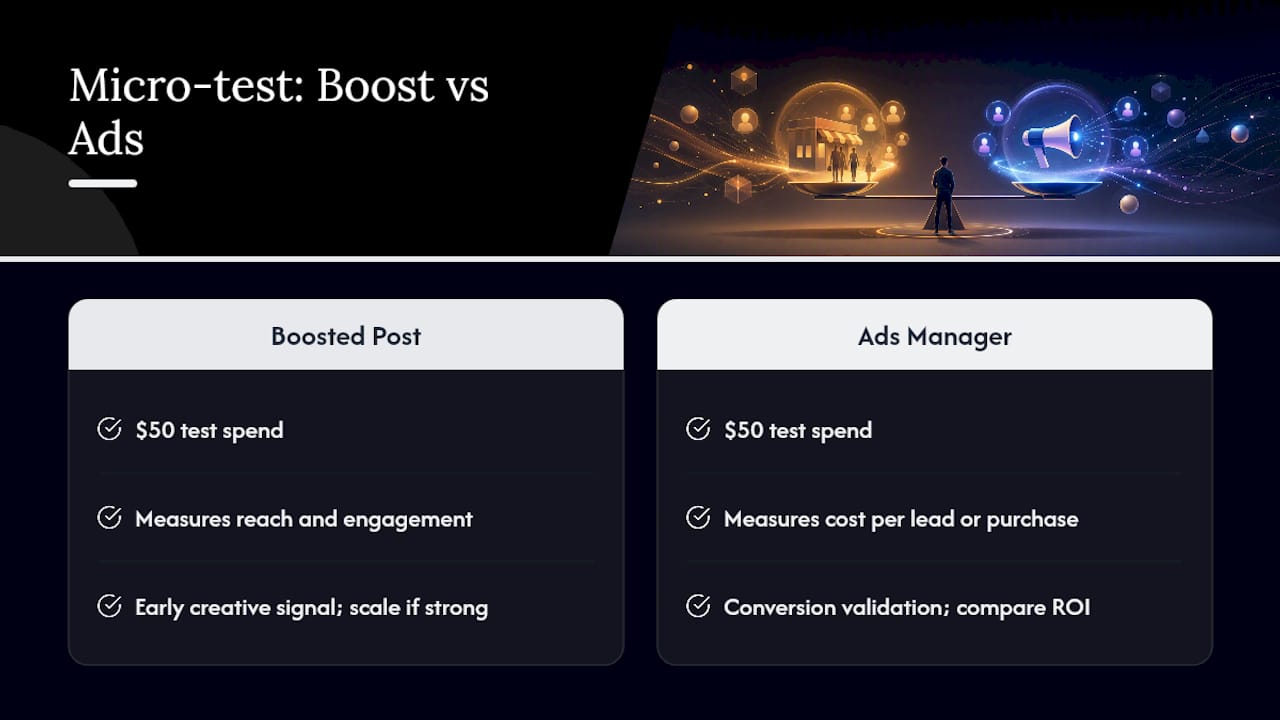
The head-to-head micro-test. Run $50 through a boosted post and $50 through an Ads Manager campaign with the same creative. Measure reach and engagement on one side, cost per lead or purchase on the other. The gap usually settles the debate for good.
How Ibrand.media Approaches Paid Social for Clients
Most engagements start the same way: a discovery call to understand the goal, followed by an audit of whatever tracking already exists (or doesn’t). If there’s no Pixel or Conversions API in place, that gets built first, because no campaign structure fixes a measurement gap.
From there, the approach is low-cost learning tests before scale. Small, controlled budgets validate creative and audience signals, then winning combinations move into larger, conversion-focused campaigns.
A typical timeline looks like this: week one covers tracking setup and audience research, week two launches initial test campaigns, and by month one, clients see a clear read on cost per lead or cost per sale, with a scaling plan built around whatever actually worked.
An Editorial Take on Boosted Posts vs Ads
My default answer, almost every time, is Ads Manager. If a goal can be measured in dollars, leads, or bookings, boosting a post is rarely the right tool. It optimizes for the wrong signal, and small businesses can’t afford to pay for attention that doesn’t convert.
That said, I still use boosts. They’re the fastest, cheapest way to sanity-check a new creative idea before committing real budget to it, and for a business that lives entirely inside Instagram DMs, boosting can be the whole strategy.
The misuse I see constantly: owners boosting the same underperforming post week after week, mistaking rising likes for rising revenue. That’s not a strategy. That’s a habit.
— TONY
Get Paid Social Set Up the Right Way
A practical alternative to figuring out Ads Manager alone. Instead of guessing at objectives, targeting, and Pixel setup, you get a plan built around your actual goal, whether that’s bookings, leads, or online sales.

A starter audit typically covers your current tracking setup, a review of what’s been boosted versus what’s been run through full campaigns, and a recommendation on where your budget is actually leaking. From there, social media management support can take the day-to-day testing off your plate while you watch the results come in.
If your website isn’t set up to capture conversions once someone clicks, that’s worth fixing before you spend another dollar on ads. Ibrand also builds conversion tracking into the campaigns it manages, so every dollar spent shows up somewhere in your reporting. If you’re ready to stop guessing which post to boost and start running campaigns built for actual sales, reach out through Ibrand to schedule a starter audit.
Sources
- Boosted posts vs. ads: What to know in 2026 | Hootsuite
- The difference between boosted posts and Meta ads
FAQ
Is it better to boost a post or create an ad?
For measurable outcomes like leads or sales, an Ads Manager campaign is better because it optimizes for conversion events instead of engagement. Boosting works fine for quick visibility on content that’s already performing well organically.
Do boosted posts count as ads?
Yes. Meta classifies boosted posts as paid promotions, just with more limited targeting and placement options than campaigns built directly in Ads Manager.
What are the key differences between boosted posts and ads?
Boosted posts optimize for engagement and reach with basic targeting, while Ads Manager campaigns optimize for conversion objectives with advanced targeting, full placement control, and pixel-based reporting.
Can you tell if a post is boosted?
Yes. A boosted post shows a “Sponsored” label directly on the original organic post in your feed, while standard Ads Manager ads can appear as new creative with no organic post attached.
Recent Comments