
Most small local businesses in the US pay a moderate amount per click on Google Maps placements, with some competitive fields running higher. A modest daily budget is enough to run a real test. Billing is mostly cost per click (CPC), though some placements, like promoted pins running through Performance Max, can charge by impression (CPM) instead. Before spending a dollar, verify your Google Business Profile, then launch a geo targeted test for two to eight weeks.
TL;DR:
- Most small businesses pay between $0.50 and $6 per click for Google Maps ads, with higher costs typical in legal and healthcare sectors.
- Actual billing occurs only when users click, call, or request directions, not when they simply view or swipe past the pin.
- Campaign setup requires verified Google Business Profiles, complete listings, and properly linked location assets to ensure ad visibility.
- Improving Quality Score through fast-loading, relevant landing pages and active profile management significantly reduces ad costs.
- A daily budget of $10 to $20 is a practical starting point for testing, with in-depth tracking needed to measure true return on investment.
Table of Contents
- What Are Google Maps Ads and Where Do They Show Up?
- How Does Google Bill You for Maps Ads?
- What Do Google Maps Ads Actually Cost by Industry?
- How Do You Set Up a Google Maps Ad Campaign?
- How Can You Lower Your Google Maps Advertising Cost?
- How Do You Measure ROI on Google Maps Ads?
- Should You Run Maps Ads Yourself or Hire Help?
- Tony’s Quick Wins for Maps Ad Campaigns
- Get Your Maps Ad Campaign Off the Ground With Ibrand
- Sources
- FAQ
What Are Google Maps Ads and Where Do They Show Up?
Google Maps advertising cost only makes sense once you know what you’re actually buying, because “Google Maps ads” covers a few different things and they behave differently. A promoted pin is the orange square marker that pushes a business above the organic map results. A map search ad appears in the list view when someone searches “coffee shop near me” directly inside the Maps app. Map suggest is the auto-complete style prompt that surfaces sponsored results as someone types a search.
None of that is the same as your free Google Business Profile listing, which shows up organically based on relevance, distance, and prominence. Paid placements sit on top of or alongside that free listing. You still need the free profile claimed and verified. It’s the foundation the paid campaign attaches to, and Google is explicit that you must enable location assets and link a verified Business Profile before any ad can show on Maps at all.
A handful of campaign types can serve on these Maps surfaces:
- Performance Max, which pulls in Maps placements automatically when store visits or local action goals are set.
- Search campaigns with location assets enabled, which extend a normal text ad to include your address, map pin, and call button.
- Smart campaigns, built for small businesses without a marketing team.
- Demand Gen, which can incorporate location assets for visual, discovery-style ads.
What actually triggers a charge on any of these matters more than the campaign type itself. A click on your headline that opens your site, a click that opens your Business Profile, a tap to call, and a tap for directions can all be billable interactions. Someone just glancing at your pin or swiping through a photo carousel is not.
How Does Google Bill You for Maps Ads?
Most Maps advertising runs on cost per click, meaning you pay only when someone acts, not when they merely see your pin. That single fact is the reason “Google Maps ads cost” is such a slippery phrase to nail down. Two businesses running identical daily budgets can pay wildly different amounts per action depending on their Quality Score, their category, and which specific interactions count as billable.
Pro Tip: Don’t assume every tap on your listing costs you money. A user swiping through your photo carousel or just viewing your pin without acting on it generates zero charge, which is exactly why a high impression count with a low cost is often a good sign, not a red flag.
What actually gets billed
Google’s own documentation on local ads billing lays out the billable events clearly:
- A click on your ad’s headline that opens your website.
- A click that opens your Google Business Profile.
- A tap to call your business directly from the ad.
- A tap for driving directions.
Passive interactions, like someone simply viewing your pin on the map or swiping through a photo carousel without tapping through, are not charged. That distinction is easy to miss when you’re staring at an impressions number that looks huge compared to your spend.
The CPM exception: Performance Max campaigns built around store visit goals can bill by impression (CPM) rather than click, specifically for branded or promoted pins. If your campaign shifts to a store goal setup, don’t assume the CPC math below still applies. Check your billing summary in Google Ads to confirm which model is actually running.
The formula behind your actual CPC
Your maximum bid is not what you pay. Google calculates your actual CPC using Ad Rank and Quality Score, roughly:
Actual CPC = (Ad Rank of the advertiser ranked just below you ÷ Your Quality Score) + $0.01
Here’s why that formula matters more than most business owners realize. Say your Quality Score is 8 out of 10 because your landing page is fast, relevant, and mobile-friendly, while a competitor bidding the same maximum amount has a Quality Score of 4. You could end up paying roughly half of what they pay for the same ad position, because Google rewards relevance with a lower effective price. Practitioner benchmarking on Quality Score’s effect on CPC backs this up: advertisers who invest in ad relevance and landing page quality consistently pay less per click than competitors bidding blind on price alone.
That’s the mechanical reason two businesses in the same city, same category, same daily budget, can see completely different Google Maps advertising pricing at the end of the month.
What Do Google Maps Ads Actually Cost by Industry?
The cost of Google Maps ads varies by vertical more than most first-time advertisers expect, and the swing isn’t small. Practitioner benchmarks put typical local Maps CPCs somewhere between $0.50 and $6 for most small business categories, with legal services and certain healthcare niches often running well above that range because the value of a single client is so much higher.
Here’s a starting point for common local categories:
Those ranges are a starting point, not a guarantee. A dentist in a mid-size suburb and a dentist competing in a dense metro area for cosmetic procedures are not playing the same game, even though they share a category. Legal and healthcare CPCs deserve an extra caveat: those verticals attract the most competitive bidding in local search, period, so budget expectations should be built around cost per client acquired, not cost per click.
If you’re brand new to paid search generally, it helps to understand the basic mechanics of PPC budgeting before committing real money to a Maps-specific campaign.
How Do You Set Up a Google Maps Ad Campaign?
Getting a campaign live on Maps takes about an hour of setup work if your Business Profile is already in decent shape. Here’s the order that actually works:
- Claim and verify your Google Business Profile. This is non-negotiable. Google requires a verified profile linked to location assets before any Maps placement can serve.
- Fill out your profile completely. Accurate hours, correct categories, real photos, and a working phone number all feed into how your ad performs once it’s live. A thin, outdated profile drags down performance even with a big budget behind it.
- Link your Business Profile to your Google Ads account and enable location assets in your campaign settings.
- Choose your campaign type. Performance Max works well if you want Google’s automation handling placement decisions across Maps, Search, and Display simultaneously. Search campaigns with location assets give you more manual control over keywords and bids. Smart campaigns fit businesses with no dedicated marketing staff who want something closer to set-and-forget.
- Set your geo-targeting. Decide between a radius (say, 10 miles from your storefront) or specific city and zip code targeting. A tight radius usually outperforms a broad one for foot-traffic goals.
- Apply bid adjustments by location if you serve multiple areas with different competitive intensity.
- Schedule your ads for the hours when your business can actually respond, whether that’s answering calls or having staff on-site.
- Pick a starting bid strategy. For a first test, manual CPC or a conservative “maximize clicks” setting with a budget cap gives you cleaner data than letting an automated bidding strategy optimize blind on day one.
- Build your assets. Upload real photos, not stock images. Add a call button and, if relevant, a booking button. Include any local offer. Make sure whatever landing page the ad points to loads fast on a phone.
Pro Tip: Resist the urge to launch with your biggest promotion baked into the ad copy on day one. Run a plain, accurate version first so you get a clean read on baseline Quality Score before layering in a discount offer that might skew your early data.
If you run a service business without a physical storefront customers walk into, your setup differs slightly, particularly around how you define your service area. It’s worth reviewing service area business SEO guidance before you set your radius targeting.
How Can You Lower Your Google Maps Advertising Cost?
Quality Score is the single biggest lever most business owners ignore, and it directly reduces your Google Maps advertising expenses without touching your bid. A landing page that loads in under two seconds on mobile, matches the language in your ad, and gets someone to a call button or booking form in one tap earns a materially better score than a generic homepage.
Your Business Profile itself is part of the equation too, even though it’s technically free. Google factors in how complete and active it looks. Accurate hours, the right primary and secondary categories, fresh photos, and prompt responses to reviews all signal a business worth showing.
- Adjust bids by location if some zip codes convert better than others; don’t spread your budget evenly across a whole metro area by default.
- Segment your radius into tighter rings closer to your storefront and looser targeting further out, then bid accordingly.
- Test ad scheduling against your actual staffing, since a call that goes unanswered after hours is wasted spend.
- Rotate creative assets, especially photos, since stale imagery underperforms fresh, seasonally relevant shots.
Pro Tip: Pair your Maps campaign with an active review-collection habit. A profile with 40 recent reviews and a 4.6 average consistently outperforms one with 400 reviews from three years ago, because Google and searchers both weight recency.
Combining paid Maps placements with local inventory ads or a time-bound promotion tends to produce a visible lift over running Maps ads in isolation, since it gives the same customer two separate reasons to act.
How Do You Measure ROI on Google Maps Ads?
Google Maps ads ROI comes down to a small set of metrics: clicks, phone calls, requests for driving directions, Business Profile opens, and, if you’ve set it up, actual store visits. Google’s own guidance on Maps advertising points advertisers toward exactly these conversion types rather than raw impressions, because impressions tell you almost nothing about revenue.
Getting attribution right takes a bit of setup work:
- Turn on call tracking so you know which calls originated from the Maps ad versus organic search or a repeat customer.
- Import offline conversions into Google Ads if your point-of-sale or booking system supports it, so a walk-in sale ties back to the click that caused it.
- Add UTM parameters to any landing page URL tied to the campaign, which matters even more if you’re also running organic local SEO and need to separate the two channels in your analytics. A guide like Cairrot’s conversion tracking setup for GA4 walks through the technical side of connecting ad platforms to Google Analytics cleanly.
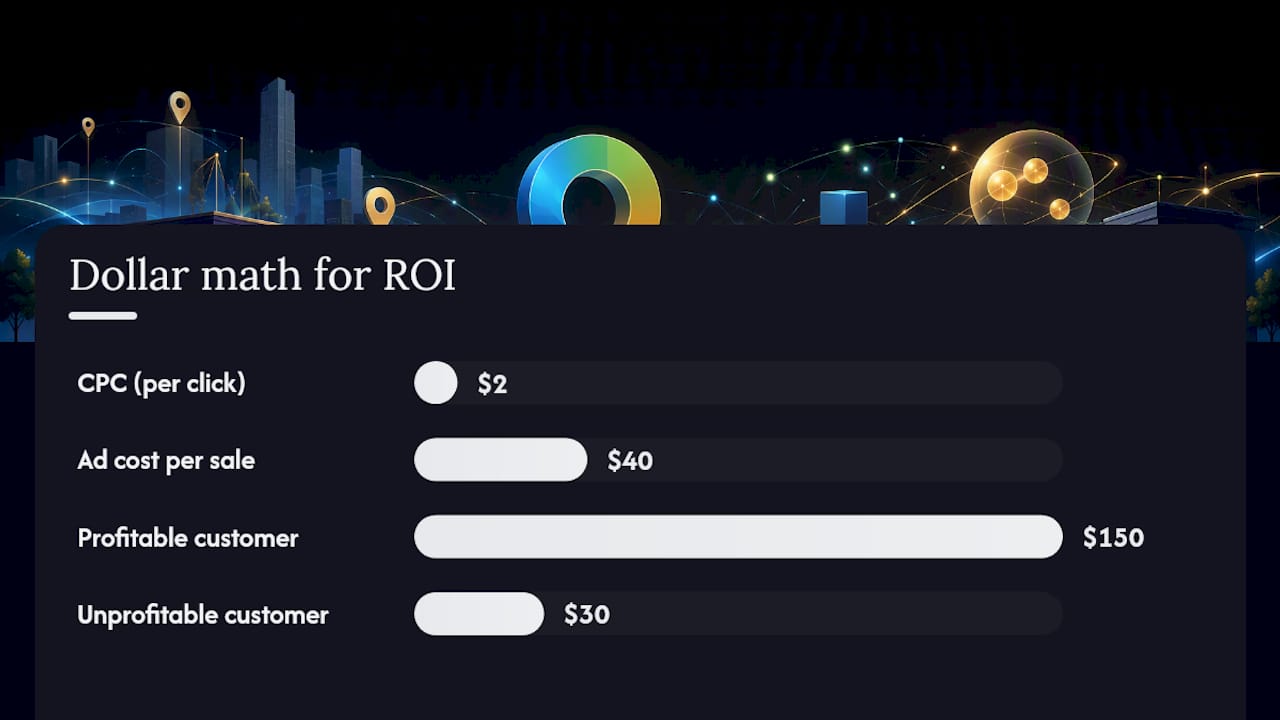
A simple break-even calculation makes the ROI conversation concrete. Say your average CPC is $2, and roughly 1 in 20 clicks converts into a paying customer, a 5% conversion rate. That’s $40 in ad spend per customer. If your average customer is worth $150, you’re comfortably profitable. If your average customer is worth $30, that same campaign is losing money, and no amount of creative tweaking fixes a math problem like that. Know your value-per-conversion before you judge whether a CPC is expensive or cheap.
Should You Run Maps Ads Yourself or Hire Help?
Running Maps ads in-house works fine if you have a few hours a week, basic comfort with Google Ads’ interface, and someone willing to set up call tracking and check performance weekly. That’s a real time cost, not a hypothetical one.
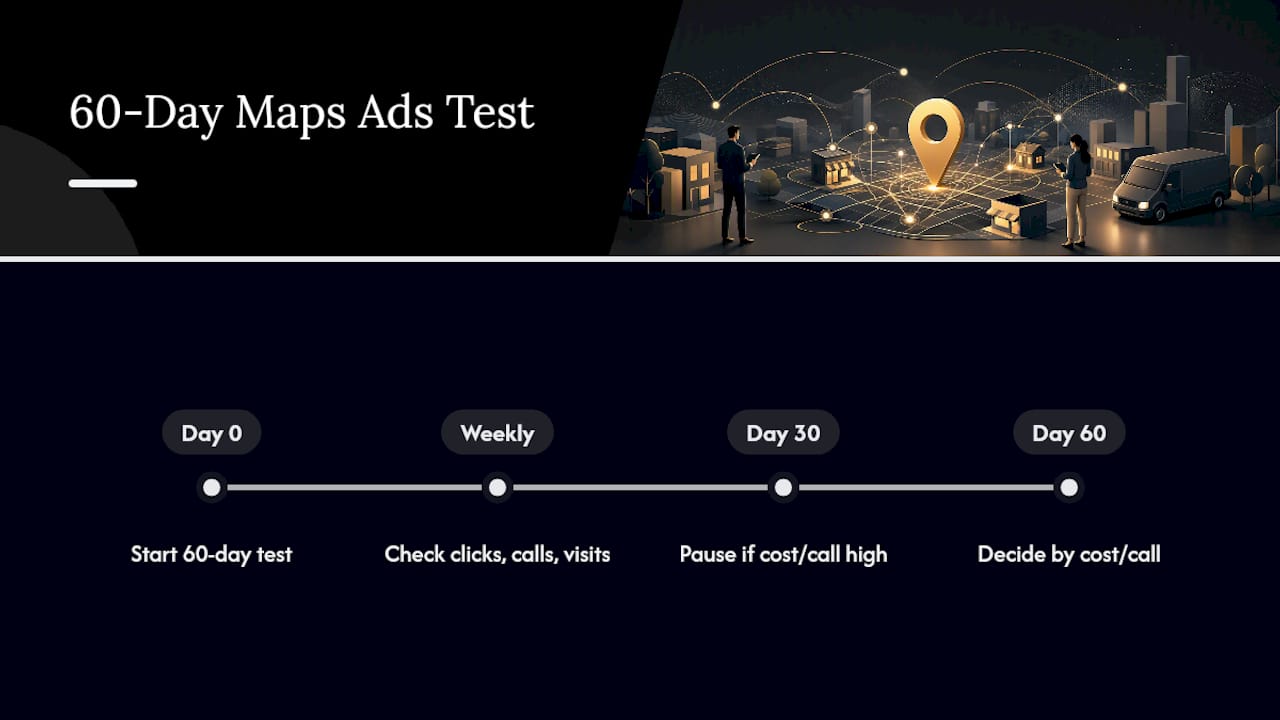
Signs you’re better off handing it to an agency: you operate more than one location, you have no offline conversion tracking in place, or you need results faster than a slow, self-taught learning curve allows. A 60-day test is the right window either way. Watch click volume, call rate, and store visit trends weekly, and set a threshold going in, for example, pause and rework if cost per call exceeds a set dollar figure by day 30, scale the budget if it comes in under.
Tony’s Quick Wins for Maps Ad Campaigns
The three mistakes I see most often on Google Maps ads campaigns aren’t creative problems. They’re setup problems. An unverified or half-finished Business Profile is the biggest one, since it undercuts everything downstream. Second is launching without any store visit or call tracking, which means three months later nobody can say whether the campaign worked. Third is testing with a budget so small, $3 or $5 a day, that Google’s algorithm never gets enough signal to optimize anything.
Fix all three this week. Verify your Business Profile if you haven’t already, and fill in every field Google gives you room for. Set a real geo-targeted test at $10 to $20 a day rather than a token amount. Turn on call tracking before you spend a single dollar, not after you’re wondering where the calls came from.
— TONY
Get Your Maps Ad Campaign Off the Ground With Ibrand
Some agencies offer alternatives to guessing your way through Google Ads settings alone. Instead of burning your first month’s budget learning what “location assets” even means, consider getting a team to set up your Business Profile, campaign structure, and tracking correctly the first time.

Core services for local Maps campaigns include Google Business Profile optimization so your listing qualifies for paid placements, tracking setup for calls and store visits to measure ROI, and ongoing campaign management that adjusts bids and targeting as data comes in. If you’d rather start with the fundamentals, some teams can also help strengthen the website your ads point to so clicks convert instead of bouncing.
Request a free audit or book a short consultation to map out a 60-day test built around your specific vertical and budget, rather than using a generic template.
Sources
For the official rules on billing and setup, start with Google’s own documentation: local ads billing, Maps location assets requirements, and the main Google Ads platform. For CPC benchmarking and budget examples, practitioner analysis from Scrap.io’s Maps advertising guide provides useful real-world ranges.
- Show local search ads on Google Maps – Google Ads Help
- Get the most out of advertising on Google Maps — Google Ads
- Google Maps Advertising 2026: Costs, Setup & Strategy
FAQ
Is $10 a day enough for Google Ads on Maps?
Yes, for a test. $10 a day is enough to start collecting real click and cost data over a few weeks, though it won’t generate huge volume in competitive verticals like legal or healthcare.
How much do Google Maps ads cost overall?
Most small local businesses pay $0.50 to $6 per click, depending on industry, with a reasonable starter monthly budget landing between $300 and $1,200 for most categories.
Is $20 a day good for Google Ads?
$20 a day is a solid middle ground for most local categories, generating enough clicks in most verticals for meaningful weekly data without the risk of a large first-month bill.
How much do Google Ads cost in the US on average?
Costs vary enormously by keyword competitiveness and industry, but local Maps and search campaigns for small businesses commonly fall in the $0.50 to $6 per click range, with legal and specialty healthcare running higher.
Can promoted pins cost more than regular clicks?
Sometimes. Promoted pins running through Performance Max for store visit goals can bill by impression (CPM) rather than by click, so the cost structure differs from a standard click-based Maps ad.
Recent Comments