
Google Ads call extensions are now called call assets. They add your phone number to your search ads so a customer can call you straight from the results page. To get them working you need a call asset applied at the right level, call reporting switched on, a schedule that matches the hours someone can pick up the phone, and a conversion action that tells Google which calls were worth having. This guide walks through each step for a local business, and flags where each one tends to go wrong.
TL;DR
- Call extensions are now called call assets. They put a tap-to-call button on mobile ads and a “Call us” button on desktop ads, and you pay the same cost per click as for a website visit.
- Set one up under Assets in your Campaigns menu, then choose account, campaign or ad group level. The most specific level wins.
- Turn on call reporting and count calls as a conversion, so Google gets the data it needs to find you more callers.
- Schedule the asset to the hours you answer the phone. A call that goes to voicemail is wasted spend.
- Old call-only ads stop getting impressions in February 2027, so move your phone number onto responsive search ads now.
Table of Contents
- What call assets are and how they show up
- Before you start: what you need
- How to set up a call asset, step by step
- Understanding call reporting and forwarding numbers
- Tracking which calls are worth paying for
- Why your call asset is not showing
- If you still run call-only ads
- Our view: calls are the conversion small businesses actually feel
- Get your calls set up and measured
- FAQ
- Sources
What call assets are and how they show up
A call asset is a phone number attached to a Google search ad. Google Ads Help describes call assets as a way to add phone numbers to your ads to increase clickthrough rates. On a phone, a clickable call button appears under your responsive search ad. On a desktop, a “Call us” button shows your number, or a Google forwarding number if call reporting is on, along with a QR code that opens a phone’s dialer with your number already filled in. People can still click the ad itself to reach your website.
For a plumber, HVAC company, dentist or med spa, this is the shortest path between a customer with a problem and your front desk. Someone with a burst pipe or a broken furnace does not want to read a landing page. They want to talk to someone.
The cost works the way you would hope. Google explains that customers who tap the call button are charged the same cost per click as for a click to your website.
Why the name changed
The old name was “call extension.” Google now calls all of these add-ons “assets,” so you will see both terms. The same goes for the older standalone format, call-only ads. Google’s call ads page says the options to create new call ads were removed in February 2026, and existing call ads stop receiving impressions in February 2027. If your phone leads still depend on one of those ads, see the migration section below.
Before you start: what you need
A call asset needs very little, but the pieces have to be right.
- A Google Ads account with a search campaign running responsive search ads.
- A real business number that people can reach during the hours you plan to advertise. Use a dedicated business line, not a personal cell, so you can tell ad calls apart from everything else.
- A website that shows that same number. For call ads, Google requires a verification URL for a page that includes your business phone number.
- An eligible country and number. Google’s call measurement page says call conversion measurement requires a verified phone number, call reporting enabled in account settings, and a number whose country code is on its eligible list. Call recording is limited to calls where both parties are in the U.S. or Canada, and you can disable it in account settings.
If you are still setting up the basics, our conversion tracking checklist covers the tag work that sits underneath all of this.
How to set up a call asset, step by step
Step 1: Open the Assets page
In Google Ads, go to Assets in the Campaigns menu and select the plus icon. Google’s instructions then have you pick Call as the asset type.
Where it goes wrong: people hunt for “Extensions” in the menu and cannot find it. It no longer carries that name.
Step 2: Choose the level
You pick Account, Campaign or Ad group. Google serves the most specific level: an ad group asset beats a campaign asset, which beats an account asset.
Here is how that plays out for a local business:
| Situation | Best level | Why |
|---|---|---|
| One location, one phone number | Account | One setting covers every campaign |
| Separate campaigns by service, such as HVAC repair and installation, each with its own line | Campaign | Each service routes to the right team |
| Several locations or very specific services | Ad group | You can see which number produces which calls |
Where it goes wrong: you set an account-level number, then later add a campaign-level number and forget it. The campaign one wins, and your calls start landing somewhere you did not expect.
Step 3: Create the asset or reuse one
Select Create new, enter your phone number and agree to the Call Ads Supplemental Terms. If you already built a call asset, choose Use existing and pick it from the list. Reusing one keeps your numbers consistent across campaigns.
If you work in the desktop Google Ads Editor, the path is different. Editor Help has you create a shared call asset with its phone country and number in the Shared library, then add it to a campaign or ad group through Ad assets.
Step 4: Turn on call reporting and conversion counting
When you create the asset, you can enable call reporting and count calls as conversions. Do this. Without it you will see that calls happened but not which ads, keywords or searches caused them.
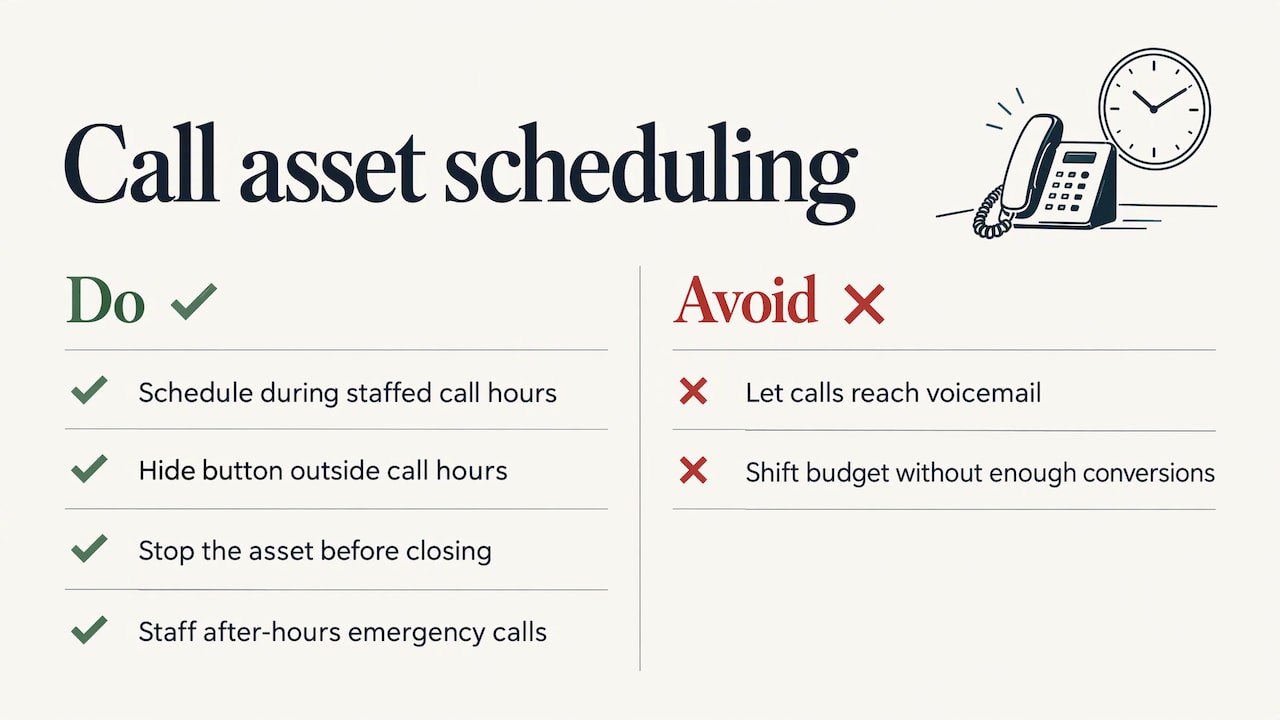
Step 5: Set a schedule
Under Advanced options you can schedule when the asset shows. Google notes that call assets can be scheduled to show only during specific times, for example when your business can take calls.
The point is easy to miss. Search Engine Land’s guide warns that a customer reaching voicemail is the worst outcome, and suggests stopping the asset a few minutes before closing time, for example 4:55 p.m. for a 5 p.m. close. If you offer after-hours emergency service, schedule the asset for those hours and make sure someone is on the line.
Your ads can keep running with the button hidden. Customers who search outside your hours still see the ad and can click through to your website, where a form can catch them.
Before you decide to cut hours or shift budget by time of day, read our note on dayparting with small budgets. Without enough conversions, time-of-day decisions are guesses.
Understanding call reporting and forwarding numbers
Call reporting is an account-level setting. Google explains that when it is on, a Google forwarding number is assigned to your ad. It records the call’s duration, start time, the caller’s phone number for calls over 15 seconds (except in India), and whether the call connected. Turn it off and customers see your direct number, but you lose the tracking.
Two practical points:
- Forwarding numbers change. Google says they may change over time, so you cannot print one on a truck or a flyer. They only work for call reporting and website call conversion tracking.
- Caller ID generally works. Your team sees the customer’s number as they would with any other call.
If you also use a separate call tracking tool on your site, read our guide to call tracking setup for U.S. small businesses so the two do not collide. Businesses that also take calls from their Google Business Profile will want the GBP call tracking guide.
Tracking which calls are worth paying for
A phone ringing is not the same as a customer. A wrong number, a vendor selling something and a real job request all look alike unless you measure.
Create the conversion action
Go to Goals, then Summary, then Create conversion action. Google’s measurement page lists three call options: Calls from ads, Calls from website visits and Calls via uploads. Google Ads automatically includes the default “Calls from ads” action in your Conversions column.
With call recording on, Google’s AI analyzes recordings to judge lead quality. If recording is unavailable, it uses the minimum call duration you set.
Set a sensible minimum call length
The duration threshold is yours to choose. Google’s example: with a 30-second threshold, a 26-second call counts as one phone call and zero conversions. For a service business, a call to book a repair usually runs longer than a wrong-number hang-up, so a threshold in the range of a minute is often a reasonable starting point. Adjust it after you listen to a sample of real calls.
Make it a primary goal
Search Engine Land recommends setting Calls from ads as a Primary conversion action so bidding prioritizes calls. If your real goal is phone leads, this tells Google to go find more of them rather than clicks that never dial.
Read the report
Call details appear in your campaign tables through the Columns icon, then Call Details. Google lists impressions, phone calls received, phone-through rate, start and end time, missed versus received, caller area code and call type. Missed calls are the line to watch. Each one is a click you paid for that never turned into a conversation.
Bring offline results back in
If calls become jobs only after a quote, Google lets you import phone call conversions through scheduled uploads via Google Sheets, HTTPS or SFTP. That lets Google learn which calls led to revenue. A 4-step setup for the tracking tags is in our GA4 setup guide.
Why your call asset is not showing
The most common complaint is that the asset is set up and nothing appears. Work through these causes in order.
- Ad Rank is too low. Google says whether assets show depends on Ad Rank (your bid, ad and landing page quality, thresholds, search context and expected asset impact), ad position and other enabled assets. Higher positions get the first opportunity to show assets. A low bid or weak ad can suppress an asset that is configured correctly.
- The schedule is hiding it. Check that your asset schedule matches the hours you are testing in.
- The device cannot call. Call ads appear only on devices that make phone calls. On desktop you get the “Call us” button and QR code instead.
- The number is unverified. This one trips up sites with swapped-in tracking numbers. Google’s troubleshooting guidance says that if your site uses Dynamic Number Insertion or third-party call tracking, automated verification cannot verify the number from the source code, and reformatting to E.164 will not fix an “Unverified Phone Number” disapproval. Instead, prove domain ownership by linking Google Search Console to Google Ads (detection can take up to 24 hours) or by placing the gtag.js tag directly in your raw HTML rather than through a tag manager. Then resubmit for review.
- Another asset takes the slot. Competing assets can crowd yours out of a given impression.
When the calls arrive but are wrong
If a lot of callers are confused, the usual causes are a vague headline, a number that reads as another business’s, or ads showing on searches that have nothing to do with what you sell. Tighten keywords, add negative keywords, and make the business name in your ad clear. Then listen to calls in the report to see what people expected. For trades, our Google Ads for plumbers guide shows how setup, budget and lead quality fit together.
If you still run call-only ads
Call-only ads are on a clock. Google’s transition guide says new ones can no longer be created and existing ones stop getting impressions in February 2027. To move over:
- Add your business name in account or campaign settings.
- Add your phone numbers as call assets.
- Attach them to responsive search ads using More Asset Types.
- Remove the old call ad once the new responsive search ad is approved and performing.
Do not delete the old ad first. Run both until the new one has proven it earns calls, so you never have a gap in phone leads.
Our view: calls are the conversion small businesses actually feel
Most of the local businesses we talk to are not after clicks. They want the phone to ring with someone who needs the job done. That is why we treat the call asset as a core part of a search campaign, not an add-on.
The setup is quick. What separates a profitable call asset from a wasteful one is everything around it: the number on your site matching the number in the ad, a schedule that follows your real staffing, a conversion action that counts real leads, and numbers you can read without a spreadsheet.
That is the reasoning behind how we build advertising for small and local businesses: a plan tailored to the business, pricing that is transparent, and real-time stats so you can see what your spend produced. A call you can trace to a keyword is a call you can decide about.
TONY
Get your calls set up and measured
If you would rather have your phone number, schedule and call tracking built into a campaign that is planned around your business, IBrand Media offers advertising, local marketing, web design and realtime stats for small and local businesses. We start with a custom plan for each client, so your call assets match your hours, services and locations.
See the full list of services and request a plan on the IBrand Media site.
FAQ
Are call extensions the same as call assets?
Yes. Google renamed extensions as assets, so what used to be a call extension is now a call asset. The function is the same: a phone number attached to your search ad, shown as a call button on mobile and a “Call us” button on desktop.
Do I pay more when someone calls from my ad?
No. Google states that you pay the same cost per click as for a click to your website. You pay when the customer taps the call button, whether or not the call connects, which is why scheduling the asset to your open hours matters.
Why does my number show as unverified?
Usually because your site uses call tracking or Dynamic Number Insertion, so Google cannot read your number from the page source. Link Google Search Console to your Google Ads account or place the gtag.js tag directly in your page HTML, wait up to 24 hours, and resubmit the asset for review.
Should I apply the call asset to the account, campaign or ad group?
Use the account level for one location with one number. Use the campaign level when services have different numbers, and the ad group level for multiple locations or tight per-service tracking. The most specific level always takes priority.
Sources
- About call assets, Google Ads Help
- Call assets, Google Ads Editor Help
- Measure calls from ads, Google Ads Help
- About call ads, Google Ads Help
- About call reporting, Google Ads Help
- Analyze call reporting data, Google Ads Help
- Import phone call conversions, Google Ads Help
- About assets, Google Ads Help
- How to transition from call ads to call assets, Google Ads Help
- How to use call assets, lead forms and message assets, Search Engine Land
Recent Comments