
The best Google Business Profile posts are specific, timely and tied to one action: a seasonal offer with an end date, an event with a time, a before-and-after job, or a short answer to a question customers keep asking. Below are the post ideas we would use for a local service business, with example wording, the rules that get posts removed, and a simple way to see what works.
TL;DR
- Google gives you three post types: Updates, Offers and Events. Pick the one that matches your goal, then add one clear button.
- Good ideas for local businesses: seasonal offers, finished jobs, team news, answers to common questions, event announcements and holiday hours.
- Keep phone numbers, emails and social handles out of the post text. Use the action buttons instead.
- Hotels cannot post Offers or anything that mentions deals or discounts.
- Post counts are now visible in your dashboard, so check which posts get views and drop the ones that do not.
Table of Contents
- What a Business Profile post is, and where customers see it
- The three post types and when to use each
- 12 post ideas that work for local businesses
- Post ideas by business type
- How to write a post that gets action
- What Google does not allow in posts
- How often to post, and how to plan it
- Measuring what works
- Our view: treat posts as a sales tool, not a chore
- Want someone to run this for you?
- FAQ
- Sources
What a Business Profile post is, and where customers see it
A post is a short update that shows on your Business Profile in Search and Maps. Google describes it as a way to share announcements, offers, updates and event details directly with customers. Someone who searches your business name, or finds you on the map, sees it next to your reviews, photos and hours.
That placement matters. The person reading is usually already looking at you, often comparing you with two or three other businesses. A community best-practices guide on Google’s own help site calls posts a bottom-of-funnel tool, because these users are searching for your business and are ready to act. So write for a customer who is close to a decision, not for a social media follower scrolling past.
The three post types and when to use each
According to Google’s post documentation, most businesses can publish:
| Post type | Best for | What to know |
|---|---|---|
| Update | News, tips, finished projects, new services, hours changes | The everyday format. Works for weekly content. |
| Offer | Discounts, coupons, seasonal promotions | Needs a title and start and end dates. |
| Event | Open houses, workshops, grand openings, banquet tastings | Shows as 24 hours if you give no time range. |
Posts can contain text, photos or video. Choose a real photo from your own work over a stock image whenever you can. Google also publishes guidance on category-specific photos that shows which images help customers decide for each type of business.
12 post ideas that work for local businesses
Each idea below includes a sample you can adapt. Replace the details with your own real prices, dates and neighborhoods. Do not publish a number you cannot honor.
1. A seasonal offer with a deadline
This is the strongest use of the Offer type. The community guide recommends a framework of value, scarcity and a clear redemption path: say what the customer saves, when it ends, and how to claim it.
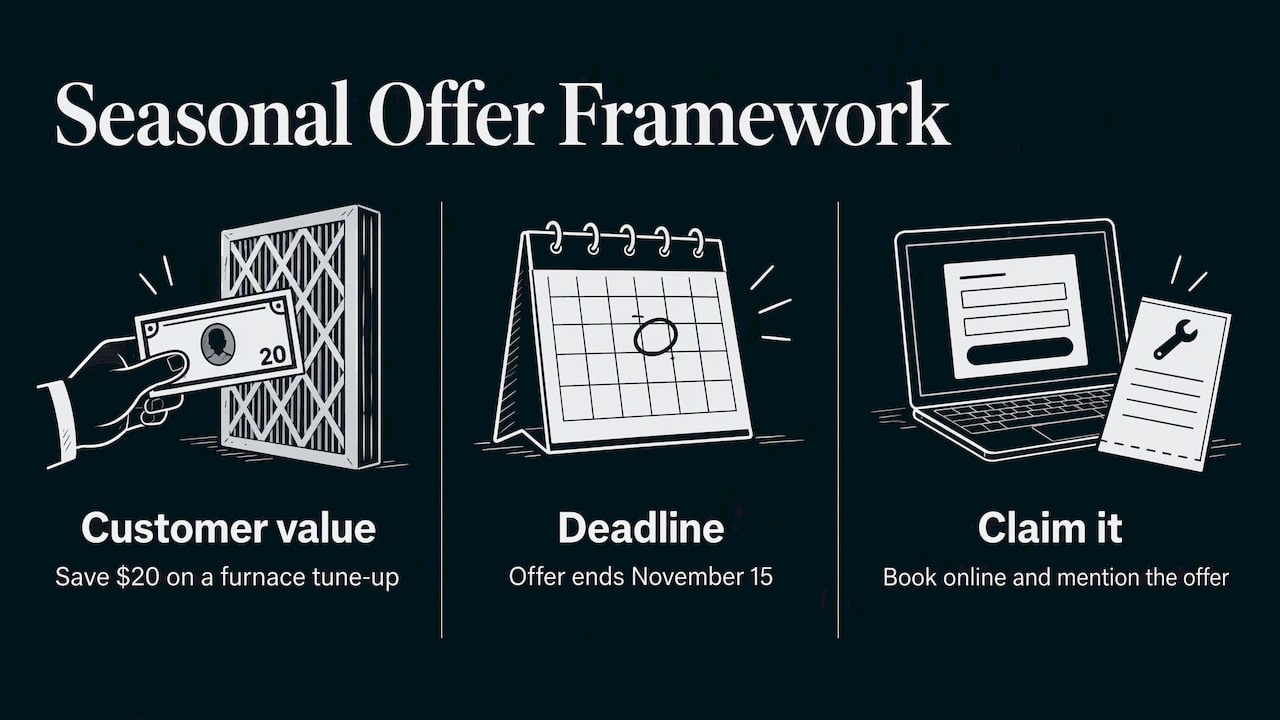
Example for an HVAC company: “Furnace tune-up, $20 off through November 15. Book online and mention this offer at the visit.” Add the button that goes to your booking page.
2. A finished job with a photo
Show one project, one problem and one result. Plumbers, roofers and home contractors can do this every week.
Example: “Replaced a failing water heater in a Maple Street home in one afternoon. Old unit out, new unit tested, area cleaned. Ask us about same-week installs.”
3. Answer a question customers ask on the phone
If your front desk answers the same question ten times a month, it deserves a post. Dentists can explain what a first visit includes. Med spas can explain downtime after a treatment. Keep it factual and short, and leave medical claims out unless a licensed provider on your team has signed off on the wording.
4. A new service or product
Announce it the week it launches, with a photo and a Learn more or Book button. A retailer can post a new arrival. A home service company can post a new service area.
5. An event announcement
Use the Event type with a real start and end time, since Google defaults to 24 hours otherwise. Banquet halls and venues can promote open houses, bridal showcases and tasting days.
Example: “Open house Saturday, 11 a.m. to 3 p.m. Tour the main hall, meet our catering lead and see sample table settings.”
6. Holiday and special hours
Simple, useful and easy to forget. Post your holiday hours a week or two ahead and update your profile hours as well, so the two never disagree. If you manage listings across several sites, our guide to updating business listings covers keeping them consistent.
7. Team and community news
A new technician, an anniversary, a local sponsorship or a cleanup day. These posts tell nearby customers you are a real business in their area. Use a photo of real people, with their permission.
8. A seasonal checklist
Local demand follows the calendar. Heating and cooling, gutter cleaning, lawn care, wedding season and back-to-school each have a window. Google’s guidance stresses that posts should be timely, and its dashboard lets you schedule posts ahead, so you can plan a quarter of seasonal content in one sitting.
9. Safety and prevention tips
Tips that help the customer protect something they own build trust fast. A security company might publish short tips such as the ideas in this piece on securing a business perimeter. A plumber can post how to find a main shutoff valve. A dentist can post how to handle a chipped tooth until the visit.
10. A customer result, with permission
A short story about a problem solved works better than a vague claim. Name the job type and the neighborhood, and get the customer’s consent before you use a name or a photo. Never invent a testimonial.
11. A behind-the-scenes look
Show how a cake is built, how a room is set for 200 guests, or how a treatment room is prepared. It answers the “what will it be like” question before the customer walks in.
12. A limited-time bundle or package
Pair two services at a fixed price for a short window. Med spas, salons and home service companies do this well. State exactly what is included and when it ends.
Post ideas by business type
| Business | Fast, repeatable post ideas |
|---|---|
| HVAC and plumbing | Seasonal tune-up offer, emergency availability, finished job photo, maintenance tip |
| Dentist | New patient offer, what to expect at a first visit, team introduction, hours changes |
| Med spa | Seasonal package, treatment explainer reviewed by your provider, event night, new service |
| Home contractor | Project spotlight, free estimate window, material or style trend, service area update |
| Banquet hall or venue | Open house event, tasting day, available dates, real event photos |
| Retail | New arrivals, in-store event, local pickup, holiday hours |
How to write a post that gets action
A short formula covers most posts:
- Lead with the point. Put the offer, news or answer in the first line, because that is what shows first.
- Be specific. “$20 off a furnace tune-up through November 15” beats “great deals this fall.”
- Use a real photo or video. A picture of your truck, your room or your work is more convincing than a graphic.
- Add one button. Choose Book, Call, Learn more or the offer link. One action is clearer than three.
- Tag your link. The community guide suggests adding UTM parameters to links so you can see these visits in your analytics. Our conversion tracking checklist walks through the setup.
What Google does not allow in posts
Posts fall under Google’s Business Profile content policy. Two rules come up most often.
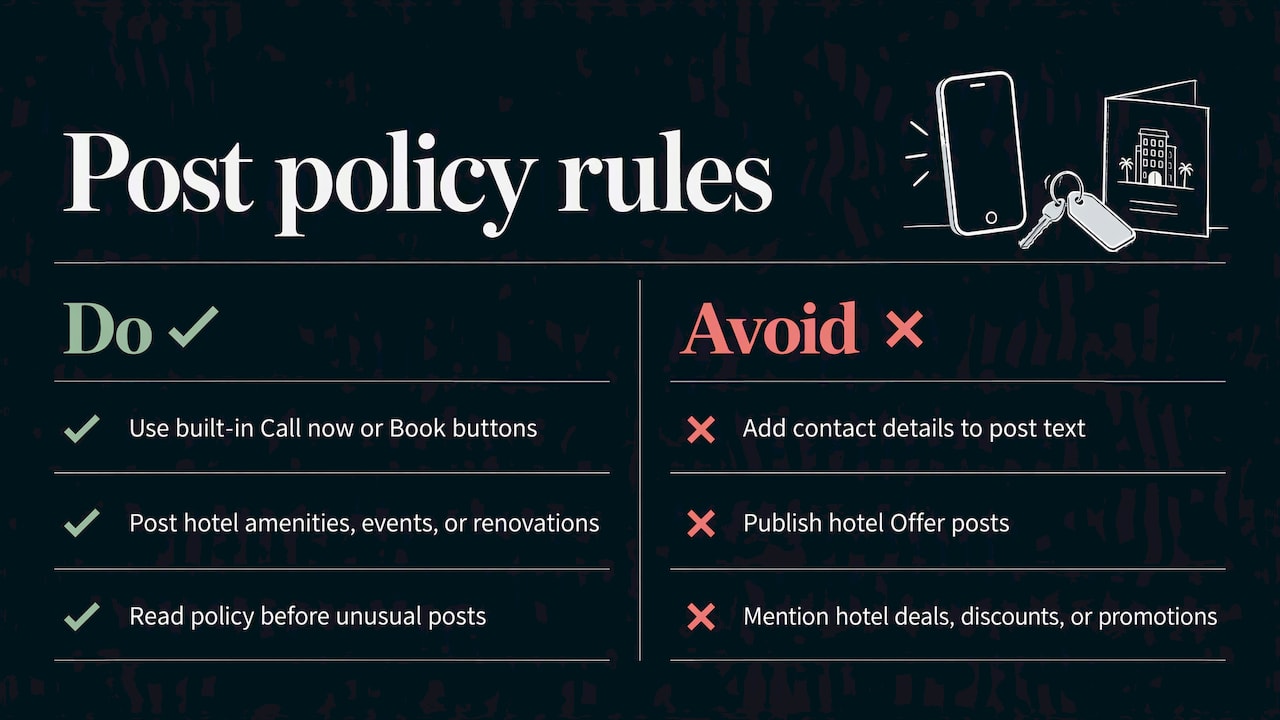
No contact details in the text. Google may remove posts that put phone numbers, email addresses or social handles in the body. Use the built-in buttons, such as Call now or Book, which draw on your verified profile information.
Hotels cannot post Offers. Under the same policy, hotels cannot create Offer posts or any post mentioning deals, discounts or promotions, to avoid confusion with the pricing Google displays for the hotel. If you run a hotel or lodging property, stick to Updates about amenities, local events and renovations.
Read the full policy before you publish anything unusual, since removed posts waste your time and can draw attention to your profile for the wrong reasons.
How often to post, and how to plan it
Google does not publish a required schedule. What works in practice is a rhythm you can keep. For most small businesses that means one Update a week and an Offer or Event whenever you have a real one. A four-week plan might look like this:
- Week 1: Finished job or project photo
- Week 2: Answer to a common customer question
- Week 3: Seasonal offer with an end date
- Week 4: Team or community news
Write all four in one session and use the scheduling feature in your dashboard, as described in Google’s documentation. Then you only need to check in for comments and questions.
Measuring what works
Until recently you needed third-party tools to see post engagement. Google is now rolling out post view counts globally, covering posts from the past 18 months and combining views from Search and Maps. Check your dashboard monthly and look at three things:
- Which post type earns the most views
- Which photos and topics repeat among your top posts
- Whether tagged links bring visits to your site and calls or bookings
Treat views as a first signal only. Views do not pay your bills. What counts is calls, direction requests and booked jobs. If your top-viewed posts never produce a call, change the offer or the button, not the posting frequency.
Our view: treat posts as a sales tool, not a chore
We work with local service companies, venues and clinics, and the same pattern shows up again and again. Owners start strong, post for three weeks, then stop because a post feels like extra social media. The profile ends up looking abandoned right where a ready-to-buy customer is looking.
Our advice is to shrink the job. One real photo, two sentences, one button, once a week. A post is not a brand statement. It is a small, timely nudge placed in front of someone who is already searching for what you do. If you only have time for one habit, make it the seasonal offer with a clear end date, because it gives the customer a reason to act now.
Posts also work best as part of a complete profile: correct categories, accurate hours, fresh photos and a steady flow of reviews. Our guides on Google Business Profile tips and Google Maps optimization cover those basics, so the posts have something solid to support.
— TONY
Want someone to run this for you?
If you would rather spend your week on jobs, patients or events, our team can handle your local marketing, from Business Profile management to local SEO, web design and advertising, with a custom plan for each client and real-time performance tracking. See the full list of services on the Ibrand home page, or read how local marketing fits together before you decide.
FAQ
Do Google Business Profile posts help you rank higher?
Google’s documentation describes posts as a way to communicate with customers in Search and Maps, and does not present them as a ranking factor. Their reliable value is on the profile itself: they give a customer a reason to call, book or visit. For ranking, look at the basics in our local search rankings guide.
Is it worth posting on Google Business Profile?
Yes, if you post things a ready-to-buy customer cares about, like a dated offer, an event or a recent job. The time cost is small, and Google now shows view counts so you can judge for yourself. If a post type gets no views or no calls after a couple of months, replace it.
Can I put my phone number or website in the post text?
Phone numbers, emails and social media handles in the post body can get the post removed. Use the action buttons instead, such as Call now or Book, which use your verified profile details. A website link belongs on the button, not in the text.
Can hotels post special offers?
No. Google’s content policy says hotels cannot create Offer posts or any post that mentions deals, discounts or promotions. Hotels can still publish Updates about amenities, renovations or nearby events.
Sources
- Create & manage posts on your Business Profile, Google Business Profile Help
- Business Profile photos, videos & posts content policy, Google Business Profile Help
- Google Business Profile Posts Best Practices, Google Business Profile Community
- Tips for business-specific photos on your Business Profile, Google Business Profile Help
Recent Comments