
Start by choosing your tracking approach, dynamic number insertion for your website or account-level call reporting for Google Ads, then create or assign a tracking number, and finally install or enable it so calls forward correctly and get logged as conversions. That gets you measurable attribution within a day. Before you trust the numbers, you still need to test every call path and confirm your compliance basics are in place.
TL;DR:
- Use a number pool that matches your peak traffic to ensure accurate attribution for dynamic number insertion.
- Test call paths thoroughly and confirm tag firing, number swaps, and caller ID details before trusting the data.
- Enable Google Ads call conversion tracking with appropriate minimum call duration and consider recording for lead qualification.
- Ensure compliance by announcing recordings on all calls, scrubbing against DNC lists, and retaining consent records for four years.
- Connecting call data to your CRM and reports is essential for measuring performance and optimizing campaigns effectively.
Table of Contents
- Getting started: tracking numbers, static vs dynamic
- Install call tracking on your website: GTM or manual code
- Set up Google Ads call conversion tracking
- Test and verify your call tracking setup
- Compliance checklist: consent, recording, and retention
- Connect call data to your CRM and reporting
- Should you DIY call tracking or bring in help?
- What most setup guides get wrong
- Let us set up and manage your call tracking
- FAQ
- Sources
Getting started: tracking numbers, static vs dynamic
Static numbers stay fixed, one number tied to one source, like a print ad or a single landing page. Dynamic number insertion (DNI) swaps numbers automatically based on visitor behavior, so you can see which campaign, keyword, or even session drove a specific call. DNI is the right call for a website with multiple traffic sources; static numbers work fine for offline channels like flyers or trade show banners.
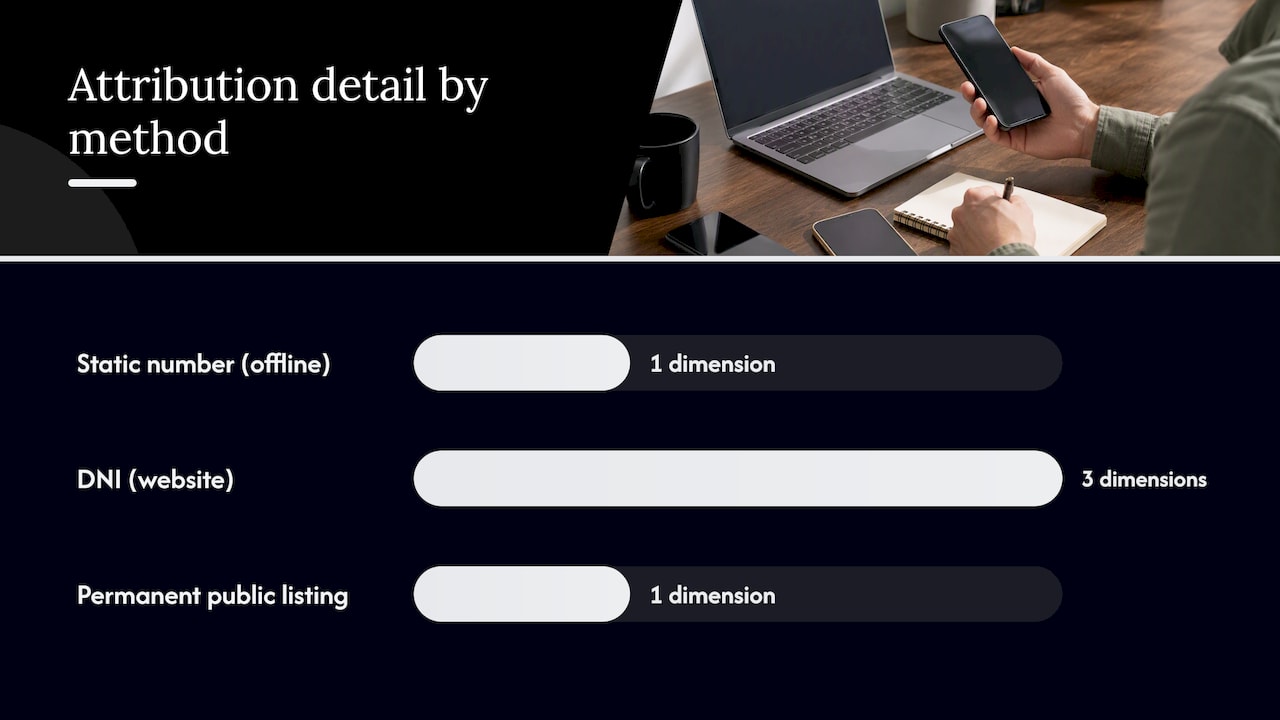
If you use DNI, size your number pool to your peak concurrent visitors per hour, not your daily total. Calculate the pool from peak traffic so two visitors never see the same number at once, which would break attribution for both.
The basic setup sequence looks like this:
- Provision a number or number pool through your call tracking provider.
- Set the destination or forwarding number to your existing phone system.
- Label each number or pool by source: Google Ads, organic, Google Business Profile, print.
Pro Tip: Never put a dynamic tracking number somewhere permanent, like your Google Business Profile listing, if your provider can reassign it later. Use a static number for permanent public listings instead.
Install call tracking on your website: GTM or manual code
Google Tag Manager (GTM) is the easier path for most marketers because you can add, edit, and test tags without touching your site’s code base. Direct JavaScript installation works too, and it has fewer moving parts once it is live, but every change requires a developer.
To set up DNI through GTM:
- Create a new tag in your GTM container using your provider’s DNI script.
- Set the trigger to fire on all pages, or specifically on your paid landing pages if you only need to track ad traffic.
- Publish the container, then open GTM’s preview mode to confirm the tag fires and the number on the page actually swaps.
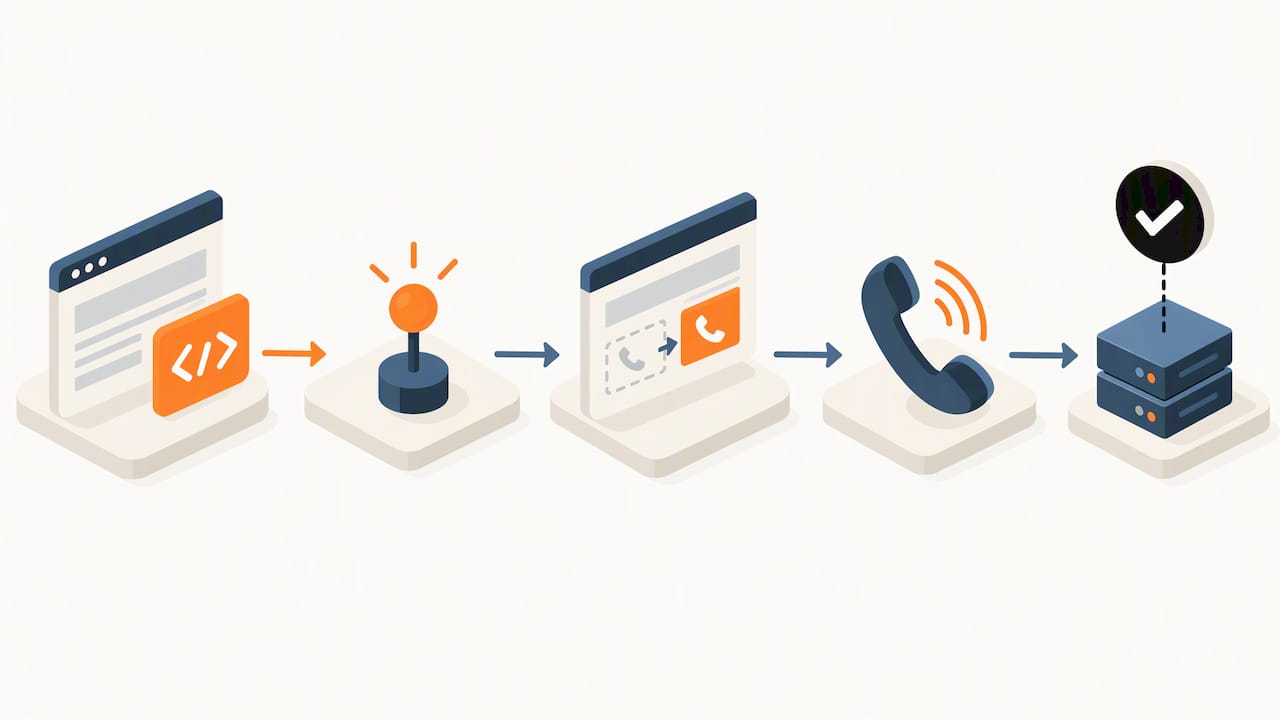
DNI typically works by assigning a visitor a number from your pool through a session cookie or a URL parameter, then holding that assignment for the length of the session so the number stays consistent while they browse. Our GTM checklist for conversion tracking walks through the same tag and trigger logic if you want a second reference while you build it.
Pro Tip: Run a test call using Tag Assistant open in another tab. You should see the dynamic number appear on the page and the call land correctly on your forwarding line within seconds.
Testing matters more than the install itself. A tag that fires but points to the wrong trigger, or a DNI script that loads after the phone number renders, will quietly break attribution without throwing an obvious error.
Set up Google Ads call conversion tracking
Google Ads call reporting works by assigning forwarding numbers that swap in for ad clicks, and these numbers are Google’s property for call reporting purposes, not numbers you own or can reuse elsewhere. Once call reporting is enabled at the account level, you create a conversion action, typically “calls from ads” or “calls from website visits,” and set a minimum call duration that defines what counts as a conversion.
A few things to decide before you turn this on:
- Pick a minimum duration that reflects a real inquiry for your business, not just a connected call.
- Decide whether to enable call recording so Google’s systems can help qualify leads, or rely on duration thresholds alone.
- If you run a CRM that tracks deal outcomes, plan to import those call conversions for more precise optimization later.
You can set a minimum call length to count a call as a conversion, and if recording is unavailable, Google falls back to duration or ad-interaction data to classify it. That fallback matters if you decide against recording for privacy reasons, since your conversion counting still works.
Caller phone number data is only available for calls longer than 15 seconds, and coverage varies by region, so don’t expect full caller ID visibility on every short call.
Test and verify your call tracking setup
Before you make any budget decisions based on call data, run through a short list of test scenarios:
- Click a paid ad, land on your site, and place a call from the dynamic number shown.
- Visit your site organically and call from the number that loads for non-paid traffic.
- Click to call directly from your Google Business Profile listing.
- Check each call’s details: start time, duration, connected status, and caller ID (expected only above 15 seconds).
- Match each test call’s ID against your CRM or vendor dashboard, and confirm Google Ads shows the conversion if that call met your duration threshold.
When something doesn’t line up, the usual culprits are a GTM tag firing on the wrong trigger, a content security policy blocking the DNI script, or a number pool that ran out during a traffic spike. Check your tag firing status first, then your pool capacity, before assuming the phone system itself is broken.
Compliance checklist: consent, recording, and retention
Recording laws split between one-party consent states, where only one person on the call needs to agree, and all-party consent states, where everyone on the line must agree. Because you can’t always control where a caller is physically located, the safer default is to announce recording on every call, treating all calls as if all-party consent applies.
A documented TCPA compliance program for a small team includes consent fields in your CRM, DNC scrubs every 31 days, and weekly sample call reviews, even without expensive monitoring software. Policy and process do more work than any single tool here.
Build these into your routine:
- Place the recording disclosure before recording starts, and log the disclosure timestamp in your CRM.
- Scrub your calling list against the Do Not Call registry every 31 days, and honor opt-outs immediately.
- Retain consent records and call recordings for four years to match typical statute-of-limitations windows.
- Review a sample of recorded calls weekly and log any incidents for later reference.
Pro Tip: Automate the disclosure and the CRM logging step together. Manual logging is the first thing that gets skipped when call volume picks up.
For a deeper legal review of consent requirements by state, our partners at Attorney Assistant and LeadCompliant both cover this in more detail than we can fit here.
Connect call data to your CRM and reporting
Most call tracking providers offer a native CRM integration, a webhook, or a CSV export, and Google Ads separately supports importing call conversions directly from your own tracked outcomes. Pick whichever method matches your CRM’s capabilities, but keep the same data fields consistent across every call record.
At minimum, capture:
- Call ID, caller number, and timestamp for every call.
- Duration and connected status.
- Disposition (lead, customer, spam) and attribution source.
With that data flowing consistently, build dashboards around calls by source, conversion rate by source, cost per call, and lead quality by campaign. Our guide on tracking campaign performance covers how to turn these into decisions rather than just numbers on a screen. When you import call conversions with a value attached, Google Ads can use that signal to optimize bidding toward the calls that actually turned into revenue, not just any connected call.
Should you DIY call tracking or bring in help?
Doing this yourself works well if someone on your team is comfortable with GTM and your call volume is modest, maybe a few dozen calls a week across one or two channels. The math changes once you need CRM wiring across multiple systems, airtight compliance documentation, or you simply need it running correctly by next week rather than next month.
Our team at Ibrand handles the parts that eat the most time: provisioning numbers, wiring DNI and GTM, connecting Google Business Profile calls into your CRM, and building the compliance checklist alongside it. A managed project typically starts with a scope conversation covering your current phone system, ad accounts, and CRM, followed by a build phase and a verification pass before handing off reporting.
What most setup guides get wrong
Most guides treat call tracking as a one-time install: add the script, flip on call reporting, done. That misses where the real failures happen, which is almost always in the gap between installation and verification. A tag that fires but points to the wrong trigger looks identical to a working one until you actually place a test call and check the details.
The compliance side gets treated as an afterthought too, something to handle “later” once the technical setup works. That ordering is backward. Recording a call without the right disclosure, or forgetting a DNC scrub, creates real liability from day one, not after you scale up. We’d rather see a business launch a smaller setup with testing and compliance built in than a full multi-channel rollout with neither.
The single highest-leverage habit is matching a call ID across your tracking vendor, your CRM, and Google Ads before you trust any dashboard. Skip that step and you are optimizing budget based on numbers nobody has actually checked.
— TONY
Let us set up and manage your call tracking
Setting this up correctly across a website, Google Ads account, and CRM takes a few focused days of work, time most small business owners don’t have between running the business itself. We build the full setup for you and keep it running as your campaigns change.

A managed setup with us includes:
- Number provisioning and DNI or GTM installation on your site.
- Google Ads call conversion wiring with the right duration thresholds.
- CRM integration so every call lands where your sales team already works.
- A compliance checklist covering disclosure, consent logging, and retention.
Reach out through our services page to start with a scope conversation about your current setup.
This article is general information, not a substitute for advice from a qualified lawyer. Consult a qualified legal professional about your own circumstances before acting on anything here.
FAQ
How do I set up call tracking?
Choose between static numbers or dynamic number insertion, provision your number through a tracking provider, set the forwarding destination to your phone system, and install the DNI script through Google Tag Manager or directly on your site. Then enable Google Ads call reporting if you run paid campaigns, and test every call path before trusting the data.
How much does call tracking cost?
Pricing varies by provider and call volume, and no single published rate applies across the market, so get a quote based on your expected monthly call volume and number of tracking numbers needed. If you want a managed setup instead of pricing out tools yourself, our team can scope a plan during an initial consultation.
What are the best call tracking platforms?
The right platform depends on whether you need deep CRM integration, multi-location number pools, or simple Google Ads call reporting alone, and providers differ on pricing models and support. Rather than naming one as universally best, match the platform to your CRM, your ad spend, and your number of local Google Business Profile listings before committing.
How do I track another phone call after the first one is set up?
Once your number pool and forwarding rules exist, additional calls route automatically through the same DNI logic or static number assignment you already configured, no new setup needed per call. Confirm each new source, like a second ad campaign or a new location listing, gets labeled correctly so its calls attribute to the right channel.
Sources
- Set up Tracking calls to a phone number on a website
- Call monitoring program for TCPA compliance: small teams
- Call Recording Consent Laws for U.S. Businesses | Attorney Assistant
Recent Comments