
A negative keywords list tells Google Ads which searches should never trigger your ads, and this page gives you both pieces you actually need — ready-to-use category lists you can copy in minutes, and the setup steps that keep you from blocking searches that would have converted. You’ll also get a short governance checklist so a quick cleanup doesn’t turn into an accidental traffic freeze.
TL;DR:
- Most accounts waste budget on irrelevant queries, but a carefully curated negative keywords list can recover significant spend by excluding low-value searches.
- Common negative categories include free and bargain terms, employment-related searches, and informational or research modifiers, which should be validated for your specific business first.
- Negative keywords are organized at the ad group, campaign, or account level, with the broadest scope on shared lists that require regular review and cross-checking with positive keywords.
- Negative match types behave differently from positive ones, with broad matching excluding all queries containing all words, and length limits and symbol restrictions affecting performance.
- Regular review of the search terms report and cautious use of negative match types help prevent over-blocking, which can harm impressions and conversions.
Table of Contents
- What Should Be On Your Negative Keywords List?
- How Do You Organize a Negative Keyword List in Google Ads?
- How Do Negative Keyword Match Types Actually Work?
- How Do You Find Negative Keywords Using the Search Terms Report?
- How Often Should You Review and Update Negatives?
- What Are the Most Common Negative Keyword Mistakes?
- Why Ibrand Audits Before It Touches Your Negative List
- Get a Negative Keyword Audit
- Sources
- FAQ
What Should Be On Your Negative Keywords List?
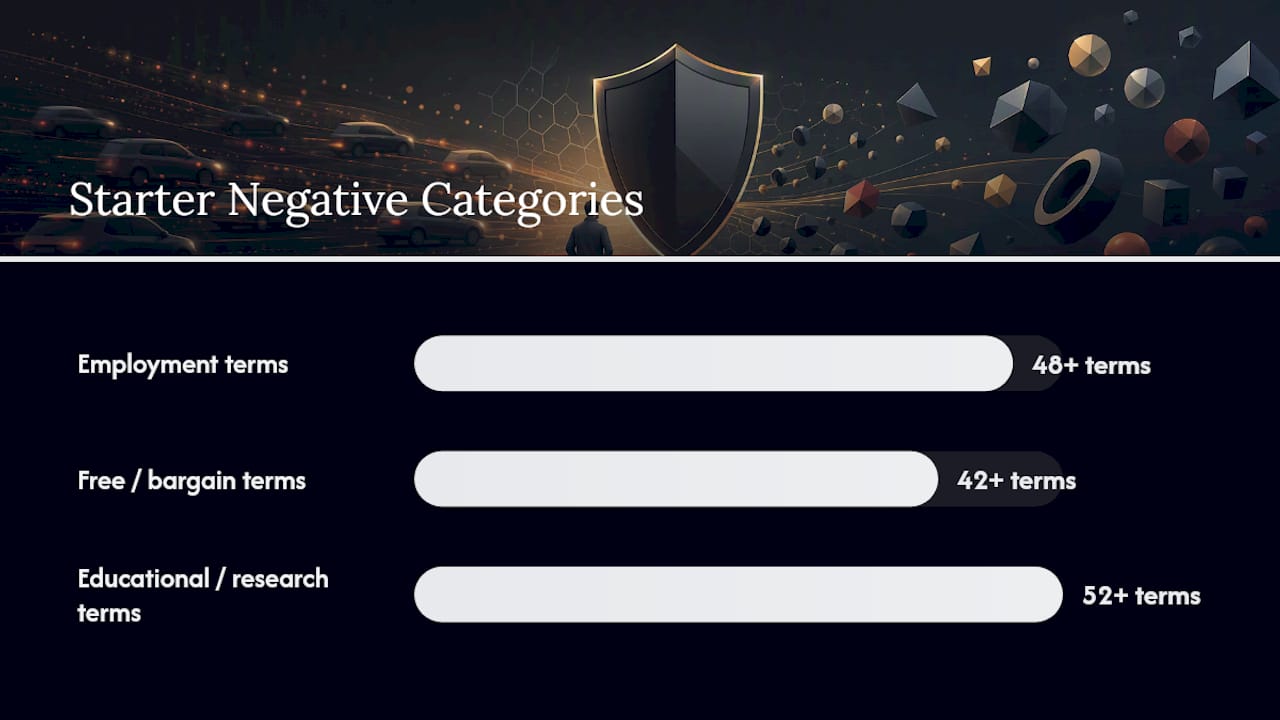
Most accounts waste budget on the same handful of query types, and a handful of well-chosen exclusions can recover a meaningful chunk of that spend. Common negative categories tend to cluster into three groups: employment terms, free/bargain terms, and informational or research modifiers. Search Engine Land’s overview of modern negative keyword strategy notes that advertisers typically draw from more than 48 job and employment terms, over 42 free and bargain terms, and more than 52 educational or research terms when building a starter list.
Here’s a practical starting set, organized by why the query signals low buying intent:
Almost-universal negatives (safe for most B2B and mid-to-high ticket B2C accounts):
- free, cheap, discount, coupon, promo code
- jobs, career, hiring, salary, internship
- how to, tutorial, example, definition, wiki
- pdf, template, sample, torrent, download
Informational and research modifiers:
- what is, meaning, guide, explained
- vs, comparison, review, reddit
Price-shopper and bargain terms:
- cheap, discount, coupon, free shipping, clearance
Employment and education exclusions:
- jobs, internship, training, syllabus, course
Don’t add every category blindly. If you sell entry-level training courses, “training” and “course” are buying terms, not junk. If you run a staffing agency, “jobs” is your entire business. The categories above work as a checklist to review, not a script to paste wholesale. A term only belongs on your list once you’ve confirmed, through your own search terms report or conversion data, that it does not convert for your specific offer.
How Do You Organize a Negative Keyword List in Google Ads?
Google Ads lets you add negatives at three levels, and picking the right one matters more than the words themselves.
- Ad group level — narrowest scope. Use this for negatives that apply to one product line but would be wrong elsewhere in the account (excluding “commercial” under a residential ad group, for instance).
- Campaign level — mid-range scope. Good for negatives that should block a query across every ad group in one campaign, like blocking a competitor name from a whole Search campaign.
- Account-level negative keyword lists — broadest scope. Built once, then applied to multiple campaigns at a time. Google Ads caps these lists at 1,000 negative keywords, and account-level lists override campaign and ad group settings wherever they’re applied.
To build one, go to Tools and Settings, create a negative keyword list under shared library, add your terms, then apply the list to the relevant campaigns from the same screen. That last step is the one people forget: a list that exists but isn’t attached to any campaign does nothing.
Before you save any negative, cross-check it against your active positive keywords. Adding “free” as a negative when you also bid on “free consultation” as a keyword creates a direct conflict that quietly kills a converting ad group.
Pro Tip: Keep a spreadsheet copy of every account-level list before you edit it. If a change tanks impressions, you want to roll back in seconds, not rebuild from memory.
How Do Negative Keyword Match Types Actually Work?
Negative broad, negative phrase, and negative exact control how tightly a negative keyword blocks queries, but they don’t behave like their positive counterparts. Negative broad blocks any query containing all the words in any order. Negative phrase blocks queries containing that exact sequence. Negative exact blocks only that literal query.

The catch: negative keywords never match close variants the way positive keywords do. If you add “shoe” as a negative, “shoes” can still trigger your ad. You have to add plurals, misspellings, and synonyms separately if you want them all excluded.
Two more technical limits worth knowing:
- Negative keywords stop working past the 16th word in a search query, so unusually long queries can slip through even with a matching negative in place.
- Certain symbols and operators are ignored or restricted in negative keyword text, which can cause a negative to behave differently than you expect.
One overlooked detail: negative keyword behavior on Display and Video campaigns is less precise than on Search, since those networks match against page and video context rather than a live search query.
How Do You Find Negative Keywords Using the Search Terms Report?
The Search terms report is where real negative keyword candidates come from, not guesswork. Run the report at the campaign or account level, sort by spend descending, and look for queries with clicks but zero conversions.
- Export the report and filter for terms with meaningful spend and no conversions.
- Cross-check each candidate against your existing positive keywords to avoid conflicts.
- Add confirmed junk terms as negatives, choosing exact or phrase match to control scope precisely.
Negatives added directly from the search terms report default to negative exact match, though you can change that when adding manually. Third-party scanners like NegativeFinder can speed up this audit by flagging wasted-spend patterns, but treat their suggestions as a shortlist to verify, not an auto-apply list.
Pro Tip: Filter for queries with at least a few clicks and zero conversions over 30 days before you touch anything. One bad click doesn’t justify a negative.
How Often Should You Review and Update Negatives?
Review cadence should scale with spend, not follow a fixed calendar. High-spend accounts often benefit from a weekly search terms scan; smaller accounts can usually get by with a monthly pass.
- There’s no single “right” aggression level for negatives — it depends on your conversion volume and how much room you want to leave the algorithm to explore.
- Avoid applying single-word negatives at the account level without a full audit; a broad term can silently block dozens of ad groups at once.
- Keep a version history or change log for every negative list so you can measure the impact of each addition and roll back cleanly if performance drops.
What Are the Most Common Negative Keyword Mistakes?
Over-blocking is the mistake that costs the most, and it’s usually invisible until impressions or conversions drop sharply.
- Symptom: impressions or conversion volume falls right after a bulk negative upload. Check the search terms report for queries that stopped appearing.
- Immediate fix: pause the newest negative list, wait 48 to 72 hours, and compare volume before and after.
- Longer-term fix: swap overly broad negative match types for phrase or exact, and build exceptions for keywords that clash with account-level lists.
Pro Tip: If you’re not sure whether a term is safe to exclude, add it as negative phrase first instead of negative broad. Phrase gives you a middle ground between a surgical exact-match block and a sweeping broad-match one.
Why Ibrand Audits Before It Touches Your Negative List
Most accounts we look at have never had a proper negative keyword audit, and the instinct once someone finally runs one is to add everything at once. That’s the mistake worth naming: a maximal negative list often does more harm than the wasted spend it was meant to fix, because it limits how much room Google’s algorithm has to find new converting queries. Our review process starts with the search terms report and a conversion history check, never a template list applied on faith. If you’re weighing whether your account needs conversion tracking cleaned up first, that’s usually the right place to start before touching negatives at all.
— TONY
Get a Negative Keyword Audit
A professional team can run a full search terms audit, flag wasted-spend queries with prioritized recommendations, and build an implementation plan scoped to your account size and goals.

A typical audit takes about a week and includes a scanned search terms report, a categorized negative recommendation list by priority, and a rollout plan across your account, campaign, and ad group levels so nothing gets blocked without a reason attached to it. This pairs naturally with the real-time performance tracking we set up for advertising clients, so you can watch the impact of every negative you add instead of hoping it worked. If your current ads are burning budget on searches that were never going to convert, request a free account review through Ibrand’s advertising services page and get a prioritized negative keyword plan built around your actual search terms data.
Sources
For technical accuracy, lean on Google’s own documentation: About negative keywords covers match behavior, and Add negative keywords to campaigns covers list limits and setup. For strategy, Search Engine Land’s piece on negative keyword decisions in 2026 is worth a read before your next audit.
- The real strategy behind negative keywords in 2026
- Use the search terms report for negative keyword ideas – Google Ads Help
FAQ
What Are Examples of Negative Keywords?
Common examples include “free,” “cheap,” “jobs,” “how to,” “tutorial,” and “pdf” since these terms usually signal a search that won’t convert into a sale. The right examples depend heavily on your business: a training company would never exclude “course,” for instance.
How Do You Make a Negative Keyword List?
Start by pulling your search terms report and filtering for queries with clicks but no conversions, then cross-check each candidate against your active keywords before adding it. Build the list in Google Ads under Tools and Settings, then apply it to the campaigns where it belongs.
Where Do You Find Negative Keyword Lists in Google Ads?
Negative keyword lists live under Tools and Settings, in the Shared Library section, where you can create, edit, and apply lists to multiple campaigns at once. Individual campaign and ad group negatives are managed directly inside each campaign’s Keywords tab.
What Are the Four Main Types of Keywords?
Google Ads keyword types are broad match, phrase match, exact match, and negative match, and negatives themselves split further into negative broad, phrase, and exact. Negative keywords behave differently from their positive counterparts since they never match close variants like plurals or misspellings.
Recent Comments