
A good appointment reminder email is short, arrives when the customer can still act on it, and gives them one easy next step. It names the service, the exact date and time, the place, and a button to confirm or reschedule. Set it up once as an automated sequence and every empty chair, idle truck or unused banquet room becomes a chance to rebook instead of a loss. We build email and marketing automation for small and local businesses, and this is the playbook we would hand to a dentist, plumber, med spa or venue owner.
TL;DR
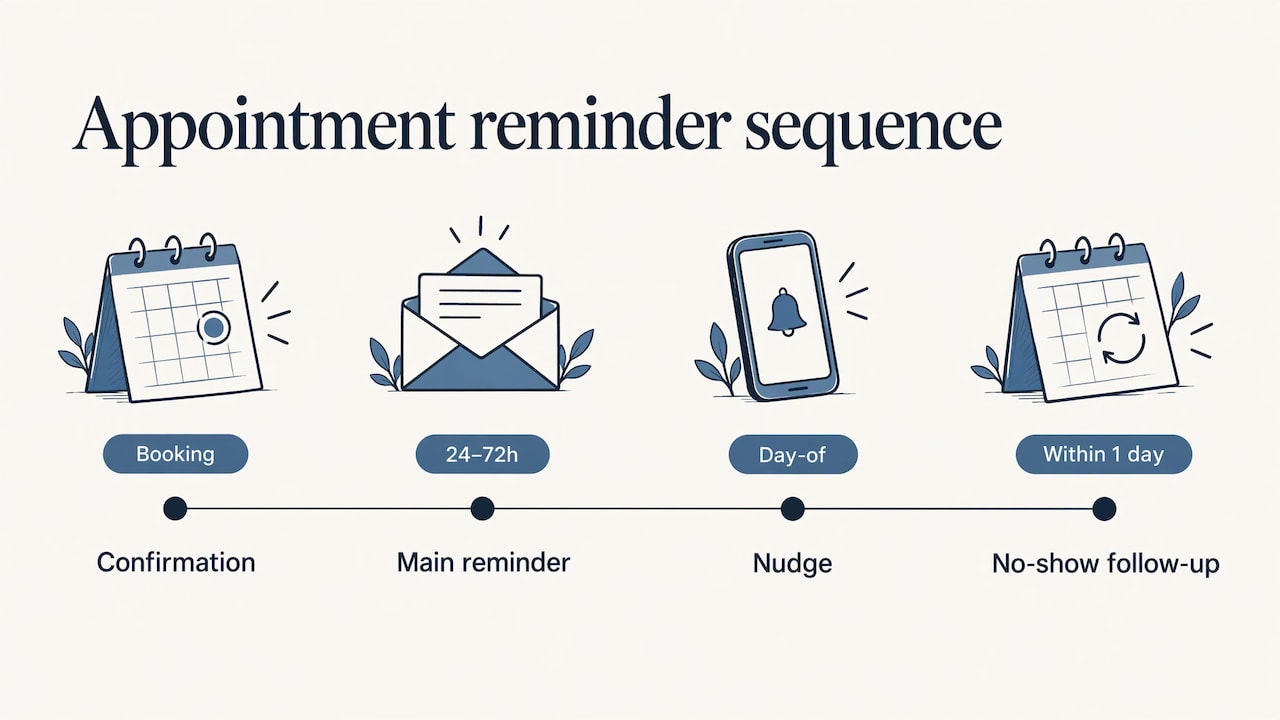
- Send a confirmation right after booking, a reminder one to three days before, and an optional short nudge on the day for same-day or high-risk appointments.
- Put the essentials in the first lines: business name, service, date, time with time zone, address or video link.
- Give one clear action, confirm or reschedule, and make rescheduling a single click.
- Keep the subject line plain and specific, with the date or time in it.
- Appointment reminders are generally transactional, so keep promotions out of them, and health practices should limit what the email reveals.
Table of Contents
- Why reminders deserve a real system
- What every reminder email should contain
- The subject line
- When to send: a schedule that fits your business
- Appointment reminder email templates you can adapt
- Tone: friendly, brief, assuming they will come
- Rules to follow in the United States
- Automating the sequence
- How to tell whether your reminders work
- Common mistakes
- Our perspective
- Let us set up your reminders
- FAQ
- Sources
Why reminders deserve a real system
A no-show costs you twice. You lose the revenue from the slot, and you lose the chance to give that slot to someone on your waitlist. For a service business with a few appointments a day, a handful of misses a week adds up quickly.
Most missed appointments are not a decision. The customer forgot, mixed up the day, did not know where to park, or could not find the link. A reminder fixes the forgetting. A well-written one also fixes the confusion, and a one-click reschedule turns a probable no-show into a moved booking you can still serve.
Email is the right backbone for this because it carries detail that a text message cannot: directions, preparation steps, your cancellation policy, a calendar file. Many businesses then add a text for the final nudge, but the email is the message customers go back to when they need the address.
What every reminder email should contain
Whatever your industry, the same checklist applies. Treat it as the skeleton and change the wording to suit your customers.
- Who you are. Your business name in the sender field and again in the body, so the message is recognized instantly.
- The service. “Teeth cleaning with Dr. Alvarez” or “Water heater inspection”, not just “your appointment”.
- Date, day of the week and time. Spell it out, include AM or PM, and add the time zone if customers book online from outside your area.
- Where. Full street address, suite number, parking notes, or the exact video link. For on-site visits, the address you are coming to and the arrival window.
- Preparation. Bring an ID or insurance card, clear access to the unit, avoid eating before a procedure, arrive ten minutes early.
- One next step. A confirm button, a reschedule link, or a reply instruction.
- Contact details. A phone number that a person answers.
- Your policy. If late cancellations carry a fee, say so in one friendly line, with the deadline.
Ambiguity does the most damage. If a customer has to wonder which location, which entrance or which time zone, some of them will simply not come.
The subject line
The subject line has one job: make it obvious that this is the message about their appointment. Clever wording loses to clarity here, because the customer is not browsing, they are looking for a fact.
Subject lines that work:
- Appointment reminder from [Business Name]
- Your visit is tomorrow at 3:00 PM
- Upcoming appointment: Thursday, May 14 at 10:30 AM
- Please confirm your appointment for Thursday
- Your technician arrives tomorrow between 8 and 10 AM
Keep it short enough to read on a phone, roughly 60 characters or fewer, and put the date or time near the front. Avoid all caps, exclamation marks and sale language. A reminder that looks like a promotion gets ignored, and, as the legal section below explains, it can also change how the message is treated under federal law.
When to send: a schedule that fits your business
There is no single correct timing, but there is a sensible default that you can adjust.
| Message | When | Purpose |
|---|---|---|
| Confirmation | Immediately after booking | Proves the booking worked, gives details and a calendar file |
| Early reminder | 3 to 7 days before, for appointments booked weeks ahead or that need prep | Time to prepare, reschedule or fill forms |
| Main reminder | 24 to 72 hours before | The reminder most customers act on |
| Day-of nudge | 1 to 3 hours before, optional | Catches the forgetful; most useful for virtual or same-day visits |
Adjust it to your cancellation window. If you charge for cancellations inside 24 hours, the main reminder must land well before that cutoff, otherwise you are warning people after they can no longer change plans without penalty. If an appointment needs intake forms, a lab fast or site preparation, send the first reminder early enough to do the work.
Two more habits help. Send during regular business hours, and mid-morning is a good default, rather than at midnight. And do not send more than two or three reminders per appointment. Past that point the sequence becomes noise.
Timing by type of business
- Dental offices and med spas: a confirmation at booking, a reminder two or three days out with preparation and paperwork, and a short day-before message. See our guide to email marketing for dentists for how reminders fit alongside recall and review emails.
- HVAC, plumbing and home contractors: a confirmation with the service description, a day-before message with the arrival window and technician name, and a short “on the way” note. Our pieces on HVAC email best practices and plumber email basics go further on this.
- Venues and banquet halls: tours and tastings are the appointments that matter. Confirm immediately, remind a week ahead for event-planning meetings, and again the day before. More in our venue email tips.
Appointment reminder email templates you can adapt
Copy these, replace the brackets, and keep the structure. Each one is short, because a reminder is read in seconds.
Template 1: Booking confirmation
Subject: You’re booked: [Service] on [Day, Date] at [Time]
Hi [First name],
Thanks for booking with [Business]. Here are your details:
- Service: [Service]
- When: [Day, Date] at [Time] [Time zone]
- Where: [Address and parking notes, or video link]
Need to change it? [Reschedule link]. Questions? Call us at [phone].
See you soon, [Name], [Business]
Template 2: Main reminder, 24 to 72 hours before
Subject: Reminder: your appointment is [tomorrow/Thursday] at [Time]
Hi [First name],
A quick reminder that you’re scheduled for [Service] on [Day, Date] at [Time] at [Address].
Please [confirm here] so we know you’re coming. If something has come up, [reschedule here] and we’ll find another time.
Before your visit: [one preparation line].
Thanks, [Business], [phone]
Template 3: Day-of nudge
Subject: See you today at [Time]
Hi [First name], we’re looking forward to seeing you at [Time] today. Address: [Address]. Running late or need to change plans? Call [phone] and we’ll help.
Template 4: Home service visit
Subject: Your [Service] visit tomorrow, [arrival window]
Hi [First name],
Our technician [Name] will arrive at [Address] between [window] tomorrow to [service description]. Please make sure [access instruction, such as clear access to the water heater]. Reply to this email or call [phone] if the window no longer works.
Template 5: Missed appointment follow-up
Subject: We missed you today
Hi [First name], we’re sorry we didn’t see you today. Life gets busy. You can pick a new time here: [booking link]. We’d love to help.
This fifth message, sent within a day of a no-show, is the one many businesses forget. A friendly rebooking link recovers customers who would otherwise drift away.
Tone: friendly, brief, assuming they will come
Write the way you would speak to a regular. Two or three short sentences of body copy plus the details block is plenty. Assume the customer intends to show up; “we’re looking forward to seeing you” works better than “failure to attend will result in a fee”.
Match the voice to the service. A med spa or a wedding venue can be warm and enthusiastic. An accountant or a law-adjacent practice may prefer a succinct, formal tone. A dental office should be calm and reassuring, since some patients are nervous about their visit.
One rule beats all others: one request per email. If you ask the customer to confirm, fill out a form, leave a review and follow you on social media, they will do none of it. Pick the single action that protects the appointment.
Rules to follow in the United States
This is general information, not legal advice. If you handle patient data or send at scale, ask your attorney or compliance officer to review your setup.
Transactional versus commercial messages
The federal CAN-SPAM Act treats an email by its primary purpose. According to the FTC’s compliance guide, a commercial message is one whose primary purpose is the commercial advertisement or promotion of a product or service, and the law makes no exception for business-to-business email. Messages that fall into the “transactional or relationship” categories, such as those that facilitate or confirm a transaction the customer already agreed to, face lighter requirements than ads.
The practical takeaway: keep reminders about the appointment. If you stuff a discount banner or a promotion into a reminder, its primary purpose may shift toward advertising, and then the full commercial rules apply: accurate sender and subject information, your physical postal address, and a working way to opt out. Even when you are confident your reminder is transactional, a physical address in the footer and a simple way to adjust email preferences are good habits, and they keep customers from marking you as spam.
Health practices and HIPAA
Dentists, med spas that are covered health care providers, and other medical offices have an extra layer. HHS says HIPAA permits providers to email patients when they apply reasonable safeguards, such as confirming the address is right and limiting what is disclosed in unencrypted email. HHS also says providers should accommodate a patient’s reasonable request to receive communications by alternative means, which can include email reminders.
So for a health practice, a reminder should carry the minimum: practice name, date, time, location and a phone number. Leave out diagnoses, procedure details and anything sensitive. HHS guidance on voicemail reminders points the same way: providers may communicate appointment reminders but should limit the information disclosed where others might see or hear it. Write “your appointment with Dr. Alvarez” rather than “your root canal follow-up”.
Consent and list hygiene
Only email people who gave you their address when booking, and honor opt-out requests promptly. Texts have their own consent rules, separate from email, so do not assume permission for one covers the other.
Automating the sequence
Sending reminders by hand works for about a week. After that, someone is busy, a reminder is missed, and the no-show happens anyway. Automation connects your booking calendar or scheduling software to a template and a timing rule: when a booking is created, send the confirmation; 48 hours before, send the reminder; if the customer clicks reschedule, update the calendar.
When you set it up, check these points:
- Merge fields: first name, service, date, time and location pull from the booking, so nothing is typed by hand.
- Time zones: the email shows the time in the customer’s expected zone, or states yours clearly.
- Reschedule link: it goes to a live booking page, not to a contact form.
- Stop rules: if the customer cancels, the remaining reminders stop.
- Mobile layout: most customers open the email on a phone, so use one column, a big button and a readable font.
- Plain-text fallback and calendar file: an .ics attachment lets them add the appointment in a tap.
- Reporting: track opens, confirmations and reschedules so you can see which timing works.
Once the basics run, a reminder sequence is the foundation for the rest of your email program: review requests after a visit, recall messages six months later, seasonal service offers. Those later emails are commercial, so segment your list and keep them separate from the transactional reminders. Our email marketing best practices cover how.
How to tell whether your reminders work
Measure results against your own calendar, not against someone else’s average. Before you turn on the sequence, count your no-shows and late cancellations over a month. After four to six weeks of reminders, compare. Also watch:
- Confirmation rate: the share of customers who click confirm.
- Reschedule rate: a rising number is good news, because each one is a slot you can refill.
- Late cancellations: if these stay high, move the main reminder earlier.
- Replies and calls: many questions about the address or parking tell you the details block needs work.
Change one thing at a time, such as the subject line or the send time, and give it a few weeks. For venues, our guide on increasing event bookings and attendance shows how reminders connect to the rest of the booking funnel.
Common mistakes
- Sending only one reminder, too close to the appointment to change plans.
- Omitting the time zone or the exact address.
- Burying the details under a long greeting or a promotion.
- Using a no-reply sender, so customers cannot answer.
- Asking for several actions at once.
- Sending reminders at night or on weekends for a weekday business.
- Continuing to send reminders after a cancellation.
Our perspective
A reminder is the cheapest piece of marketing a service business owns, and it is also the one most often left to chance. In our work with local businesses, we treat it as part of the customer journey, not an admin chore: the confirmation sets expectations, the reminder protects the slot, and the follow-up brings the customer back.
That is why our approach is a custom plan for each business. A plumber with a dispatch window, a dentist with intake forms and a banquet hall with tasting appointments need different timing, different wording and different next steps. We offer email marketing and marketing automation so those messages run on their own, and real-time stats so you see what is working.
Our advice is to start small: a confirmation and one reminder, written plainly, sent on a schedule that matches your cancellation policy. Then build outward.
TONY
Let us set up your reminders
If you would rather not wire up templates, timing rules and tracking yourself, IBrand Media offers email marketing, marketing automation and real-time performance tracking for small and local businesses, with a custom plan built around how your business takes bookings.
Tell us how you book appointments today and what your cancellation policy looks like, and we will map the confirmation and reminder sequence that fits.
FAQ
What is a good subject line for an appointment reminder email?
Make it plain and specific, with the date or time included, such as “Reminder: your appointment is tomorrow at 10:30 AM”. Avoid clever wording, because the customer is looking for a fact, not an offer. Keep it near 60 characters so it is readable on a phone.
How far in advance should I send an appointment reminder?
A good default is 24 to 72 hours before, with a confirmation at booking. For appointments booked weeks ahead, add a reminder about a week out. A same-day nudge a few hours before can help for virtual or short-notice appointments. Always send early enough that the customer can still reschedule within your policy.
How do I politely remind someone about an appointment?
Start with their name, state the service, date, time and place, and ask for one simple action, such as confirming or rescheduling. Use friendly, assuming language like “we’re looking forward to seeing you” and keep it to two or three short sentences plus the details.
Can I include a promotion in a reminder email?
It is best not to. Under the CAN-SPAM Act, what counts is the primary purpose of the message, and a promotion can push a reminder toward advertising, which brings stricter rules. Send offers in separate marketing emails.
What should a dental or medical office leave out of a reminder?
Leave out diagnoses, treatment details and anything sensitive. Include the practice name, date, time, location and phone number. HHS says providers may email patients when they apply reasonable safeguards and limit what they disclose.
Sources
- CAN-SPAM Act: A Compliance Guide for Business (FTC)
- Does the HIPAA Privacy Rule permit health care providers to use email to discuss health issues with patients? (HHS)
- May health care providers leave messages for patients? (HHS)
Recent Comments