
You can report any Google review from your Business Profile, but Google only removes the ones that break its content policies. A review you simply disagree with stays up. So the way to get a fake review removed is to match it to a specific policy, flag it from the right place, attach clean evidence, and use the one-time appeal if the first report is denied. This guide walks through that process for local business owners, from the first screenshot to the appeal.
If you run a dental office, an HVAC company, a med spa, a venue or any other business where a few stars move the phone, this is the routine to follow. Our own guide to Google review removal covers what tends to get a review taken down in more depth.
TL;DR
- Google removes reviews that violate its policies (fake experience, conflict of interest, spam, harassment, off-topic content). It does not remove reviews just because they are negative or unfair.
- Flag the review from your Business Profile: Read reviews, Report, pick a reason, Send report. Evaluation typically takes several days.
- Before you flag, confirm in your own records that the reviewer was never a customer, and save the review URL, text and screenshots.
- If the report comes back as no policy violation, you get one appeal covering up to 10 reviews. Use it to correct the classification or add evidence, not to repeat that the review is unfair.
- If a flood of bad reviews arrives with a demand for money, do not pay or reply to the sender. Use Google’s extortion report form.
Table of Contents
- What Google will and will not remove
- Decide whether the review is actually fake
- How to report a fake Google review, step by step
- Build an evidence file before you need it
- If fake reviews come with a demand for money
- What happens next: status, spikes and appeals
- While you wait: respond, but carefully
- Reporting fake positive reviews and rival abuse
- When a review disappears or your reviews do not show
- Making the profile resilient
- Where we can take this off your plate
- Our perspective
- FAQ
- Sources
What Google will and will not remove
Google’s help page says you can report any review, but only reviews that violate its content policies are eligible for removal. It also tells businesses not to report a review just because they disagree with it or dislike it, and says it does not get involved in disputes between a business and a customer (Google Business Profile Help).
That shapes everything else. A one-star review from a real customer who had a bad appointment is a customer dispute. A one-star review from someone who has never been near your shop is a policy problem. Your job is to show Google which one you are looking at.
Google’s Maps policy lists what is prohibited. The categories that matter most to a local business are:
- Reviews that do not reflect a genuine experience at the place.
- Incentivized reviews, such as a discount or gift in exchange for a rating.
- Conflicts of interest, including reviews by current or former employees, owners, or competitors.
- Impersonation of another person or business.
- Harassment, hate speech and personal information.
- Off-topic content that is not about the visit.
The full wording is on Google’s Maps prohibited and restricted content policy. Read the exact sentence that applies to your review before you report it. You will want to refer to it later.
Decide whether the review is actually fake
Owners often flag in anger and get denied. A faster route is a five-minute check before you touch the Report button.
Search your records. Look for the reviewer’s name, phone number or email in your appointment system, invoices, call logs, job tickets and staff schedules. A name you do not recognize may be a spouse, a tenant or a guest who booked under someone else. A name that appears nowhere, describing a service you do not offer, is a different story.
Read the review for details that cannot be true. Examples: a review praising or attacking a service you do not provide, a location you do not have, a staff member who never worked for you, or a date when you were closed.
Look at the pattern. Google explains that its systems look at account-level context, place-level anomalies such as a sudden influx of one-star or five-star reviews, and conflicts of interest (Google Maps Content Trust & Safety Report). You can use the same lens. Five reviews from brand-new accounts in one afternoon is a pattern. One odd profile on its own proves little.
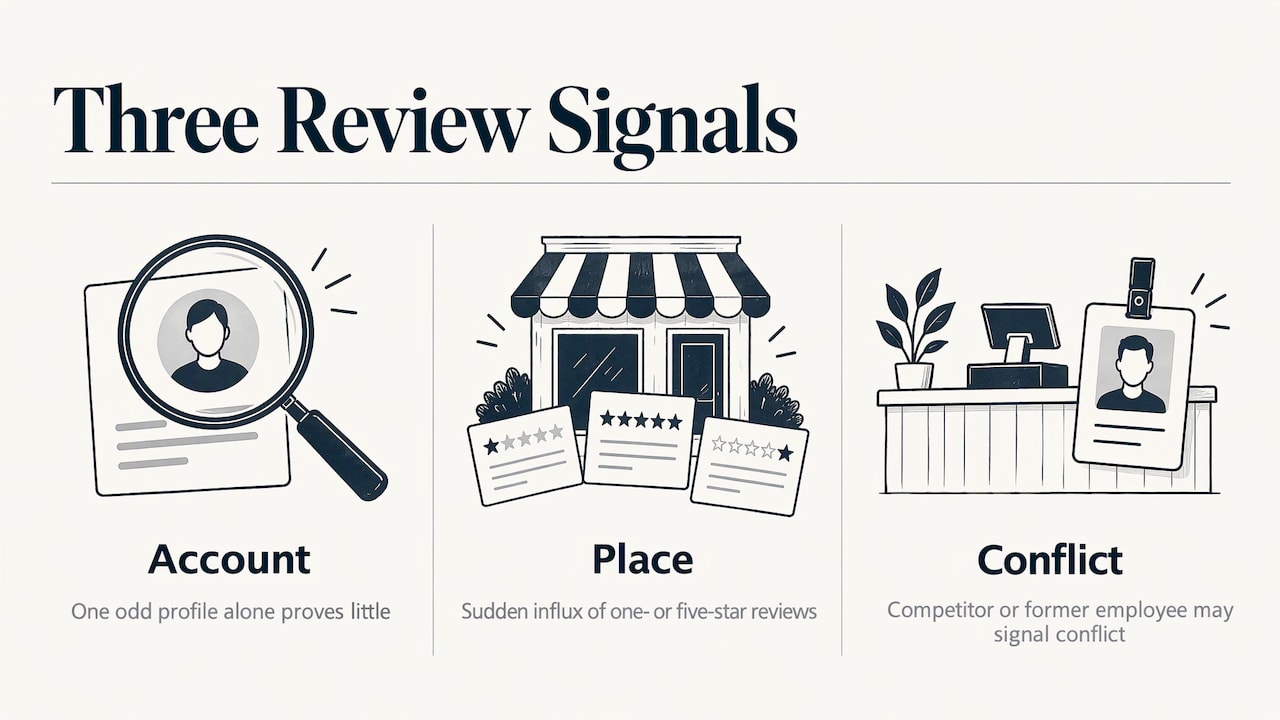
Check for a competitor or former employee. A review that reads like an insider complaint, or one posted right after a dispute with a vendor or ex-staff member, may fall under conflict of interest.
If the review plausibly reflects a real experience, even a badly worded one, it is better handled with a public reply than a report. Our guide on how to respond to reviews has templates and timing for that.
How to report a fake Google review, step by step
Google’s own instructions for business owners are short. The detail that makes them work is what you do before and after.
- Sign in to the account that manages your Business Profile. Flagging from within the profile lets Google verify who is reporting.
- Open your Business Profile and select Read reviews.
- Find the review and select Report next to it.
- Choose the reason that matches the policy it breaks, such as spam or profanity. Pick the closest accurate reason rather than the most dramatic one.
- Select Send report.
Those are the steps on Google’s Report inappropriate reviews page. Google says evaluation typically takes several days, and you can follow the status in the Reviews Management Tool.
Where this goes wrong
- Wrong reason. If you pick a category that does not fit, the report can come back as no violation even when the review is bad. Match the reason to the policy sentence you identified earlier.
- Reporting from the public listing instead of the profile. Use the profile so the report is tied to your verified account.
- Reporting everything. A pile of reports on reviews that are merely harsh teaches you nothing and uses up your credibility on the ones that matter.
- Mixed-up facts. Do not guess in the report. Stick to what you verified.
Build an evidence file before you need it
The report form is short, so most of your case is made by the file you keep for the appeal and for any follow-up. Start it before you contact the reviewer or reply publicly, because reviews can be edited or deleted and the record disappears with them.
Save these items for each review:
- The review URL and your Business Profile URL.
- The reviewer’s display name, star rating, full text and any photos.
- The publication date and any visible edit history.
- Screenshots of the review as it appears on the page, with the date on your device.
- A short note of what you checked internally: which systems you searched, what you found or did not find.
- The exact policy sentence the review appears to break.
- Proof of harm if there is any, such as canceled bookings or the rating dropping on a particular day.
Keep confidential customer records in your own files. What you tell Google should be a concise explanation of why the review fails Google’s own rules, with a short chronology, not a legal brief or a dump of private information.
A worked example
Say you run a plumbing company and a review appears: one star, a claim that a technician flooded a basement last Tuesday. You search job tickets, the dispatch calendar and call logs for that name and address and find nothing. You also see that the same account left one-star reviews on three other plumbers in town in the past week.
Your file would hold the screenshot, the URL, the date, a one-line note that no job or call exists under that name, and the policy line about reviews that do not reflect a genuine experience. That is a report Google can act on. Compare it with “this customer is lying and ruining us”, which gives a reviewer nothing to verify.
If fake reviews come with a demand for money
Some fake review campaigns are extortion. Google describes the pattern as a sudden increase in one-star and two-star reviews followed by demands for money, goods or services to make them go away. Its guidance is clear: do not engage with the sender and do not pay. Gather evidence right away and submit the merchant extortion report form (Google’s extortion scam help page).
The evidence Google asks for includes:
- Screenshots of the messages, showing date, time and the sender’s contact information.
- Direct links to the suspicious reviews.
- Context on what happened and when.
This is the dedicated route for this situation, so use it instead of flagging each review one by one. If a threat is physical or you are being asked to pay, you can also contact local law enforcement.
What happens next: status, spikes and appeals
Check the status
Open the Reviews Management Tool in your Business Profile. It shows whether your report is still pending or has been decided. Google’s help page notes that it uses automated spam detection and that the system occasionally removes legitimate reviews by mistake. If one of your genuine reviews vanishes, Google advises contacting support.
Google’s Transparency Report says most fake reviews are caught immediately by machine-learning systems, while reviews flagged by the community can be decided by trained content reviewers and analysts, especially in complex cases. In an April 2026 post, Google said its systems blocked or removed over 292 million policy-violating reviews in 2025, and that when it detects a sudden spike of spam reviews it removes the fake content, pauses new reviews on the profile and alerts the owner with a banner (Google’s Maps protection update). If you see that banner, the system has already noticed the spike. Your report and your evidence file still matter for any reviews left behind.
Use the one-time appeal well
If the tool shows the report was reviewed and no policy violation was found, you can submit a one-time appeal. Per Google’s help page, select Appeal eligible reviews, choose up to 10 reviews, fill out the form and submit. Google emails the result: a violating review is removed, a compliant one stays live.
Because you only get one shot, do not simply repeat that the review is unfair. Use the appeal to:
- Correct the classification, for example from a general complaint to a review of a service you do not provide.
- Point to a pattern the first report missed, such as several reviews from linked accounts.
- Add a fact that is not visible from the review alone, such as the lack of any record of that customer.
Group related reviews into the same appeal where it makes sense, since the form covers up to 10.
While you wait: respond, but carefully
A pending report does not stop customers from reading the review. A calm public reply protects you either way. Keep it short, factual and free of accusations: say you cannot find a record of the visit, invite the person to contact you, and move on. Prospective customers read your tone as much as the complaint.
There are things to avoid:
- Do not threaten the reviewer or make public accusations you cannot support. Legal counsel for businesses warns that unfounded threats and false public accusations aimed at removing a review can create their own problems, including under the FTC’s review rule.
- Do not offer compensation for deletion. That can break platform rules.
- Do not post fabricated positive reviews to push the bad one down. Google’s Fake Engagement policy can lead to restrictions on your own profile, including a pause on new reviews, unpublished existing reviews, or a warning that fake reviews were removed (Business Profile restrictions).
- Do not pay anyone who promises guaranteed removal through special access to Google’s systems.
The same logic covers your own request process. If you ask only happy customers to leave reviews, you may be gating reviews, which creates exposure under Google and FTC rules. Ask every customer, the same way.
Reporting fake positive reviews and rival abuse
Fake reviews are not only negative ones. If a competitor is posting fake praise for itself, or you suspect a business of paying for reviews, the same Report function applies to those reviews. Google treats fake engagement as a policy violation that can restrict the offending profile. Your report is stronger if you can point to the pattern: many reviews with similar wording, accounts created recently, or reviews that mention nothing specific.
On the other side, make sure your own profile is clean. Reviews from staff, family or anyone with a stake in the business fall under conflict of interest, and incentivized reviews are prohibited. Keeping that discipline protects the reviews you have earned.
When a review disappears or your reviews do not show
Sometimes the problem is the reverse: genuine reviews vanish, or new ones never appear. That can come from automated filtering, a profile issue or a suspension. Our quick checklist on missing Google reviews covers the common causes. If your whole profile has been suspended, see our evidence kit for Business Profile suspensions.
Making the profile resilient
No report is guaranteed, and removals take time. What you control is the rest of the page. A steady flow of real reviews, prompt replies and an accurate, complete profile dilute the effect of any one bad rating. Our Google Business Profile guide covers the setup, and the broader guide to managing online business reputation covers the day-to-day routine.
Two habits pay off quickly. First, log every review in a simple sheet as it arrives, with the date and whether you recognize the customer. When a fake one shows up, half the evidence is already there. Second, ask each customer for a review at the end of the job, the same way every time, so that a single hostile post sits among dozens of real ones.
Where we can take this off your plate
Reporting one review is manageable. Keeping a Business Profile accurate, collecting real reviews and watching for the next problem is a recurring job on top of running a dental practice, an HVAC crew or a banquet hall. Our services include local SEO and Google Business Profile management, reputation management and real-time performance tracking, built as a custom plan for each small or local business. If review problems are costing you calls, you can see what we offer at IBrand Media.

Our perspective
Most owners treat a fake review as a single emergency. In our experience of how local marketing works, it is better treated as one part of how your business looks when someone searches for it.
The report is the part you can control in an afternoon: match the review to a policy, file it from your profile, keep the evidence. That is worth doing well. But the review is only one of the things a prospect sees. They also see your rating over time, how you answer criticism, how complete your profile is and whether your website matches what the listing promises.
That is why our approach to local marketing puts reputation management next to Google Business Profile management and local SEO, with a personalized plan for each client and real-time performance tracking, so you can see what moves. A small business should not have to guess whether reviews are helping or hurting.
If you are a home service owner, a med spa, a dentist or a venue, the practical advice is the same. Document early, report accurately, reply with composure, and build a steady stream of honest reviews. We would rather help you do that every week than rescue you after the fact.
TONY
FAQ
Can you delete a Google review written by someone else?
Not directly. You can report any review from your Business Profile, and Google removes it only if it violates its content policies. Disagreeing with the rating or the opinion is not enough. If the review is a genuine customer complaint, a public reply is your best tool.
How long does it take Google to remove a fake review?
Google says evaluation typically takes several days, and you can check progress in the Reviews Management Tool. Some fake reviews are caught automatically and never stay visible, while flagged ones may be decided by trained reviewers, especially in complex cases.
What if Google says the review does not violate its policies?
You can submit a one-time appeal from the Reviews Management Tool by selecting Appeal eligible reviews. Choose up to 10 reviews, fill out the form and submit it. Use it to correct the classification or add evidence the review itself does not show.
Are fake Google reviews illegal?
They can be, depending on the facts, but Google decides removal under its own content policies, not by state law. Explain why the review fails Google’s rules, and if you face threats, extortion or a serious false statement, speak with an attorney in your state.
What should I do if someone demands money to remove bad reviews?
Do not pay and do not engage. Save screenshots of the messages with date, time and sender details, collect links to the reviews, and submit Google’s merchant extortion report form.
Sources
- Report inappropriate reviews on your Business Profile (Google Business Profile Help)
- Prohibited and restricted content, Maps user generated content (Google)
- Report negative review extortion scams on your Business Profile (Google)
- Business Profile restrictions for policy violations (Google)
- Google Maps Content Trust & Safety Report (Google Transparency Report)
- New ways we’re protecting businesses on Maps (Google blog)
Recent Comments