
Yes, YouTube ads are worth testing for most small and local businesses, mainly for the reach and branded search lift they generate rather than instant clicks. Start with a single awareness-to-retargeting campaign at $10 to $50 a day. The rest of this guide covers formats, realistic costs, targeting, a launch checklist, and how to measure whether it’s working.
TL;DR:
- Keep placement types in separate campaigns, exclude irrelevant content, and review cost per view and conversion weekly rather than changing bids daily.
- Seed retargeting with customer lists and site visitors before prospecting; turn off Optimized Targeting so those campaigns reach only selected audiences.
- Match each asset to its placement: use vertical videos under 15 seconds for Shorts and landscape cuts lasting 15 to 30 seconds for video ads.
- Run the campaign for two to four weeks before major changes, and track branded searches alongside conversions because impact may appear outside YouTube.
Table of Contents
- Why YouTube ads can work for small and local businesses
- YouTube ad types and when to use each
- Budget and costs: what to expect and how to budget a test
- Targeting and audience strategy that works on modest budgets
- Step-by-step launch checklist for your first YouTube campaign
- Creative testing and measurement: the metrics that matter
- Agency perspective and proof points from Ibrand
- What small business owners get wrong about YouTube ads
- Let us set up and manage your YouTube ad campaigns
- FAQ
- Sources
Why YouTube ads can work for small and local businesses
The core appeal is scale paired with intent. YouTube’s own audience data shows a platform with an enormous daily audience across age groups, which gives even a modest local budget access to attention most other channels can’t match at the same price.
What small businesses often miss is that YouTube rarely wins on last click. A viewer watches a bumper ad, does nothing that day, then searches your business name a week later. That’s the pattern industry guidance points to when it recommends cross-channel measurement and watching branded search volume instead of judging a campaign on direct conversions alone.
Realistic outcomes for a small test budget include:
- Increased branded search volume in the weeks following a campaign launch.
- More store visits or appointment requests tied to retargeting audiences.
- Lower cost per view than social video ads in many placements.
- Slow but measurable improvement as creative and targeting are refined.
YouTube ad types and when to use each
YouTube for Business organizes its ad products around campaign goals rather than formats alone, which makes choosing easier once you know your objective.
- In-stream skippable ads run before, during, or after other videos and suit awareness and consideration goals since viewers can skip after five seconds.
- In-feed (Discovery) ads appear next to search results and suggested videos, working well when your thumbnail and title need to earn the click.
- Shorts ads run between short-form videos and need vertical, fast-paced creative under 15 seconds.
- Bumper ads are six-second non-skippable spots built for pure reach and brand recall.
- Video Reach and Demand Gen campaigns let Google’s systems place your ad across formats automatically, a reasonable default for a first test.
Match your creative to the placement: vertical cuts for Shorts, landscape story-driven cuts for in-stream. Running the same asset everywhere wastes budget.
Budget and costs: what to expect and how to budget a test
YouTube ads typically bill on CPV (cost per view) for in-stream formats or CPM (cost per thousand impressions) for reach campaigns. CPC and CPA bidding apply once you shift toward Demand Gen or direct-response goals, where Google optimizes toward clicks or conversions instead of views.
A practical starter budget is $10 to $50 a day, split evenly enough to gather signal without draining a monthly budget in a week. Search Engine Journal’s small-budget playbook notes that YouTube inventory is often mispriced relative to other platforms, so proper placement and creative alignment can lower effective costs even on tight budgets.
To limit waste early:
- Separate campaigns by placement (Shorts, in-stream, Discovery) instead of lumping them together.
- Exclude placements and content categories that don’t match your brand before spending accumulates.
- Review cost-per-view and cost-per-conversion by placement weekly, not daily.
Pro Tip: Keep your first two weeks of spend flat and resist adjusting bids daily; YouTube’s delivery system needs a stable signal before it optimizes well.
Targeting and audience strategy that works on modest budgets
Smaller accounts get more value from explicit audience signals because the algorithm has less conversion history to lean on, a point Search Engine Journal makes directly for small advertisers.
- Upload a customer list for Customer Match and layer website remarketing on top for your highest-value retargeting audience.
- Build a conservative prospecting audience using custom intent terms tied to what customers search before buying, plus a local radius around your service area. Our audience targeting guide for small businesses walks through building these audiences step by step.
- Keep placement types in separate campaigns so you can tell which audience and format combination is actually working.
- Leave Optimized Targeting off for retargeting campaigns, since you want those ads reaching only the people on your list, not similar users Google adds automatically.
- Schedule ads to run during your local business hours if your goal is calls or walk-ins, so the ad lands when someone can act on it.
Retargeting website visitors who didn’t convert is often the single highest-return piece of this setup. Our guide to retargeting in advertising covers how to structure those lists correctly.
Step-by-step launch checklist for your first YouTube campaign
Follow this order and you’ll avoid the most common setup mistakes.
- Create or confirm your Google Ads account and billing details, and link a YouTube channel if you have one.
- Choose a campaign objective: awareness (Video Reach or bumper), consideration (in-stream), or action (Demand Gen).
- Build separate campaigns by placement type, Shorts versus in-stream, rather than mixing them in one campaign.
- Set up ad groups: name audiences clearly, add exclusions for irrelevant content categories, and attach the matching creative.
- Prepare creative specs ahead of launch: vertical under-15-second cuts for Shorts, 15 to 30 second landscape cuts for in-stream, captions burned in, and a strong custom thumbnail.
- Set tracking before you spend a dollar: one primary conversion action in Google Ads, Google Analytics linked, and UTM parameters on every landing page link, following the setup HubSpot’s advertising guide outlines.
- Launch and let the campaign run for two to four weeks before making major changes.
A few things worth doing before launch:
- Confirm your landing page loads fast on mobile, since most YouTube traffic is mobile.
- Seed a remarketing list from existing site visitors so retargeting has an audience on day one.
Pro Tip: Write down your primary KPI before launch, whether it’s cost per view or cost per lead, so you’re not shifting the goal post midway through the test.
Creative testing and measurement: the metrics that matter
Track a small, consistent set of numbers rather than everything the dashboard offers:
- View rate, the percentage of people who watch past the skip point.
- CPV (cost per view) and CTR, which together tell you if the creative earns attention cheaply.
- Cost per conversion, tracked against the single conversion action you set up.
- Branded search lift, the increase in people searching your business name during and after the campaign.
Branded search lift and cross-channel measurement matter because YouTube’s impact often shows up outside the ad platform itself, in search volume or direct traffic rather than in-platform conversions.
Test one variable at a time: a new hook in the first three seconds, a different thumbnail, or a shorter cut for Shorts. If a creative underperforms after a full budget cycle, replace the hook before replacing the whole concept. Scale the budget only on the placement and creative combination that’s already beating your other variants.
Agency perspective and proof points from Ibrand
We focus on creating tailored YouTube campaign plans, prioritizing transparency and real-time performance tracking to help you understand campaign outcomes. In one online advertising campaign we ran for a small business client, sales rose 35% after launch.
Practices we lean on with clients include:
- Feeding campaigns strong audience signals early: top search terms, customer lists, and site-visitor remarketing.
- Building a small set of creative templates per placement instead of one asset stretched across every format.
- Reviewing placement-level performance weekly and reallocating budget only after a full test cycle.
What small business owners get wrong about YouTube ads
The most common mistake is judging a YouTube test by the same yardstick as a search ad: clicks and immediate conversions. That standard kills campaigns that are actually working, just not in a way last-click reporting can see. Conventional advice tends to emphasize production value, a polished video, a tagline, a jingle, when the more useful priority is a strong three-second hook and correct creative dimensions for the placement.
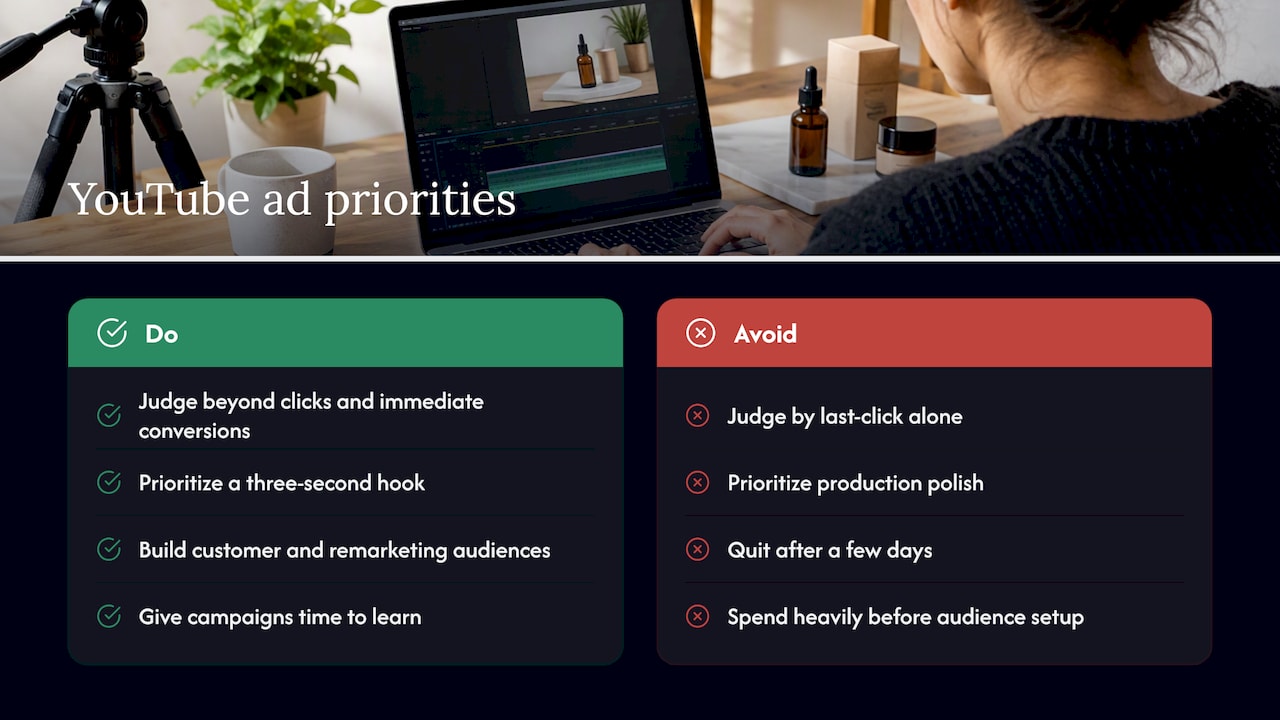
The second gap is patience with data. A two-week test on $20 a day doesn’t produce a statistically reliable signal, but owners often pull the plug after a few days of low direct conversions. What actually moves the needle is audience signal quality, not creative polish, especially early on when the algorithm has little history to work from.
If you take one thing from this guide, prioritize getting a customer list and remarketing audience into the account before you spend heavily on prospecting. Everything else, formats, bidding, creative, works better once that foundation is in place.
— TONY
Let us set up and manage your YouTube ad campaigns
We handle the parts that trip up most small business owners: account setup, audience targeting, creative specs, and conversion tracking, all under one plan. 
A consultation gets you a custom plan built around your budget, transparent pricing with no surprise fees, and real-time stats so you can see what your spend is producing week to week. If you’re ready to put a test campaign live, reach out through our agency page and we’ll map out the setup together.
FAQ
How many YouTube views do I need to make $10,000 a month?
This question applies to creator ad revenue, not advertiser costs, and the figure depends heavily on niche, audience location, and ad rates, so there’s no fixed view count that guarantees a specific income. What’s fixed is YouTube Partner Program eligibility: 1,000 subscribers plus either 4,000 watch hours in 12 months or 10 million Shorts views in 90 days.
How much do 1,000 YouTube ad views cost?
Cost per view on YouTube typically costs a few cents, depending on targeting, competition, and placement, so 1,000 views often falls in the tens of dollars rather than a fixed price. Running a small daily budget, such as $10 to $50 a day, lets you see your actual CPV before committing more spend.
What is the 7 second rule on YouTube?
The idea behind the so-called 7 second rule is that your ad needs to capture attention and communicate its core message within the first seven seconds, since many viewers decide whether to keep watching or skip in that window. It’s a practical guideline for structuring hooks, not an official YouTube policy.
Is $10 a day enough for Google Ads?
A $10 daily budget is enough to start a small test campaign and gather early signal on cost per view and audience response, particularly for bumper or in-stream awareness formats. It won’t generate large volume, but it’s a reasonable starting point before scaling toward the $10 to $50 a day range recommended for small-business tests.
Sources
- How To Run Profitable YouTube Ad Campaign Without 7-Figure Budgets
- Video Campaigns with YouTube Ads – YouTube for Business
- YouTube video adverting guide – HubSpot
Recent Comments