
Dynamic number insertion (DNI) is the technique that swaps the phone number on your website in real time so every call can be traced back to the exact ad, keyword, or channel that generated it. Marketers use it because phone leads have always been a black box compared to form fills, and DNI closes that gap the same way form-tracking pixels do for web conversions.
The payoff is straightforward:
- You know which campaigns produce calls, not just clicks
- Paid search budgets shift toward keywords that actually ring the phone
- Call data flows into the same analytics and CRM systems as your other conversion data, so a lead from a Google ad and a lead from a contact form live in one report instead of two disconnected spreadsheets
Key Takeaways
Dynamic number insertion works because it turns phone calls into trackable conversions by tying a swapped number to session, source, and keyword data in real time.
| Point | Details |
|---|---|
| DNI defines source, not just calls | It ties every call to the campaign, keyword, or channel that generated it, closing the phone-lead attribution gap. |
| Pool sizing prevents most failures | Size the number pool to peak concurrent visitors plus a buffer, not average traffic, to avoid fallback numbers. |
| Match granularity to traffic | Source-level suits small sites, session-level suits mid-traffic, keyword-level suits high-spend paid search accounts. |
| Caching breaks attribution silently | Exclude DNI snippets and swapped numbers from page caching rules to prevent stale numbers reaching the wrong visitors. |
| Ibrand.media builds and monitors setups | Ibrand.media handles installation, pool sizing, and analytics/CRM wiring so mobile-heavy call traffic gets tracked correctly. |
Table of Contents
- What Is Dynamic Number Insertion and How Does It Differ From Static Tracking?
- What Level of Granularity Does Your Site Actually Need?
- How Does DNI Improve Marketing ROI and Lead Quality?
- What Does a DNI Implementation Checklist Look Like?
- Where Should DNI Data Flow for Real Reporting?
- How Should Privacy and SEO Factor Into Your DNI Setup?
- Why Ibrand.media’s Experience Matters Here
- What Marketers Get Wrong About DNI
- Get Your DNI Setup Built and Wired Correctly
- Sources
- FAQ
What Is Dynamic Number Insertion and How Does It Differ From Static Tracking?
A static tracking number is one dedicated line assigned to a single channel, like print or radio, that never changes. Dynamic numbering flips that model: the number on your site changes per visitor or session based on where that visitor came from, then reverts once the session ends. That’s the core difference searchers usually mean when they ask about “dynamic” versus “static” numbers, and it’s why DNI works for digital campaigns while static numbers work fine for offline ones.
Here’s the mechanical sequence behind every DNI call:
- Snippet loads and reads source data. A JavaScript snippet on the page checks the referrer, UTM parameters, and Google’s
gclidto figure out where the visitor came from. - A number gets pulled from the pool. The script requests an available tracking number from a pre-provisioned pool tied to that traffic source.
- The page swaps visible numbers. Every instance of the phone number on the page, in the header, footer, and click-to-call buttons, gets replaced with the assigned tracking number.
- Session data persists in a cookie. The visitor’s session gets tied to that number through a cookie so a repeat visit within the same session still shows the same number.
- The call routes and logs. When the visitor dials, the call forwards to your real business line while the platform logs which source, campaign, and sometimes keyword triggered it.
Pro Tip: Test this flow on an incognito browser window for each major traffic source you track. If the number doesn’t change between a direct visit and a paid-search visit, your snippet placement or UTM detection is broken before you’ve spent a dollar on ads.
What Level of Granularity Does Your Site Actually Need?
DNI isn’t one setting, it’s a spectrum, and picking the wrong level either wastes money or leaves you blind.
- Source-level DNI assigns one number per channel (organic, paid, referral, social). It’s the cheapest option and tells you which channel drives calls, nothing more granular.
- Session-level DNI assigns a unique number per visitor session, showing exactly which visit produced the call, including landing page and time on site.
- Keyword-level DNI goes furthest, tying calls to the specific paid search term that triggered the ad. This tier requires Google Ads integration to capture the gclid and a meaningfully larger number pool, since every active keyword can theoretically need its own number during peak hours.
A small local business running one or two campaigns rarely needs more than source-level tracking. Mid-traffic sites running multiple paid campaigns usually justify session-level. High-traffic sites spending heavily on paid search are the ones where keyword-level DNI earns back its added cost, because even small bid adjustments at that volume move real revenue.
How Does DNI Improve Marketing ROI and Lead Quality?
Attribution is the whole point, but the practical business impact shows up in a few specific places.
- Paid search bidding gets sharper. Once you know which keywords generate calls instead of just clicks, you can shift budget away from terms that look good in a dashboard but never produce a phone lead.
- Content and SEO get credit they usually miss. A blog post or service page that drives five calls a month often looks like a dead page in standard analytics because nobody filled out a form. DNI surfaces that value.
- Lead routing improves. Calls tagged with source and campaign data can route to different teams or scripts. A call from a “get a quote” landing page gets a different intake flow than one from a general brand search.
- Revenue modeling becomes possible. Once call source data ties into your conversion tracking setup, you can calculate cost per lead and lifetime value by channel instead of guessing.
The net effect: phone leads stop being a rounding error in your attribution model and start behaving like any other tracked conversion.
What Does a DNI Implementation Checklist Look Like?
Getting DNI right the first time saves you weeks of chasing missing data later. Work through this sequence in order.
- Inventory every phone number placement. List every spot a number appears, header, footer, click-to-call buttons, embedded PDFs, and note the format used (parentheses, dashes, plain digits) so your swap targets match consistently.
- Place the snippet correctly. Vendor guidance generally calls for the JavaScript snippet to load sitewide, ideally before the closing
</head>tag, so it fires before the page renders visible numbers. - Size your number pool. A common rule of thumb is provisioning a pool sized to a percentage of your peak concurrent visitors who might plausibly call, plus a safety buffer rather than sizing for average traffic.
- Test across environments. Check desktop and mobile browsers, tap-to-call buttons specifically, cached versions of pages, and any subdomains running separate campaigns.
- Watch for the usual failure points. Hardcoded numbers buried in old templates, aggressive page caching that serves a stale swapped number, and undersized pools that force fallback to a default number are the most common causes of lost attribution.
Pro Tip: Mobile click-to-call is where most attribution quietly dies. A number can display correctly but link to the wrong destination if the tap-to-call href attribute wasn’t updated along with the visible text.
Where Should DNI Data Flow for Real Reporting?
Tracking numbers only matter if the data behind them reaches the systems your team actually uses to make decisions.
- Map the core fields. Tracking number, session ID, UTM parameters, and gclid should all connect to a single record so a call and a click from the same visitor tell one story.
- Send call events to analytics and CRM. Capture call duration, source, and outcome as event properties, then push them into the same reporting view as your website’s real-time analytics.
- Feed bidding decisions. Once call data sits alongside form conversions, you can calculate cost per lead and lifetime value by channel and adjust paid search bids accordingly.
- Monitor a short weekly list. Pool utilization rate, calls per source, and missed-call percentage weekly; cost per call and revenue per channel monthly.
The biggest reporting mistake isn’t missing data, it’s collecting call data in a separate tool nobody checks against the rest of the funnel. A call that never touches your CRM or analytics dashboard might as well not have happened for attribution purposes.
How Should Privacy and SEO Factor Into Your DNI Setup?
DNI cookies raise two separate questions: are they compliant, and do they hurt your local search visibility?
- Classify the cookie honestly. Most DNI cookies function as strictly necessary rather than marketing cookies since they only support call routing, but disclose them in your privacy notice regardless.
- Test your consent flow without assumptions. Confirm the swap still works correctly under different cookie consent configurations rather than assuming it does.
- Protect your primary business number. Keep your main, permanent phone number in your structured data and Google Business Profile listing so search engines and directories always show a consistent NAP (name, address, phone), even while your on-page number rotates.
- Use
data-nosnippetselectively. Apply it around swapped number elements if you want to prevent a temporary tracking number from ever appearing in search snippets.
Why Ibrand.media’s Experience Matters Here
Ibrand.media builds and manages tracking setups for small and local businesses where mobile call volume often outweighs form submissions. That focus on mobile-friendly tracking matters because tap-to-call failures are the most common and least visible way DNI breaks.
- Hands-on setup of number pools sized to real traffic, not guesswork
- Direct wiring of call data into existing analytics and CRM tools
- Ongoing monitoring so pool exhaustion or caching issues get caught before they cost you attribution data
- A practical next step: request a tracking audit before your next campaign launch
What Marketers Get Wrong About DNI
Most advice on dynamic number insertion treats it like a plug-and-play analytics tag: install the script, watch calls roll in, done. That undersells the two places where implementations actually fail, and both are boring. Pool sizing and caching.
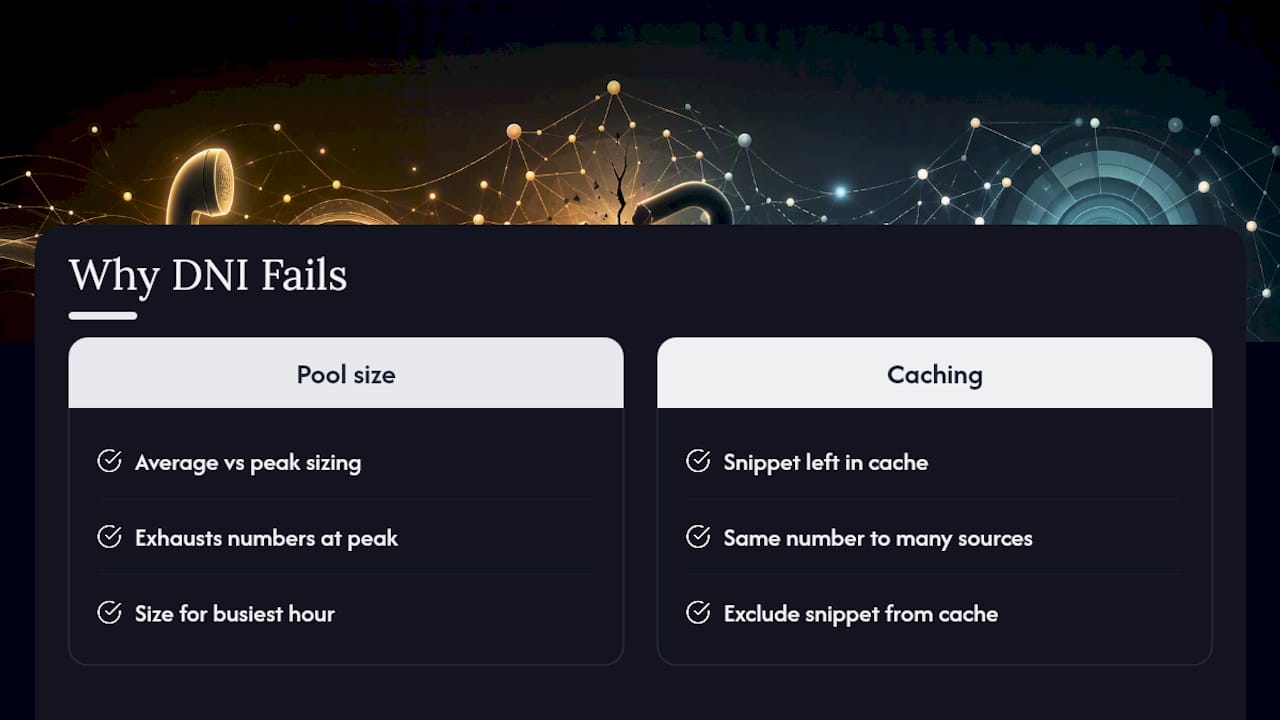
Everyone focuses on the flashy part, keyword-level attribution, gclid capture, revenue modeling, while skipping the unglamorous math of how many numbers you actually need at peak traffic. Undersized pools are the single most common cause of DNI going wrong, and it’s almost always because someone sized the pool for average traffic instead of the busiest hour of the busiest day.
The second blind spot is caching. A marketing team spends weeks setting up campaigns, then a page cache serves the same swapped number to five different traffic sources because nobody excluded the tracking snippet from the cache rules. If you take one thing from this article and apply it before anything else, audit your caching configuration and your pool size, in that order, before you touch keyword-level granularity. The sophisticated stuff only matters once the basics hold up.
Get Your DNI Setup Built and Wired Correctly
Ibrand.media is the alternative to a do-it-yourself DNI install for small businesses that don’t have a dedicated developer on staff. Instead of piecing together a snippet, guessing at pool size, and hoping the caching plugin doesn’t break your attribution, Ibrand.media handles installation, pool sizing based on your actual traffic patterns, and the analytics and CRM wiring that turns call data into decisions you can act on.

That includes mapping tracking numbers to sessions and UTMs, connecting call events to your reporting dashboards, and catching the caching and hardcoding mistakes that quietly wreck attribution for businesses that try this alone. If your paid search and SEO reporting still can’t tell you which campaigns drive phone calls, request a website and tracking audit and get a setup built around how your customers actually reach you.
Sources
- What is call attribution — Twilio Docs
- Dynamic number insertion overview – CallRail Help Center
- Dynamic Number Insertion (DNI) Guide: Setup, Sizing, and Troubleshooting | VeloCalls Blog
FAQ
What does “dynamic number” mean?
A dynamic number is a phone number that changes automatically based on how a visitor arrived at a website, such as through a specific ad or search term, rather than staying fixed like a printed business line.

What is dynamic number insertion in CallRail?
In CallRail’s implementation, a JavaScript snippet detects UTM parameters, referrer data, and gclid values, then swaps the visible number for one pulled from a pool and stores that assignment in a session cookie.
How are salespeople getting my phone number if it keeps changing?
If your number is disappearing into a rotating tracking pool without your business’s permanent number staying listed anywhere, it usually means your primary NAP data isn’t set correctly in your Google Business Profile or structured data, which lets outdated or scraped numbers surface elsewhere.
What is the difference between static and dynamic numbers?
A static number is one fixed line assigned permanently to a single channel, like a billboard, while a dynamic number changes per visitor or session so digital campaigns can be measured individually.
How big should my number pool be?
Pool size should be based on peak concurrent visitors likely to call, not average traffic, typically provisioned as a percentage of that peak with a safety buffer rather than a flat guess.
Recent Comments