
You can write a publishable, search-ready blog post by following a practical 7-step process: pick a validated topic, define your reader and CTA, outline your H2/H3 structure, draft fast, edit hard, optimize for search and AI, then publish and promote. Most bloggers skip steps 2 and 3, which is exactly why their posts drift and underperform.
Here is the full roadmap with realistic time estimates:
- Pick a topic and validate demand — Use Google Keyword Planner or Ahrefs to confirm search volume before you write a single word.
- Define your reader, goal, and CTA (10–15 min) — Decide what one action you want the reader to take. According to ProBlogger, failing to set a CTA before writing is one of the most common mistakes that kills post focus.
- Draft a working title and one-line promise (10 min) — Your title is a contract with the reader. Write it before the outline.
- Build your H2/H3 outline (20–30 min) — Map every section before you write prose. This single step cuts drafting time in half.
- Write the first draft (60–120 min for 1,500 words) — Write fast. Flag gaps. Do not edit while drafting.
- Edit, optimize, and add multimedia (45–60 min) — Three passes: structure, clarity, proofread. Add images with alt text, internal links, and meta fields.
- Publish and promote (20–30 min) — Share across email, social, and any distribution channel your audience uses.
Start right now: open a blank doc, write a working title, and sketch five H2 headings. That skeleton is your post.
Key Takeaways
Writing a publishable, search-ready blog post requires validating your topic, defining your CTA before drafting, building a structured outline, writing fast, editing in three passes, and measuring performance after publishing.
| Point | Details |
|---|---|
| Validate before you write | Use Google Keyword Planner or Ahrefs to confirm search demand before drafting. |
| CTA first, always | Define the single action you want readers to take before writing the headline or introduction. |
| Outline beats drafting speed | A complete H2/H3 outline cuts drafting time and reduces structural edits significantly. |
| Three-pass editing | Edit for structure, then clarity, then proofread — never try to do all three at once. |
| Measure and update | Track CTR and engaged time in Search Console and Google Analytics; refresh evergreen posts quarterly. |
| Ibrand for full execution | Ibrand provides content strategy, SEO, writing, and distribution support for small businesses that want results without the time investment. |
Table of Contents
- What is a blog post, and which format should you choose?
- How to write blog posts from scratch: the full step-by-step process
- How do you write headlines and opening hooks that get clicks?
- What on-page SEO and AI-friendly structure should you check before publishing?
- How do you edit, polish, and publish a blog post consistently?
- How do you measure whether a blog post is working?
- Why does a content brief differ from an outline, and how do you build both?
- How do you beat writer’s block and write consistently?
- What are the legal considerations for blog content?
- How do you gather and use reader feedback after publishing?
- What most bloggers get wrong about writing for results
- Ibrand can handle the strategy and execution for you
- Sources
- FAQ
What is a blog post, and which format should you choose?
A blog post is a piece of web content published on a blog, typically 500–3,000 words, designed to inform, persuade, or entertain a specific audience while supporting a business or personal goal. The format you choose shapes everything from the outline to the CTA, so picking the right one before you write saves significant rework. Wix’s step-by-step guide frames this choice as the first real decision in any blogging workflow.
Common post types and when to use each:
- How-to / tutorial — Walks the reader through a process step by step. Best when search intent is clearly instructional (“how to write blog posts”).
- Listicle — Numbered or bulleted collection of tips, tools, or examples. High click-through, easy to scan, works well for “best of” queries.
- Opinion / thought leadership — Your take on an industry trend or debate. Builds authority; works best when you have a genuinely contrarian or well-supported position.
- Case study — Documents a real result with before/after data. Converts well because it shows proof, not promises.
- Roundup — Aggregates expert opinions, tools, or resources. Earns backlinks when you feature others who then share it.
- Review — Evaluates a product, tool, or service. Strong commercial intent; pairs naturally with affiliate or service CTAs.
- Evergreen guide — Comprehensive reference on a stable topic. Compounds traffic over time and earns internal links from newer posts.
Match the format to search intent first, then to your CTA. A reader searching “how to start a blog” wants a tutorial, not an opinion piece. A reader searching “best blogging platforms” wants a roundup or review. Getting this wrong means writing a great post that ranks for the wrong intent and converts nobody. For a broader look at how consistent blogging drives business outcomes, the real importance of blogging for your business is worth reading before you commit to a format and frequency.
How to write blog posts from scratch: the full step-by-step process
This is the operational checklist. Follow it in order, and you will have a publishable draft at the end.
Step 1: Pick a topic and validate demand
Start with a problem your reader actually has, then confirm that people are searching for it. Open Google Keyword Planner and type your rough idea. Look for a keyword with meaningful monthly searches and manageable competition. If the head term is too competitive (think “blogging tips” against major media sites), pivot to a long-tail angle like “blog writing tips for small business owners” — lower volume, but you will rank faster and attract a more qualified reader.

Run a quick SERP scan: search your keyword and read the top five results. Note what they cover and, more importantly, what they miss. That gap is your angle.
Micro-tasks:
- List three topic ideas from your niche
- Check each in Google Keyword Planner or Ahrefs
- Pick the one with the clearest gap between search demand and existing content quality
Step 2: Define your reader, goal, and CTA
Before you write a single sentence of prose, answer three questions: Who is reading this? What do you want them to do after reading? What is the single CTA? ProBlogger’s Darren Rowse is direct on this: the CTA should shape the headline, the introduction, and the entire structure of the post. A post without a defined CTA wanders.
Your CTA does not have to be a sale. It can be “subscribe,” “download,” “share,” or “read this next.” But it has to be one thing, decided before you draft.
Pro Tip: Write your CTA and your primary evidence source (the one stat, case study, or example that proves your main claim) at the top of your draft doc before you write anything else. Every section you write should either support the CTA or support the evidence. If a section does neither, cut it.
For practical CTA templates, the guide on calls to action that convert covers the mechanics in detail.
Step 3: Draft a working title and one-line promise
Your working title is not your final headline. It is a compass. Write something like: “How to Write a Blog Post in 7 Steps (With an Outline Template).” Then write one sentence that completes this prompt: “After reading this post, the reader will be able to ___.” That sentence is your post’s promise, and every section either keeps it or breaks it.
Step 4: Build your H2/H3 outline
HubSpot’s content team recommends a seven-step formula: topic research, intent validation, competitor gap analysis, working title, H2/H3 map, examples to include, and CTA placement. The outline is where you do the thinking so the draft is just execution.

Copy-ready outline template:
Title: [Working title]
Promise: [One sentence — what the reader gains]
CTA: [Single action]

H2: Introduction / BLUF answer
H2: [Core concept or definition]
  H3: [Sub-point 1]
  H3: [Sub-point 2]
H2: [Step or method 1]
H2: [Step or method 2]
H2: [Common mistakes or what to avoid]
H2: [CTA section or next steps]
Filled example for a “how to start a blog” post:
Title: How to Start a Blog in 2026: A Beginner's Step-by-Step Guide
Promise: Readers will launch a live blog with their first post published.
CTA: Start your free trial on WordPress.org

H2: You can launch a blog in under two hours
H2: What platform should you use?
  H3: WordPress.org vs. Wix Blog Maker
  H3: When to choose a hosted platform
H2: How to pick your niche and first topic
H2: How to write and publish your first post
H2: How to promote your post on day one
H2: Ready to start? Here's your next step
Step 5: Write the first draft
Write fast and do not edit mid-sentence. The goal of a first draft is completion, not perfection. If you hit a gap, type “[[FILL]]” and keep moving. Draft in this order: introduction last (it is easier once you know what the body says), body sections first, conclusion second.
Aim for roughly 150–200 words per H2 section. At that pace, a 1,500-word post takes about 90 minutes of focused writing.
Step 6: Add examples, links, and multimedia
Every abstract claim needs a concrete example. Every image needs alt text — WebAIM’s guidance on alt text is the clearest reference for writing descriptions that serve both accessibility and SEO. Keep alt text descriptive and specific: “screenshot of Google Search Console performance report” beats “image1.jpg” every time.
Internal links belong in the body, not bolted on at the end. Link to a related post the first time you mention a concept it covers in depth.
Step 7: Pre-edit pass and publishing checklist
Before you hit publish, run through this list:
- [ ] Does the introduction answer the reader’s question within the first two sentences?
- [ ] Is every H2 section necessary, or can one be cut without losing the promise?
- [ ] Does every image have alt text?
- [ ] Is the meta description written (under 160 characters, includes the keyword)?
- [ ] Is the URL slug clean (no stop words, keyword present)?
- [ ] Is the CTA present and clear?
- [ ] Have you previewed on mobile?
The content marketing checklist for SMBs expands this into a full distribution workflow if you want to go further.
How do you write headlines and opening hooks that get clicks?
Your headline is doing two jobs at once: earning the click from the SERP and setting the expectation the post must then meet. UW–Madison’s Writing Center recommends keeping headlines concise, roughly under 10 words, to maintain clarity and click-through performance. That constraint forces precision.
Four headline formulas that work:
- How to [achieve result]: “How to Write a Blog Post That Ranks on Page One”
- [Number] ways to [achieve result]: “7 Ways to Write Blog Content That Keeps Readers Reading”
- Case study + result: “How One Dental Practice Got 67% More Leads From Blogging”
- Question + benefit: “Struggling to Start a Blog? Here’s the Framework That Works”
Six quick examples:
- “How to Write Blog Posts Beginners Can Actually Finish”
- “5 Blog Writing Tips That Cut Your Drafting Time in Half”
- “What Makes a Blog Post Worth Reading (And Sharing)”
- “How to Create Blog Posts That Rank Without Paid Ads”
- “The Outline Template That Makes Every Blog Post Easier”
- “Why Your Blog Posts Aren’t Getting Traffic (And the Fix)”
Three opening hook templates:
- TL;DR hook: State the answer in one sentence, then explain why it matters. Best for instructional posts where the reader wants the answer fast.
- Bold claim → proof: Open with a counterintuitive statement, then back it immediately with a specific example or data point. Works well for opinion and thought leadership posts.
- Micro-story → promise: One sentence of scene-setting, then pivot to what the reader will learn. Effective for case studies and personal-experience posts.
Example: headline → opener → expected H2 flow
Headline: “How to Write a Blog Post in 7 Steps (With a Free Outline Template)”
Opener: “You can write a publishable blog post in under three hours — if you outline before you draft. Most writers skip the outline and spend twice as long fixing structural problems in editing.”
Expected H2 flow: Step 1: Pick a topic → Step 2: Define your CTA → Step 3: Build the outline → Step 4: Draft fast → Step 5: Edit hard → Step 6: Optimize → Step 7: Publish and promote.
The UW–Madison framing is useful here: treat your blog as a conversation. A direct question in your headline or opener signals to the reader that you understand their problem, which reduces bounce before they read a single body paragraph.
What on-page SEO and AI-friendly structure should you check before publishing?
Search engines and AI overviews both reward the same thing: content that answers a specific question clearly, with a logical structure a machine can parse. These are not competing goals.
On-page SEO checklist:
- [ ] Title tag: includes the primary keyword, under 60 characters
- [ ] Meta description: 120–160 characters, includes keyword, reads like a human wrote it
- [ ] URL slug: short, keyword-present, no stop words (e.g.,
/how-to-write-blog-posts) - [ ] Keyword in first paragraph: appears naturally within the first 100 words
- [ ] Header hierarchy: one H1, logical H2/H3 nesting, no skipped levels
- [ ] Internal links: at least two contextual links to related content
- [ ] Image alt text: every image has a descriptive alt attribute (see WebAIM’s alt text guidance)
- [ ] Mobile preview: post renders cleanly on a phone screen
AI-optimization tips: Open each H2 section with a crisp one-sentence definition of what that section covers. Use numbered lists for processes and question-format headings where natural. Short, quotable sentences near the top of each section are what AI overviews pull for citations. HubSpot’s outline guidance specifically recommends this structure to improve both AI summarization and human skimmability.
Tools that help: The Yoast SEO plugin on WordPress.org handles title/meta guidance and readability checks directly inside the WordPress editor. For deeper competitive analysis, Ahrefs shows keyword gaps and backlink opportunities; SurferSEO grades your content against top-ranking pages in real time and suggests specific keyword inclusions and word-count targets. Use SurferSEO when you are targeting a competitive keyword and need a data-driven content score, not just a gut check.
Google Search Console is where you verify that your post is indexed and track its impressions, clicks, and average position over time. Set it up before you publish your first post, not after.
For a deeper look at balancing readability with technical SEO, the guide on optimizing website content for business growth covers the tradeoffs clearly. Plainlanguage are also worth bookmarking: writing clearly for the reader is not just good style, it is a ranking signal.
How do you edit, polish, and publish a blog post consistently?
Editing is where most writers lose time because they try to do everything in one pass. Three separate passes, each with a single focus, is faster and catches more problems.
The three-pass editing workflow
-
Structure pass — Read only the headings and the first sentence of each paragraph. Does the post flow logically? Does every section earn its place? Cut or merge anything that does not advance the promise you made in the introduction.
-
Clarity pass — Read every sentence aloud. Anything you stumble over, rewrite. Replace passive constructions with active ones. Cut filler phrases (“it is important to note,” “in order to”). Check that your voice is consistent throughout — a post that starts casual and turns formal mid-way loses readers.
-
Proofread pass — Check spelling, punctuation, and factual accuracy. Verify every statistic has a source. Confirm every link works.
Cutting rules: Lead with the answer, not the context. If your first paragraph is background that the reader already knows, delete it. A 1,200-word post that gets to the point beats a 2,000-word post that circles it.
Publishing checklist:
- [ ] Featured image uploaded with alt text
- [ ] Meta title and description filled in
- [ ] At least two internal links placed contextually
- [ ] CTA present and linked
- [ ] Mobile preview checked
- [ ] Post scheduled or published at your peak audience time
Tool recommendations: Grammarly catches grammar and style issues in real time inside most browsers and CMSs. Hemingway Editor flags passive voice and overly complex sentences. For CMS, WordPress.org gives you the most control over SEO and formatting; Wix Blog Maker is faster to set up and works well for beginners who want a clean interface without plugin management.
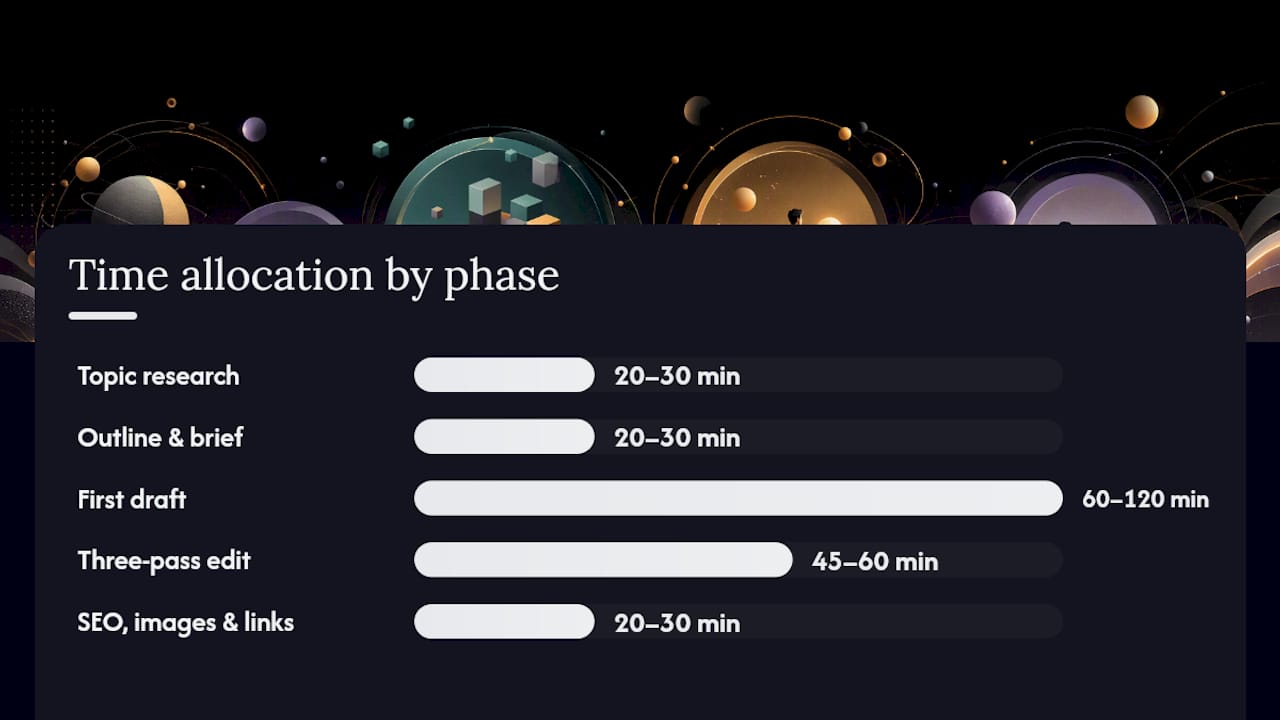
Realistic timeline for a 1,500-word guide:
| Phase | Time |
|---|---|
| Topic research and keyword validation | 20–30 min |
| Outline and brief | 20–30 min |
| First draft | 60–120 min |
| Three-pass edit | 45–60 min |
| SEO fields, images, links | 20–30 min |
| Total | 120–180 minutes |
How do you measure whether a blog post is working?
Publishing is not the finish line. A post that ranks on page two for a high-intent keyword is worth more attention than a post that ranks on page one for a keyword nobody searches.
Primary KPIs to track:
- Impressions and average position (Google Search Console) — tells you whether Google is surfacing the post at all
- Clicks and CTR (Search Console) — a low CTR with high impressions means the headline or meta description needs work
- Sessions and engaged time (Google Analytics) — engaged time above 60 seconds suggests the content is holding attention
- Bounce rate / exit rate — high exit on the first scroll usually means the introduction did not deliver on the headline’s promise
Simple experiments to run:
- Rewrite the headline — Change one word or restructure the promise. Check CTR in Search Console after two weeks.
- Add a concrete example — Insert a specific case or data point into a section with high exit rate. Watch engaged time.
- Rearrange H2 sections — Move the most valuable section earlier. Compare time-on-page before and after.
Priority framework for updates: Focus first on posts with high impressions but low CTR (headline fix), then posts with good traffic but low conversion (CTA fix), then posts with declining traffic (content refresh or expansion).
Cadence: Review evergreen posts quarterly. A post that ranked well 12 months ago may have slipped because a competitor published something more thorough. A targeted update, adding a new section, updating a statistic, or improving the introduction, often recovers rankings faster than writing a new post from scratch.
Why does a content brief differ from an outline, and how do you build both?
Conflating a content brief with an outline is one of the most common structural mistakes in blogging. They serve different purposes, and mixing them produces content that is neither strategically sound nor well-executed.
The distinction:
- Content brief (strategy): Answers what and why. Defines the keyword, search intent, target audience, competitor gaps, CTA, and the evidence you will use. Written before the outline.
- Blog post outline (execution): Answers how and in what order. Maps the H2/H3 hierarchy, the examples for each section, and where the CTA lands. Written after the brief.
HubSpot’s seven-step formula captures this well: topic research and intent validation belong to the brief phase; the H2/H3 map and example bullets belong to the outline phase. Skipping the brief means your outline has no strategic anchor.
The 7-step formula to build brief → outline
- Topic research — Identify the head term and three to five related keywords.
- Intent validation — Confirm the dominant search intent (informational, commercial, navigational).
- Competitor gap analysis — Read the top five results and list what they miss.
- Working title — Write a specific, benefit-driven title that reflects the gap you found.
- H2/H3 map — Sketch every section in order, with one-line descriptions.
- Examples to include — List the specific case studies, data points, or screenshots you will use.
- CTA placement — Decide where in the post the CTA appears and what it asks.
Copy-ready brief template:
Keyword: [Primary keyword]
Intent: [Informational / Commercial / Navigational]
Audience: [Who is reading this and what do they already know?]
Competitor gap: [What do the top results miss?]
Working title: [Specific, benefit-driven]
CTA: [Single action]
Primary evidence: [The one stat, case, or example that proves the main claim]
Filled outline sample (for this article’s topic):
Keyword: how to write blog posts
Intent: Informational
Audience: Beginners and solo creators who want a repeatable process
Competitor gap: Most guides skip the brief vs. outline distinction
Working title: How to Write Blog Posts That Actually Get Read
CTA: Draft a working title and H2 skeleton today

H2: 7-step roadmap (BLUF)
H2: What is a blog post and which format fits your goal?
H2: Step-by-step process from idea to published post
H2: Headlines and opening hooks
H2: On-page SEO and AI-friendly structure
H2: Editing and publishing checklist
H2: Measuring success and iterating
H2: Brief vs. outline: the 7-step formula
A note on AI tools during the brief and outline phase: AI writing assistants like ChatGPT or Claude can accelerate topic research and gap analysis, but treat their output as a first draft of thinking, not a finished brief. Verify every suggested keyword against Google Keyword Planner or Ahrefs. AI tools hallucinate search volumes and competitor rankings. Use them to brainstorm, not to validate.
How do you beat writer’s block and write consistently?
Writer’s block is almost always a planning problem, not a creativity problem. When you sit down to write and nothing comes, it usually means the outline is not specific enough, or you are trying to write and edit at the same time.
Fix the planning problem first. If your H2 says “Talk about SEO,” you will stall. If it says “Explain why keyword placement in the first 100 words matters for ranking,” you will write. The more specific the section brief, the faster the draft flows.
Separate writing from editing. Set a timer for 25 minutes and write without stopping. Do not delete. Do not reread. Just move forward. The Pomodoro Technique works here not because of the timer itself, but because it removes the permission to edit mid-draft.
Batch similar tasks. Research one day, outline the next, draft the third. Context-switching between research mode and writing mode is expensive. Writers who batch by task type consistently produce more output with less friction.
Build a topic bank. Keep a running list of post ideas in a simple doc or tool like Notion or Trello. When inspiration hits, add it. When you sit down to write and feel blank, pull from the bank instead of starting from zero. Aim for at least 10 ideas in the bank at all times.
Set a minimum viable output. Commit to 300 words per session, not a finished post. Three 300-word sessions produce a 900-word draft. That draft is easier to finish than a blank page.
Consistency matters more than volume. One well-researched post per week compounds faster than three rushed posts that do not rank or convert.
What are the legal considerations for blog content?
Copyright, plagiarism, and content usage rights are practical concerns every blogger needs to understand, not just legal formalities.
Copyright basics: Every piece of original writing, photography, or illustration is protected by copyright the moment it is created, whether or not it carries a copyright notice. Using someone else’s text, image, or graphic without permission is infringement, even if you link back to the source. Linking is not a license.
What you can use safely:
- Content you created yourself
- Images licensed under Creative Commons (check the specific license terms — some require attribution, some prohibit commercial use)
- Stock photos from licensed platforms (Unsplash, Pexels for free; Getty, Shutterstock for paid)
- Public domain works (U.S. works published before 1928 are generally in the public domain, but verify)
- Content you have explicit written permission to use
Plagiarism vs. copyright infringement: Plagiarism is an ethical violation — presenting someone else’s ideas or words as your own. Copyright infringement is a legal violation — reproducing protected work without permission. You can plagiarize without infringing copyright (paraphrasing without attribution) and infringe without plagiarizing (copying with attribution but without permission). Both are problems; only one carries legal liability.
Fair use: U.S. copyright law allows limited use of copyrighted material for commentary, criticism, news reporting, and education under the fair use doctrine. Fair use is a defense, not a right. It is evaluated case by case on four factors: purpose, nature of the work, amount used, and market impact. When in doubt, get permission or use an alternative source.
Practical steps:
- Run your draft through a plagiarism checker (Copyscape or Grammarly’s plagiarism tool) before publishing.
- Source every statistic with a link to the original study or report.
- Use royalty-free or licensed images only, and keep records of your licenses.
- If you quote someone at length, get permission or keep the quote short enough to qualify as fair use.
This section provides general information about copyright and content usage. It is not legal advice. Consult a qualified attorney for guidance specific to your situation.
How do you gather and use reader feedback after publishing?
Publishing is the start of a feedback loop, not the end of the writing process. Reader feedback tells you what the post actually communicated versus what you intended.
Where feedback comes from:
- Comments — Direct, qualitative, and often specific. A comment that says “this didn’t explain X clearly” is a free edit note.
- Social shares and replies — What people say when they share your post reveals which section resonated most. That section deserves more content.
- Email replies — If you distribute posts via newsletter, replies are the highest-signal feedback you will get. Readers who reply are engaged enough to spend time on you.
- Search Console data — Queries that land on your post but do not match its content are a signal that readers expected something you did not deliver. Add a section or update the introduction to address those queries.
- On-page surveys — A single-question poll at the bottom of the post (“Was this helpful? Yes / No / What was missing?”) takes five minutes to add and generates surprisingly useful data over time.
How to incorporate feedback:
Read comments and replies within the first week of publishing. Flag every question that reveals a gap in the post. Group similar questions and add a new H2 section or FAQ entry to address them. Update the post date when you make substantial changes, which signals freshness to both readers and search engines.
The UW–Madison Writing Center frames blogging as a conversation. Treating feedback as the reader’s half of that conversation, rather than noise to filter out, is what separates posts that compound in value from posts that plateau after the first week.
What most bloggers get wrong about writing for results
The conventional wisdom says write more, publish more, and the traffic will follow. The reality is that most blogs plateau not because of volume but because of structure. Posts that rank and convert share one trait: they were planned before they were written.
The brief-before-outline discipline is where most solo bloggers skip. They open a doc, start typing, and produce something that reads like a brain dump. The ideas are good; the structure is not. Search engines reward structure because structure signals that the writer understood the question before answering it.
The second underestimated factor is the CTA. A post without a defined CTA is a post that informs but does not convert. Darren Rowse’s point at ProBlogger is worth repeating: the CTA should shape the headline and the introduction, not be bolted on at the end. When you write the CTA first, every section either earns its place by supporting that action or gets cut.
The third thing most writers miss: the post is not done when it is published. The first version is a hypothesis. The data, comments, and search queries that accumulate over the following weeks tell you whether the hypothesis was right. Writers who treat publishing as the end of the process leave most of their post’s potential value on the table.
For a practical look at how this plays out in a specific niche, the case study on how blogging grows a dental practice shows what structured, CTA-first content does to lead volume over time.
Ibrand can handle the strategy and execution for you
Writing a great blog post takes planning, structure, and consistent execution — and most small-business owners do not have three to four hours per post to spare. Ibrand handles the full workflow: keyword research, content briefs, outline-to-draft writing, on-page SEO, and distribution support, so your blog produces traffic and leads without pulling you away from running your business.

Specific services include:
- Content strategy and brief creation — keyword validation, intent mapping, and competitor gap analysis before a word is written
- Outline-to-draft writing — structured posts built around your CTA and audience
- On-page SEO optimization — title tags, meta descriptions, header hierarchy, internal linking, and schema where relevant
- Distribution support — email, social, and repurposing guidance to extend each post’s reach
If you want posts that rank and convert, not just fill a content calendar, explore Ibrand’s SEO and content services and request a plan built around your goals.
Sources
The resources below are the tools and guides referenced throughout this article, organized for quick access.
Keyword research and SEO tools:
- ProBlogger
- UW–Madison Writing Center: Writing a Blog Post
- WebAIM: Writing Effective Alt Text
- Plainlanguage
CMS and publishing platforms:
Writing and editing guidance:
Strategy and workflow:
FAQ
How do you write a blog post for beginners?
Start with a validated topic, define your reader and CTA, build an H2/H3 outline, then write the draft fast without editing mid-sentence. Follow the seven-step roadmap above and you will have a publishable post in two to four hours.
How do you write posts on a blog consistently?
Batch your tasks: research one session, outline the next, draft the third. Keep a topic bank of at least 10 ideas so you never start from blank, and commit to a minimum word count per session rather than a finished post.
How do you write a short blog post?
A short post (around 500 words) works best when the search intent is simple and the answer is direct. Write one H1, two to three H2 sections, and a clear CTA. Cut every sentence that does not advance the reader toward the answer or the action.
What is the difference between a content brief and a blog post outline?
A content brief defines strategy: keyword, intent, audience, CTA, and competitor gaps. An outline defines execution: the H2/H3 structure, examples, and CTA placement. Write the brief first, then build the outline from it.
How long should a blog post be?
Length should match search intent. Instructional guides and evergreen references typically perform well at about 1,500 words. Short-answer posts and news-style content can perform at around 500 words. Write as long as the topic genuinely needs, then stop.
Recent Comments