
Set up a working Facebook lead ad by creating a Leads campaign in Meta Ads Manager, choosing Instant Form as the conversion destination, building a short privacy-compliant form, connecting lead delivery to a CRM or automation tool, then running a test submission before you publish. Name the campaign clearly and align your ad copy, form questions and thank-you CTA to one specific offer so the leads you collect are easy to act on.
TL;DR:
- Choose Higher intent when lead quality matters: its confirmation step can reduce submissions while filtering out accidental taps; More volume removes that review.
- Keep only custom questions that change follow up, match every form element to one offer, and verify the privacy link on a phone.
- Connect submissions to a CRM or automation tool, then test a sample lead for correct field mapping and duplicate records before launch.
- Judge results by cost per qualified lead, meetings, or opportunities, not cost per form fill; compare Instant Forms with landing pages using SQL rates.
- Prioritize precise audiences before adding form fields to compensate; test mobile feed and Stories, and watch lead quality when using Advantage+ placements.
Table of Contents
- Pre-flight checklist: accounts, privacy, offer and CRM access
- Ads Manager workflow: campaign, ad set and ad
- How to build the Instant Form: fields, privacy and thank-you
- Choose audiences, placements and budgets that protect lead quality
- Match creative and copy to one clear offer
- How to get leads out of Meta: export, CRM and automation
- Pre-launch tests and publishing checklist
- Measure quality, not just cost per lead
- Agency operations checklist for running lead ads
- What actually separates working lead ads from wasted spend
- How ibrand.media builds and manages lead ad campaigns
- FAQ
- Sources
Pre-flight checklist: accounts, privacy, offer and CRM access
Before you open Ads Manager, gather the pieces that determine whether setup is quick or takes longer. Missing page permissions or a broken privacy link are the two most common reasons a lead ad campaign stalls before it ever reaches review.
- Confirm Business Manager and Ads Manager access, plus Admin permission on the Facebook or Instagram page you plan to connect.
- Have a working privacy policy URL ready and decide on one specific offer, such as a free website audit or an SEO consultation.
- Line up CRM credentials or automation access, such as a Zapier account, and decide who owns incoming leads and how fast they respond.
A single offer matters more than it sounds. A form that tries to capture interest in SEO, web design and social media all at once produces vague leads that are hard for a sales team to qualify. Pick one promise, write the ad around it, and keep every later decision in the setup process pointed at that same promise.
Ads Manager workflow: campaign, ad set and ad
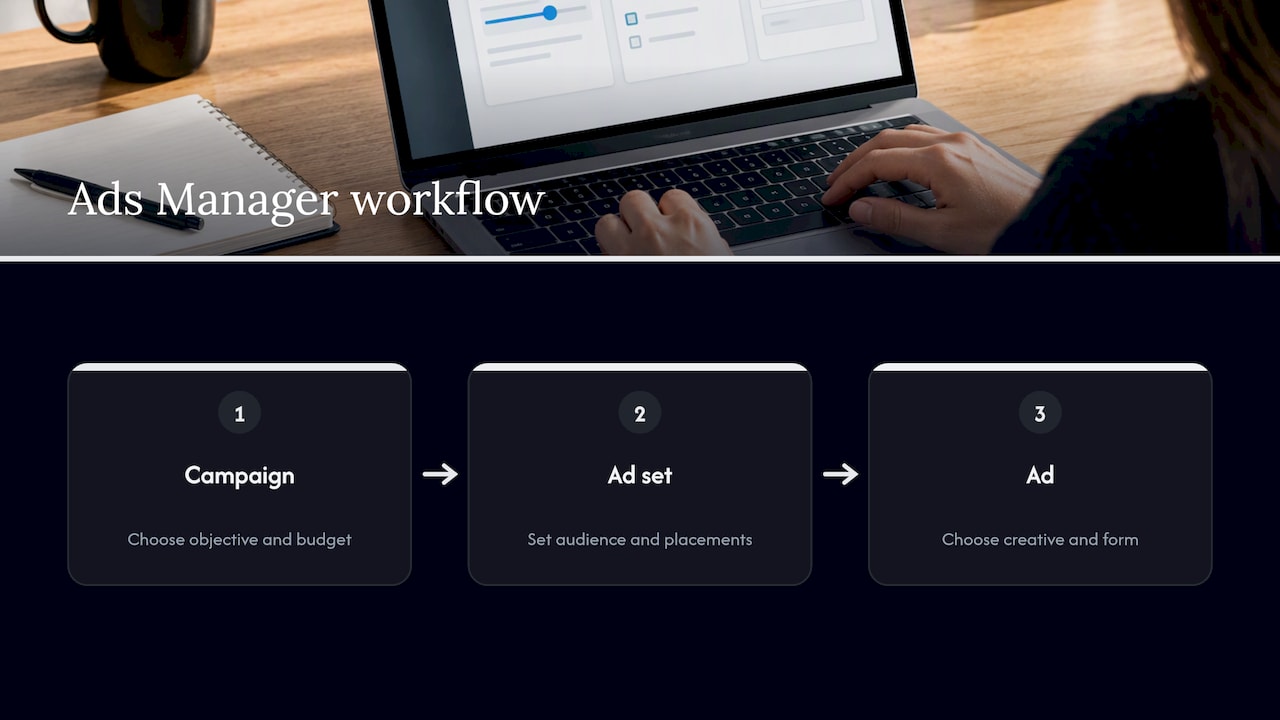
Meta’s own setup guidance for lead ads moves through three levels: campaign, ad set and ad, and each level controls a different part of how leads get captured. Start in Ads Manager, select Create, then choose the Leads objective. This tells Meta you want form submissions, not clicks, views or purchases.
At the campaign level, name the campaign in a way your team will recognize later, for example by offer and month rather than a generic label. Choose between a daily budget, which spends evenly, and a lifetime budget, which lets Meta pace spend across a set schedule. If you are new to the platform, testing Advantage+ placements at this stage can widen reach, but keep an eye on lead quality once results start coming in rather than optimizing for volume alone.
The ad set level is where conversion location gets decided. According to Meta’s official setup guidance, choosing Instant Forms keeps the entire interaction inside Facebook or Instagram, which removes a page load and tends to lift raw conversion rates. Other conversion locations, like a website, send the prospect off-platform instead. This choice should follow your offer and sales process, not just whichever option produces the cheapest form fill.
Also at the ad set level, choose your audience, whether that is a custom audience built from your customer list, a lookalike audience modeled on existing customers, or a saved audience built from interests and demographics. Set placements and a basic bid strategy here too. Automatic placements are the simplest starting point, though manual placement control lets you favor mobile feed and Stories, where instant forms tend to perform best.
At the ad level, confirm the Facebook Page and, if relevant, the Instagram account the ad will run under. Choose a creative format, a call-to-action button such as “Learn More” or “Sign Up,” and then move to the Destination setting, where you create a new Instant Form or attach one you already built. This is the step that connects everything above it to the form your prospect will actually fill out.
How to build the Instant Form: fields, privacy and thank-you
The Instant Form editor is where lead quality is won or lost. Meta’s Instant Form documentation outlines a structure of prefilled contact fields, an intro section, custom questions, a privacy policy link and a completion screen, and each piece deserves a deliberate choice rather than a default click-through.
Start with the form type. “More volume” removes a review step and maximizes signups, while “Higher intent” adds a confirmation screen that asks people to double-check their information before submitting. The higher-intent option tends to produce fewer but more qualified leads, since it filters out people who tapped the ad without real interest.
- Write an intro with a background image, a short headline and a description that match the promise made in the ad itself.
- Use prefilled contact fields as your baseline, then add only the custom questions that actually change how you follow up, such as company size, primary goal or timeline.
- Include a working privacy policy link and a plain sentence describing how submitted information will be used, then test that link on a phone before publishing.
- Build a thank-you screen with one clear next action, such as booking a call, rather than a generic confirmation message.
Extra questions feel harmless when you are building the form on a desktop screen, but every added field is friction on a phone, and according to Meta’s Instant Form guidance, question formats include short-answer and multiple-choice options whose exact appearance can shift as Ads Manager updates. Save deeper discovery, like budget range or detailed project scope, for the actual sales conversation instead of the form.
Pro Tip: Preview the form on your own phone before every launch. What reads fine on a laptop screen often looks cramped or slow on mobile, where most lead ad traffic lands.
The thank-you screen is worth more attention than it usually gets. Rather than a flat “Thanks, we’ll be in touch,” point high-intent leads toward booking a specific time slot or visiting a page with more detail. If your offer involves a quick payment or deposit rather than a consultation, a simple tipping-style link, such as the kind Tipper’s creator payment tools use for instant, no-account transactions, shows how a thank-you screen can carry a direct action instead of a dead end.
Choose audiences, placements and budgets that protect lead quality
Targeting decisions affect lead quality more than almost any form tweak, so fix your audience before you start adding questions to compensate for weak targeting. Extra qualification questions cannot rescue an audience that was never a good fit for the offer.
- Prioritize precise targeting first: custom audiences built from past customers, lookalikes modeled on your best leads, or job function and seniority filters for B2B offers.
- Favor mobile feed and Stories placements for instant forms, since that is where the format performs most naturally, and test Advantage+ placements only while watching quality signals closely.
- Start with a modest test budget, run several creative variations per audience, and judge results by downstream metrics like SQLs or meetings booked, not cost per lead alone.
Placement and audience choices interact. A broad Advantage+ placement set can lower cost per lead quickly, but if the underlying audience is loosely targeted, you end up with a cheap list of names that convert poorly once a salesperson calls. Tightening the audience is almost always a better first move than adding form friction.
Match creative and copy to one clear offer
Every piece of a lead ad, from the headline to the thank-you screen, should describe the same promise. When ad copy says “Get a free site audit” but the form asks ten unrelated qualification questions, the mismatch shows up as drop-off mid-form or as leads who seem confused when your team calls them.
- Keep ad copy, the form intro and the thank-you CTA pointed at one outcome, so a promise like “Get a free site audit” only leads to form fields that support scheduling that audit.
- Build creative around mobile-first visuals, a short headline and one clear call-to-action such as “Get Quote” or “Book Consultation,” and plan at least three variations to test against each other.
- Check message match across every touchpoint: the ad image, the form intro text and any landing page (if one is used) should all set the same expectation.
Message mismatch is one of the quieter reasons a technically correct setup still produces disappointing leads. If the form promises a callback within 24 hours, someone on your team needs to actually make that call within 24 hours, or the lead quality problem is really a follow-up problem wearing a different hat.
How to get leads out of Meta: export, CRM and automation
A lead sitting inside Meta’s lead-management area is worth nothing until it reaches whoever follows up. Zapier’s guide to lead ads lays out three practical retrieval paths, and the right one depends mostly on how fast your team needs to respond.
- Manual CSV download from Meta’s lead center, which works for low volume but introduces delay since someone has to remember to check it.
- A native CRM integration, where Meta connects directly to a supported platform and leads appear automatically.
- Third-party automation, such as Zapier, which pushes new leads into a CRM, spreadsheet or autoresponder the moment they come in.
Before you ever turn on real budget, create a test lead and confirm that every field value lands correctly in your destination, whether that is a CRM record or an automation workflow. Check for dedupe issues too, since a prospect who fills out the form twice should not create two disconnected records that two different salespeople call separately.
Pro Tip: If speed to first contact matters for your offer, skip manual downloads entirely. A connected CRM or automation route delivers leads in real time, while a daily manual export can mean a prospect hears from a competitor before they hear from you.
The operational point behind this is simple: lead generation is a system, not a single ad. Form design, privacy disclosure, tracking, retrieval and follow-up all need to work together, and a campaign that is technically flawless can still underperform commercially if nobody owns the leads once they arrive, a point Zapier’s setup guide makes directly.
Pre-launch tests and publishing checklist
Run through a short verification pass before you hit publish, since catching a broken link or a mismatched field early can prevent lost leads later.
- Submit a test lead through the form and confirm it lands correctly in your CRM, including any email or SMS triggers tied to it.
- Open the privacy policy link on a phone and click through the thank-you CTA or booking flow to confirm both work as expected.
- Verify UTM parameters and, if you are using a landing page alongside the form, confirm Pixel events are firing so leads get attributed to the right campaign.
A test run catches many of the problems that otherwise surface as a week of silent, unattributed or mis-routed leads.
Measure quality, not just cost per lead
Cost per lead is the easiest number to watch and the least useful one on its own. Industry analysis comparing lead ads and landing pages finds that lead ads typically raise raw conversion rates by removing friction, but that does not guarantee the leads are qualified, so tracking cost per SQL or meetings held matters more than tracking cost per form fill.
- Pick at least one quality metric, such as cost per SQL, meetings held, or opportunities created, and report on that alongside CPL.
- Run Instant Forms against a landing page for the same offer and compare SQL rate and cost per SQL, not just raw lead count.
- Test “More volume” against “Higher intent” form settings to see which produces better downstream results for your specific offer.
- Tighten targeting before adding form questions, then layer in creative testing once targeting is stable, scaling only the combinations that hold up on quality.
One case workflow running lead ads and landing pages in parallel with identical creative and audiences found lead ads can produce a lower cost per lead alongside a lower SQL rate, while landing pages show the reverse: higher cost per lead but a higher SQL rate. The practical takeaway is to judge the format by what happens after the form submit, not by the submit itself.
For a deeper breakdown of how to carry these numbers forward into a broader lead generation plan, our guide on lead generation strategies for business growth covers how to connect ad-level metrics to pipeline reporting.
Agency operations checklist for running lead ads
Treating lead ads as a system rather than a single campaign setting is the difference between a form that fills up and a pipeline that actually grows. That means assigning clear ownership for incoming leads, setting a service-level agreement for first contact, configuring dedupe and suppression rules in the CRM, and keeping one dashboard that both marketing and sales trust as the source of truth.
The operational checklist that holds this together includes a documented test submission process, verified CRM field mapping, explicit routing rules for different lead types, a first-contact message template ready before launch, and a reporting cadence that includes SQLs and meetings alongside CPL. Skipping any one of these tends to surface later as a complaint that “the leads were bad,” when the actual gap was in routing or follow-up speed.
Readers who want a sense of how campaign health gets diagnosed when results fall short can start with a Facebook ads audit built around exactly these operational checkpoints, and our broader guide on how to get more leads walks through the same system from the lead generation side rather than the ad platform side.
What actually separates working lead ads from wasted spend
The setup steps above are not the hard part. Most of the advice circulating about Facebook lead ads focuses on form design tricks, like reducing fields to boost conversion, when the real failure point is almost always what happens in the minutes and hours after a form gets submitted.
A beautifully built Instant Form connected to a CRM that nobody checks is worse than a slightly clunky form with a salesperson calling promptly. The conventional advice to “optimize for lower CPL” also deserves more skepticism than it gets: a cheaper lead that never becomes a conversation is not actually cheap, it is just deferred waste that shows up later in a sales team’s complaints about lead quality.
If there is one thing to prioritize first, it is routing and follow-up speed, set up and tested before the campaign ever goes live, not retrofitted after leads start arriving. Everything else, from form length to placement choices, is a tuning problem. A broken handoff is a structural one.
— TONY
How ibrand.media builds and manages lead ad campaigns
We provide digital marketing services tailored to each client. Explore our advertising and lead generation services to learn more.

Our work is tailored to each client.
Running creative tests and routing rules well takes practice most small business owners do not have time to build on their own. An outside team can help with campaign management. If you would rather have a team handle setup and ongoing optimization, explore our advertising and lead generation services and request a custom campaign plan built around your specific offer.
FAQ
How can I create leads through Facebook ads?
Create a campaign in Meta Ads Manager with the Leads objective, choose Instant Form as your conversion location, and build a short form tied to one specific offer. Connect the form to a CRM or automation tool so new submissions route to follow-up immediately, then run a test lead before publishing.
Is $1,000 enough for Facebook ads?
A modest budget can run a meaningful test for a local or small business offer, especially when spent across creative variations and a tightly defined audience. Results depend heavily on targeting precision and the offer itself, so measuring cost per qualified lead rather than total spend gives a clearer read on whether the budget is working.
Do Facebook lead ads work?
Lead ads typically increase raw conversion rates because they remove the extra step of visiting an external page, according to industry analysis of lead ads versus landing pages. Whether they work for a specific business depends on tracking downstream results like SQLs or meetings booked, not just the number of form fills.
How do I get my leads from my Facebook ad?
Leads can be retrieved manually from Meta’s lead-management area, through a native CRM integration where one is supported, or through a third-party automation tool like Zapier that pushes submissions directly into a CRM or autoresponder, as outlined in Zapier’s lead ads guide. Testing with one sample lead before launch confirms the chosen method delivers accurate field data.
Sources
- How to Create a Lead Ad Using Meta Ads Manager
- Facebook lead ads: How to get started | Zapier
- Facebook Lead Ads vs. Landing Pages: Which Is Better? Data
Recent Comments