
A click-to-call button is a link that opens the phone’s dialer with your number already filled in, so a visitor can reach you with one tap instead of copying digits. You build it with a single line of HTML, a tel: link, and you can style it like any other button. The code takes five minutes. What decides whether the button brings in jobs is where you put it, whether the number also shows as plain text, whether someone answers, and whether you count the calls. This guide covers all four, written for owners of local service businesses, practices and venues. If you want it built and tracked as part of a site that is set up to generate leads, our team at IBrand Media does that work.
TL;DR
- A click-to-call button is an ordinary link that starts with
tel:followed by your number in international format, for exampletel:+12025550123. - Always show the number as readable text on the button or beside it, because desktop browsers handle
tel:links inconsistently and some do nothing. - Put the button in the header and on pages where visitors are ready to book, and make it large enough for a thumb.
- Taps are not calls. Measure connected calls and form leads together, and make sure someone can answer when the button is pressed.
- On WordPress you can use a Button block with a
tel:address, a plugin, or a custom HTML block.
Table of Contents
- What a click-to-call button actually does
- Why it matters for local businesses
- The code: a phone link in HTML
- Adding it without writing code
- What happens on a desktop
- Where to put the button
- Test it before you trust it
- Count calls, not just taps
- Our view on call buttons
- Get the button built into a site that converts
- FAQ
- Sources
What a click-to-call button actually does
When a visitor on a smartphone taps a tel: link, the phone app opens with your number ready to dial. On an iPhone, Apple’s documentation says that tapping a phone link shows an alert asking whether the user really wants to dial, so one extra tap is normal. Google’s web.dev guidance says the same: users typically get a confirmation before the number is dialed.
There is no software to buy for this basic version. The “button” is a link styled to look like a button. More elaborate systems, such as in-browser calling or callback forms, exist, but a local plumber, dentist or banquet hall rarely needs them. A visitor who is standing in a flooded kitchen or planning a wedding wants to talk to a person, and a tap on a phone number does exactly that.
Why it matters for local businesses
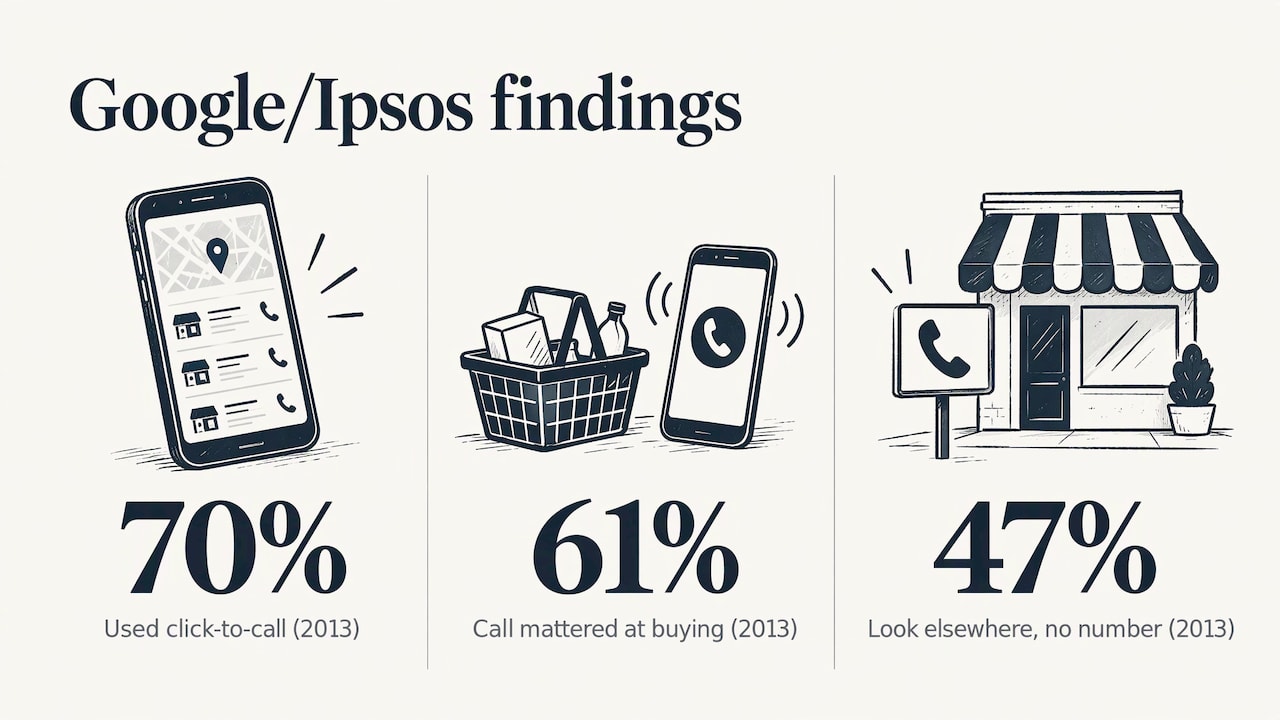
People who search on their phones often want to call. A Google study with Ipsos, based on 3,000 US smartphone users surveyed in July 2013, found that 70% of mobile searchers had used click-to-call to reach a business from search results, and 61% said it mattered most when they were ready to buy. The same study found 47% were more likely to look at other brands if a business showed no phone number. It is more than a decade old, so treat it as a sign of long-standing behavior, not a current benchmark. The habit it describes is easy to see in service trades: someone with a broken furnace, a toothache or a leaking pipe does not want to fill out a form and wait.
The button earns its place most when your buyers already prefer to phone: urgent home services, med spa consultations, dental appointments, event inquiries where the price depends on a conversation. For these businesses the phone is often the main way a lead arrives, and a button removes the friction of finding and typing the number.
The code: a phone link in HTML
The whole technique is an anchor tag with the tel: scheme in the href attribute. Google’s web.dev example looks like this:
<a href="tel:+1-303-499-7111">+1 (303) 499-7111</a>
web.dev recommends wrapping every phone number in a tel: link and using the international dialing format: a plus sign, the country code, the area code and the number. For US numbers the country code is 1. MDN’s reference for the anchor element shows the same scheme and notes that tel: behavior varies by device: cellular devices dial, while desktops open whatever app is registered, such as FaceTime or Skype.
Format the number correctly
For the safest result, write the href with a plus sign, a 1 and the ten digits, with no spaces, dashes or parentheses:
Visible text: (202) 555-0123
href value:   tel:+12025550123
The link text can be as pretty as you like. Only the href has to be clean. Typing a space or a dash right after tel: is the most common reason a link fails on some devices. If your business uses an extension, the tel: standard (RFC 3966) allows ;ext=123 after the number, though a direct line is simpler for the caller.
Turn the link into a button
A link becomes a button with a few lines of CSS. Here is a version you can paste into a custom HTML block or your theme:
<a class="call-btn" href="tel:+12025550123">Call (202) 555-0123</a>

<style>
.call-btn {
  display: inline-block;
  padding: 14px 24px;
  min-height: 44px;
  background: #c62828;
  color: #ffffff;
  font-weight: 700;
  text-decoration: none;
  border-radius: 6px;
}
.call-btn:hover, .call-btn:focus { background: #8e0000; outline: 3px solid #000; }
</style>
Three choices in that snippet matter. The button text contains the number, so desktop visitors and screen readers get it too. The padding makes the whole shape tappable, not just the words, which is what a thumb needs on a phone. And the colors contrast sharply with the page, so the button reads as the main action. Swap in your own brand colors and your real number, then publish.
Adding it without writing code
Most site builders have a Button or Link element where you paste tel:+12025550123 as the web address instead of a normal URL. Use your own number, written in the format above. That is the entire setup. Some builders also hide the field behind a link-type menu, so look for an option labeled “Phone” or “Call” before you type the prefix yourself.
On WordPress
There are three straightforward routes:
- Button block. Add a Buttons block in the editor, write “Call us now” as the text, and paste
tel:+12025550123in the link field. - Text link. Highlight the number in a paragraph, press Ctrl+K (Cmd+K on a Mac), and paste the
tel:address. This suits a number inside a sentence. - Custom HTML block. Paste the button code from the section above. This gives you the styling in one step.
A floating call button plugin is the other common approach, and it puts a small button on every page without editing templates. A plugin adds another piece of software to keep updated, so a button placed deliberately in your header and key pages is usually the cleaner choice. If your header is controlled by a theme, add the button as a menu item with a custom link set to the tel: address.
What happens on a desktop
Half the work is accepting that not every visitor can dial from the device they are using. On a laptop, a tel: link hands off to whatever app is registered for phone links, or asks the visitor to pick one. MDN’s note about desktops opening apps like Skype or FaceTime reflects this. If nothing is registered, the click can look dead.
The fix costs nothing: never use a button that says only “Call now” with no number. Show the digits. A visitor on a laptop can read them and dial from a cell phone, and a visitor using a screen reader hears them. This one habit also protects you against the iPhone’s habit of auto-detecting numbers. Apple documents a format-detection meta tag that can turn off Safari’s automatic phone number detection, but if you wrap every number in your own tel: link, you control how it looks and behaves.
Where to put the button
Placement matters more than design. These spots work for local businesses:
- The header. A call button in the top right of every page, visible on mobile without scrolling, serves the visitor who knows what they want.
- Service pages. An HVAC company’s “AC repair” page or a dentist’s “emergency dental care” page is where urgency peaks. Put the button next to the first paragraph, not at the bottom.
- Next to the form. Visitors who are not ready to call can still use the form. A line like “Call us at (202) 555-0123 or send the form below” lets urgent visitors phone while everyone else submits, so you do not lose form leads.
- The contact page and footer. These get visited by people who have already decided.
- Your Google Business Profile and ads. A phone number in the listing and call options in search ads give mobile searchers the same one-tap route before they ever reach your site. Our guide to local marketing for small businesses explains how listings and sites work together.
Use clear action text such as “Call for a free estimate” or “Call to book,” not “Click here.” If you want help choosing wording, our guides on calls to action that convert and effective call to action ideas go deeper.
Show it only when someone can answer
A call button promises an answer. If your phone goes to voicemail at 6 p.m., say your hours next to the button, or switch the text to “Request a callback” after hours and point to the form. A visitor who taps and reaches nobody is worse off than one who never saw a button. Match the number of calls you promote to the number your team can actually handle, and route the number to whoever can quote a job, not to a general line.
Test it before you trust it
Run this short check after publishing:
- Tap the button on an iPhone and an Android phone. Confirm the dialer opens with the right number.
- Click it on a desktop in at least two browsers. Check that the number is visible even if nothing happens.
- Look at the page on a small screen. The button should not overlap other elements or sit under a cookie banner.
- Tab to the button with the keyboard and confirm there is a visible focus outline.
- Ask someone to call from the page and confirm the call lands where it should.
Add the test to your routine whenever you change themes, plugins or your phone number.
Count calls, not just taps
A tap on a call button is a signal, not a lead. Someone can tap and hang up, or cancel at the confirmation prompt. If you only count taps, you will overstate results. The better measure is connected calls of a meaningful length, tracked with form submissions so that you see all inquiries in one picture. If a button pulls people away from a form that you can trace, the button can look good and still reduce your total tracked leads, which is why the form line beside the button is worth keeping.
Setting up this tracking means tagging the button, connecting it to your analytics and ad accounts, and handling consent and recording rules. Our walkthrough on call tracking setup for U.S. small businesses covers that process, and our piece on tracking campaign performance shows how to read the results next to the rest of your marketing. Check results monthly: which pages produce calls, which hours, and which calls became booked jobs.
Our view on call buttons
A call button is the smallest change on a local business website that can produce the most direct result, and it is also the easiest to get wrong. The code is trivial. The work is in deciding which pages deserve it, writing text that tells a visitor what happens when they call, making sure the site works on a phone, and measuring what the calls are worth.
We build websites and run local marketing for small and local businesses, and we design pages around what a visitor wants to do next. For a plumber, an HVAC company or a med spa, that is often a phone call. For a banquet hall, it may be a tour request. A good page lets both kinds of visitor act without hunting.
That is why we treat the button, the mobile layout, the listing and the tracking as one system rather than four separate tasks. A button on a slow or hard-to-read page loses the visitor before they tap it, and a button without tracking leaves you guessing which marketing paid off. Our approach is a custom plan for each client, with performance tracked in real time, so you see what the phone is doing.
TONY
Get the button built into a site that converts
If you would rather not handle code, plugins and tracking yourself, IBrand Media offers web design, local marketing, SEO and advertising for small and local businesses, with a custom plan for each client and real-time performance tracking. A call button is one piece of a site built to turn visits into inquiries, and we can set it up alongside the pages, listings and ads that send people to it. You can see what we do and request a plan at ibrand.media.

For background on what makes a site work on phones, see our guides on responsive design for mobile leads and website conversion rate tips.
FAQ
What is a click-to-call button?
It is a button or link on your website that starts a phone call when tapped. On a smartphone it opens the dialer with your number filled in, usually after a quick confirmation. It is built with a tel: link, so no special software is needed.
What is the HTML for a phone link?
Use an anchor tag: <a href="tel:+12025550123">Call (202) 555-0123</a>. Write the href in international format with a plus sign, the country code 1 for the US and the digits, with no spaces or dashes. Keep the visible text readable for people and screen readers.
Can I use click-to-call on a desktop computer?
It depends on the computer. The browser passes the link to whatever app is registered for phone links, such as FaceTime or a softphone, and if none exists, nothing happens. That is why you should always display the number as text next to the button.
How do I add click-to-call in WordPress?
Add a Buttons block in the editor and paste your tel: address into the link field. You can also link a number inside a paragraph, or paste a styled button into a Custom HTML block. Publish, then test on at least one iPhone and one Android phone.
Should the button replace my contact form?
No. Keep both. Visitors who need help right away will call, and others prefer to write. A line such as “Call us or use the form below” serves both groups and keeps your form leads trackable.
Sources
- Click to call, web.dev
- The anchor element, MDN Web Docs
- Phone Links, Apple Developer Documentation
- The Role of Click to Call in the Path to Purchase, Think with Google
Recent Comments