
Performance Max local campaigns are Google’s automated way to bring nearby customers to a physical business. You provide store locations, a budget and ad assets, and Google’s AI decides where and when ads run across Search, Maps, YouTube and more. The goal is store visits, store sales, calls and direction requests. They replaced the old Local campaign type, and for most local owners the real work is not clicking “create”. It is feeding the system clean conversion data, solid creative and a realistic budget.
This guide covers what these campaigns are, who qualifies, how to set one up, what to prepare before you spend, and where they tend to disappoint.
TL;DR
- Performance Max for store goals is the current home of Google’s local advertising automation. Local campaigns were upgraded into it, and settings and history carried over.
- You supply locations, a budget and assets. Google handles bids, placements and asset combinations across Search, Maps, Waze, YouTube, Gmail and Display.
- Conversion tracking is the fuel. Set calls and directions as Primary conversion actions or the campaign has little to learn from.
- Pay-per-lead goals in the US require a verified Business Profile and an eligible storefront or home services category, and they do not offer keyword targeting.
- Give it assets, give it time, and avoid overly tight Target CPA or Target ROAS settings early on.
Table of Contents
- What Performance Max local campaigns actually are
- What goals and placements you get
- Who can use it
- How to set one up
- What to prepare before you spend
- Measuring calls, directions, visits and sales
- Optimizing, and where it falls short
- Our perspective
- Want help setting this up?
- FAQ
- Sources
What Performance Max local campaigns actually are
Performance Max (PMax) is a goal-based campaign type. Instead of building separate Search, Display and video campaigns, you give Google one campaign with a goal, and it mixes your text, images and videos with generated creative to build ads across its inventory. Google describes this as combining your assets with generated creatives to build ads across available inventory.
The “local” flavor is called Performance Max for store goals. Google frames it around simplicity: you provide store locations, a budget and ad assets, and Google AI optimizes bids, placements and asset combinations. There is no keyword list to manage and no manual placement picking.
How it relates to the old Local campaigns
If you ran Local campaigns before, you may remember them as a simple way to promote locations. Google moved those advertisers over. When Local campaigns are upgraded to Performance Max, historical performance and settings such as conversion goals, budget, creative assets and bid strategy carry over. So an older account may already have a store-goal PMax campaign that nobody on your team has looked at in a while. Check before building a new one, because two campaigns chasing the same customers in the same radius just compete with each other.
What goals and placements you get
A local PMax campaign can optimize for three kinds of outcomes, according to Google: store visits, store sales, and local actions such as call clicks and direction clicks. The same page lists where ads can appear: Google Search, Maps, Waze, YouTube, Gmail and the Google Display Network.
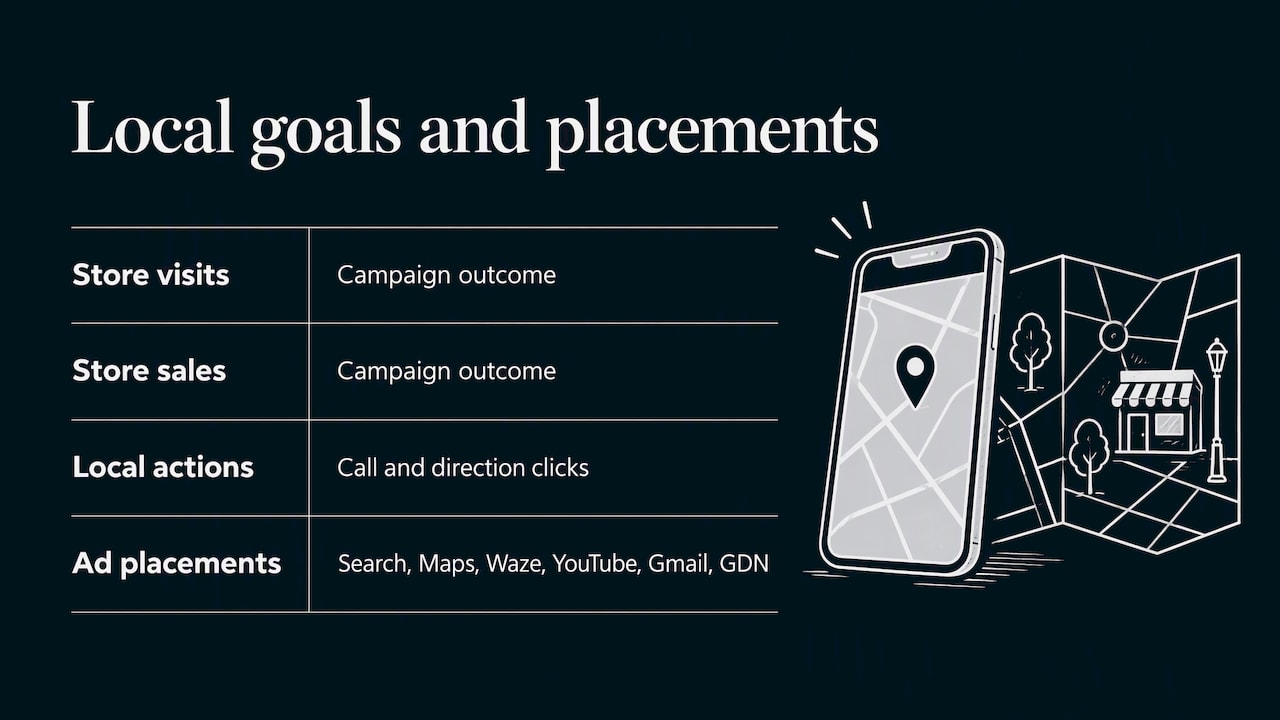
That spread matters for a local owner. A plumber’s ad might show to someone searching on their phone, while a banquet hall’s video might reach someone watching YouTube in the same city. You do not choose between them. Google does, based on who looks likely to convert.
What the ad can show
Local ads can display business details such as star rating, address, phone number, images and hours, often pulled from a linked Google Business Profile. That makes your profile part of your advertising. An outdated phone number or wrong hours on the profile follows you into every ad. Fix the profile first, then spend money.
Pay-per-lead goals
For some service businesses, Google also offers pay-per-lead goals inside Performance Max. These campaigns charge when a potential customer contacts the business directly through an ad, rather than when they click it. For a home service owner who has paid for plenty of clicks that never called, that billing model is worth understanding. It is not available to everyone, which brings us to eligibility.
Who can use it
Store-goal campaigns fit businesses with physical locations customers visit or call: dental offices, med spas, venues, retailers, restaurants. You need locations Google can recognize, either through a linked Business Profile or affiliate locations.
Pay-per-lead is stricter. In the United States, eligibility requires at least one verified Google Business Profile and an eligible storefront or home services category. If your profile is unverified, or your category is not on the eligible list, you will not see that option. Verification is the first thing to sort out.
| Business type | Typical goal | Main thing to have ready |
|---|---|---|
| Dentist, med spa | Calls, direction clicks, bookings | Verified profile, accurate hours, tracked call and form conversions |
| HVAC, plumbing, home contractor | Calls and leads | Verified profile, correct service areas and categories |
| Retail shop | Store visits, store sales | Product and offer images, location data, sales tracking |
| Venue or banquet hall | Direction clicks, inquiry forms | Strong photos and video, inquiry form tracking |
How to set one up
The flow is short. The preparation before it is where results are decided.
- Pick the goal. In Google Ads, start a new campaign and choose the “Local store visits and promotions” objective, then select Performance Max.
- Confirm conversion goals. The same setup step has you review which conversion actions the campaign will optimize for. Do not click through it.
- Choose locations. Select your Business Profile or affiliate location groups so Google knows which locations to promote.
- Set budget and targeting. Radius targeting can be set in the campaign or determined automatically. If you know your customers will not drive more than 10 minutes, set it yourself.
- Add assets. Text, images and video, covered below.
- Launch and wait. Resist changing things every other day.
If you are running pay-per-lead, expect fewer levers. These campaigns do not offer keyword targeting. You refine through service areas, business categories, service types and ad schedules instead.
If you are still choosing between ad platforms for a first campaign, our comparison of Google Ads versus Facebook Ads helps decide which to run first. And for the wider picture of how local ads fit together, see our guide to running local ads.
What to prepare before you spend
A budget you can actually learn on
Google’s system needs conversions to learn. Google notes that conversion data helps its AI determine how to spend the daily budget, and that without conversion tracking, spend may be limited. A budget so small that it produces a handful of clicks a week will starve the learning. If you can only afford a very small budget, narrow the radius and the service scope rather than spreading thin. Our note on dayparting for small budgets explains why schedule cuts only make sense after you have 30 to 50 conversions.
Assets in every format
Google recommends diverse, high-quality text, image and video assets. It also says uploading your own videos is prioritized and recommended, although PMax can create videos automatically. For a local business, automated video is often generic stock footage. A 15 to 30 second phone clip of your actual shop, your crew arriving in a branded truck or your hall set up for an event usually tells the story better than anything generated.
A practical asset checklist:
- Several headlines and descriptions that name the service and the city or neighborhood
- Real photos of your location, team and finished work, in square and landscape shapes
- At least one real video
- A logo and a clear call to action
- Business Profile photos, hours and phone number that match your website
Audience signals
Audience signals are optional hints. They guide campaign learning, and Google AI uses high-intent audiences to accelerate it. Use your customer list, past website visitors or people who have called you as starting signals. They are guidance, not a fence.
A landing page that works on a phone
Most local searches happen on mobile. If your ad drives to a page with a slow load and a tiny phone number, you pay for the click and lose the lead. Our website design basics for local businesses covers what that page needs.
Measuring calls, directions, visits and sales
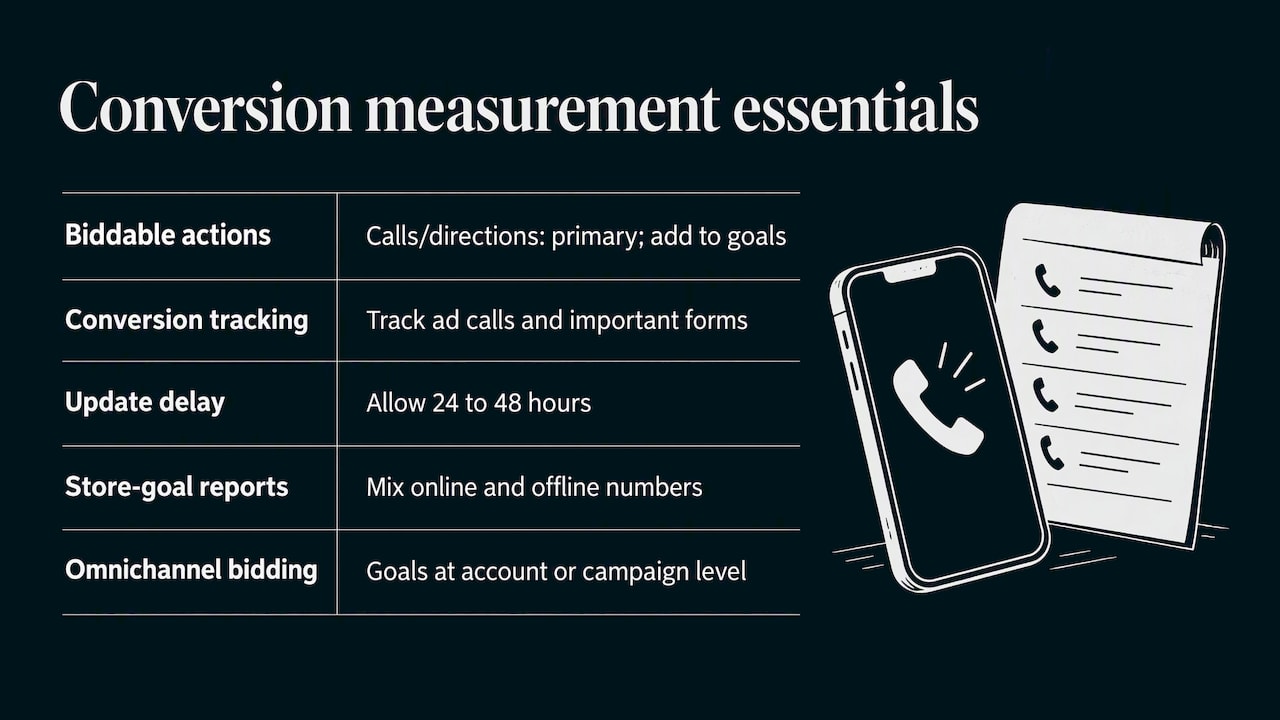
Performance Max optimizes for what you tell it counts. To optimize for biddable local actions such as calls and directions, set those conversion actions as Primary and include them in campaign goals. If a call to your front desk is your sale, make sure calls from ads are tracked and counted. If form submissions matter, track them too.
Two timing details trip people up. After you set up conversion actions, Google says to allow 24 to 48 hours for the system to update. And results for store goals can include store visits, store sales and local actions, so expect your reporting to mix online and offline numbers.
For combining online and offline goals, Google describes omnichannel bidding, where those goals can be added at the account level or the campaign level. It is worth a look if you track in-store sales.
Tracking is easier to get right when you have a clear setup. Our four-step conversion tracking checklist walks through it for small businesses. If you want customers to take a measurable action after the click, such as joining a loyalty program or redeeming an offer, these strategies to increase retail sales show ways to turn a visit into a repeat customer you can track.
A simple weekly review
Keep it short:
- Are conversions recording? Check that calls, directions and forms show up.
- Do the numbers match reality? Compare reported calls to what your staff logs.
- Are assets rated and varied? Replace weak images and add a real video if missing.
- Is anything stopping delivery? If the campaign is not showing, run through our five quick checks for ads not showing.
Optimizing, and where it falls short
Google’s own guidance for improvement is consistent: set up conversion tracking, provide diverse, high-quality assets, and avoid overly restrictive Target CPA or Target ROAS settings. In practice, that means:
- Start loose. Let the campaign gather data before imposing a tight cost target. A target set too low can simply stop delivery.
- Change one thing at a time. Swapping budget, assets and targets together leaves you guessing what worked.
- Give it weeks, not days. Automated bidding needs volume to settle.
- Keep the data honest. Remove junk conversions, such as page views counted as leads, that teach the system to chase the wrong people.
Real limitations
The automation is the product and also the catch. You have less control over exactly where ads appear. You cannot see everything the way you could in a keyword-based Search campaign. Pay-per-lead campaigns have no keyword targeting at all. And a campaign fed weak tracking will optimize toward weak signals. For a business with a very small budget, a tightly built Search campaign or a well-maintained Business Profile can sometimes carry more weight than PMax. That is a judgment call, and it depends on your market and call volume.
It also helps to remember that paid ads are one piece. Organic map visibility, reviews and a good website all raise the odds that an ad click turns into a customer. Our local marketing overview shows how those pieces fit.
Our perspective
We work with small and local businesses, and the pattern we see most is not a bad campaign. It is a campaign that was launched before the basics were ready. The Business Profile has old hours. Calls are not tracked. The only creative is three stock photos. Then the owner concludes that “Google ads don’t work” when the system never had a chance.
Our view is simple. Treat Performance Max for local as an amplifier. It takes what you give it, a verified profile, clean conversion tracking, real photos and video, a sensible radius, and widens its reach. It does not repair a weak foundation. So we start with the foundation, launch with a budget big enough to learn, and review weekly against calls and leads the owner can verify, not just dashboard numbers.
We also believe in plain reporting. If a campaign produced 12 calls and 3 booked jobs, that is what the owner should hear, not a pile of impressions. And when automation is not the right fit for a budget, we say so.
— TONY
Want help setting this up?
If you would rather have someone build the tracking, assets and campaign structure for you, we do that for small and local businesses as part of our advertising and local marketing services. Every plan is built around the business, and we report on the results in plain terms. Tell us your location, your service area and what a new customer is worth, and we will map out where to start.
FAQ
Are Performance Max local campaigns the same as Local campaigns?
Not exactly, but they are directly connected. Google upgraded Local campaigns to Performance Max, and conversion goals, budget, creative assets and bid strategy carried over. Today the local version is called Performance Max for store goals.
Do I need a Google Business Profile?
For store goals, you link a Business Profile or select affiliate locations. For pay-per-lead goals in the US, you need at least one verified profile and an eligible storefront or home services category. Verify the profile before anything else.
Can I choose keywords for a local Performance Max campaign?
For pay-per-lead campaigns, no. Google says keyword targeting is not offered, and you refine through service areas, categories, service types and ad schedules. Audience signals can still guide learning in standard campaigns.
Why is my campaign barely spending?
The usual causes are missing conversion tracking, overly restrictive Target CPA or ROAS settings, or thin assets. Google notes that spend may be limited without conversion tracking. Fix tracking first, loosen targets, then give the system a few weeks.
Sources
- Reminder: Upgrade your Local campaigns to Performance Max, Google Ads Help
- About Performance Max for store goals, Google Ads Help
- About pay-per-lead goals for Performance Max campaigns, Google Ads Help
- About Local Ads, Google Ads Help
- Step 1: Create a campaign and choose a goal, Google Ads Help
- Create a Performance Max campaign, Google Ads Help
- About Performance Max campaigns, Google Ads Help
- About omnichannel bidding, Google Ads Help
- How to increase retail sales: actionable strategies
Recent Comments